https://github.com/andev0x/guts
A faster, Guts is designed for speed and clarity when exploring CSV, JSON, and SQLite data directly in the terminal.
https://github.com/andev0x/guts
csv json open-source rust terminal
Last synced: 4 months ago
JSON representation
A faster, Guts is designed for speed and clarity when exploring CSV, JSON, and SQLite data directly in the terminal.
- Host: GitHub
- URL: https://github.com/andev0x/guts
- Owner: andev0x
- License: mit
- Created: 2026-04-01T16:50:46.000Z (4 months ago)
- Default Branch: main
- Last Pushed: 2026-04-04T17:20:49.000Z (4 months ago)
- Last Synced: 2026-04-05T12:24:41.009Z (4 months ago)
- Topics: csv, json, open-source, rust, terminal
- Language: Rust
- Homepage:
- Size: 133 KB
- Stars: 4
- Watchers: 0
- Forks: 1
- Open Issues: 0
-
Metadata Files:
- Readme: README.md
- Contributing: CONTRIBUTING.md
- License: LICENSE
Awesome Lists containing this project
README
# Guts
[](https://github.com/andev0x/guts/releases)
[](https://github.com/andev0x/guts/actions)
[](https://github.com/andev0x/guts/stargazers)
[](https://github.com/andev0x/guts/releases)
[](https://opensource.org/licenses/MIT)
A keyboard-first terminal data explorer designed for engineers who need speed and clarity when inspecting data. Guts provides an intuitive interface for exploring CSV, JSON, SQLite, and remote database sources directly from your terminal, inspired by Vim navigation principles and Unix philosophy.
## Overview
Guts streamlines data exploration and analysis through a fast, terminal-native interface. Whether you're analyzing local data files or querying remote databases, Guts delivers a responsive, keyboard-driven experience optimized for modern development workflows.
## Demo
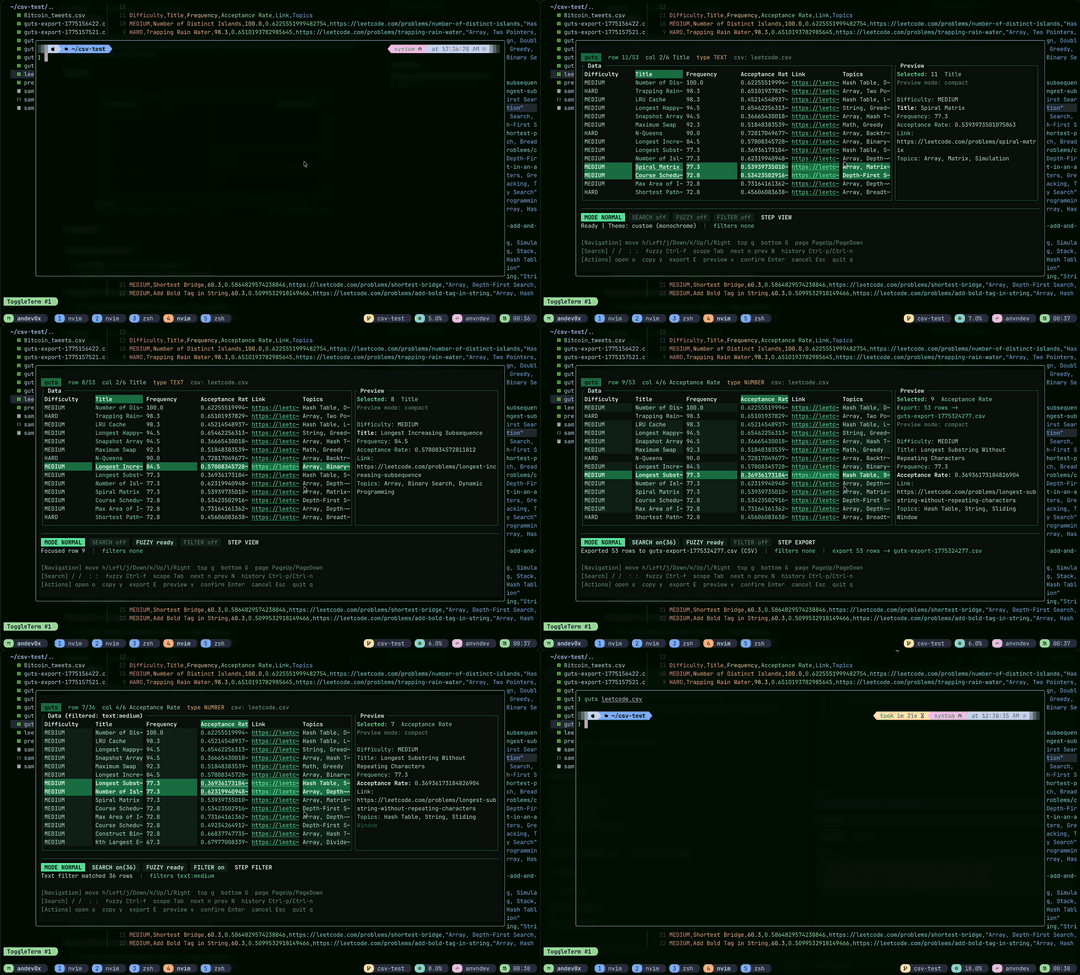
## Features
### Data Source Support
- **Local Files**: CSV, JSON, SQLite databases
- **Remote Databases**: PostgreSQL, MySQL, MongoDB
### Navigation & Interaction
- Vim-style keyboard navigation (h/j/k/l, g, G, Page Up/Down)
- Efficient table rendering with sticky headers and row selection
- Virtual scrolling for large datasets with minimal performance impact
- Smart cell type detection (URLs, emails, IP addresses, numbers)
- Direct URL and email interaction from cells
### Search & Filtering
- Incremental search with next/previous navigation
- Fuzzy search across columns, rows, and query history
- Powerful query mode with SQL and text filtering support
- MongoDB collection queries
### Data Operations
- Execute SQL files directly from command line or interactive mode
- Import CSV and JSON files into SQLite tables
- SQLite backup and restore functionality
- Copy cell values to clipboard
### Customization
- Theme system with TOML configuration
- Four built-in theme presets: Nord, Gruvbox, Catppuccin, Monochrome
- Automatic 16-color ANSI fallback for compatibility
- Fully configurable keybindings
## Installation
### Homebrew (macOS)
Install via the community tap:
```bash
brew tap andev0x/tap
brew install guts
```
### AUR (Arch Linux)
Install from the Arch User Repository:
```bash
paru -S guts
# or
yay -S guts
```
### Prebuilt Binaries
Download prebuilt binaries for Linux, macOS, and Windows from [GitHub Releases](https://github.com/andev0x/guts/releases). These are automatically published with each tagged release.
### Building from Source
**Prerequisites**: Rust toolchain (stable or later)
1. Clone the repository:
```bash
git clone https://github.com/andev0x/guts.git
cd guts/guts
```
2. Build the project:
```bash
cargo build --release
```
3. Install the binary:
```bash
cargo install --path .
```
4. Verify the installation:
```bash
guts --help
```
## Quick Start
### Basic Usage
Run Guts with any supported data source:
```bash
guts
```
Supported sources include:
- **Local files**: CSV, JSON, SQLite (`.db`, `.sqlite`)
- **Remote databases**: `postgres://`, `mysql://`, `mongodb://`
### Common Examples
```bash
# Explore a CSV file
guts users.csv
# Explore CSV with irregular row lengths
guts users.csv --relaxed
# Open and browse a JSON file
guts data.json
# Browse SQLite database tables
guts app.db
# Execute a custom SQL query
guts app.db --query "SELECT id, email FROM users LIMIT 100"
# Execute SQL statements from a file
guts app.db --sql-file migrations/init.sql
# Connect to PostgreSQL database
guts "postgres://user:password@localhost:5432/database"
# Import CSV into SQLite table
guts app.db --import-file users.csv --import-table users
# Import CSV with automatic row width correction
guts app.db --import-file users.csv --import-table users --relaxed
# Backup SQLite database
guts app.db --backup-to backups/app-backup.db
# Restore from backup
guts app.db --restore-from backups/app-backup.db
```
### Initial Setup
Initialize the default configuration:
```bash
guts --init-config
```
This creates a configuration file at `~/.config/guts/theme.toml` with `monochrome` as the default preset. You can customize it at any time in `~/.config/guts/`.
## Configuration
### Themes
Guts includes a TOML-based theming system. Configuration files are discovered in the following order:
1. `GUTS_THEME_FILE` environment variable (absolute or relative path)
2. `./theme.toml` (current working directory)
3. `$XDG_CONFIG_HOME/guts/theme.toml`
4. `$HOME/.config/guts/theme.toml`
If no theme file is found, Guts defaults to the built-in `monochrome` theme on first run. If your terminal doesn't support TrueColor, Guts automatically falls back to a 16-color ANSI palette.
#### Built-in Theme Presets
- `nord` — Cool, soothing theme inspired by arctic colors
- `gruvbox` — Warm, retro-inspired theme with vintage accents
- `catppuccin` — Modern, pastel-based color scheme
- `monochrome` — Minimalist grayscale palette
#### Theme Configuration Example
Create or edit `~/.config/guts/theme.toml`:
```toml
preset = "monochrome"
[colors]
border = "#81A1C1"
selected_background = "#5E81AC"
status_mode_background = "#A3BE8C"
```
### Keyboard Shortcuts
Guts uses Vim-inspired keybindings by default. Create `~/.config/guts/config.toml` to customize shortcuts.
#### Navigation
| Key | Action |
|-----|--------|
| `h` / `←` | Move left |
| `l` / `→` | Move right |
| `k` / `↑` | Move up |
| `j` / `↓` | Move down |
| `g` | Jump to top |
| `G` | Jump to bottom |
| `PageUp` | Scroll up one page |
| `PageDown` | Scroll down one page |
#### Search & Query
| Key | Action |
|-----|--------|
| `/` | Enter search mode (incremental) |
| `n` | Jump to next match |
| `N` | Jump to previous match |
| `:` | Enter query/filter mode |
| `Ctrl-f` | Open fuzzy search overlay |
| `Tab` | Cycle fuzzy search scope (Columns → Rows → History) |
| `Ctrl-p` | Previous query history |
| `Ctrl-n` | Next query history |
#### Actions
| Key | Action |
|-----|--------|
| `o` | Open URL or email from cell |
| `y` | Copy cell value to clipboard |
| `E` | Export current data |
| `v` | View/expand cell details |
| `Enter` | Confirm selection |
| `q` | Exit Guts |
#### Custom Keybindings
Edit `~/.config/guts/config.toml`:
```toml
[keybindings.navigation]
left = ["h", "Left"]
right = ["l", "Right"]
up = ["k", "Up"]
down = ["j", "Down"]
[keybindings.search]
fuzzy_mode = ["Ctrl-f"]
fuzzy_cycle_scope = ["Tab"]
[keybindings.actions]
copy = ["y"]
open = ["o"]
export_csv = ["E"]
toggle_preview = ["v"]
confirm = ["Enter"]
```
## Project Status
Guts is actively maintained and production-ready. The 1.0 release includes stable support for:
- CSV and JSON file parsing
- SQLite, PostgreSQL, MySQL, and MongoDB database integration
- Full table navigation and rendering
- Virtual scrolling for large datasets
- Advanced query execution and filtering
- Intelligent cell type detection and interaction
- Comprehensive theming and customization
- Configurable keyboard shortcuts
## Contributing
We welcome contributions to Guts! Please see [CONTRIBUTING.md](CONTRIBUTING.md) for:
- Development setup instructions
- Code style guidelines
- Pull request process
- Issue reporting guidelines
## Getting Help
- **Report bugs or request features**: Open an issue on [GitHub](https://github.com/andev0x/guts/issues)
- **Discuss ideas**: Use GitHub Discussions for feature proposals and questions
- **See examples**: Check the Quick Start section above
## License
Guts is distributed under the MIT License. See [LICENSE](LICENSE) for complete details.
## Acknowledgments
We appreciate all contributions to Guts. View the complete list of contributors on [GitHub](https://github.com/andev0x/guts/graphs/contributors).
