https://github.com/andre-seiji/python-data-web-scraping-example
Web Scraping html, pandas DataFrame conversion, data validation and export to Excel file. A COVID-19 database was used as an example.
https://github.com/andre-seiji/python-data-web-scraping-example
covid-19 export-to-excel html pandas-dataframe python selenium webscraping
Last synced: 2 months ago
JSON representation
Web Scraping html, pandas DataFrame conversion, data validation and export to Excel file. A COVID-19 database was used as an example.
- Host: GitHub
- URL: https://github.com/andre-seiji/python-data-web-scraping-example
- Owner: Andre-Seiji
- License: mit
- Created: 2021-07-26T14:41:32.000Z (almost 5 years ago)
- Default Branch: main
- Last Pushed: 2021-07-27T12:29:37.000Z (almost 5 years ago)
- Last Synced: 2025-03-20T14:28:38.881Z (over 1 year ago)
- Topics: covid-19, export-to-excel, html, pandas-dataframe, python, selenium, webscraping
- Language: Jupyter Notebook
- Homepage:
- Size: 635 KB
- Stars: 0
- Watchers: 1
- Forks: 0
- Open Issues: 0
-
Metadata Files:
- Readme: README.md
- License: LICENSE
Awesome Lists containing this project
README
# Python data Web Scraping example
The main goal of this project is to do a validation of a COVID-19 database, checking if the values are correct for each region.
In order to do that, the code has four objectives: Web Scraping of a COVID-19 database, a pandas DataFrame conversion, data validation and an export to Excel file.
# 1. Web Scrapping:
With Selenium the code access the web page: https://worldometers.info/coronavirus/. Cookies elements must be accepted.

(COVID-19 DATABASE)
# 2. Pandas DataFrame conversion:
For each region (Europe, North America, Asia, South America, Africa and Oceania) the code has to search the entire html until a table is found. This table is then converted through pandas extension. This was the most difficult because it was necessary to modify the table and its values, changing 'NaN' values to zeros and converting non-numeric objects to numeric.
# 3. Data validation:
The validation test is to verify if the sum of all the countries values of a region is the same as the total value of that region. This process is done with all columns.

(Validation test)
# 4. Export to Excel file:
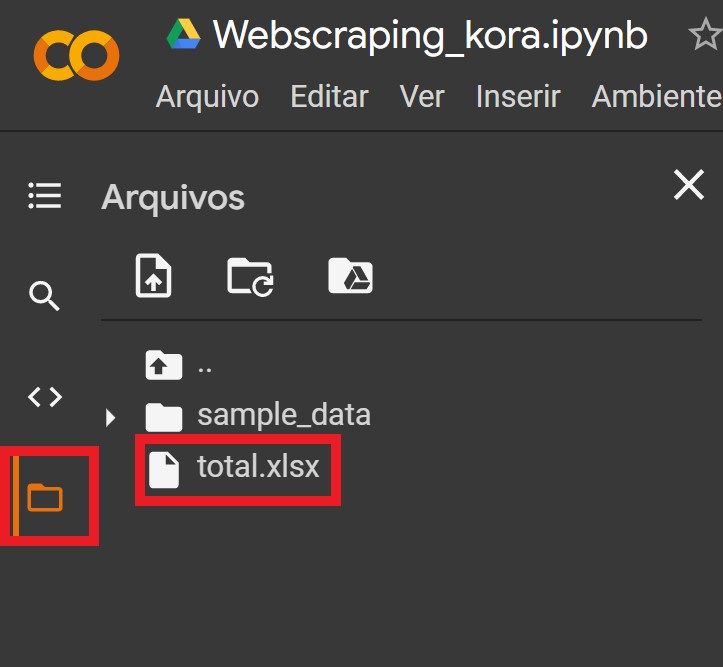
The code was written with google colab. The image below shows where the Excel file can be downloaded.