https://github.com/andreas-schwenk/pysell
pySELL - A Python-based Simple E-Learning Language for the Rapid Creation of Interactive and Mobile-Friendly STEM Quizzes
https://github.com/andreas-schwenk/pysell
classroom-tools domain-specific-language dsl e-learning learning-management math mobile-first online-courses quizzes stem teaching
Last synced: 4 months ago
JSON representation
pySELL - A Python-based Simple E-Learning Language for the Rapid Creation of Interactive and Mobile-Friendly STEM Quizzes
- Host: GitHub
- URL: https://github.com/andreas-schwenk/pysell
- Owner: andreas-schwenk
- License: gpl-3.0
- Created: 2024-02-09T19:13:30.000Z (over 2 years ago)
- Default Branch: main
- Last Pushed: 2025-09-11T16:23:30.000Z (10 months ago)
- Last Synced: 2025-12-16T09:05:49.665Z (6 months ago)
- Topics: classroom-tools, domain-specific-language, dsl, e-learning, learning-management, math, mobile-first, online-courses, quizzes, stem, teaching
- Language: JavaScript
- Homepage: https://pysell.org
- Size: 3.57 MB
- Stars: 2
- Watchers: 1
- Forks: 0
- Open Issues: 0
-
Metadata Files:
- Readme: README.md
- Changelog: CHANGELOG
- License: LICENSE
Awesome Lists containing this project
README
# pySELL

**WELCOME! VISIT THE WEBSITE [https://pysell.org](https://pysell.org) FOR EXAMPLES AND GUIDES.**
`pySELL` is a Python-based Simple E-Learning Language designed for the rapid creation of interactive STEM quizzes, with a focus on randomized math questions.
Quizzes created with `pySELL` can be used on mobile devices.
Compared to other solutions (e.g., `STACK` questions), `pySELL` has NO technological runtime dependencies, except for `katex` for math rendering. Each generated quiz consists of a single self-contained HTML file. These files can be hosted on a web server or imported into existing LMS courses (e.g., _Moodle_ via "file upload" or _Ilias_ via "HTML course").
Student answers are not stored on servers, ensuring that `pySELL` quizzes provide 100% anonymous training. This anonymity is highly appreciated by students when first engaging with new topics.
Teachers benefit from a simple-to-learn syntax. With some practice, even sophisticated questions can be generated with minimal time investment.
If you are using `pySELL` in one of your (university) classes, I would love to hear about it! Please send feedback, bug reports, or feature requests to [contact@compiler-construction.com](mailto:contact@compiler-construction.com).
As a member of the Free Software Foundation (FSF), I have decided to publish `pySELL` as free and open-source software under the `GPLv3` license.
## User Guide
To install the `pySELL` package from [https://pypi.org/project/pysell/](https://pypi.org/project/pysell/), simply run the following command:
```bash
pip install pysell
```
If you've already installed `pySELL`, you can update it to the latest version with the following command:
```bash
pip install --upgrade pysell
```
Run the following command to generate a self-contained quiz website `FILENAME.html` from the sources in `FILENAME.txt`. An example is provided below, with more examples available in the `examples/` directory.
```bash
pysell FILENAME.txt
```
Additionally, a file `FILENAME_debug.html` is created for debugging purposes. The debug output differs from the release files in the following aspects:
- The sample solution is rendered in the input fields
- All questions are evaluated directly for testing purposes
- Single and multiple-choice answers are displayed in a static order
- Python and text sources are displayed with syntax highlighting
- Line numbers from the source file are shown for each exercise
If you would like to use `SageMath` in your code, run the following commands for installation and usage:
```bash
sage -pip install pysell
sage -python -m pysell FILENAME.txt
```
### Using the Portable Version of pySELL Without Installation
Alternatively, if you'd prefer not to use a package manager, you can directly download the stand-alone file [`sell.py`](https://raw.githubusercontent.com/andreas-schwenk/pysell/main/sell.py) from the repository. This is the only file required; all other files are used for the development of `pySELL`.
Usage example:
```bash
python3 sell.py FILENAME.txt
```
## Dependencies
**Users:** Only vanilla Python 3 is required to create basic questions. If you want to use symbolic calculations in your questions, you should also install `sympy` (`pip install sympy`). For linear algebra, you can use `numpy` (`pip install numpy`). To enable plotting, `matplotlib` is supported (`pip install matplotlib`). You can also use `SageMath` for advanced mathematical computations.
**Developers:** Node.js and a local web server are recommended for debugging the web code. Alternatively, you can install the recommended VS Code extension available in this repository.
## Example
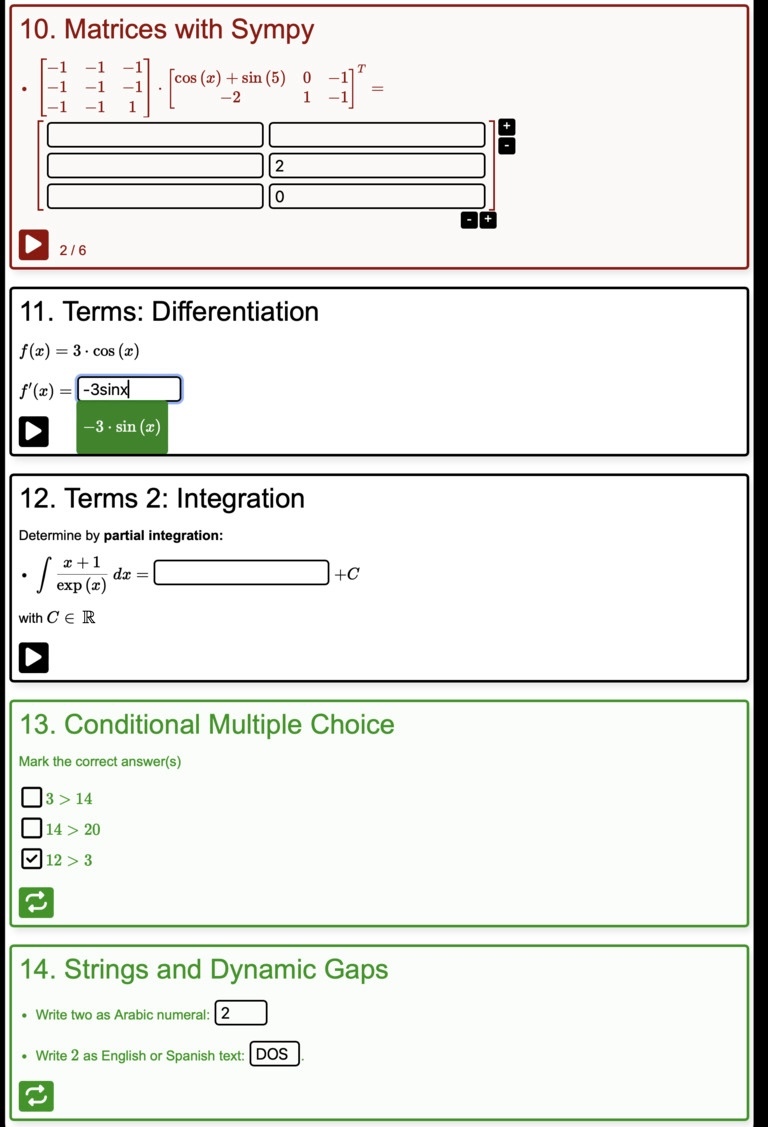
The following example code generates some questions, as can be seen in the figure. You may run the examples [here](https://andreas-schwenk.github.io/pysell/ex1.html).
**Command:**
```bash
pysell examples/ex1.txt
```
Files `ex1.html` and `ex1_DEBUG.html` will be generated. The latter file shows the sample solution.
Some contents of the example file `examples/ex1.txt` are shown below. Get the complete example file [here](https://github.com/andreas-schwenk/pysell/blob/main/examples/ex1.txt):
```
LANG en
TITLE pySELL Demo
AUTHOR Andreas Schwenk
QUESTION Multiple-Choice
Mark the correct answer(s)
[x] This answer is correct
[x] This answer is correct
[ ] This answer is incorrect
QUESTION Addition
"""
import random
x = random.randint(10, 20)
y = random.randint(10, 20)
z = x + y
"""
Calculate $x + y =$ %z
QUESTION Gaps
- Write 3 as a word: %"three"
- Write 7 as a word: %"seven"
- Write the name of one of the first two letters in the Greek alphabet: %"alpha|beta"
QUESTION Lists/Vectors
"""
fib = [1] * 7
for i in range(2,len(fib)):
fib[i] = fib[i-2] + fib[i-1]
fib3 = fib[3:]
"""
Continue the Fibonacci sequence
- $ 1, 1, 2, $ %!fib3, ...
QUESTION Terms 2: Integration
"""
from sympy import *
x = symbols('x')
f = parse_expr("(x+1) / exp(x)", evaluate=False)
i = integrate(f,x)
"""
Determine by **partial integration:** \\
- $ \displaystyle \int f ~ dx =$ %i $+ C$ \\
with $C \in \RR$
QUESTION Matrices with Sympy
"""
from sympy import *
A = randMatrix(3,3, min=-1, max=1, symmetric=True)
B = randMatrix(2,3, min=-2, max=2, symmetric=False)
x,y = symbols('x,y')
B[0,0] = cos(x) + sin(y)
C = A * B.transpose()
"""
- $A \cdot B^T=$ %C
QUESTION Images
!../docs/logo.svg:25
What is shown in the image?
(x) the pySELL logo
( ) the PostScript logo
```
### Quiz with time limit
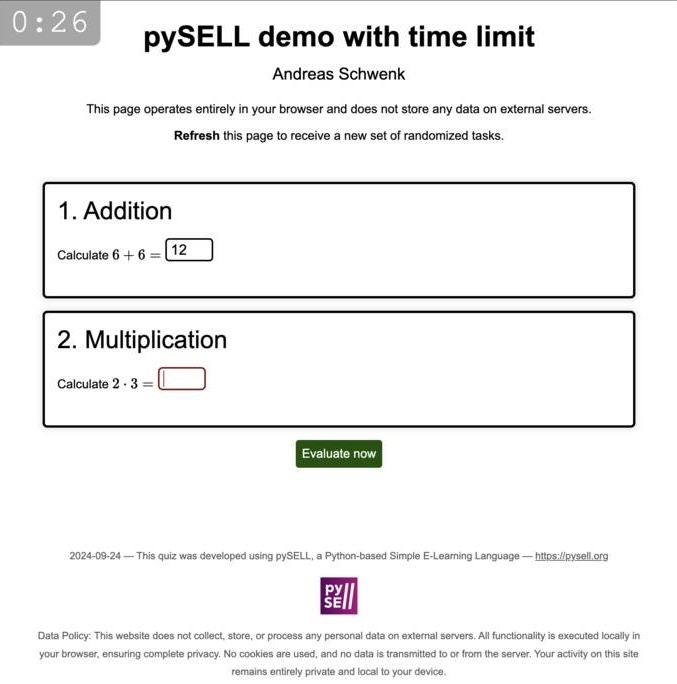
Create timed quiz pages easily by adding the `TIMER` keyword to the preamble. Once the timer expires, all questions will be automatically evaluated at once.
```
LANG en
TITLE pySELL demo with time limit
AUTHOR Andreas Schwenk
TIMER 30 # all questions will be evaluated when the timer runs out.
QUESTION Addition # student earns 1 points per default
"""
import random
x = random.randint(-10, 10)
y = random.randint(1, 10)
z = x + y
"""
Calculate $x + y =$ %z
QUESTION Multiplication (2 pts) # student earns 2 points
"""
import random
x = random.randint(-10, 10)
y = random.randint(1, 10)
z = x * y
"""
Calculate $x \cdot y =$ %z
```
## Syntax
This section describes the syntax of `pySELL`. Many aspects are self-explanatory and can be understood from the [example file](https://github.com/andreas-schwenk/pysell/blob/main/examples/ex1.txt).
### Global
- `LANG` defines the natural language used in the few built-in output strings. Currently supported languages are `en`, `de`, `es`, `it`, and `fr`.
- `TITLE` defines the title of the page. You may include HTML code, but everything must be written on the same line where the title keyword starts.
- `AUTHOR` defines the author or institution of the quizzes. You may include HTML code, but everything must be written on the same line where the author keyword starts.
- `QUESTION` indicates the start of a new question, with its title specified on the same line. By default, each correctly answered question earns the student one point. To specify a different point value, include the desired points in parentheses, such as `(X pts)`, where `X` is the number of points. For example: `QUESTION Turing Machine (3 pts)`
- `TIMER` restricts the time students have to complete the quiz page. The time, specified in seconds, is written after a space.
- `##` introduces a comment, i.e., text that is not considered by the compiler (Inside of Python code, a single hashtag is
used for comments).
### Questions
A question consists of a textual part and optionally includes Python code that generates random variables and calculates the sample solution.
**Question text**
All text shown to the student is written as plain text. Formatting options are as follows:
- _Italic text_ is enclosed in single asterisks `*` (e.g., `math is *cool*`).
- **Bold text** is enclosed in double asterisks `**` (e.g., `math can be **challenging**`).
- Embedded code within a paragraph text is enclosed in backticks `` ` ``.
- Embedded code that spans multiple lines is embedded within a pair of triple backticks. The triple backticks must be on separate lines without any other characters on these lines.
- Items in a list are preceded by `-`.
- TeX-based inline math is enclosed in dollar signs `$` (e.g., `$\sqrt{x^2+y^2}$` for $\sqrt{x^2+y^2}$).
- TeX-based display style math is enclosed in double dollar signs `$$`. Display mode in inline math can also be activated by writing, e.g., `$\displaystyle \sum_{i=1}^n i^2$`.
- Multiple-choice questions use `[x]` for correct answers and `[ ]` for incorrect answers, with text separated by a space (e.g., `[x] This answer is correct`).
- Single-choice questions use `(x)` for the correct answer and `( )` for incorrect answers. Only one answer can be true (e.g., `( ) This answer is incorrect`).
- A line break can be forced with `\\` at the end of a line (e.g., `A new paragraph will start after this line. \\`).
- Static images can be included with `!`, followed by the path and optionally the width in percentage (path and width are separated by `:`). For example, `!myImage.svg:25` shows the image located at `myImage.svg` with a width of `25%` relative to the question box. If the width is omitted, `100%` is assumed. Supported image formats are `svg`, `png`, and `jpg`. Note that image data is directly embedded into the output files, so you do not need to publish them separately. Be mindful of image file sizes. SVG files are usually very small for vector graphics (hint: use the tool `pdf2svg` to generate SVG files from PDF files. The latter can be generated by `tikZ`). For dynamic plots via `matplotlib`, refer to the next section.
**Question code**
To generate randomized variables, arbitrary Python code can be evaluated (this is secure, as the code is executed only locally on the teacher's computer).
For each question that includes randomization (the compiler checks if your Python code contains the string `rand`), 5 distinct instances are drawn. If your randomization is poor, some instances may be identical. If no random numbers are used, only one instance will be created.
- Python code is embedded within a pair of triple quotes `"""`. The triple quotes must be on separate lines without any other characters on these lines. Python code must be provided **before** its variables are accessed in the textual part.
- Variables denoted in math mode are replaced by their actual values (the execution environment randomly selects one of the 5 instances). This behavior can be suppressed by embedding the variable name in double quotes (e.g., write `"x"` instead of just `x`).
**Warning: Variable names with underscores (e.g., `x_1`) are not allowed, as the underscore can cause ambiguity in TeX.**
- Input fields are generated using `%`, followed by the variable name. The structure of the input field depends on the type of the variable (`int`, `set`, `numpy.array`, etc.). If the variable is non-scalar, parentheses (or brackets, or braces) will be rendered around vectors/sets/etc. To suppress these parentheses, write `%!` followed by the variable name. This is used, for example, in the _Fibonacci_ example in the example file. Example: `The answer is %answer`.
- In general, variables can only be accessed within math mode (i.e., in `$...$`). To use Python-generated variables of type `str` (strings) seamlessly in the question text, use the ampersand operator `&`, followed by the variable name in text mode. Example: `Today I feel &mood`.
- To create gap questions, use `%` followed by the expected word(s), enclosed in double quotes (e.g., `%"three"`). To accept multiple answers, separate the words with the pipe operator `|`. Example: `%"three|tres|trois|tre"`.
- Dynamic gaps can be created with Python code. Generate a string variable (e.g., `answer = "three|tres"`) and ask it exactly as for number inputs (e.g., `%answer`).
- For static or dynamic plots, refer to the `Plot` example in the examples. `pySELL` supports using `matplotlib`.
_Hint: If a question has no input fields, the evaluation button is not shown._
**Important notes**
- Consider excluding certain Python variables from the output. For example, `matplotlib` requires defining axes, and the $x$-vector `x = np.linspace(-10,10,1000)` has a length of 1000. By default, `pySELL` will include this in the question database. To prevent this, you should write `del x` at the end of your Python code to exclude `x`.
- In general, you may import arbitrary Python libraries. `pySELL` will attempt to map data types to its internal data types (e.g., some commonly used `sage` data types are mapped). For all unimplemented types, the variable is considered a _term_ and the value is exported using `str(my_var)`. This may work or may not. Feel free to ask the author of `pySELL` to extend support for missing or exotic data types.
### LLM generated questions
Generating questions can be time-consuming, but Large Language Models (LLMs) like ChatGPT can assist.
Use the following prompt to generate questions:
```
Generate 10 questions for students in a math course on the topic of complex numbers using the pySELL formal language. The pySELL language is defined here: https://raw.githubusercontent.com/andreas-schwenk/pysell/main/llm.md. Ensure that each question is correctly formatted according to the pySELL specification and covers a range of topics related to complex numbers, including arithmetic operations, modulus, argument, conjugate, and forms of representation.
```
_Note that the specification in the `llm.md` file is not yet complete. Additionally, the quality of generated questions may not be perfect and may require human post-correction._
### Hints on generating random variables
_Note: also read about the custom function `rangeZ`, to exclude the zero from a range, below._
Read the docs:
- [https://docs.python.org/3/library/random.html](https://docs.python.org/3/library/random.html)
Examples:
#### Draw a random integer `a` from `{-2,-1,...,5}`:
```python
import random
a = random.randint(-2,5)
# equivalent:
a = random.choice(range(-2,5+1))
```
_The examples explicitly write `+1` to clarify that the upper bound is not included._
#### Choose a random number `a` from set `{2,3,5,7}`:
```python
import random
a = random.choice([2,3,5,7])
```
_Note that the parameter is actually a list._
#### Draw 3 random integers `a`, `b`, `c` from `{-2,-1,...,5}` with replacement:
```python
import random
# store in a, b, c
[a,b,c] = random.choices(range(-2,5+1),k=3)
# store as array x
x = random.choices(range(-2,5+1),k=3)
```
_Note that the upper bound of `range` is **excluded**._
#### Draw 3 **unique** (i.e. without replacement) random integers `a`, `b`, `c` from `{-2,-1,...,5}`:
```python
import random
# store in scalar variables a, b, c
[a,b,c] = random.sample(range(-2,5+1),k=3)
# store as an array/list x
x = random.sample(range(-2,5+1),k=3)
# store as a set y
y = set(random.sample(range(-2,5+1),k=3))
```
_Note that the upper bound of `range` is **excluded**._
#### Shuffle a list `[2,4,6,8]` (e.g. to get `[6,8,4,2]`):
```python
import random
# in place shuffling
x = [2,4,6,8]
random.shuffle(x)
# one liner with immutable input
x = random.sample([2,4,6,8],k=4)
```
#### Generate a 2 x 3 matrix `A` with random integer elements from `{-2,-1,...,5}` using `numpy`:
```python
import numpy
A = numpy.random.randint(-2, 5, size=(2,3))
# overwrite element A_{0,0}
A[0,0] = 1337
```
Elements are limited to numbers.
#### Generate a 2 x 3 matrix `A` with random integer elements from `{-2,-1,...,5}` using `sympy`:
```python
from sympy import *
A = randMatrix(2,3, min=-2, max=5, symmetric=False)
# overwrite element A_{0,0}
x, y = symbols('x,y')
A[0,0] = sin(x) * cos(y)
```
Elements can also be terms.
#### Exclude the zero
In some cases, it may be beneficial to exclude the zero from random number generation. For example, a numerical question would be too easy to solve, if zero is drawn for a variable.
`pySELL` provides a function `rangeZ` that behaves syntactically similar to `range`, but excludes the zero.
Example to draw 3 random numbers `a`, `b`, `c` from `{-2,-1,1,2,3}` with replacement:
```python
import random
# get a single random number
a = random.choice(rangeZ(-2,3+1))
# get 3 numbers with replacement (some of a,b,c may be equal)
[a,b,c] = random.choices(rangeZ(-2,3+1),k=3)
# get 3 numbers without replacement (a,b,c are distinct)
[a,b,c] = random.sample(rangeZ(-2,3+1),k=3)
```
_Note that the result of `rangeZ` is of type `list`, while the built-in function `range` returns type `range`. This may be destructive in some cases!_
## Developer Guide
To debug (or extend) the web code, first convert an input file into a json file with the `-J` option enabled, e.g. `python3 sell.py -J examples/ex1.txt`. Then `examples/ex1.json` is generated.
Then start a local web server (e.g. using `python3 -m http.server 8000`) and open `web/index.html` (e.g. `localhost:8000/web/`, if your port number is 8000). The uncompressed JavaScript code in directory `web/src/` is interpreted as module.
To update `sell.py` after any change in the JavaScript code, and run `./build.sh` in order to update variable `html` in file `sell.py` as well as to rebuild the Python package.
Structure of the repository:
- `sell.py` mainly compiles an input file to a JSON file. The generation of HTML output files can be found at the end. HTML/CSS/JavaScript template code is inserted by `build.py`.
- `build.py` builds and minifies the JavaScript code in path `web/src/`, inserts it into `web/index.html` and finally writes the self-contained HTML file into `sell.py`.
- `docs/` contains the logo, as well as the [showcase](`https://andreas-schwenk.github.io/pysell/ex1.html`)
- `examples/` contains example quizzes.
- `web/` contains the front end, i.e. HTML/CSS/JavaScript code.
- `web/index.html` is (a) used for testing; in this case, JavaScript code in path `web/src/` is loaded as module (b) used as template code for the final HTML insertion into `sell.py`
- `web/build.js` is called by `build.py`. It uses `esbuild` to build and minify JavaScript code in path `web/src/`. Alternative build tools should also work without issues.
### Dev Notes for pySELL-Maintainers
Update as follows:
1. change the version number in `pyproject.toml`
2. update `CHANGELOG`
3. run `./build.sh`
4. run `twine upload dist/*`
5. commit the code and create a new release version for `https://github.com/andreas-schwenk/pysell/releases`