https://github.com/andrei-tatar/node-ambilight
RPi webcam node.js ambilight
https://github.com/andrei-tatar/node-ambilight
ambilight nodejs opencv raspberry-pi rpi webcam
Last synced: 11 months ago
JSON representation
RPi webcam node.js ambilight
- Host: GitHub
- URL: https://github.com/andrei-tatar/node-ambilight
- Owner: andrei-tatar
- Created: 2020-02-18T17:00:23.000Z (over 6 years ago)
- Default Branch: master
- Last Pushed: 2023-01-07T15:17:47.000Z (over 3 years ago)
- Last Synced: 2024-11-15T01:44:44.851Z (over 1 year ago)
- Topics: ambilight, nodejs, opencv, raspberry-pi, rpi, webcam
- Language: TypeScript
- Homepage:
- Size: 1.81 MB
- Stars: 5
- Watchers: 4
- Forks: 1
- Open Issues: 30
-
Metadata Files:
- Readme: README.md
Awesome Lists containing this project
README
# node-ambilight
[](https://www.npmjs.com/package/@andrei-tatar/node-webcam-ambilight)
[](https://www.npmjs.com/package/@andrei-tatar/node-webcam-ambilight)
[](https://paypal.me/andreitatar)
## Hardware
RPi 3 + RPi camera + ESP8266 + ws2812
## Software
node.js + opencv + angular client
## Flow
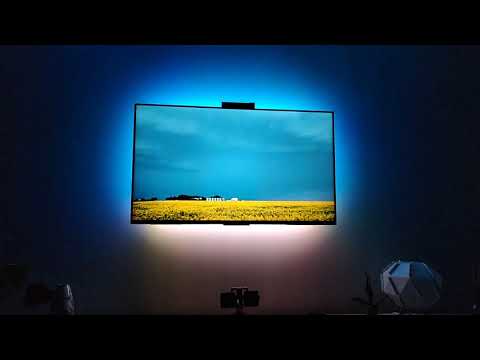
camera -> opencv -> sampling and adjustments (node.js) -> web socket -> ESP8266 -> ws2812 leds.
### Project is still a work in progress.
To get started just `npm install -g @andrei-tatar/node-webcam-ambilight`. It might take a while as (depending on your config) it downloads and builds opencv.
After installation is complete you can start it with the command `node-ambilight`.
It will host an http server on http://localhost:3000. Here you can set the area to be sampled by moving the dots over the window.
Most of the configuration can only be manually changed in the file `~/.node-ambilight`.
## Demo
[](https://www.youtube.com/watch?v=voDa9won3kM)