https://github.com/andreia/filament-stripe-payment-link
Filament plugin that provides an action to generate a Stripe payment link.
https://github.com/andreia/filament-stripe-payment-link
filament payment-link php plugin stripe
Last synced: 4 months ago
JSON representation
Filament plugin that provides an action to generate a Stripe payment link.
- Host: GitHub
- URL: https://github.com/andreia/filament-stripe-payment-link
- Owner: andreia
- License: mit
- Created: 2024-06-02T02:38:13.000Z (about 2 years ago)
- Default Branch: main
- Last Pushed: 2025-08-20T20:50:41.000Z (11 months ago)
- Last Synced: 2025-09-28T22:24:47.238Z (9 months ago)
- Topics: filament, payment-link, php, plugin, stripe
- Language: PHP
- Homepage:
- Size: 442 KB
- Stars: 14
- Watchers: 1
- Forks: 2
- Open Issues: 0
-
Metadata Files:
- Readme: README.md
- Changelog: CHANGELOG.md
- Contributing: .github/CONTRIBUTING.md
- Funding: .github/FUNDING.yml
- License: LICENSE.md
- Security: .github/SECURITY.md
Awesome Lists containing this project
README
# Filament Stripe Payment Link
[](https://packagist.org/packages/andreia/filament-stripe-payment-link)
[](https://github.com/andreia/filament-stripe-payment-link/actions?query=workflow%3Arun-tests+branch%3Amain)

[](https://packagist.org/packages/andreia/filament-stripe-payment-link)
Provides an action to generate a Stripe payment link.
## Installation
You can install the package via composer:
```bash
composer require andreia/filament-stripe-payment-link
```
You can publish the config using:
```bash
php artisan vendor:publish --tag="filament-stripe-payment-link-config"
```
or run the install command:
```bash
php artisan andreia/filament-stripe-payment-link:install
```
This is the contents of the published config file:
```php
return [
'action' => [
'icon' => 'heroicon-m-link',
'requires-confirmation' => false,
],
'payment-link-key-location' => 'services.stripe.payment-link-key',
];
```
## Requirements
- [Stripe PHP API](https://github.com/stripe/stripe-php)
## Setup
### Stripe
On [Stripe dashboard](https://dashboard.stripe.com/apikeys/create), create a restricted API key:
1. Add a descriptive name for your key on "Key name" field
2. Add `write` permission to `Products`, `Prices`, and `Payment Links`
3. Click on "Create key" button
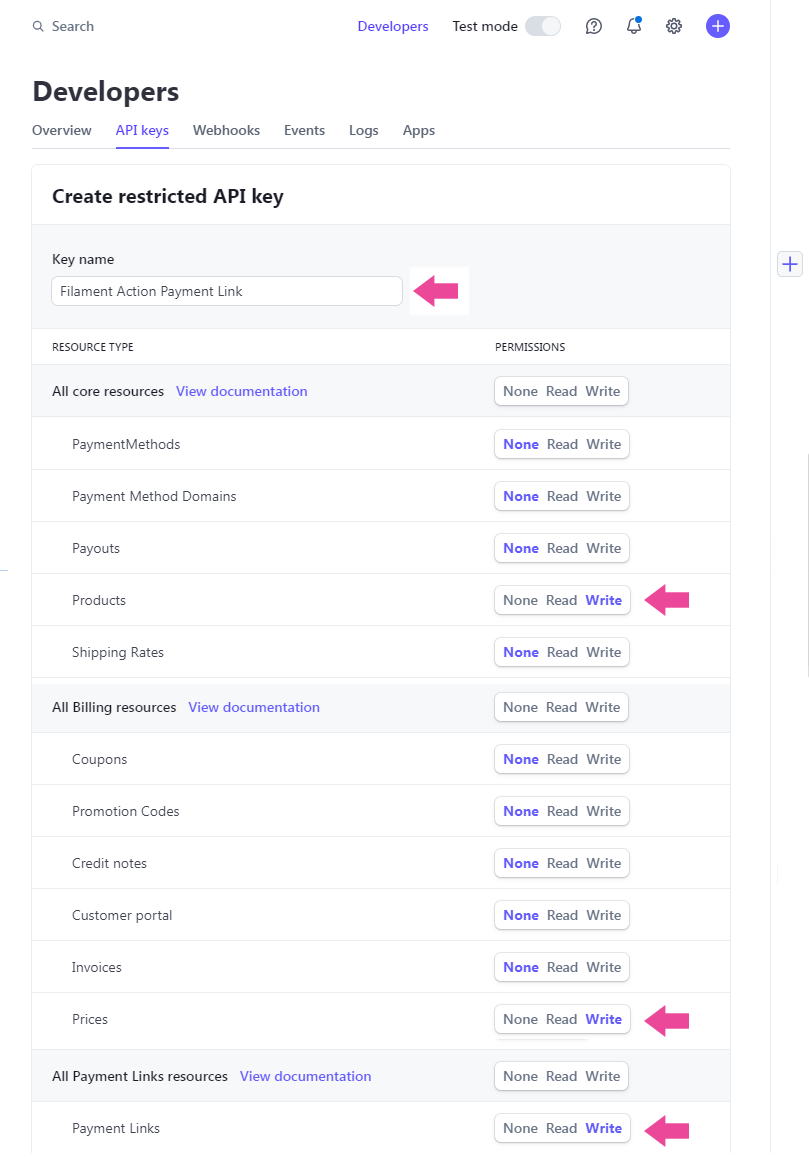
On the redirected page, in "Restricted keys" section, locate the name of your key. Click to reveal the secret key and copy it. It will be used to connect to Stripe.
### Laravel Project
In your Laravel application, add the following on your `config/services.php` file:
```php
'stripe' => [
'payment-link-key' => env('STRIPE_PAYMENT_LINK_KEY')
],
```
And on your `.env` file, add the secret key generated on Stripe dashboard:
```
STRIPE_PAYMENT_LINK_KEY="your key here"
```
## Usage
Add the Stripe payment link action to a [Filament form input field](https://filamentphp.com/docs/3.x/forms/actions#adding-an-affix-action-to-a-field):
```php
use Andreia\FilamentStripePaymentLink\GenerateStripeLinkAction;
public static function form(Form $form): Form
{
return $form
->schema([
TextInput::make('stripe_payment_link')
->required()
->suffixAction(GenerateStripeLinkAction::make('stripe_payment_link')),
]);
}
```
This is how the action will look like:

When the user clicks on the link icon, a modal will be shown with the `product name`, `amount`, and `currency` fields:
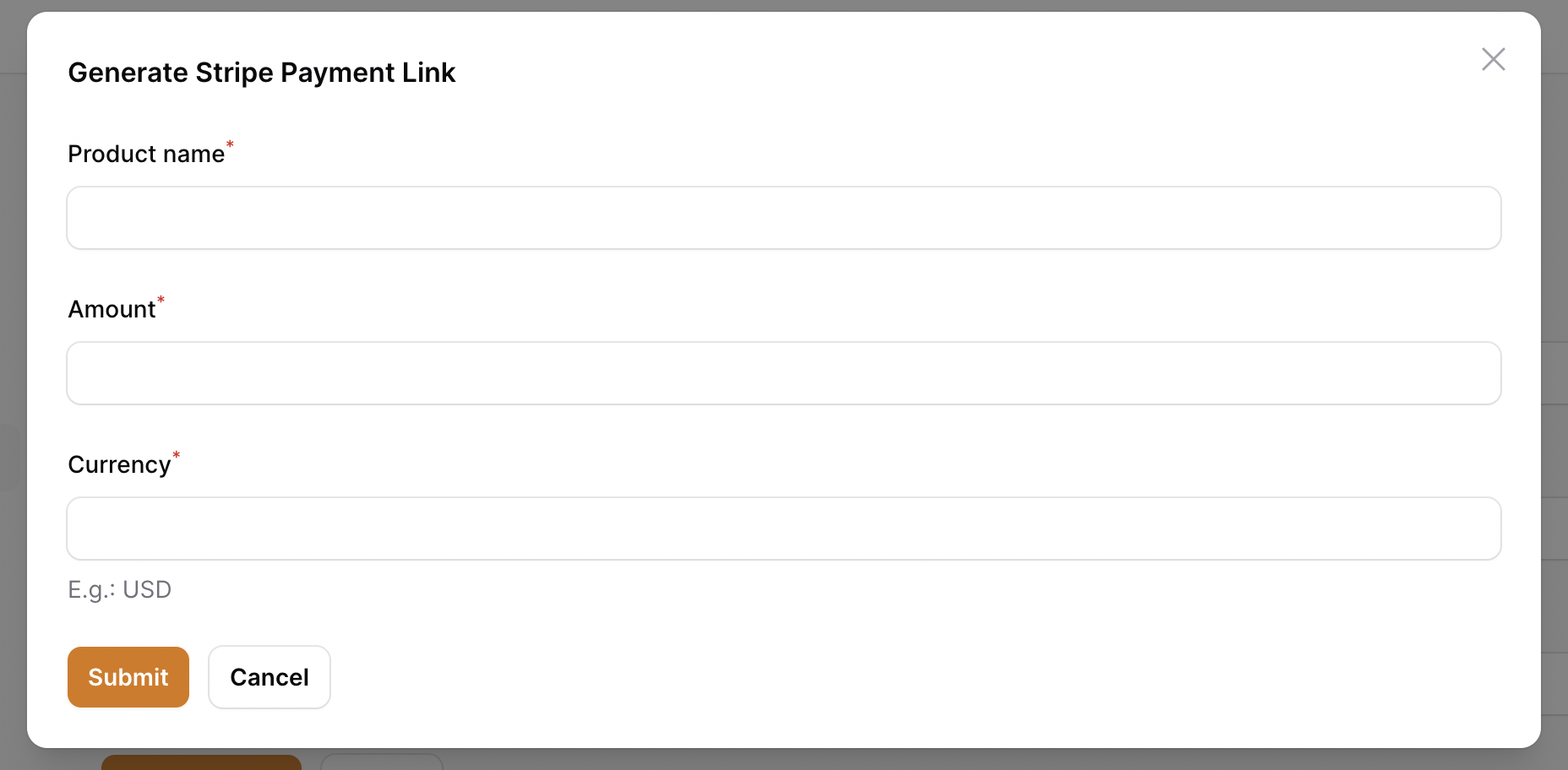
After filling the form data and submitting, the payment link will be added to the form field:

## Testing
```bash
composer test
```
## Changelog
Please see [CHANGELOG](CHANGELOG.md) for more information on what has changed recently.
## Contributing
Please see [CONTRIBUTING](.github/CONTRIBUTING.md) for details.
## Security Vulnerabilities
Please review [our security policy](../../security/policy) on how to report security vulnerabilities.
## Credits
- [Andréia Bohner](https://github.com/andreia)
- [All Contributors](../../contributors)
## License
The MIT License (MIT). Please see [License File](LICENSE.md) for more information.