https://github.com/andrejewski/dn-paint
a paint tool for DN profile headers and portraits
https://github.com/andrejewski/dn-paint
Last synced: about 1 year ago
JSON representation
a paint tool for DN profile headers and portraits
- Host: GitHub
- URL: https://github.com/andrejewski/dn-paint
- Owner: andrejewski
- License: isc
- Created: 2014-10-20T19:19:45.000Z (over 11 years ago)
- Default Branch: master
- Last Pushed: 2014-10-22T20:35:58.000Z (over 11 years ago)
- Last Synced: 2025-04-05T00:02:37.973Z (about 1 year ago)
- Language: JavaScript
- Size: 285 KB
- Stars: 15
- Watchers: 2
- Forks: 0
- Open Issues: 0
-
Metadata Files:
- Readme: README.md
- License: LICENSE
Awesome Lists containing this project
README
DN Paint
========
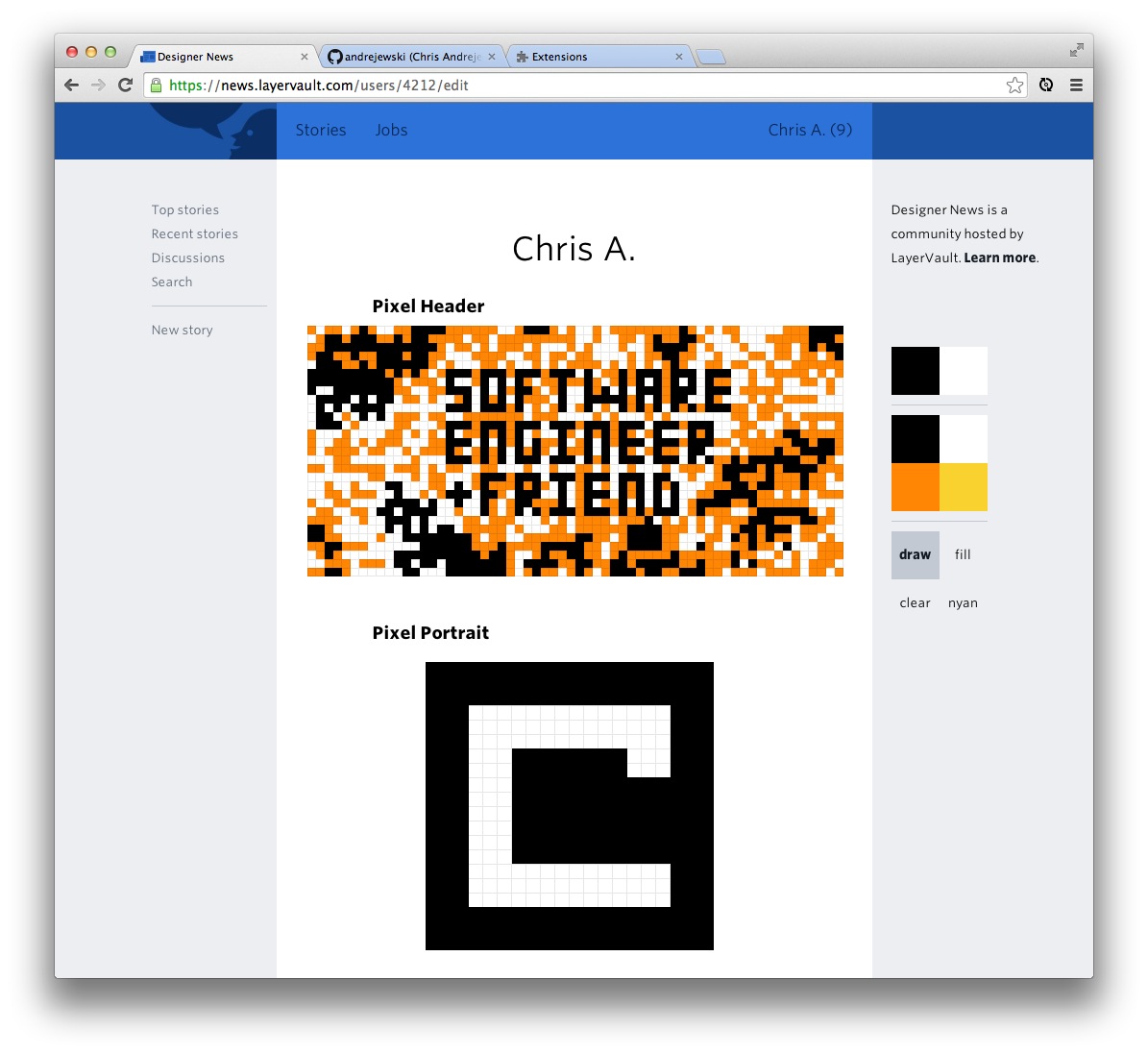
A Chrome extension for making the art of header and portrait pictures on Designer News faster.
**This is not officially supported and is in active development.**
## Installation
Since DN Paint is not complete, you must install it manually on Chrome for it to work.
[Direct download of crx file](https://github.com/andrejewski/dn-paint/blob/master/chrome.crx?raw=true)
## Features
**Two colors at once** DN Paint allows you to use two colors at once: the primary color is used via the left mouse click, the secondary by the right click. This is a conveinence that has a few bugs right now. Left clicks are more reliable.
**Paint tools** DN paint includes three standard paint tools:
- draw, which is what existed before except this does not rotate through colors
- fill, which is the standard paint bucket action
- clear, which gives you a clean slate
**Tool?** Nyan is the fourth color tool which changes the color on every draw, cycling similar to the original painting interface.
## Problems
DN Paint has to work within and against Layervault's drawing rules, which essentially means any action their code takes DN Paint has to manually reverse. This has lead to a lot of problems with the user interface.
There are many possible fixes. We could try to disable the event callbacks Layervault listens for, but I have not found an adequate solution there. I have also thought about making a virtual dom to mimic the events taken on the interface, merging those changes on to the canvas when complete. But that idea probably would suffer from performance issues as well as limit the types of interactions possible.
Many thanks to the person who can crack this coding challenge.
## Contributing
The source of the entire extension can be found in the `chrome` directory.
For pull requests, I would only like changes to the source code. Please do not submit the packed extension as we cannot trust that code to be secure. I will check each pull and build it myself for releases.
All code should target the newest stable release of Chrome (not Canary). If you want to contribute for a different browser, awesome!. Just create the source folder by browser name (i.e. `firefox`) and work from there.
## Other Repositories
I have made some other programs that fit within this space of interest.
[**txt2text**](https://github.com/andrejewski/txt2text) is a Chrome extension that replaces a customizable list of acronyms with their expanded forms.
[**Color Me Shocked**](http://chrisandrejewski.com/project/color-me-shocked/) is a real-time color conversion tool that you have to try to believe.
[**Dribbble Responses**](http://chrisandrejewski.com/project/color-me-shocked/) is a Google Chrome extension that hides short, useless comments on Dribbble shots.
## The End
Thanks for using DN Paint. Or for at least reading this far down into the README.
Follow me on [twitter](http://twitter.com/compooter) and check-out my other [repositories](http://github.com/andrejewski) if I've earned it.