https://github.com/andrew-blake/melcloudhome
Melcloudhome Home Assistant Integration
https://github.com/andrew-blake/melcloudhome
climate-control hacs home-assistant home-assistant-integration hvac melcloud mitsubishi-electric
Last synced: 3 months ago
JSON representation
Melcloudhome Home Assistant Integration
- Host: GitHub
- URL: https://github.com/andrew-blake/melcloudhome
- Owner: andrew-blake
- License: mit
- Created: 2025-11-16T10:05:47.000Z (8 months ago)
- Default Branch: main
- Last Pushed: 2026-01-19T16:09:07.000Z (6 months ago)
- Last Synced: 2026-01-19T22:40:36.483Z (6 months ago)
- Topics: climate-control, hacs, home-assistant, home-assistant-integration, hvac, melcloud, mitsubishi-electric
- Language: Python
- Homepage:
- Size: 1.68 MB
- Stars: 31
- Watchers: 4
- Forks: 1
- Open Issues: 5
-
Metadata Files:
- Readme: README.md
- Changelog: CHANGELOG.md
- Contributing: CONTRIBUTING.md
- License: LICENSE
- Security: SECURITY.md
- Support: SUPPORTED_DEVICES.md
Awesome Lists containing this project
README
# MELCloud Home
[](https://github.com/custom-components/hacs)
[](https://github.com/andrew-blake/melcloudhome/releases)

[](https://github.com/andrew-blake/melcloudhome/actions/workflows/test.yml)
[](https://codecov.io/gh/andrew-blake/melcloudhome)
[](https://github.com/astral-sh/ruff)

Home Assistant custom integration for **MELCloud Home**.
## What's New in v2.3.0
Migrated to the mobile BFF API with OAuth 2.0 PKCE authentication, resolving the MELCloud service outage. Existing users will be automatically migrated on upgrade. Now available in 10 languages with French and Turkish added. See [CHANGELOG.md](CHANGELOG.md) for full history.
## Features
### Air-to-Air (ATA) - Air Conditioning
- Full climate control (power, temperature, modes, fan speeds, vane directions)
- Energy monitoring with Home Assistant Energy Dashboard support
- Real-time sensors (room temperature, outdoor temperature*, WiFi signal, connection status)
- 60-second polling for climate updates, 30-minute for outdoor temperature
*Auto-detected from device capabilities - not all units have outdoor temperature sensors
### Air-to-Water (ATW) - Heat Pumps
- Zone 1 & Zone 2 climate control with preset modes (Room/Flow/Curve) - Zone 2 auto-detected
- DHW tank control via water heater platform
- System power switch
- Multiple sensors (temperatures, operation status, 6 telemetry sensors)
- Energy monitoring* (consumed, produced, COP - Energy Dashboard compatible)
- Cooling mode* (Cool Room/Cool Flow presets)
*Auto-detected from device capabilities - see [docs/entities.md](docs/entities.md) for details
## Requirements
- Home Assistant 2024.11.0 or newer
- MELCloud Home account with configured devices
- Internet connection for cloud API access
## Supported Devices
### Air-to-Air (ATA) - Air Conditioning Units
This integration supports Mitsubishi Electric air conditioning units connected via **MELCloud Home** WiFi adapters (MAC-5xx series).
**Supported systems:** Wall-mounted splits, ducted systems, and console units tested and working.
> **Note:** If your system uses the classic **MELCloud** app (not MELCloud Home), use the official Home Assistant MELCloud integration instead.
For complete hardware compatibility including specific models, WiFi adapters, and technical notes, see [SUPPORTED_DEVICES.md](SUPPORTED_DEVICES.md).
### Air-to-Water (ATW) - Heat Pumps
- **Status:** Production-ready (tested on real hardware)
- **Supported systems:** Mitsubishi Electric Ecodan heat pumps with FTC controllers
- **Core features:** Zone 1 & Zone 2 heating, DHW control, 3-way valve systems, telemetry sensors, energy monitoring*
- **Optional features:** Cooling mode (capability-based), energy monitoring (capability-based)
*Feature availability auto-detected from device capabilities
For tested controller models and capability details, see [SUPPORTED_DEVICES.md](SUPPORTED_DEVICES.md).
## Installation
### HACS (Recommended)
[](https://my.home-assistant.io/redirect/hacs_repository/?owner=andrew-blake&repository=melcloudhome&category=integration)
Or manually: HACS → Integrations → ⋮ → Custom repositories → add `https://github.com/andrew-blake/melcloudhome`
After adding, find "MELCloud Home" in HACS, click "Download", and restart Home Assistant.
### Manual Installation
1. Download the latest release from [GitHub](https://github.com/andrew-blake/melcloudhome/releases)
2. Extract the `melcloudhome` folder to your `custom_components` directory
3. Restart Home Assistant
## Configuration
[](https://my.home-assistant.io/redirect/config_flow_start/?domain=melcloudhome)
Or manually: **Settings** → **Devices & Services** → **Add Integration** → search "MELCloud Home"
Enter your MELCloud Home credentials (email and password). Your devices will be automatically discovered and added.
## Important Notes
### Stable Entity IDs
This integration uses **UUID-based entity IDs** to ensure automations never break when device names change. Entity IDs follow the format `{domain}.melcloudhome_{short_id}_{entity_name}` where `short_id` is derived from the device UUID.
**Device names** are set to friendly names from your MELCloud Home account (e.g., "Living Room").
**⚠️ Warning:** If you delete entities and use the "Recreate entity IDs" option, entity IDs will change to name-based IDs (e.g., `climate.living_room_climate`), breaking automations. To preserve IDs, delete and re-add the integration instead.
See [docs/entities.md](docs/entities.md) for complete entity ID reference.
## Entities
The integration creates the following entities for each device:
**Air-to-Air (ATA) Systems:**
- Climate control (HVAC modes, temperature, fan speeds, swing)
- Sensors (room temperature, outdoor temperature*, WiFi signal, energy consumption)
- Binary sensors (error state, connection status)
**Air-to-Water (ATW) Heat Pumps:**
- Climate control (Zone 1 & Zone 2 heating/cooling with preset modes)
- Water heater (DHW tank control)
- System power switch
- Sensors (temperatures, operation status, telemetry, WiFi signal, energy*)
- Binary sensors (error state, connection status, forced DHW active)
*Energy monitoring auto-detected from device capabilities
**Complete entity reference:** See [docs/entities.md](docs/entities.md) for detailed entity IDs, control options, and configuration examples.
## Troubleshooting
### Integration Not Loading
- Check Home Assistant logs for errors
- Verify your MELCloud Home credentials
- Ensure devices are configured in the MELCloud Home app
### Entities Not Updating
- Check your internet connection
- Verify MELCloud Home service is accessible
- Review the integration logs for API errors
### Energy Sensor Unavailable
- Some devices may not report energy data
- Check if device shows energy consumption in the MELCloud Home app
- Energy sensors require 30 minutes for initial data
### Export Diagnostics
1. Go to **Settings** → **Devices & Services**
2. Find "MELCloud Home" integration
3. Click the three dots and select "Download diagnostics"
4. Share the file when reporting issues
## API Rate Limiting
The integration uses conservative polling intervals to respect API limits:
- **Climate/Sensors**: 60 seconds
- **Energy Data**: 30 minutes
- **Outdoor Temperature**: 30 minutes
These intervals balance update frequency with API rate limits.
## Development & Code Quality
[](https://codecov.io/gh/andrew-blake/melcloudhome)
**Test Coverage:**
- Integration tests: Climate control, sensors, config flow, diagnostics
- API tests: Authentication, device control, data parsing
- Quality gates: All PRs require passing tests and coverage checks
**Documentation:**
- [Architecture Overview](docs/architecture.md) - Visual system architecture with mermaid diagrams
- [Testing Best Practices](docs/testing-best-practices.md) - Development setup and testing guidelines
- [Architecture Decision Records](docs/README.md#architecture-decision-records-adrs) - Key architectural decisions (ADR-001 through ADR-016)
## Support
- **Issues**: [GitHub Issues](https://github.com/andrew-blake/melcloudhome/issues)
- **Documentation**: [GitHub Repository](https://github.com/andrew-blake/melcloudhome)
## License
This project is licensed under the MIT License - see the [LICENSE](LICENSE) file for details.
## Disclaimer
This is an unofficial integration and is not affiliated with, endorsed by, or connected to Mitsubishi Electric or MELCloud. Use at your own risk.
## Star History
[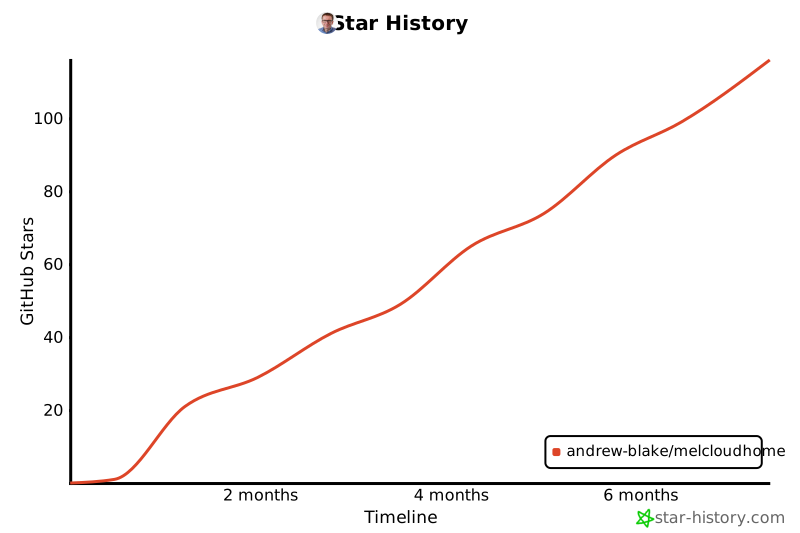](https://www.star-history.com/#andrew-blake/melcloudhome&type=timeline&legend=bottom-right)
## Credits
Developed by Andrew Blake ([@andrew-blake](https://github.com/andrew-blake))