https://github.com/andrewjo/qmk-drop-alt
Custom keymap and lighting themes for Drop ALT keyboard
https://github.com/andrewjo/qmk-drop-alt
drop-alt keyboard massdrop outrun qmk qmk-firmware qmk-keymap
Last synced: over 1 year ago
JSON representation
Custom keymap and lighting themes for Drop ALT keyboard
- Host: GitHub
- URL: https://github.com/andrewjo/qmk-drop-alt
- Owner: AndrewJo
- Created: 2021-03-08T23:53:31.000Z (over 5 years ago)
- Default Branch: master
- Last Pushed: 2023-04-22T23:23:26.000Z (about 3 years ago)
- Last Synced: 2025-03-18T15:16:17.563Z (over 1 year ago)
- Topics: drop-alt, keyboard, massdrop, outrun, qmk, qmk-firmware, qmk-keymap
- Language: C
- Homepage:
- Size: 29.3 KB
- Stars: 16
- Watchers: 1
- Forks: 5
- Open Issues: 0
-
Metadata Files:
- Readme: README.md
- Changelog: CHANGELOG.md
Awesome Lists containing this project
README
# qmk-drop-alt :keyboard:
This is a custom QMK keymap and lighting firmware for Drop ALT keyboards.
## Usage
Go to [Releases][releases] and download the binary file. You can use either
[QMK Toolbox][qmk-toolbox] or [mdloader][mdloader] to flash your keyboard.
## Compiling from source
If you don't trust the binary release, you can also build from source. If you
plan on making modifications to the keymap or lighting programs, this will be
mandatory.
### Prerequisites
You will need `qmk` CLI tool in order to build the firmware. Please read
[Setting Up Your QMK Environment][qmk-newbs-getting-started] and set up your
QMK build environment before getting started.
### Getting Started
Navigate to QMK home directory. On default installs, this should generally be
at: `$HOME/qmk_firmware`.
Configure your build environment and set your keyboard as Drop ALT:
```console
qmk config user.keyboard=massdrop/alt
```
Then, add this repository into `keyboards/massdrop/alt/keymaps` as a submodule:
```console
cd keyboards/massdrop/alt/keymaps
git submodule add https://github.com/AndrewJo/qmk-drop-alt AndrewJo/
```
If you plan on modifying the code, please fork this repository first and
replace the repository path accordingly.
You can now build the firmware:
```console
qmk compile
```
This will create a binary file that is named as `massdrop_alt_AndrewJo.bin`.
You can flash this binary using the tools mentioned in the [Usage](#usage)
section above.
## LED Matrix Themes
### Outrun Sunset
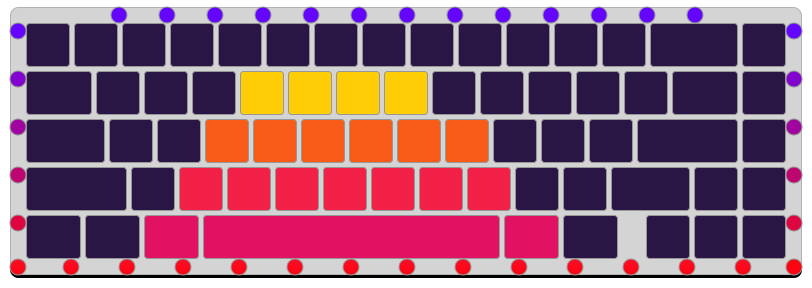
#### Supported Lighting Commands
- `Fn` + `W`: Increase brightness
- `Fn` + `S`: Decrease brightness
- `Fn` + `T`: Increase saturation
- `Fn` + `G`: Decrease saturation
- `Fn` + `Z`: Toggle: All LEDs / Key LEDs / Underglow LEDs / LED Off
### Game Mode: FPS
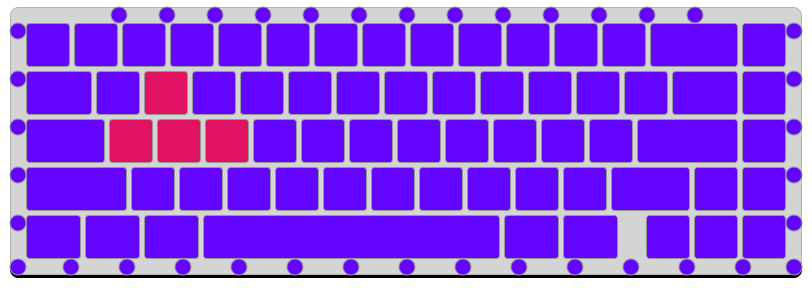
#### Supported Lighting Commands
- `Fn` + `W`: Increase brightness
- `Fn` + `S`: Decrease brightness
- `Fn` + `R`: Increase background hue value
- `Fn` + `F`: Decrease background hue value
- `Fn` + `E`: Increase foreground hue value (WASD keys)
- `Fn` + `Q`: Decrease foreground hue value (WASD keys)
- `Fn` + `T`: Increase saturation
- `Fn` + `G`: Decrease saturation
- `Fn` + `Z`: Toggle: All LEDs / Key LEDs / Underglow LEDs / LED Off
### Game Mode: MOBA
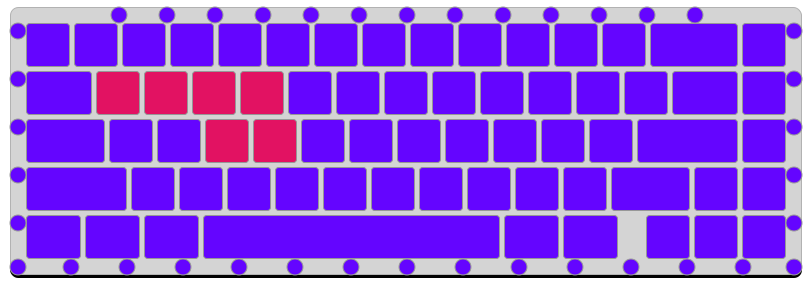
#### Supported Lighting Commands
- `Fn` + `W`: Increase brightness
- `Fn` + `S`: Decrease brightness
- `Fn` + `R`: Increase background hue value
- `Fn` + `F`: Decrease background hue value
- `Fn` + `E`: Increase foreground hue value (WASD keys)
- `Fn` + `Q`: Decrease foreground hue value (WASD keys)
- `Fn` + `T`: Increase saturation
- `Fn` + `G`: Decrease saturation
- `Fn` + `Z`: Toggle: All LEDs / Key LEDs / Underglow LEDs / LED Off
[releases]: https://github.com/AndrewJo/qmk-drop-alt/releases
[qmk-toolbox]: https://github.com/qmk/qmk_toolbox
[mdloader]: https://github.com/Massdrop/mdloader
[qmk-newbs-getting-started]: https://docs.qmk.fm/#/newbs_getting_started