https://github.com/androguard/axml
Android binary XML parser in Python
https://github.com/androguard/axml
android axml binary parser xml
Last synced: about 2 months ago
JSON representation
Android binary XML parser in Python
- Host: GitHub
- URL: https://github.com/androguard/axml
- Owner: androguard
- License: apache-2.0
- Created: 2025-03-23T21:59:36.000Z (over 1 year ago)
- Default Branch: main
- Last Pushed: 2025-09-24T18:42:41.000Z (10 months ago)
- Last Synced: 2026-04-24T17:39:39.775Z (3 months ago)
- Topics: android, axml, binary, parser, xml
- Language: Python
- Homepage:
- Size: 5.73 MB
- Stars: 16
- Watchers: 5
- Forks: 3
- Open Issues: 3
-
Metadata Files:
- Readme: README.md
- Funding: .github/FUNDING.yml
- License: LICENSE
Awesome Lists containing this project
README

AXML
# AXML/ARSC: The Rosetta Stone for Android's Binary XML



Android doesn't speak in plain text XML. To save space and speed up parsing,
it uses a compressed, obfuscated binary format (AXML) for its manifests and
a complex table (ARSC) for its resources. axml is your translator.
This is a standalone, dependency-free, native Python library built to decode
the secrets of Android's binary XML and resource files. It is a
battle-hardened pillar of the new Androguard Ecosystem, providing the critical
ability to turn machine-optimized formats back into human-readable intelligence.
This is a library for handling the `AXML` file format. `AXML` is the informal
common name for the compiled binary `XML` data format used in Android app files.
The Android Open Source Project does not seem to have named the format, other
than referring to is as `binary XML` or `compiled XML`.So `AXML` stands for
Android XML. The file format is based on compiling XML source into a binary
format based on [protobuf](). There are a number of different Android XML file
types that are compiled to AXML, these are generically known as [Android
Resources](https://developer.android.com/guide/topics/resources/available-resources).
All of these files are included in the APK's ZIP package with the file extension
`.xml` even though they are actually `AXML` and not `XML`.
Some specific data files, like String Resources and Style Resources, are instead
compiled into a single file `resources.arsc` in its own data format, known as
ASRC. AXML files often refer to values that are in `resources.arsc`.
The entry point for an app is the "[app
manifest](https://developer.android.com/guide/topics/manifest/manifest-element)"
defines the essential data points that every app must have, like Package Name
and Version Code, and includes lots of other metadata that describe the
app. Every Android app file (APK) must include
[`AndroidManifest.xml`](https://developer.android.com/guide/topics/manifest/manifest-intro),
which in the APK is the compiled binary AXML format, not XML, despite the file
extension. The source code files for the binary app manifest file are also
called `AndroidManifest.xml`, but they are actually XML. There can be
[multiple](https://developer.android.com/build/manage-manifests) source files,
but there is only ever one single compiled binary `AndroidManifest.xml` that is
valid in the APK.
https://developer.android.com/guide/topics/manifest/manifest-intro#reference
## Installation
If you would like to install it locally, please create a new venv to use it directly, and then:
```
$ git clone https://github.com/androguard/axml.git
$ pip install -e .
```
or directly via pypi:
```
$ pip install axml
```
### Usage
Two new commands will be exported in your current environnement: `axml` and `arsc`, that will allow to read and display
the corresponding files.
```
$ axml -i AndroidManifest.xml
$ arsc -i resources.arsc
```
### API
The most easy way to use this project is probably directly via using the API:
```
>>> from axml.axml import AXMLPrinter
>>> from axml.arsc import ARSCPrinter
>>> AXMLPrinter(open("AndroidManifest.xml", "rb").read())
>>> obj
>>> obj.package
'org.t0t0.androguard.TC'
>>> obj.androidversion
{'Code': '1', 'Name': '1.0'}
>>> obj = ARSCPrinter(open("test.arsc", "rb").read())
>>> obj
>>> obj.get_xml()
b'\n\n\n\n\n\n\n\n'
```
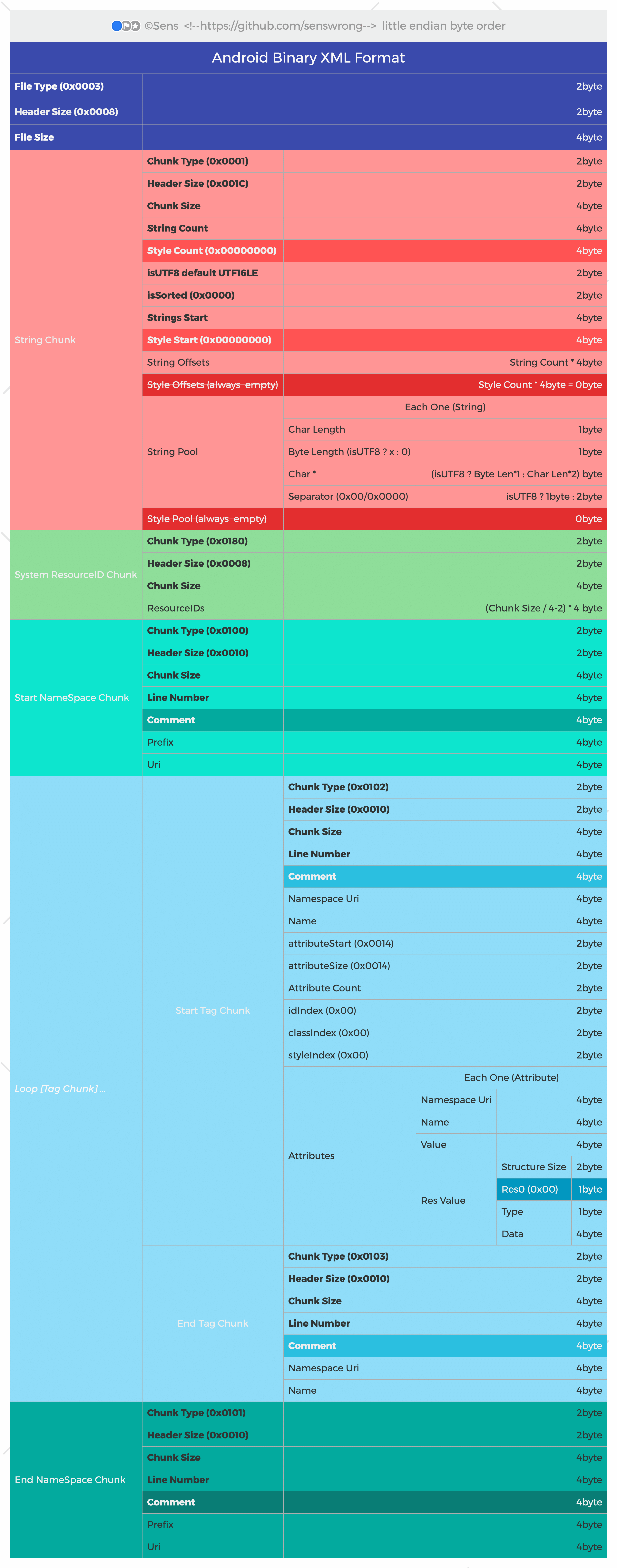
## AXML binary format
Some references about the binary AXML format:
* [_aapt2_](https://developer.android.com/tools/aapt2) compiles XML to protobuf-based AXML
* [_aapt2_ source code](https://android.googlesource.com/platform/frameworks/base/+/master/tools/aapt2)
* [_aapt_ source code](https://android.googlesource.com/platform/frameworks/base/+/master/tools/aapt)
* The binary format for `AndroidManifest.xml` is defined in [`ApkInfo.proto`](https://android.googlesource.com/platform/frameworks/base/+/refs/heads/main/tools/aapt2/ApkInfo.proto).