https://github.com/andy-blum/drupal-smart-snippets
This extension adds rich language support for Drupal Hooks, Services, and Render Elements to VS Code.
https://github.com/andy-blum/drupal-smart-snippets
drupal hacktoberfest snippets vscode-extension
Last synced: 6 months ago
JSON representation
This extension adds rich language support for Drupal Hooks, Services, and Render Elements to VS Code.
- Host: GitHub
- URL: https://github.com/andy-blum/drupal-smart-snippets
- Owner: andy-blum
- License: mit
- Created: 2020-10-04T05:02:05.000Z (over 5 years ago)
- Default Branch: main
- Last Pushed: 2025-02-28T16:42:06.000Z (over 1 year ago)
- Last Synced: 2025-03-28T13:44:28.719Z (about 1 year ago)
- Topics: drupal, hacktoberfest, snippets, vscode-extension
- Language: JavaScript
- Homepage: https://marketplace.visualstudio.com/items?itemName=andrewdavidblum.drupal-smart-snippets
- Size: 6.12 MB
- Stars: 21
- Watchers: 2
- Forks: 4
- Open Issues: 5
-
Metadata Files:
- Readme: README.md
- Changelog: CHANGELOG.md
- License: LICENSE.md
Awesome Lists containing this project
README
# Visual Studio Code Smart Drupal Snippets
This extension adds rich language support for the
[Drupal Hooks API](https://api.drupal.org/api/drupal/core%21core.api.php/group/hooks) and [Drupal Form and render elements](https://api.drupal.org/api/drupal/elements)
to VS Code. This extension is intended as a successor to
[Drupal 8 Snippets](https://marketplace.visualstudio.com/items?itemName=dssiqueira.drupal-8-snippets).
# Usage & Features
Type part of a snippet, press enter and/Or tab, and the snippet unfolds.
## Built from Drupal Core
Hooks gathered by scraping the codebase of the latest minor versions of Drupal 9. This includes those that are marked as deprecated.
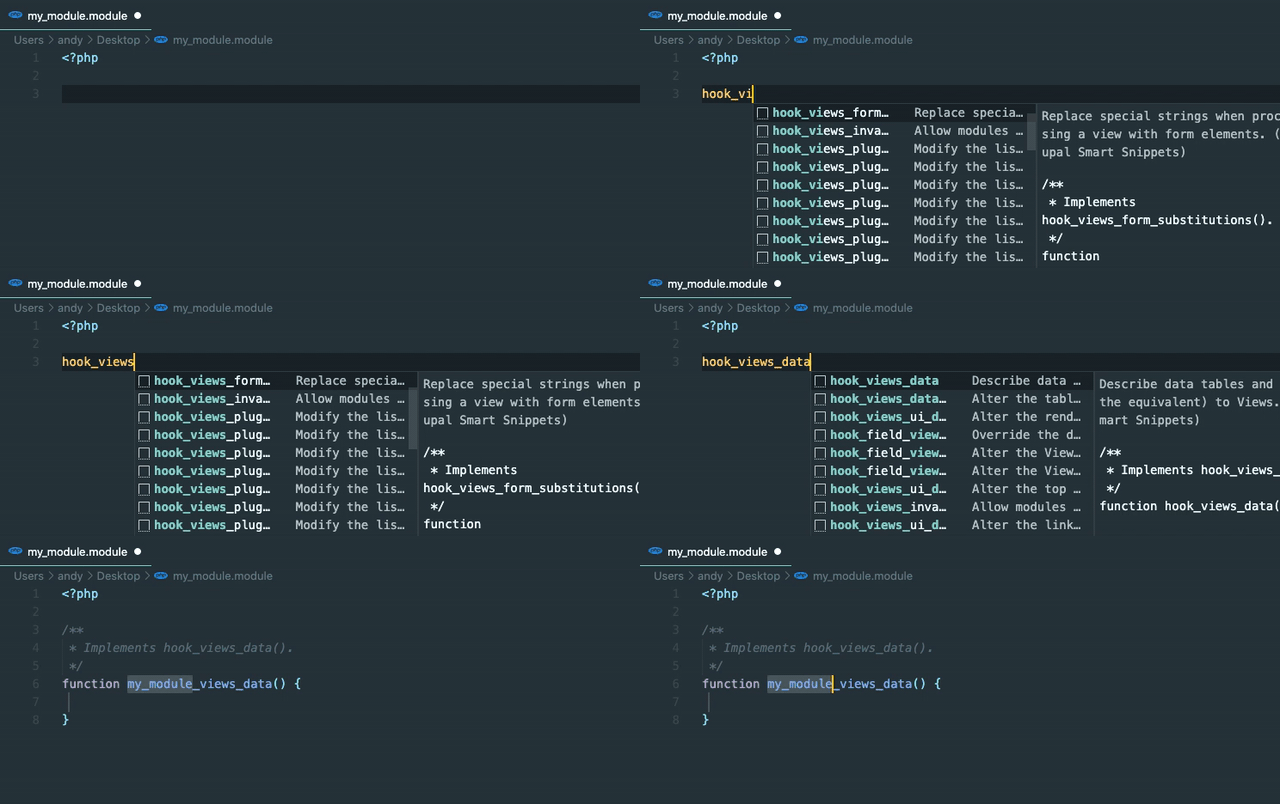
## Smart hook replacement
Snippets will automatically replace the leading `hook` with the current file's name.
## Smart element replacement
Snippets will automatically render the element array base on RenderElement or FormElement. Start by typing `@RenderElement`, `@FormElement`, `@Element` or the `[type_name]` itself.
FormElement will have `#title`, `#title_display`, `#description` and `#required` properties by default. Additional properties listed on docblock is generated automatically.
### @FormElement

### @RenderElement

### @Element

### Typing [type_name]

## Smart service snippet
While services with global methods allow IDEs to suggest methods and properties, those retrieved using the \Drupal::service() method do not. Service snippets provide a easy access to all core services in a datatyped variable allowing intellisense suggestions.
### Services without datatyping

### Services with datatyping

### Deprecated services

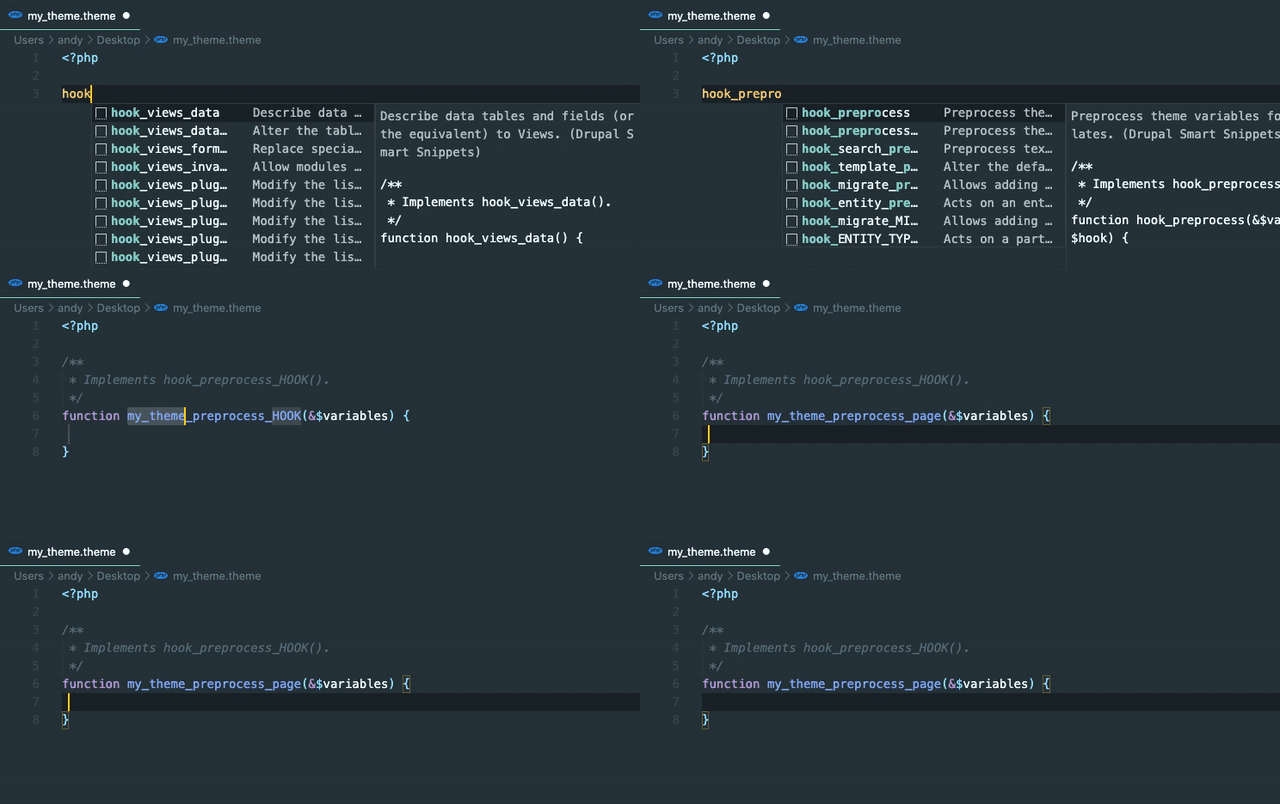
## Tab Stops
Snippets are formatted to have tab stops on values that need replaced like `HOOK`,
`ENTITY_TYPE`, `BASE_FORM_ID`, etc.
### Hook Replacement
### Element Replacement
FormElement have `#title`, `#title_display` ([providing default options](https://www.drupal.org/docs/drupal-apis/form-api/form-render-elements)), `#description`, `#required` (*TRUE* or *FALSE*) and final ending option of comma `','` or semi-colon `';'` as deafult tab stops.

### Services
Services snippets provide a snake-cased, tab-stopped variable matching the service's name. On snippet insertion, the variable can be overwritten easily.
# Installation
1. Open VS Code
2. From the command palette `Ctrl-Shift-P` (Windows, Linux) or `Cmd-Shift-P` (OSX)
3. Select Install Extension
4. Search by `Drupal Smart Snippets`
5. Click install
6. Reload Visual Studio Code
# Contributions
This project is maintained on
[Github](https://github.com/andy-blum/smart-drupal-snippets).
Your bugs, feature requests, and pull requests are welcome.