https://github.com/andytango/redux-postgrest
https://github.com/andytango/redux-postgrest
Last synced: about 1 year ago
JSON representation
- Host: GitHub
- URL: https://github.com/andytango/redux-postgrest
- Owner: andytango
- Created: 2020-01-23T18:28:39.000Z (over 6 years ago)
- Default Branch: master
- Last Pushed: 2023-01-06T02:35:59.000Z (over 3 years ago)
- Last Synced: 2025-03-29T15:01:37.767Z (about 1 year ago)
- Language: TypeScript
- Size: 695 KB
- Stars: 28
- Watchers: 1
- Forks: 3
- Open Issues: 22
-
Metadata Files:
- Readme: README.md
Awesome Lists containing this project
README
# 🐘 Redux-Postgrest

A library to make developing with React and postgREST as effortless as possible, by taking care of all the plumbing 🔧.
[See the demo app!](https://github.com/andytango/redux-postgrest-demo)
# Why?
One of the great things about [PostgREST](http://postgrest.org/) is that it can remove any indirection between your React application and your database, treating your data model itself as a *"single, declarative source of truth"*.
Redux-PostgREST fully embraces this philsosophy. Your tables, views and functions are mapped to *redux action types* using PostgREST's own documentation endpoint.
Now, when you want to query your database, all you have to do is just *dispatch redux actions*, and then *select the response data*! 👍
# 🧰 What's in the box
- A middleware - *takes care of data fetching*
- A reducer - *stores API requests and responses*
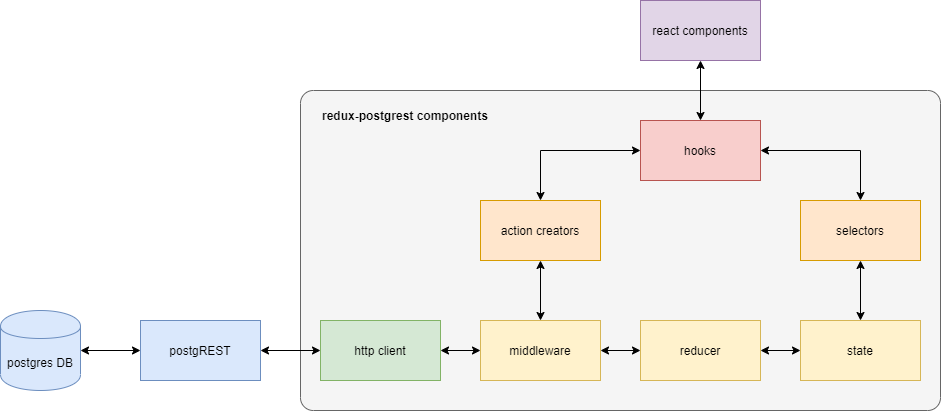
Optionally, to make life *even easier*:
- Action creators
- Selectors - *in development*
- Hooks
# 🏁 Quickstart
## Install
```sh
yarn add redux-postgrest
```
## Configure
```jsx
// store.js
import { applyMiddleware, combineReducers, createStore } from "redux";
import { connectPgRest } from "redux-postgrest";
const { reducer, middleware } = connectPgRest({
url: "http://localhost:8000" // Your postgREST server
});
const store = createStore(
combineReducers({ api: reducer }),
applyMiddleware(middleware)
);
export default store;
```
## Make a table
```sql
-- your postgres db:
CREATE TABLE my_table_name (
example_id INTEGER PRIMARY KEY GENERATED ALWAYS AS IDENTITY,
example_text TEXT,
example_datetime TIMESTAMPTZ NOT NULL DEFAULT CURRENT_TIMESTAMP
);
INSERT INTO my_table_name (example_text) VALUES ('Hello world!');
```
## Dispatch
```jsx
// Component.js
const {
useDispatchGet,
useDispatchPost,
useDispatchPatch,
useDispatchDelete
} = makePgRestHooks("my_table_name"); // Your postgREST endpoint
function MyComponent() {
const dispatch = useDispatchGet();
useEffect(() => {
dispatch()
}, [dispatch]); // will only run after the component is first mounted
// ...
}
export default MyComponent;
```
## Select
```jsx
// Component.js
import React from 'react';
const {
useDispatchGet,
useDispatchPost,
useDispatchPatch,
useDispatchDelete
} = makePgRestHooks("my_table_name"); // Your postgREST endpoint
function MyComponent() {
const dispatch = useDispatchGet();
useEffect(() => {
dispatch();
}, [dispatch]);
const myTableData = useSelector(
({ api }) => api.my_table_name && api.my_table_name.GET.body
);
if(myTableData && myTableData.length) {
return {myTableData[0].example_text} // Should say "Hello world!"
}
return null;
}
export default MyComponent;
```
## License
[MIT](LICENSE).