https://github.com/angelelz/keepassmasterslavesync
KeePass 2 plugin that Allows synchronization of specific Groups or Tags between local databases.
https://github.com/angelelz/keepassmasterslavesync
keepass local-databases plugin synchronization
Last synced: over 1 year ago
JSON representation
KeePass 2 plugin that Allows synchronization of specific Groups or Tags between local databases.
- Host: GitHub
- URL: https://github.com/angelelz/keepassmasterslavesync
- Owner: Angelelz
- License: mit
- Created: 2019-07-23T17:25:35.000Z (almost 7 years ago)
- Default Branch: master
- Last Pushed: 2019-08-14T02:02:11.000Z (almost 7 years ago)
- Last Synced: 2025-03-18T06:51:33.510Z (over 1 year ago)
- Topics: keepass, local-databases, plugin, synchronization
- Language: C#
- Size: 742 KB
- Stars: 38
- Watchers: 6
- Forks: 8
- Open Issues: 16
-
Metadata Files:
- Readme: README.md
- License: LICENSE
Awesome Lists containing this project
README
# KeePassMasterSlaveSync
[](https://github.com/Angelelz/KeePassMasterSlaveSync/releases/latest)
[](https://github.com/Angelelz/KeePassMasterSlaveSync/releases)
[](https://github.com/Angelelz/KeePassMasterSlaveSync/blob/master/LICENSE)
KeePassMasterSlaveSync is a KeePass 2 plugin that Allows synchronization of specific Groups or Tags between local databases.
This plugin is heavily based on [KeePassSubsetExport.](https://github.com/lukeIam/KeePassSubsetExport)
## Why?
Automatically and securely share entries and groups with other databases. I have my personal database from which I share a group containing bank and family entries with my wife's database.
My Database act as a Master for those entries: If I delete or move any entry, It will be deleted from the Slave; but if there is different data in any entry, the one with the newer modification time will be synced across both databases.
Also, my wife's database (slave Database) can have entries to share too, for which it will be the master.
## Disclaimer
I'm not an expert programmer and I tried not to compromise security - but I can't guarantee it.
**So use this plugin at your own risk.**
If you have more experience with KeePass plugins, I would be very grateful if you have a look on the code.
## How to install?
- Download the latest release from [here](https://github.com/Angelelz/KeePassMasterSlaveSync/releases)
- Place KeePassMasterSlaveSync.plgx in the KeePass program directory
- Start KeePass and the plugin is automatically loaded (check the Plugin menu)
## How to use?
- Open the database containing the entries that should be exported/synced
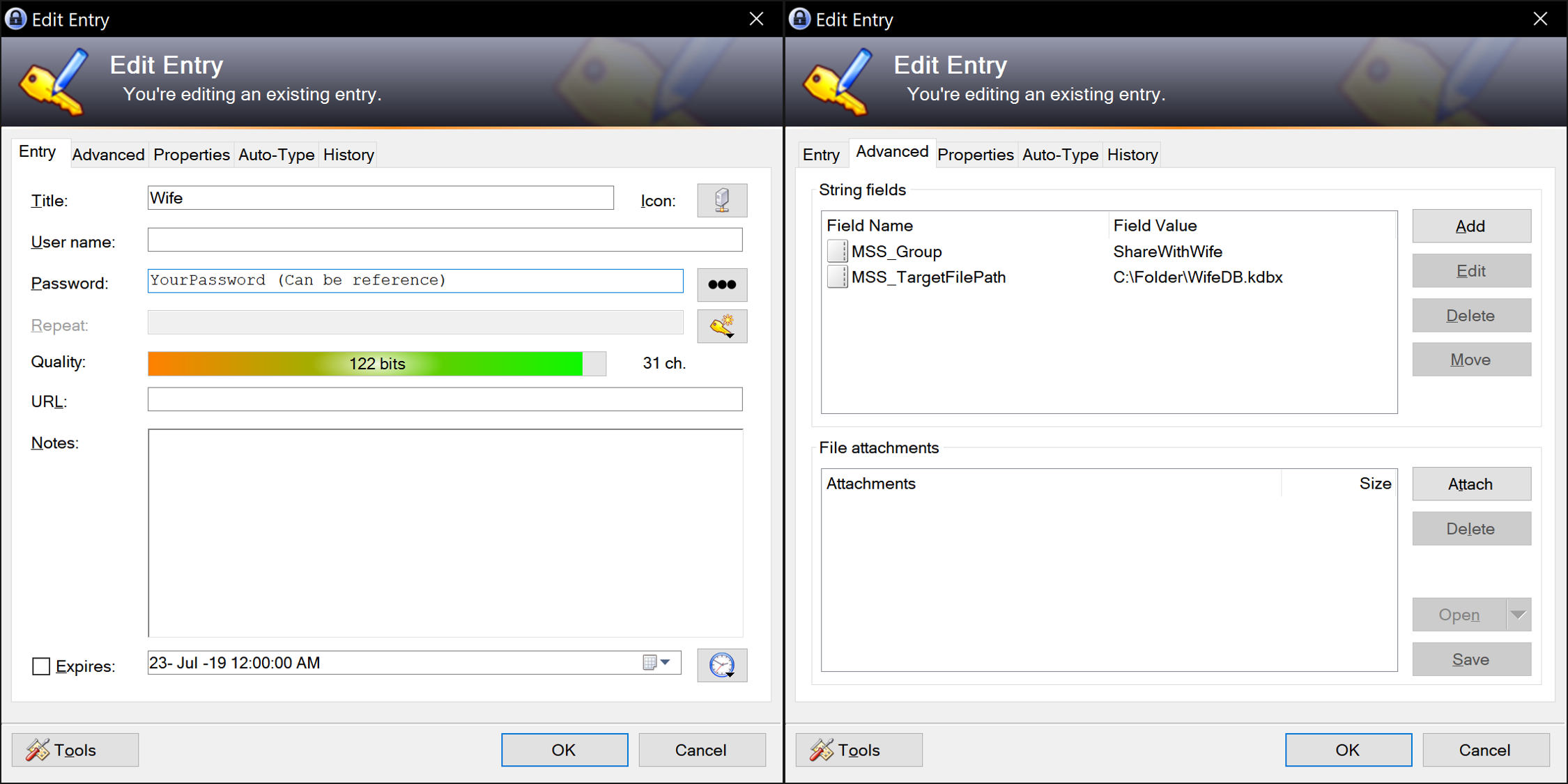
- Create a folder `MSSyncJobs` under the root folder
- For each export job (slave database) create a new entry:
| Setting | Description | Optional | Example |
| --------------------------------------------------------- | ----------------------------------------------------------------------- | ------------------------------------------ | --------------------------------------- |
| `Title` | Name of the job | No | `MSS_MobilePhone` |
| `Password` | The password for the target database | Yes, if `MSS_KeyFilePath` is set | `SecurePW!` |
| `Expires` | If the entry expires the job is disabled and won't be executed | `-` | `-` |
| `MSS_KeyFilePath`
[string field] | Path to a key file | Yes, if `Password` is set | `C:\keys\mobile.key` |
| `MSS_TargetFilePath`
[string field] | Path to the target database.
(Absolute, or relative to source database parent folder.) | No | `C:\sync\mobile.kdbx`
or
`mobile.kdbx`
or
`..\mobile.kdbx` |
| `MSS_Group`
[string field] | Group(s) for filtering (`,` to delimit multiple groups - `,` is not allowed in group names)| Yes, if `MSS_Tag` is set | `MobileGroup` |
| `MSS_Tag`
[string field] | Tag(s) for filtering (`,` to delimit multiple tags - `,` is not allowed in tag names)| Yes, if `MSS_Group` is set | `MobileSync` |
| `MSS_ExportUserAndPassOnly`
[string field] | If `True` Only the Title, Url, Username and Password will be synced with the slave Database. | Yes (defaults to `False`) | `True` |
| `MSS_PerformSlaveJobs`
[string field] | If true, Sync jobs on slave database will be executed too (Making it the master for those jobs). | Yes (defaults to `True`) | `True` |
| `MSS_IsSlave`
[string field] | If `True` this job will be ignored when not executed from a Master database. This option prevents the warning "Missing Password or valid KeyFilePath" to show | Yes (defaults to `False`). `MSS_PerformSlaveJobs` must be `true` | `True` |
- Every time the (Master) database is saved, every configured sync job will be executed
- To disable an sync job temporarily just set it to expire, it does not matter the time
- If both `MSS_Group` and `MSS_Tag` are set, only entries matching *both* will be exported
- You can have a sync job on a slave database to target the Master database without setting a password or a key file, by executing from the master and setting 'MSS_IsSlave' to true in slave and 'MSS_PerformSlaveJobs' to true on the master.
- The plugin will automatically update the UI of any opened database.
- To prevent duplicated Uuids, the plugin will delete any entry from the slave DB that has been moved out of the synced group or tag.
## Next up!
- You tell me...