https://github.com/anicine/native_splash_screen
WIP simple package to let your app show a splash screen before it loads completely.
https://github.com/anicine/native_splash_screen
dart flutter linux windows
Last synced: 3 months ago
JSON representation
WIP simple package to let your app show a splash screen before it loads completely.
- Host: GitHub
- URL: https://github.com/anicine/native_splash_screen
- Owner: anicine
- License: bsd-3-clause
- Created: 2025-05-03T16:15:46.000Z (about 1 year ago)
- Default Branch: main
- Last Pushed: 2025-10-03T12:15:03.000Z (9 months ago)
- Last Synced: 2026-02-24T19:34:20.426Z (4 months ago)
- Topics: dart, flutter, linux, windows
- Language: C++
- Homepage: https://pub.dev/packages/native_splash_screen
- Size: 37.2 MB
- Stars: 11
- Watchers: 0
- Forks: 1
- Open Issues: 0
-
Metadata Files:
- Readme: README.md
- License: LICENSE
Awesome Lists containing this project
README
# 🖼️ native_splash_screen
> Native splash screens provide faster startup visuals, smoother transitions, and eliminate the first-frame jank common with typical Flutter splash workarounds.
**native_splash_screen** is a Flutter plugin that delivers fully configurable, animated splash screens on **Linux**, **Windows** and **Macos** — powered by **GTK + Cairo**, **Win32 GDI** and **AppKit + Cocoa**, respectively.
> 🔧 Image composition and layout are handled at **compile-time** via a CLI tool, while rendering is performed natively at runtime using high-performance platform APIs.
## 📚 Table of Contents
- [✨ Features](#-features)
- [📦 Installation](#-installation)
- [⚙️ Setup](#️-setup)
- [1. Generate the splash screen configuration file](#1-generate-the-splash-screen-configuration-file)
- [2. Generate the splash screen build files](#2-generate-platform-specific-buildintegration-files)
- [3. Generate the splash screen code](#3-generate-the-splash-screen-code)
- [4. Integrate the build files](#4-integrate-the-build-files)
- [🐧 Linux](#-linux)
- [🪟 Windows](#-windows)
- [🍎 Macos](#-macos)
- [5. Add the missing code on each platform](#5-add-the-missing-code-on-each-platform)
- [🐧 Linux](#-linux-1)
- [🪟 Windows](#-windows-1)
- [🍎 Macos](#-macos-1)
- [🚀 Usage](#-usage)
- [🍎 macOS Configuration Notes](#-macos-configuration-notes)
- [🛠️ How It Works](#️-how-it-works)
- [📝 Configuration](#-configuration)
- [🎥 Demos](#-demos)
- [📄 License](#-license)
---
## ✨ Features
- 🖼️ Native splash screens on Linux (GTK + Cairo) and Windows (WinGDI) and Macos (AppKit + Cocoa)
- 🖥️ Retina Display Support: Automatically generates 1x and 2x assets for macOS, ensuring crystal-clear splash screens on all displays.
- 🎞️ Runtime closing animations e.g : fading
- ⚙️ CLI-driven image layout and asset generation
- 🧩 Static linking — zero runtime dependencies
- 🛠️ Easily extensible for other platforms
- 🌟 Supports raster formats like PNG and JPEG. Transparency and scaling are fully handled at compile time by the CLI.
---
## 📦 Installation
Add `native_splash_screen` to your `pubspec.yaml`:
```yaml
dependencies:
native_splash_screen: ^3.0.0
```
Also add the CLI tool under dev_dependencies:
```yaml
dev_dependencies:
native_splash_screen_cli: ^3.0.0
```
> ⚠️ **Caution:** To avoid errors, ensure `native_splash_screen` and `native_splash_screen_cli` are on the same major version (e.g., `3.x.x`). The runtime and CLI tool are designed to work together.
Then run:
```sh
flutter pub get
```
## ⚙️ Setup
Setting up `native_splash_screen` involves a few steps: generating configuration, integrating platform-specific build files, and adding minimal native code to show the splash screen early.
## 1. Generate the splash screen configuration file
First, generate the main YAML configuration file (`native_splash_screen.yaml`) in your project's root directory. This file allows you to customize the splash screen's appearance and behavior for each platform.
Run:
```sh
dart run native_splash_screen_cli init
```
- This command will create `native_splash_screen.yaml` pre-filled with comments and examples to guide you through the available options.
## 2. Generate platform-specific build/integration files
Once you've configured `native_splash_screen.yaml` (e.g., enabled desired platforms, set image paths), run the setup command. This prepares platform-specific files that help integrate the splash screen into your native builds.
Run:
```sh
dart run native_splash_screen_cli setup
```
- For Linux and Windows: This typically creates `native_splash_screen.cmake` files in your respective platform runner directories (`linux/runner` and `windows/runner`). These CMake files define how the native splash screen code (generated in the next step) will be compiled and linked.
- For macOS: This step primarily prepares the ground. The actual Swift configuration files are generated by the gen command (see next step), and integration involves Xcode project modifications.
## 3. Generate the splash screen code
Now make sure to add the images path in the configuration file
and put a valid window size and image size.
Then you can generate the splash screen code by running:
```sh
dart run native_splash_screen_cli gen
```
This command:
- Reads your `native_splash_screen.yaml`.
- Processes the specified images (resizing, applying effects as configured).
- Generates the actual native source code for the splash screen:
- **Linux & Windows:** Creates C++ source files that are then compiled via the `.cmake` files.
- **macOS:** Creates Swift files (`NativeSplashScreen.swift` and its flavor-specific counterparts like `NativeSplashScreen_Debug.swift`) in your `macos/Runner/` directory. These files contain your splash screen configuration as Swift code.
> **Important:** Do not run your app yet. You still need to integrate these generated files and add platform-specific initialization code as described below.
## 4. Integrate the build files
Now, you need to tell each platform's build system how to use the files generated in the previous steps.
### 🐧 Linux
Click to Expand
Apply the following patch to your `linux/runner/CMakeLists.txt`:
> if you edited the linux path in `native_splash_screen.yaml`, you
> need to apply the patch in to the **correct** CMakefile.txt
```diff
+ # Include splash screen library configuration
+ include("${CMAKE_CURRENT_SOURCE_DIR}/native_splash_screen.cmake")
add_executable(${BINARY_NAME}
"main.cc"
"my_application.cc"
"${FLUTTER_MANAGED_DIR}/generated_plugin_registrant.cc"
)
```
### 🪟 Windows
Click to Expand
Apply the following patch to your `windows/runner/CMakeLists.txt`:
> if you edited the windows path in `native_splash_screen.yaml`, you
> need to apply the patch in to the **correct** CMakefile.txt
```diff
+ # Include splash screen library configuration
+ include("${CMAKE_CURRENT_SOURCE_DIR}/native_splash_screen.cmake")
add_executable(${BINARY_NAME} WIN32
"flutter_window.cpp"
"main.cpp"
"utils.cpp"
"win32_window.cpp"
"${FLUTTER_MANAGED_DIR}/generated_plugin_registrant.cc"
"Runner.rc"
"runner.exe.manifest"
)
```
### 🍎 Macos
> **Xcode is required** for macos setup.
Click to Expand
For macOS, integration involves adding the Swift files generated by `native_splash_screen_cli gen` to your Xcode project and setting a compilation flag. **Xcode is required for these steps.**
**A. Add Generated Swift Files to `Runner` Target:**
The `gen` command creates these files in `[YourApp]/macos/Runner/`:
- `NativeSplashScreen.swift`
- `NativeSplashScreen_Debug.swift`
- `NativeSplashScreen_Profile.swift`
- `NativeSplashScreen_Release.swift`
Follow these visual steps to add them to Xcode:
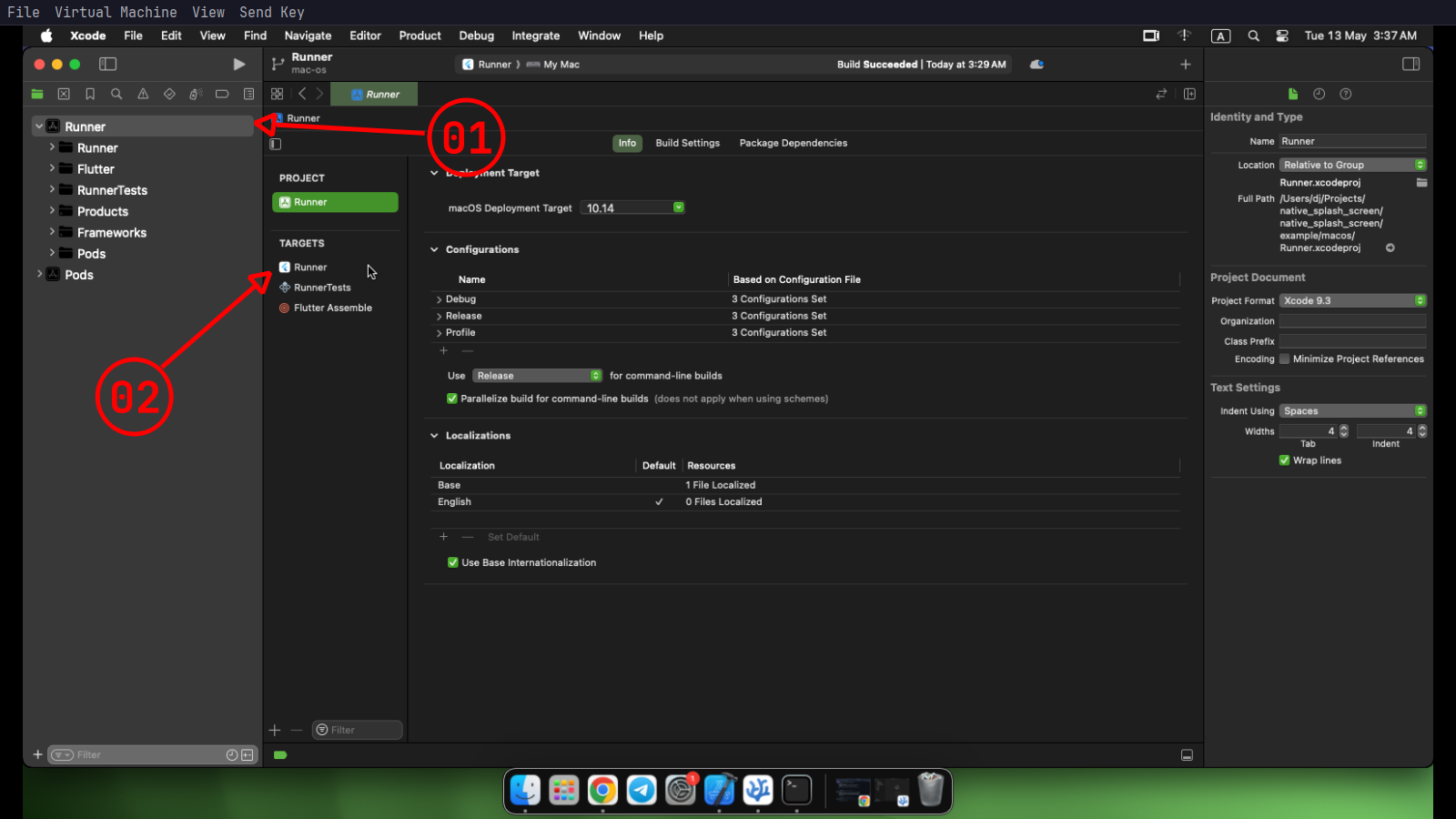
**1** - click on **`01`** then **`02`**.
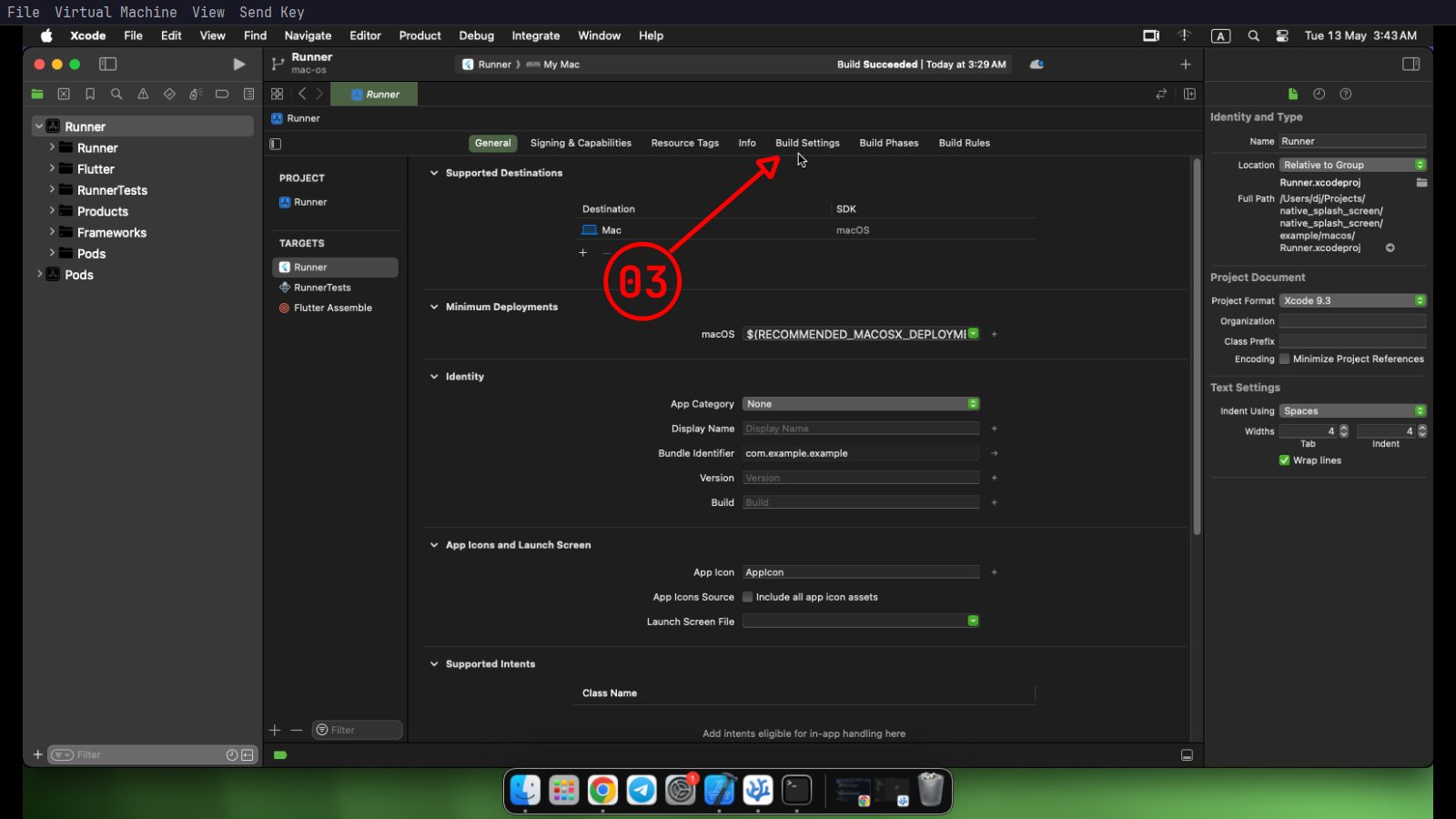
**2** - then click on **`03`**.
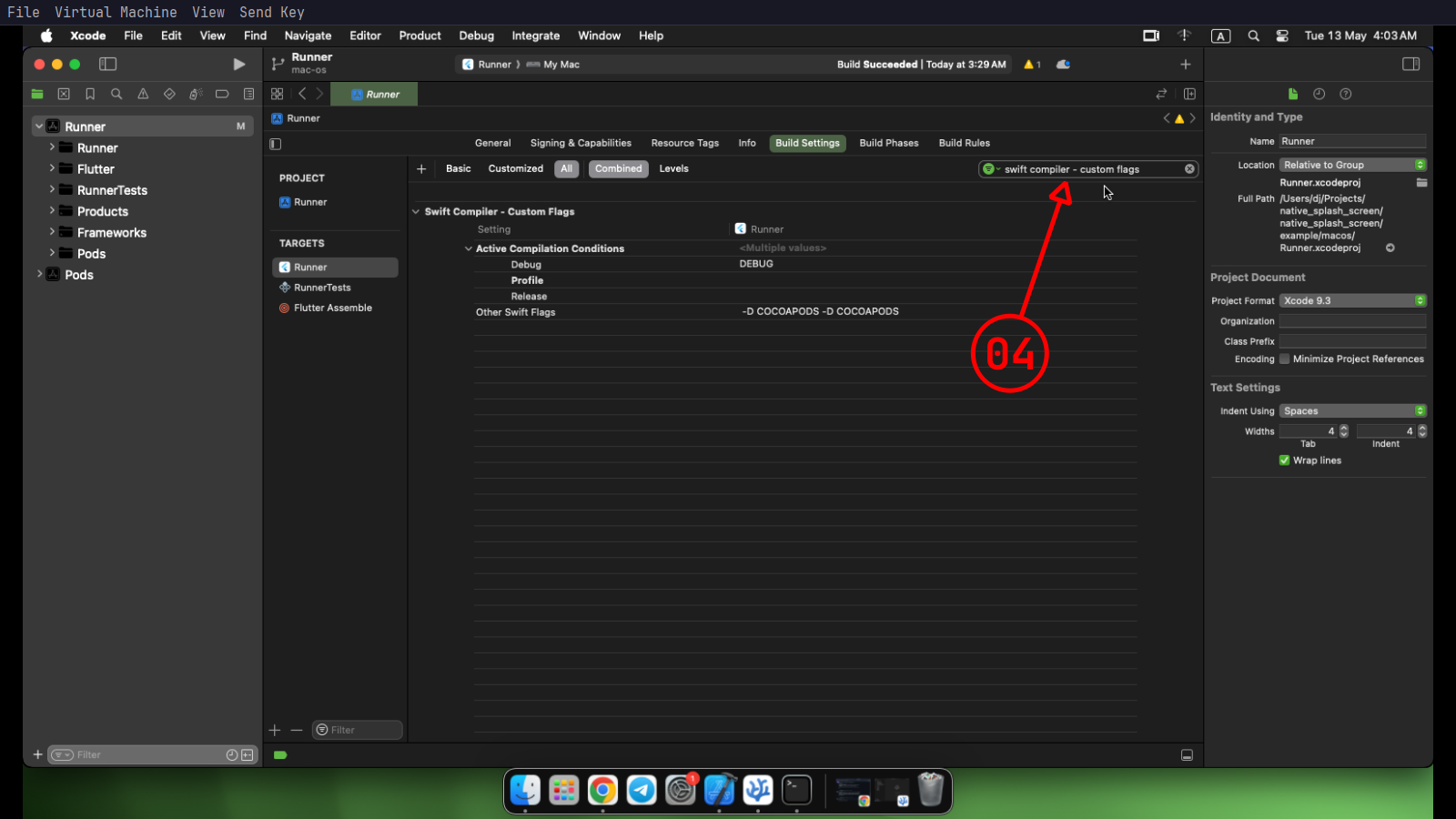
**3** - then search for `swift compiler - custom flags` on **`04`**.
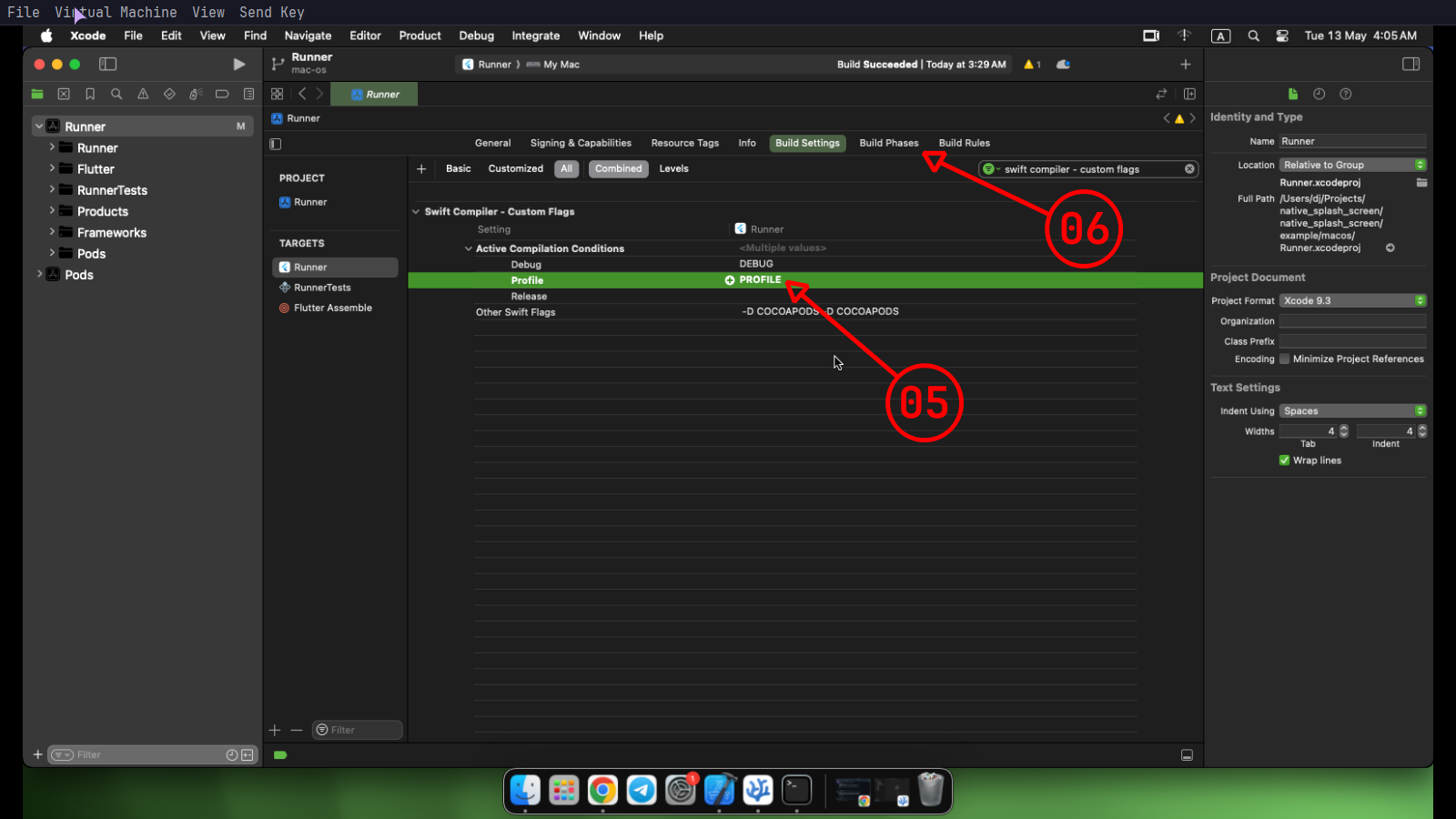
**4** - click `↵` in **`05`** and type `PROFILE` then click `↵` to confirm and click **`06`**.
**5** - click **`07`** to expand it then click **`08`** to add new files.
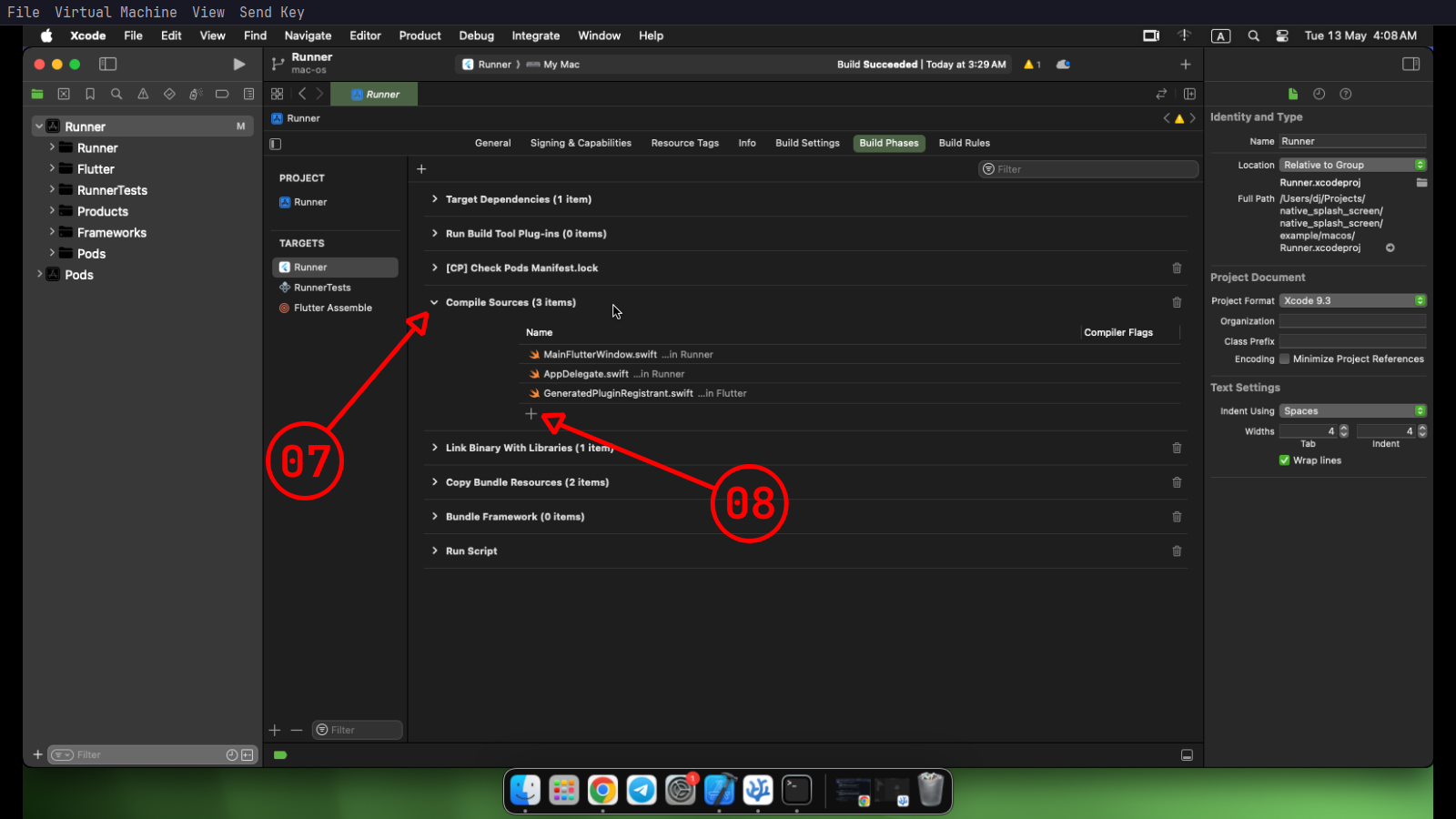
**6** - click **`09`** to choose the files.
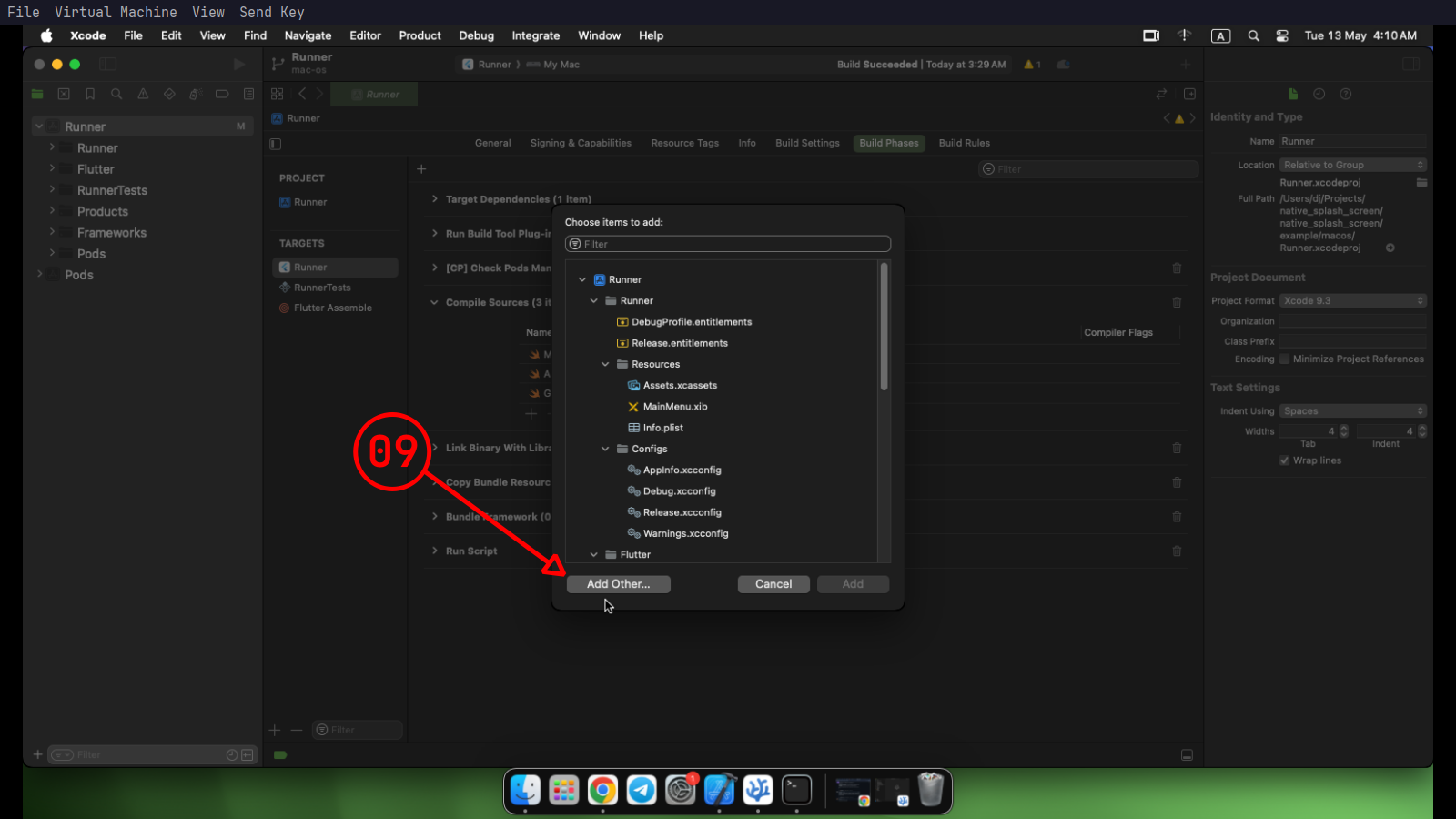
**7** - in the project root folder open the macos folder like **`10`** then open the Runner folder like **`11`** after that choose all the swift files which contain **"NativeSplashScreen"** like **`12`**, cause those get generated by the `native_splash_screen_cli` the click open like **`13`**.
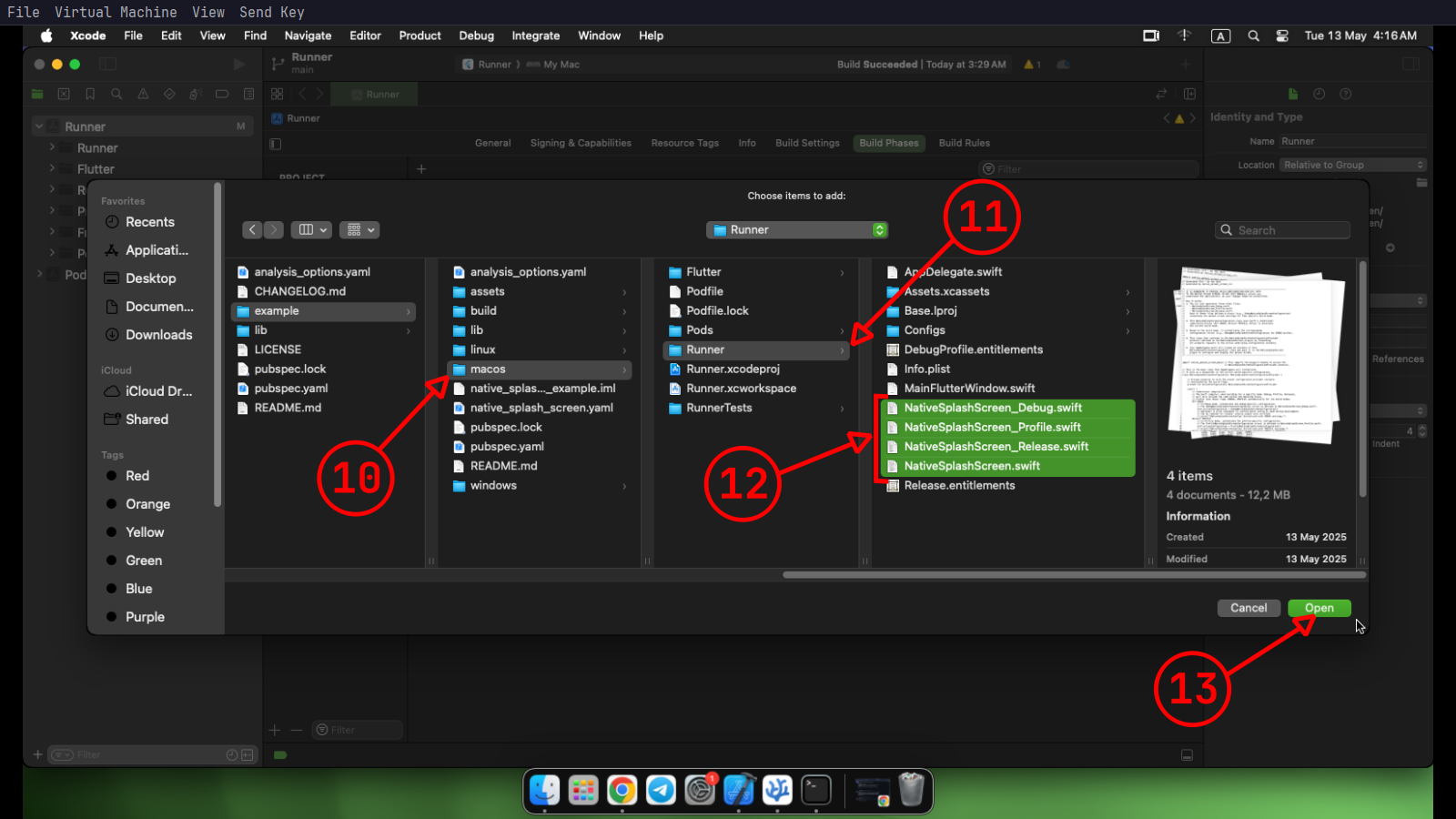
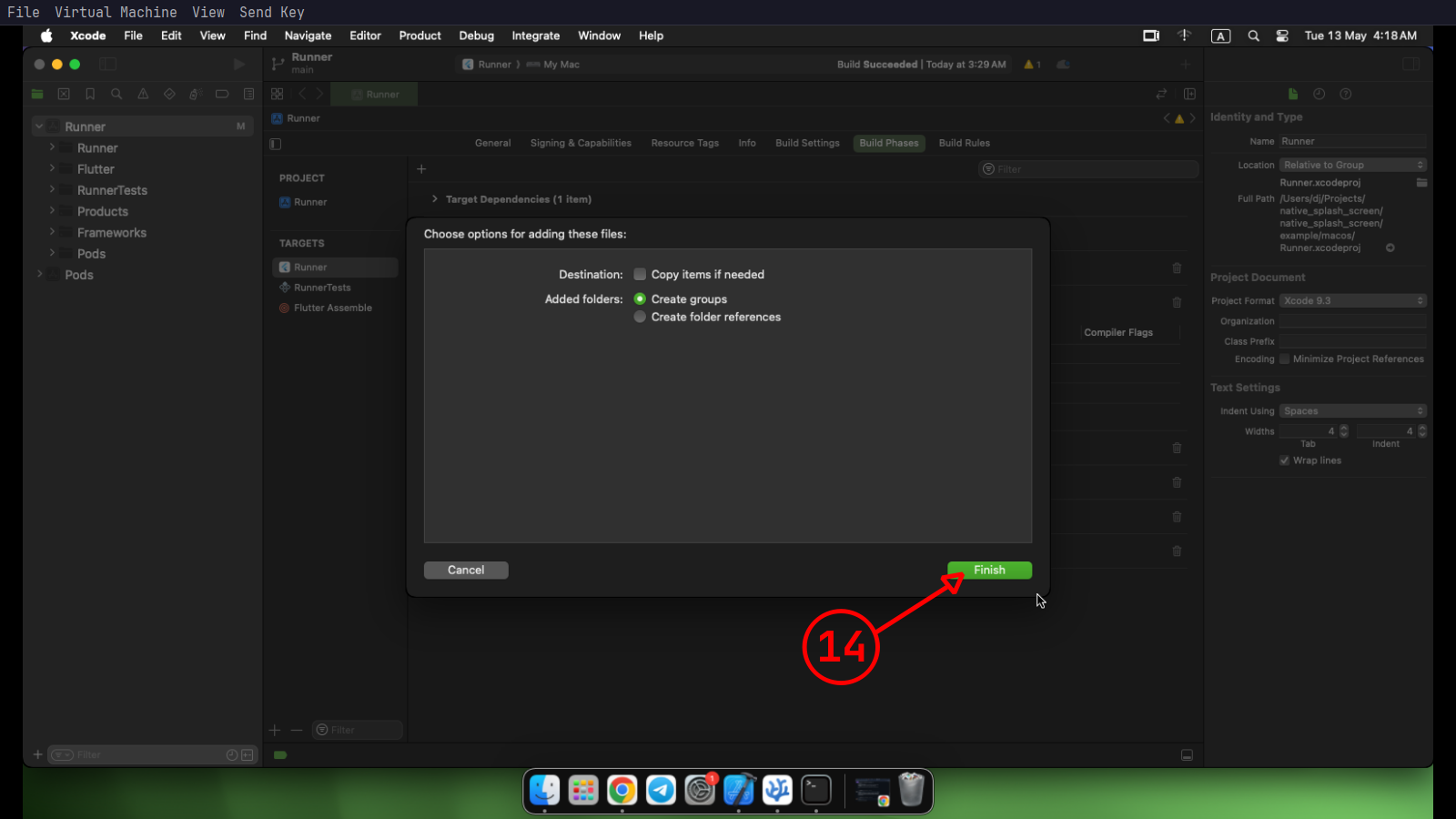
**8** - finally click finish like **`14`** .
## 5. Add the missing code on each platform
### 🐧 Linux
Click to Expand
Apply the following patch to your `linux/runner/main.cc`:
```diff
+#include
#include "my_application.h"
int main(int argc, char** argv) {
// Initialize GTK first
+ gtk_init(&argc, &argv);
// So can safely show the splash screen first.
+ show_splash_screen();
// Then initialize and run the application as normal
g_autoptr(MyApplication) app = my_application_new();
return g_application_run(G_APPLICATION(app), argc, argv);
}
```
### 🪟 Windows
Click to Expand
Apply the following patch to your `windows/runner/main.cpp`:
```diff
+#include
#include "flutter_window.h"
#include "utils.h"
int APIENTRY wWinMain(_In_ HINSTANCE instance, _In_opt_ HINSTANCE prev,
_In_ wchar_t *command_line, _In_ int show_command) {
// Show the splash screen first.
+ ShowSplashScreen();
```
### 🍎 Macos
Click to Expand
Apply the following patch to your `macos/Runner/AppDelegate.swift`:
```diff
import Cocoa
import FlutterMacOS
+import native_splash_screen_macos
@main
class AppDelegate: FlutterAppDelegate {
override func applicationShouldTerminateAfterLastWindowClosed(_ sender: NSApplication) -> Bool {
return true
}
override func applicationSupportsSecureRestorableState(_ app: NSApplication) -> Bool {
return true
}
+
+ override func applicationWillFinishLaunching(_ notification: Notification) {
+ NativeSplashScreen.configurationProvider = NativeSplashScreenConfiguration()
+ NativeSplashScreen.show()
+ }
}
```
## 🚀 Usage
### Run
If everything completes successfully, you can now run and test your app.
If you encounter any issues during generation, please [open an issue](https://github.com/anicine/native_splash_screen/issues).
### Closing the splash screen
So now you need to close the splash screen in your app when you're ready:
```dart
import 'package:flutter/material.dart';
import 'package:native_splash_screen/native_splash_screen.dart' as nss;
void main() {
WidgetsFlutterBinding.ensureInitialized();
runApp(const MyApp());
}
class MyApp extends StatefulWidget {
const MyApp({super.key});
@override
State createState() => _MyAppState();
}
class _MyAppState extends State {
@override
void initState() {
super.initState();
// Close splash screen after the first frame renders
WidgetsBinding.instance.addPostFrameCallback((_) {
nss.close(animation: nss.CloseAnimation.fade);
});
}
@override
Widget build(BuildContext context) {
return MaterialApp(
home: Scaffold(
appBar: AppBar(title: const Text('Native Splash Screen')),
),
);
}
}
```
>💡 Calling `close()` multiple times or when the splash screen is already closed has no effect and is completely safe.
See the [example app](https://github.com/anicine/native_splash_screen/tree/main/native_splash_screen/example) for more details.
## 🍎 macOS Configuration Notes
The package automatically generates assets for both standard (1x) and high-resolution Retina (2x) displays to ensure your splash screen looks sharp on all devices.
#### Quality Recommendation for Retina Displays
For the best visual quality, your source image in `image_path` should have pixel dimensions that are at least **twice** the configured `image_width` and `image_height`.
> **Example**: For an `image_width` of 400 and `image_height` of 200, provide a source image that is at least **800x400 pixels**.
#### How `image_scaling` works on macOS
The scaling logic is designed to prevent quality loss.
- **`image_scaling: false` (Default)**: Prevents a small source image from being upscaled (stretched), which causes blurriness. If the image is smaller than the target dimensions, it will be centered on the splash screen at its original size. Large images will still be cleanly downscaled to fit.
- **`image_scaling: true`**: Forces the image to be resized to exactly match the configured `image_width` and `image_height`, whether it's upscaling or downscaling.
## 🛠️ How It Works
**At compile time (`gen`):**
- Parses your YAML configuration
- Composes and rasterize your image layout
- Generates native C++ an swift source code
- Builds platform-specific static libraries (Linux and Windows)
**At runtime:**
- **Linux**: Uses GTK & Cairo to render the splash screen.
- **Windows**: Uses Win32 GDI for fast native rendering.
- **Macos**: Uses AppKit & Cocoa to render the splash screen.
- You call `close()` from Dart when your app is ready, triggering the animation.
## 📝 Configuration
See [native_splash_screen_cli](https://pub.dev/packages/native_splash_screen_cli) for configuration reference.
## 🎥 Demos
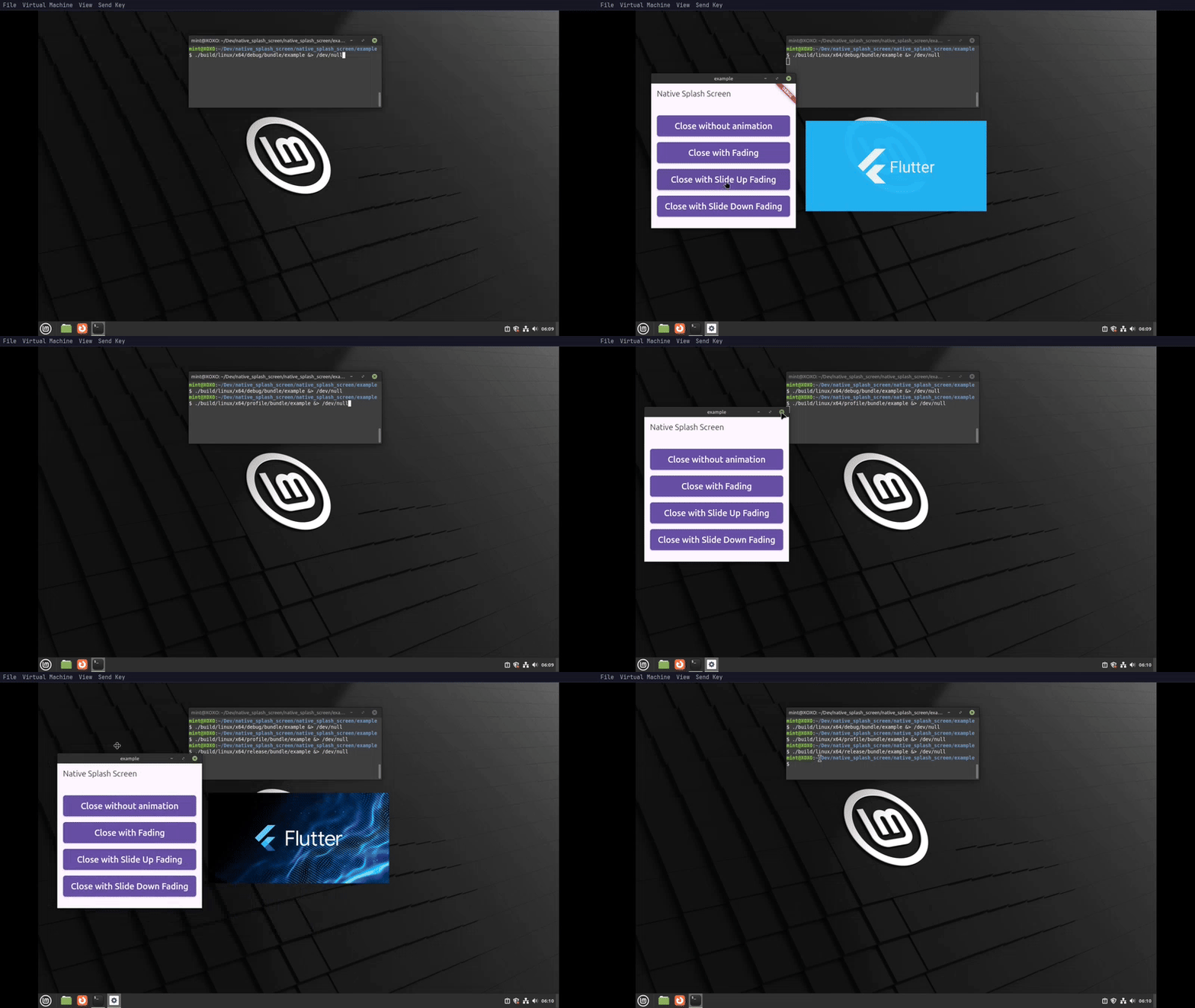
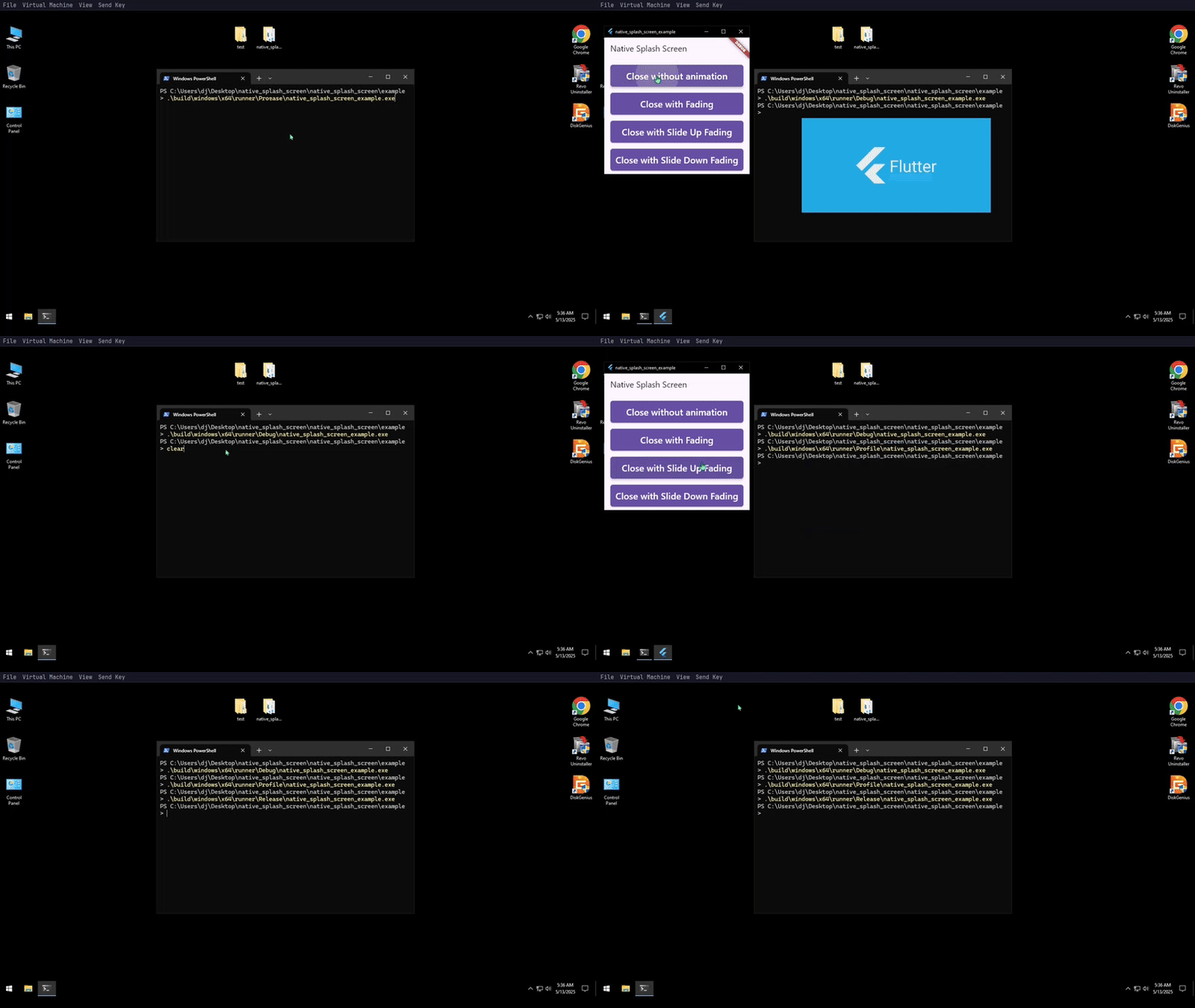
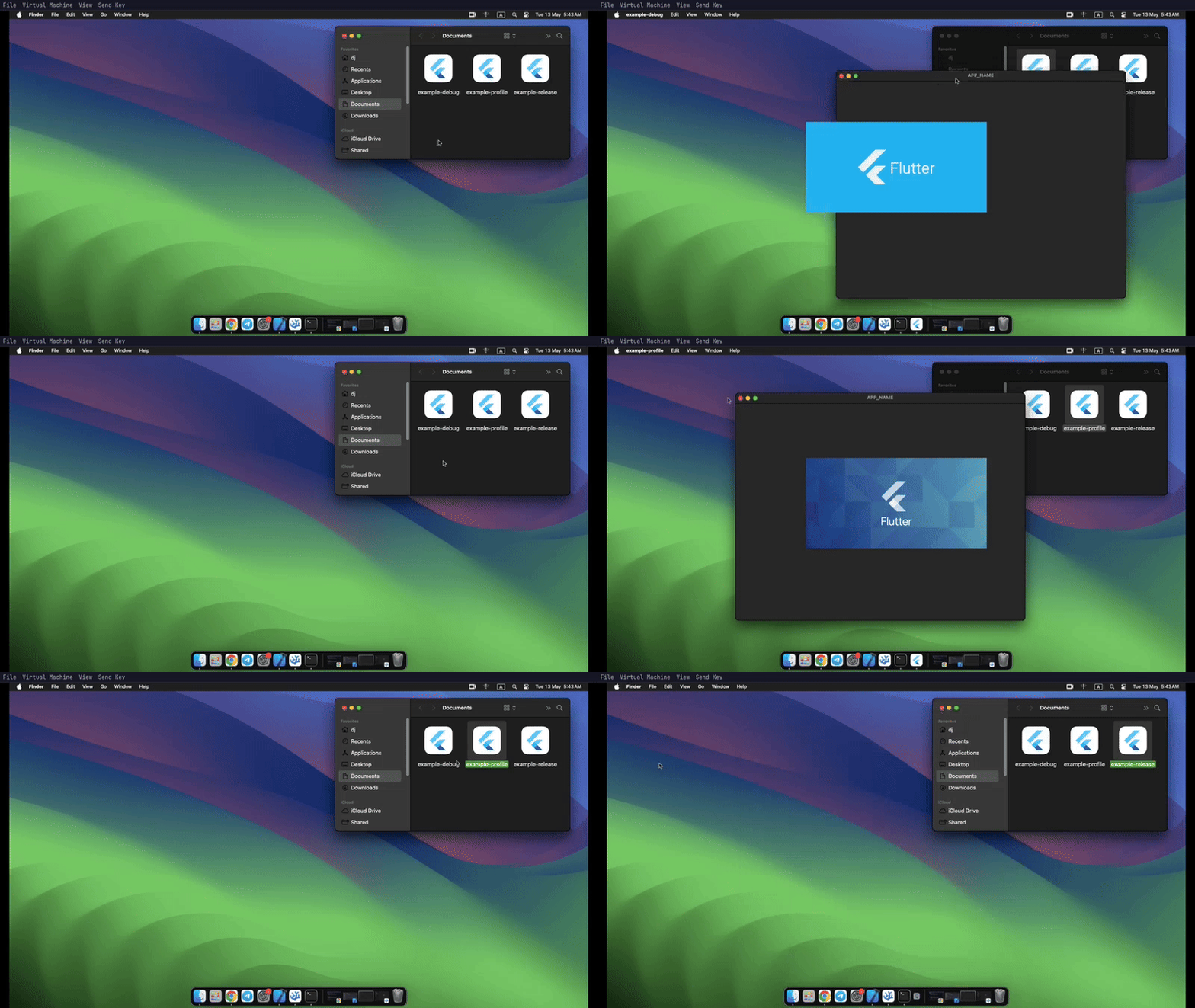
Here are some recorded demos of the splash screen in different environments:
### 🐧 Hyprland (Wayland)
Click to Expand
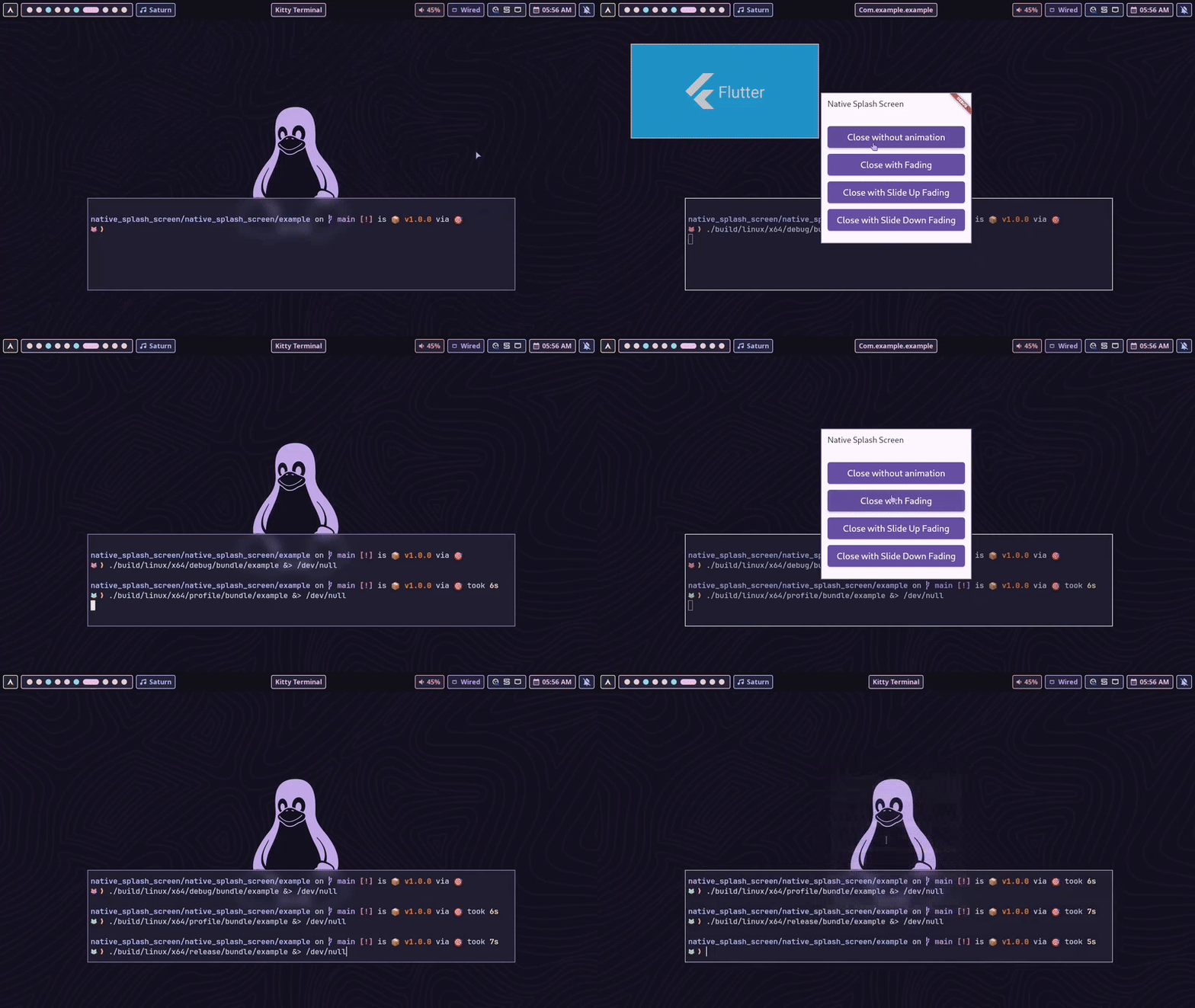
> ⚠️ Note: Most Wayland window managers — especially tiling WMs like Hyprland — are very strict about client-side window movement.
> Because of this, only the **fade** animation is supported reliably. Slide or Move transitions may not behave as expected.
### 🐧 Linux Mint (X11)
Click to Expand
### 🪟 Windows
Click to Expand
### 🍎 Macos
Click to Expand
## 📄 License
```
BSD 3-Clause License
Copyright (c) 2025, Anicine Project
Redistribution and use in source and binary forms, with or without
modification, are permitted provided that the following conditions are met:
1. Redistributions of source code must retain the above copyright notice, this
list of conditions and the following disclaimer.
2. Redistributions in binary form must reproduce the above copyright notice,
this list of conditions and the following disclaimer in the documentation
and/or other materials provided with the distribution.
3. Neither the name of the copyright holder nor the names of its
contributors may be used to endorse or promote products derived from
this software without specific prior written permission.
THIS SOFTWARE IS PROVIDED BY THE COPYRIGHT HOLDERS AND CONTRIBUTORS "AS IS"
AND ANY EXPRESS OR IMPLIED WARRANTIES, INCLUDING, BUT NOT LIMITED TO, THE
IMPLIED WARRANTIES OF MERCHANTABILITY AND FITNESS FOR A PARTICULAR PURPOSE ARE
DISCLAIMED. IN NO EVENT SHALL THE COPYRIGHT HOLDER OR CONTRIBUTORS BE LIABLE
FOR ANY DIRECT, INDIRECT, INCIDENTAL, SPECIAL, EXEMPLARY, OR CONSEQUENTIAL
DAMAGES (INCLUDING, BUT NOT LIMITED TO, PROCUREMENT OF SUBSTITUTE GOODS OR
SERVICES; LOSS OF USE, DATA, OR PROFITS; OR BUSINESS INTERRUPTION) HOWEVER
CAUSED AND ON ANY THEORY OF LIABILITY, WHETHER IN CONTRACT, STRICT LIABILITY,
OR TORT (INCLUDING NEGLIGENCE OR OTHERWISE) ARISING IN ANY WAY OUT OF THE USE
OF THIS SOFTWARE, EVEN IF ADVISED OF THE POSSIBILITY OF SUCH DAMAGE.
```