https://github.com/aniketc068/atick-java
Standalone PDF digital-signature library for the JVM — PAdES/CMS signing (PFX/PEM, deferred eSign/HSM/token), RFC-3161 timestamps, long-term validation, and a green-tick verified appearance Adobe shows as valid. Pure Java, one Maven dependency.
https://github.com/aniketc068/atick-java
digital-signature esign java ltv pades pdf pdf-signature timestamp
Last synced: 18 days ago
JSON representation
Standalone PDF digital-signature library for the JVM — PAdES/CMS signing (PFX/PEM, deferred eSign/HSM/token), RFC-3161 timestamps, long-term validation, and a green-tick verified appearance Adobe shows as valid. Pure Java, one Maven dependency.
- Host: GitHub
- URL: https://github.com/aniketc068/atick-java
- Owner: Aniketc068
- License: agpl-3.0
- Created: 2026-06-12T10:08:14.000Z (22 days ago)
- Default Branch: main
- Last Pushed: 2026-06-12T11:56:19.000Z (22 days ago)
- Last Synced: 2026-06-12T12:07:45.669Z (22 days ago)
- Topics: digital-signature, esign, java, ltv, pades, pdf, pdf-signature, timestamp
- Language: Java
- Homepage: https://atick-java.readthedocs.io/
- Size: 16.7 MB
- Stars: 0
- Watchers: 0
- Forks: 0
- Open Issues: 0
-
Metadata Files:
- Readme: README.md
- Contributing: CONTRIBUTING.md
- License: LICENSE
- Code of conduct: CODE_OF_CONDUCT.md
- Security: SECURITY.md
- Notice: NOTICE
Awesome Lists containing this project
README

# ATick for Java
**Standalone PDF digital-signature library for the JVM — PAdES / CMS signing with zero external services.**
[](https://central.sonatype.com/artifact/io.github.aniketc068/atick)
[](https://www.oracle.com/java/)
[](#pades-levels)
[](#compatibility--one-artifact-everywhere)
[](LICENSE)
[](https://github.com/Aniketc068/ATick-Python)
[](https://github.com/Aniketc068/ATick-DotNet)
[](https://github.com/Aniketc068/ATick-Node)
[](https://github.com/Aniketc068/ATick-PHP)
**Also available in other languages** — the same ATick engine, the same API, native to each ecosystem:
| Language | Install | Source · Docs |
|---|---|---|
| **Python** | `pip install atick` | [ATick-Python](https://github.com/Aniketc068/ATick-Python) · [docs](https://atick.readthedocs.io/) |
| **.NET** | `dotnet add package ATick` | [ATick-DotNet](https://github.com/Aniketc068/ATick-DotNet) · [docs](https://atick-dotnet.readthedocs.io/) |
| **Node.js** | `npm install atick` | [ATick-Node](https://github.com/Aniketc068/ATick-Node) · [docs](https://atick-node.readthedocs.io/) |
| **PHP** | `composer require aniketc068/atick` | [ATick-PHP](https://github.com/Aniketc068/ATick-PHP) · [docs](https://atick-php.readthedocs.io/) |
---
ATick signs PDFs the way Adobe Acrobat and the EU DSS do — **PAdES baseline** signatures with
timestamps and long-term validation. It is **pure Java**: it calls a bundled native engine through
**JNA**, so there is **no JNI build step** on your side and **no external services**. The matching
engine for your OS/arch ships **inside the jar** and is loaded automatically. Add one Maven
dependency and you are done.
```java
import io.github.aniketc068.atick.Atick;
import java.nio.file.*;
byte[] pdf = Files.readAllBytes(Paths.get("doc.pdf"));
byte[] pfx = Files.readAllBytes(Paths.get("my.pfx"));
byte[] signed = Atick.signPfx(pdf, pfx,
"{\"password\":\"••••\",\"cn\":\"Aniket Chaturvedi\",\"reason\":\"Approved\","
+ "\"green_tick\":true,\"page\":1,\"rect\":[300,55,575,175],"
+ "\"pades\":true,\"timestamp\":true,\"ltv\":true}"); // PAdES-B-LT
Files.write(Paths.get("signed.pdf"), signed);
```
---
## The green tick your readers trust
ATick draws a verified-signature appearance with a green tick. When the certificate is valid and
trusted, Adobe Reader / Acrobat shows **“Signed and all signatures are valid.”**
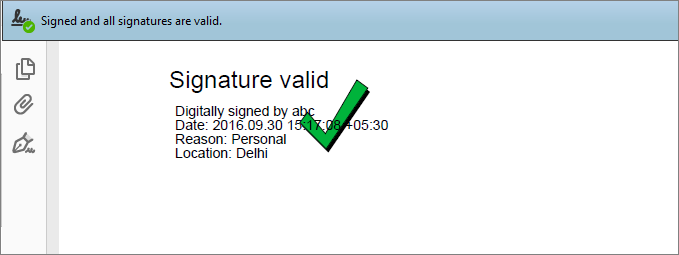
Adobe colours that same mark by the signature's real status — you don't draw these, Adobe does:
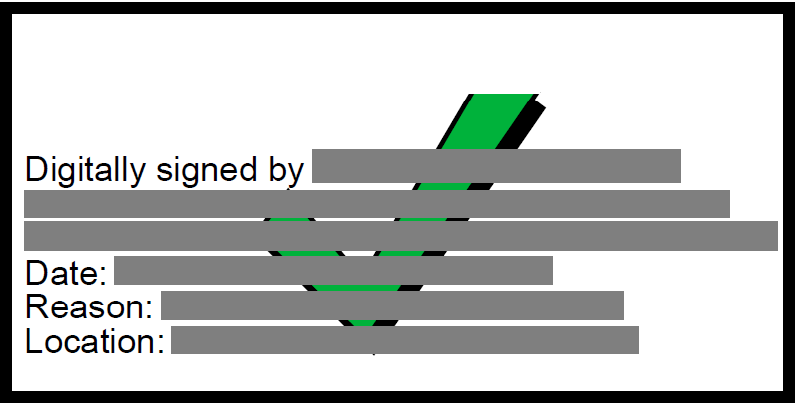
Valid & trusted
green tick
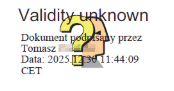
Validity unknown
yellow “?”
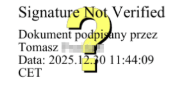
Not verified
“?” not validated
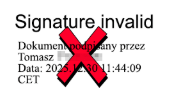
Invalid
red cross
The **green** tick appears only when the signature is valid *and* the certificate chains to a root
Adobe trusts.
---
## Why ATick
| | ATick for Java |
|---|---|
| **Zero external services** | the crypto, PKCS#12/PEM, image decode, timestamp & LTV are all built into the engine — nothing else to call |
| **Pure Java** | calls the engine through JNA — no JNI, no C compiler, no native build on your side |
| **Full PAdES** | B-B, B-T, B-LT, B-LTA — recognised by Adobe Acrobat as *“PAdES Signature Level”* |
| **Deferred / remote keys** | two-step `prepare` → external CMS → `embed`, so you can sign with a USB token / HSM / smart-card / Windows store via your own JCA provider |
| **One artifact, every platform** | one cross-platform dependency — Windows (64/32-bit), Linux, macOS — just like the Python package |
| **Clear errors** | every failure is a normal Java `Atick.AtickException` you can catch |
---
## Features (A → Z)
| Feature | How |
|---|---|
| **Sign with a `.pfx` / `.p12` / `.pem`** | `Atick.signPfx(pdf, pfx, options)` — PKCS#12 or PEM (key + certs), auto-detected |
| **Date / time format** | `"date":"21-Jun-2026 02:30 PM"` fixed · `"date":""` none (the appearance shows the signing time) |
| **PAdES levels** B-B / B-T / B-LT / B-LTA | `"pades":true` + `"timestamp":true` + `"ltv":true` + `"lta":true` |
| **Hash algorithm** | `"hash_algo":"sha256" \| "sha384" \| "sha512"` (signature = RSA PKCS#1 v1.5) |
| **Timestamp authority** | a timestamp service is already built in — or use your own with `"tsa_url":"…"` (and `"tsa_auth":["user","pass"]` if it needs a login) |
| **Long-term validation (LTV)** | `"ltv":true` embeds the certificate chain and its revocation (CRL/OCSP) so the signature keeps verifying for years |
| **Multi-page / custom coordinates** | `"placements":[[page,[x1,y1,x2,y2]], …]` |
| **Signature layout** | `"mode":"single"` (one signature, on one or many pages) · `"mode":"shared"` (several fields all showing the **same** signature) |
| **Multi-signatory** | sign an already-signed PDF again (each person signs in turn). Every signature is its own revision — Adobe shows *Rev 1, Rev 2, …* — and all stay valid. Use a different `"field_name"` per signer |
| **Certification (DocMDP)** | `"certify":1` (no changes) · `2` (form filling) · `3` (form filling + annotations) |
| **Field locking (FieldMDP)** | `"lock_fields":["*"]` (all) or `["FieldA", …]` |
| **Pre-sign checks** | `"verify_expiry":true`, `"verify_crl":true`, `"verify_ocsp":true` (or `"verify":true` for all) — signing is refused if a check fails |
| **Document metadata** | `Atick.setMetadata(pdf, options)` — title / author / subject / keywords / application / created / modified |
| **Password protection** | `"encrypt_password":"…"` (+ `"owner_password":"…"`) for the output; `"open_password":"…"` for an encrypted input; `Atick.decrypt(pdf, pw)` |
| **Appearance** | options `cn, org, ou, location, reason, text, date, dn, body, heading, image` — auto-fit text, transparent logo |
| **The mark** | the `?` (Adobe greens it), an always-green tick, or nothing — see [The mark](#the-mark) |
| **CN on the left** (Adobe-style) | `"image":"cn"` — the signer name as text on the left instead of a logo |
| **Distinguished name** | `"dn":"CN=…, O=…, C=IN"` — shown under the "Signed by:" line |
| **Custom-text-only appearance** | `"body":"*APPROVED*\nby *Aniket*"` — only your text; `\n` = line, `*x*` = bold |
| **Invisible signature** | `"placements":[]` — valid signature, nothing drawn |
| **Sign an already-signed PDF** | sign again (incremental) — existing signatures stay valid; use a fresh `"field_name"` |
| **Container only** | `Atick.prepareFields(pdf, options)` — appearance + empty field, signed later |
| **Document timestamp** | `"lta":true` adds it while signing; `Atick.addDocTimestamp(pdf, options)` adds one to an **already-signed** PDF afterwards (PAdES-B-LTA) |
| **Fast signing** | revocation cache (ON by default): repeated signing with the same cert reuses CRL/OCSP — `Atick.setFastSigning(false)` to disable |
| **Deferred / eSign (2-step)** | `Atick.prepare(pdf, options)` → external CMS over the bytes-to-sign → `Atick.embed(prepared, cms)` |
| **Detached CMS** | `Atick.cmsPfx(data, pfx, options)` — a detached PKCS#7/CMS over `data` |
| **Low-level field API** | `prepare`, `prepareFields`, `signField`, `embed` for template / remote-key flows |
---
## Install (Maven)
```xml
io.github.aniketc068
atick
1.0.6
```
Gradle:
```groovy
implementation 'io.github.aniketc068:atick:1.0.6'
```
That is the only dependency — JNA and the native engine come with it. (Deferred signing with a USB
token / HSM / Windows store uses your own JCA provider for the key; everything else is built in.)
---
## Compatibility — one artifact everywhere
- **Java 8 → latest** (Java 8 bytecode — runs on 8, 11, 17, 21, …).
- **32-bit AND 64-bit** JVMs (JNA sizes pointers / `size_t` per the running JVM).
- **Every OS/arch** — the jar bundles a native engine per platform and JNA loads the right one:
| Platform | Bundled |
|---|---|
| Windows 64-bit | `win32-x86-64` |
| Windows 32-bit | `win32-x86` |
| Linux x86-64 | `linux-x86-64` (CI) |
| Linux ARM64 | `linux-aarch64` (CI) |
| macOS Intel | `darwin-x86-64` (CI) |
| macOS Apple Silicon | `darwin-aarch64` (CI) |
So `io.github.aniketc068:atick` is one cross-platform dependency — exactly like `pip install atick`.
Each platform's engine is built by CI, the same way the Python wheels are built per platform.
---
## The API
```java
Atick.signPfx(pdf, pfx, optionsJson) // sign with a .pfx / .p12 / .pem (auto-detected)
Atick.prepare(pdf, optionsJson) // deferred / eSign: returns { prepared, bytesToSign }
Atick.cmsPfx(data, pfx, optionsJson) // detached CMS over `data`
Atick.embed(prepared, cms) // embed a detached CMS into a prepared PDF
Atick.prepareFields(pdf, optionsJson) // make an empty signature field (template)
Atick.signField(pdf, pfx, optionsJson) // sign an existing empty field
Atick.setMetadata(pdf, optionsJson) // set Title / Author / Subject / Keywords / …
Atick.addDocTimestamp(pdf, optionsJson) // add an archive DocTimeStamp (PAdES-B-LTA)
Atick.setFastSigning(true | false) // revocation-cache toggle
Atick.decrypt(pdf, password) // decrypt a password-protected PDF
Atick.version() // engine version
```
All options are passed as a JSON string. Any failure throws `Atick.AtickException`.
### Options (JSON)
`cn, org, ou, location, reason, text, date, dn, body, heading, show_mark, green_tick, always_check,
mark_color (hex / name / [r,g,b]), mark_gradient, mark_scale, text_color, bg_color, border,
font_size, width, height, page, rect, placements ([[page,[x1,y1,x2,y2]], …]), mode (single/shared),
field_name, pades, hash_algo (sha256/384/512), timestamp, tsa_url, tsa_auth, ltv, lta, certify,
lock_fields, verify, verify_expiry, verify_crl, verify_ocsp, open_password, encrypt_password,
owner_password, contents_size`.
---
## The mark
The little icon in the appearance — what Adobe shows for the signature's validity:
```java
"{… ,\"green_tick\":true}" // the "?" mark — Adobe paints it GREEN for a valid+trusted cert, RED if invalid
"{… ,\"always_check\":true}" // our green-tick graphic as the base — Adobe still reds it if the signature is bad
"{… ,\"green_tick\":false}" // no mark at all — a plain, basic signature
```
Colour the mark with any colour: `"mark_color":"#E53935"`, `"blue"`, `[255,140,0]` — or a gradient
`"mark_gradient":["red","orange","yellow"]`. The mark is always centred in the appearance.
---
## Custom appearance
```java
"{\"cn\":\"Aniket Chaturvedi\",\"image\":\"cn\"}" // CN as text on the LEFT (Adobe-style)
"{\"cn\":\"Aniket\",\"dn\":\"CN=Aniket, O=Personal, C=IN\"}" // DN under the "Signed by:" line
"{\"body\":\"*APPROVED*\\nReviewed by: *Aniket*\\nLegally *binding*.\"}" // ONLY this text; \n = line, *x* = bold
"{\"cn\":\"…\",\"image\":\"none\"}" // no logo
```
Long names wrap onto more lines instead of shrinking the font, so the appearance never overflows.
---
## Sign an already-signed PDF
```java
byte[] resigned = Atick.signPfx(alreadySignedPdf, pfx,
"{\"password\":\"••••\",\"cn\":\"Second Signer\",\"reason\":\"Counter-signed\","
+ "\"field_name\":\"Signature2\",\"page\":1,\"rect\":[40,640,260,750],\"pades\":true}");
```
ATick signs as an **incremental update**, so existing signatures keep their byte ranges and stay
valid. Use a fresh `field_name` per signer so fields never collide.
---
## Deferred signing & Indian eSign (two-step)
When the private key lives elsewhere (a USB token / HSM / smart-card via your **JCA provider**, or an
eSign ESP), split signing into two steps:
```java
// 1) prepare (no key needed): appearance + the exact bytes to sign
byte[][] pr = Atick.prepare(pdf,
"{\"cn\":\"DS TEST\",\"reason\":\"eSign\",\"placements\":[[1,[300,55,575,175]]],\"contents_size\":16384}");
byte[] prepared = pr[0], bytesToSign = pr[1];
// 2) your signer (token / HSM / eSign ESP) makes a DETACHED CMS over bytesToSign.
// The eSign InputHash is just the SHA-256 of bytesToSign:
byte[] digest = java.security.MessageDigest.getInstance("SHA-256").digest(bytesToSign);
// ... sign `digest` / `bytesToSign` with your provider, get back a detached CMS ...
// 3) embed
byte[] signed = Atick.embed(prepared, cms);
```
`pkcs7Pdf` / `pkcs7complete`-style ESP replies already carry the chain + revocation + timestamp, so
the embedded signature is LTV-complete. See `examples/DeferredEsign.java`.
---
## PAdES levels
```java
Atick.signPfx(pdf, pfx, "{… ,\"pades\":true}") // B-B
Atick.signPfx(pdf, pfx, "{… ,\"pades\":true,\"timestamp\":true}") // B-T
Atick.signPfx(pdf, pfx, "{… ,\"pades\":true,\"timestamp\":true,\"ltv\":true}") // B-LT
Atick.signPfx(pdf, pfx, "{… ,\"pades\":true,\"timestamp\":true,\"lta\":true}") // B-LTA
```
B-LT/B-LTA embed the complete validation material (chain + CRL + OCSP + VRI + `/Extensions /ESIC`) so
Adobe Acrobat shows **“PAdES Signature Level: B-LT”** in the advanced signature properties.
---
## Fast signing
ON by default. With LTV on, the first signature fetches the certificate's CRL/OCSP; ATick caches it
in memory, so every later signature with the **same certificate** reuses it instead of re-fetching —
a big speed-up for batch / multi-signature runs. Timestamps are never cached (each must be unique).
```java
Atick.setFastSigning(false); // always fetch fresh
```
---
## Examples — run via Maven (just the dependency, no native build)
`examples/` is a small Maven project that depends only on `io.github.aniketc068:atick` — exactly how
a user consumes it. One class per feature (mirroring the Python examples). Run any:
```bash
cd examples
mvn -q compile exec:java -Dexec.mainClass=SignPfx
```
or from the repo root with the helper:
```bash
./run.sh SignPfx # Linux / macOS / Git Bash
run.bat SignPfx # Windows cmd
```
Classes: `SignPfx` · `PadesLevels` (B-B/B-T/B-LT/B-LTA) · `Appearance` · `MarkColor` ·
`HashAlgorithms` · `Invisible` · `TickVariations` · `DeferredEsign` (2-step eSign) · `CertifyLock` ·
`MultiPlacement` · `Encrypted` · `MultiRevision` · `DateFormats` · `MakeContainer` · `FastSigning` ·
`DocumentTimestamp` · `Metadata` · `FieldApi` · `Pem` · `Verify` · `SignAlreadySigned`. Each reads
from `examples/samples/` and writes its signed PDF into `examples/signed/`.
---
## Documentation
Full documentation lives in [`docs/`](docs/) (Sphinx + Markdown) — installation, signing, PAdES,
appearance, certification, encryption, deferred/eSign and the complete API reference. Build it with
`pip install -r docs/requirements.txt && sphinx-build -b html docs docs/_build`.
---
## Errors
Everything throws `Atick.AtickException` (a normal Java runtime exception) you can catch:
```java
try {
Atick.signPfx(pdf, pfx, "{\"password\":\"wrong\", …}");
} catch (Atick.AtickException e) {
System.out.println("signing failed: " + e.getMessage());
}
```
---
## License
ATick is **dual-licensed** — free for personal & open use, paid if you sell:
- **Free under [GNU AGPL-3.0](LICENSE)** — personal projects, learning, internal use, and
open-source projects (released publicly under AGPL-3.0).
- **Commercial license (paid)** — if you **build a product with ATick and sell it**, or use it in a
**closed-source / commercial** product, you must buy a commercial license first. Contact
**aniketc.pro@gmail.com** for a quote.
See [LICENSING.md](LICENSING.md) for details. © 2026 Aniket Chaturvedi.