https://github.com/aniketc068/atick-python
Standalone Python library for PDF digital signatures — PAdES/CMS, USB tokens, Windows store, Indian eSign, timestamps, LTV and a green-tick appearance Adobe shows as valid. Zero dependencies.
https://github.com/aniketc068/atick-python
adobe cades cryptography digital-signature esign ltv pades pdf pdf-signature pkcs11 python sign-pdf timestamp
Last synced: 8 days ago
JSON representation
Standalone Python library for PDF digital signatures — PAdES/CMS, USB tokens, Windows store, Indian eSign, timestamps, LTV and a green-tick appearance Adobe shows as valid. Zero dependencies.
- Host: GitHub
- URL: https://github.com/aniketc068/atick-python
- Owner: Aniketc068
- License: agpl-3.0
- Created: 2026-06-11T08:27:42.000Z (13 days ago)
- Default Branch: main
- Last Pushed: 2026-06-15T07:40:55.000Z (9 days ago)
- Last Synced: 2026-06-15T08:24:04.543Z (9 days ago)
- Topics: adobe, cades, cryptography, digital-signature, esign, ltv, pades, pdf, pdf-signature, pkcs11, python, sign-pdf, timestamp
- Language: Python
- Homepage: https://atick.readthedocs.io/
- Size: 8.99 MB
- Stars: 0
- Watchers: 0
- Forks: 0
- Open Issues: 0
-
Metadata Files:
- Readme: README.md
- Contributing: CONTRIBUTING.md
- License: LICENSE
- Code of conduct: CODE_OF_CONDUCT.md
- Security: SECURITY.md
- Notice: NOTICE
Awesome Lists containing this project
README

# ATick for Python
**Standalone PDF digital-signature library for Python — PAdES / CMS signing with zero external dependencies.**
[](https://pypi.org/project/atick/)
[](https://pepy.tech/project/atick)
[](https://www.python.org/)
[](#pades-levels)
[](#why-atick)
[](LICENSE)
[](https://github.com/Aniketc068/ATick-Java)
[](https://github.com/Aniketc068/ATick-DotNet)
[](https://github.com/Aniketc068/ATick-Node)
[](https://github.com/Aniketc068/ATick-PHP)
**Also available in other languages** — the same ATick engine, the same API, native to each ecosystem:
| Language | Install | Source · Docs |
|---|---|---|
| **Java** | `io.github.aniketc068:atick` (Maven) | [ATick-Java](https://github.com/Aniketc068/ATick-Java) · [docs](https://atick-java.readthedocs.io/) |
| **.NET** | `dotnet add package ATick` | [ATick-DotNet](https://github.com/Aniketc068/ATick-DotNet) · [docs](https://atick-dotnet.readthedocs.io/) |
| **Node.js** | `npm install atick` | [ATick-Node](https://github.com/Aniketc068/ATick-Node) · [docs](https://atick-node.readthedocs.io/) |
| **PHP** | `composer require aniketc068/atick` | [ATick-PHP](https://github.com/Aniketc068/ATick-PHP) · [docs](https://atick-php.readthedocs.io/) |
---
ATick signs PDFs the way Adobe Acrobat and the EU DSS do — **PAdES baseline** signatures with
timestamps and long-term validation — but everything ships **inside the one package**, so there are
**no dependencies to install** at all. `pip install atick` and you are done. There's a Python API
*and* a full command-line tool.
```python
import atick
signed = atick.sign_pfx(
open("doc.pdf", "rb").read(),
pfx=open("my.pfx", "rb").read(), password="••••",
style=atick.Style(cn="Aniket Chaturvedi", reason="Approved"),
placements=[(1, (300, 55, 575, 175))],
pades=True, timestamp=True, ltv=True, # PAdES-B-LT
)
open("signed.pdf", "wb").write(signed)
```
---
## The green tick your readers trust
ATick draws a verified-signature appearance with a green tick. When the certificate is valid and
trusted, Adobe Reader / Acrobat shows **“Signed and all signatures are valid.”**
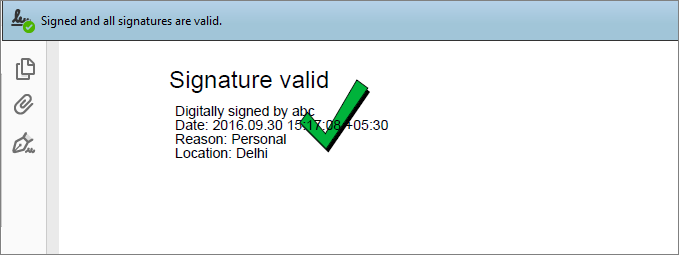
Adobe colours that same mark by the signature's real status — you don't draw these, Adobe does:
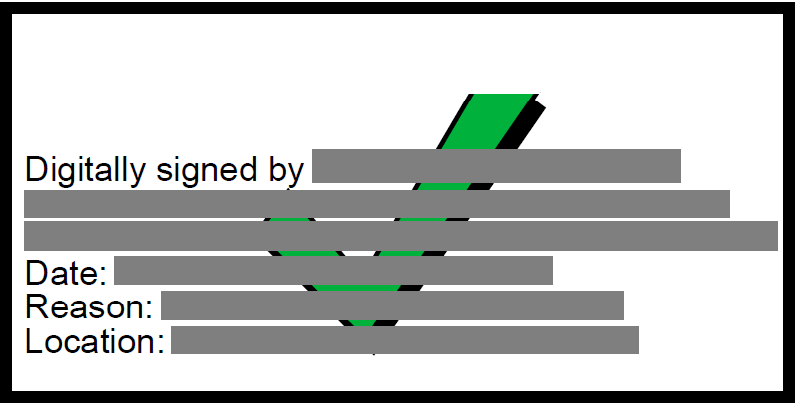
Valid & trusted
green tick
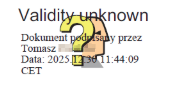
Validity unknown
yellow “?”
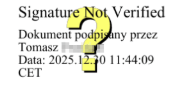
Not verified
“?” not validated
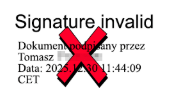
Invalid
red cross
The **green** tick appears only when the signature is valid *and* the certificate chains to a root
Adobe trusts.
---
## Why ATick
| | ATick |
|---|---|
| **Zero dependencies** | the crypto, PFX/PKCS#12, PKCS#11, image decode, timestamp & LTV are all built in — nothing else to install |
| **Four signing back-ends** | `.pfx`/`.p12` **or `.pem`** file · USB token / smart-card / HSM (PKCS#11) · Windows certificate store (its certificate picker) |
| **Full PAdES** | B-B, B-T, B-LT, B-LTA — recognised by Adobe Acrobat as *“PAdES Signature Level”* |
| **Indian eSign** | the full CCA eSign flow (rawrsa / PKCS7 / PKCS7pdf / PKCS7complete) |
| **CLI + API** | every feature from Python *or* the terminal (`atick …`) |
| **Clear errors** | every failure is a normal Python exception (`atick.AtickError`) you can catch |
---
## Features (A → Z)
| Feature | How |
|---|---|
| **Sign with a `.pfx` / `.p12` / `.pem`** | `atick.sign_pfx(pdf, pfx=, password=, …)` — PKCS#12 or PEM (key + certs), auto-detected |
| **Date / time format** | `Style(date_format="%Y-%m-%d %H:%M:%S")` (any strftime) · `date="…"` fixed · `date=""` none |
| **Sign with a USB token / HSM** (PKCS#11) | `atick.sign_pkcs11(pdf, dll=, pin=, serial=, …)` · list with `atick.pkcs11_list(dll, pin)` |
| **Sign with the Windows store** (certificate picker) | `atick.sign_winstore(pdf, thumbprint=None, …)` |
| **PAdES levels** B-B / B-T / B-LT / B-LTA | `pades=True` + `timestamp=True` + `ltv=True` + `lta=True` |
| **Hash algorithm** | `hash_algo="sha256" \| "sha384" \| "sha512"` (signature = RSA PKCS#1 v1.5) |
| **Timestamp authority** | a timestamp service is already built in — or use your own with `tsa_url=` (and `tsa_auth=(user, pass)` if it needs a login) |
| **Long-term validation (LTV)** | `ltv=True` embeds the certificate chain and its revocation (CRL/OCSP) so the signature keeps verifying for years |
| **Multi-page / custom coordinates** | `placements=[(page, (x1,y1,x2,y2)), …]` |
| **Signature layout** | `mode="single"` (one signature, on one or many pages) · `mode="shared"` (several fields all showing the **same** signature). For several **independent** signatures (different signers/values), sign the document again — see Multi-signatory — or pre-create the fields with `atick.prepare_fields(...)` |
| **Multi-signatory** | sign an already-signed PDF again (each person signs in turn). Every signature is its own revision — Adobe shows *Rev 1, Rev 2, …* — and all of them stay valid. Use a different `field_name` per signer (auto-handled by default) |
| **Certification (DocMDP)** | `certify=atick.Certify.NO_CHANGES \| FORM_FILLING \| FORM_FILLING_ANNOTATIONS` |
| **Field locking (FieldMDP)** | `lock_fields=["*"]` (all) or `["FieldA", …]` |
| **Pre-sign checks** | `verify=True` (not expired / CRL / OCSP) and `trusted_roots=[sha1, …]` (chain to a pinned root — built from AIA) |
| **Document metadata** | `atick.set_metadata(pdf, title=, author=, subject=, keywords=, application=, created=, modified=)` |
| **Password protection** | `encrypt_password=` (+ `owner_password=`) for the output; `open_password=` for an encrypted input; `atick.decrypt(pdf, pw)` |
| **Appearance** | `atick.Style(cn, org, ou, location, reason, text, date, image, …)` — auto-fit text, transparent logo |
| **The mark** | the `?` (Adobe greens it), an always-green tick, or nothing — see [The mark](#the-mark) |
| **CN on the left** (Adobe-style) | `Style(image="cn")` — the signer name as text on the left instead of a logo |
| **Distinguished name** | `Style(dn="CN=…, O=…, C=IN")` — shown under the "Signed by:" line |
| **Custom-text-only appearance** | `Style(body="*APPROVED*\nby *Aniket*")` — only your text; `\n` = line, `*x*` = bold |
| **Auto-wrap long names** | long names wrap to more lines instead of shrinking the font |
| **Invisible signature** | `placements=[]` — valid signature, nothing drawn |
| **Sign an already-signed PDF** | sign again (incremental) — existing signatures stay valid; field name auto-uniquified (`Atick_1`, `Atick_2`, …) |
| **Container only** | `prepare_deferred_multi(...)` — appearance + empty container, signed later |
| **Document timestamp** | `lta=True` adds it while signing; `atick.add_doctimestamp(pdf)` adds one to an **already-signed** PDF afterwards (PAdES-B-LTA) |
| **Fast signing** | revocation cache (ON by default): repeated signing with the same cert reuses CRL/OCSP — `atick.set_fast_signing(False)` to disable |
| **Indian eSign** | two-step CCA flow — needs the separate **`managex-xml-sdk`** package (`pip install managex-xml-sdk`) to sign the request XML; then `embed` (PKCS7\*) / `embed_rawrsa` (rawrsa) the ESP reply |
| **Detached CMS / raw signature** | `atick.cms_pfx(data, pfx, pw)` · `atick.sign_hash_pfx(data, pfx, pw)` |
| **Low-level field API** | `prepare`, `prepare_fields`, `sign_field`, `embed` for template / remote-key flows |
---
## Install
```bash
pip install atick
```
No other packages are required. (Windows-store signing is Windows-only; everything else is cross-platform.)
---
## The three signing methods
```python
atick.sign_pfx(pdf, pfx=…, password=…, style=…, placements=…) # .pfx / .p12 / .pem (auto-detected)
atick.sign_pkcs11(pdf, dll=…, pin=…, serial=…, style=…, placements=…) # USB token / smart-card / HSM
atick.sign_winstore(pdf, style=…, placements=…, thumbprint=None) # Windows store (certificate picker)
```
> A **PEM** file (unencrypted PKCS#8/PKCS#1 key + one or more `CERTIFICATE` blocks) works in the same
> `sign_pfx` call — pass its bytes as `pfx=` (and `password=""`); the format is auto-detected.
All three accept the same options: `pades=`, `hash_algo=`, `timestamp=`, `tsa_url=`, `tsa_auth=`,
`ltv=`, `lta=`, `certify=`, `lock_fields=`, `verify=`, `trusted_roots=`, plus (on `sign_pfx`)
`open_password=`, `encrypt_password=`, `owner_password=`.
---
## The mark
The little icon in the appearance — what Adobe shows for the signature's validity:
```python
atick.Style(cn="…", green_tick=True) # the "?" mark — Adobe paints it GREEN for a valid+trusted cert, RED if invalid
atick.Style(cn="…", always_check=True) # our green-tick graphic as the base — Adobe still reds it if the signature is bad
atick.Style(cn="…", green_tick=False) # no mark at all — a plain, basic signature
```
Colour the mark with any Python colour: `mark_color="#E53935"`, `"blue"`, `(255, 140, 0)` — or a gradient
`mark_gradient=["red", "orange", "yellow"]`. The mark is always centred in the appearance.
---
## Custom appearance
```python
atick.Style(cn="Aniket Chaturvedi", image="cn") # CN as text on the LEFT (Adobe-style)
atick.Style(cn="Aniket Chaturvedi", dn="CN=Aniket, O=Personal, C=IN") # DN under the "Signed by:" line
atick.Style(body="*APPROVED*\nReviewed by: *Aniket*\nLegally *binding*.") # ONLY this text; \n = line, *x* = bold
atick.Style(cn="…", image="logo.png") # your own logo (default = ATick logo)
atick.Style(cn="…", image=False) # no logo
```
Long names wrap onto more lines instead of shrinking the font, so the appearance never overflows.
---
## Fast signing
ON by default. With LTV on, the first signature fetches the certificate's CRL/OCSP; ATick caches it
in-memory, so every later signature with the **same certificate** reuses it instead of re-fetching —
a big speed-up for batch / multi-signature runs (≈ 6× in practice). Timestamps are never cached
(each must be unique).
```python
atick.set_fast_signing(False) # always fetch fresh (also clears the cache)
atick.clear_revocation_cache() # forget cached revocation (e.g. after changing certificate)
```
---
## Sign an already-signed PDF
```python
signed = atick.sign_pfx(already_signed_pdf, pfx=…, password=…, style=…, placements=…)
```
ATick signs as an **incremental update**, so existing signatures keep their byte ranges and stay
valid. The field name is auto-uniquified (`Atick_1`, `Atick_2`, …), so re-signing never collides;
pass `field_name="…"` for a specific name.
---
## Indian eSign (every CCA API version)
> **eSign needs one extra package.** Signing the eSign **request XML** requires the separate
> **`managex-xml-sdk`** package — `pip install managex-xml-sdk`. It is only needed for eSign; every
> other ATick feature works with no extra installs.
A two-step flow — sign the eSign **request** XML with `managex-xml-sdk`, then embed the ESP's
reply with ATick:
```python
prepared, ctx = atick.prepare_deferred_multi(pdf, style, placements, sub_filter="adbe.pkcs7.detached")
input_hash_hex = bytes(ctx["digest"]).hex() # the InputHash for the eSign request XML
# ... build the request, sign it with managex-xml-sdk, POST to the ESP, read EsignResp ...
signed = atick.embed(prepared, doc_signature_cms) # pkcs7 / pkcs7Pdf / pkcs7complete
# rawrsa: atick.embed_rawrsa(prepared, raw_sig, user_cert)
```
`pkcs7Pdf` / `pkcs7complete` responses already carry the chain + revocation + timestamp, so the
embedded signature is LTV-complete. See [`examples/esign/`](examples/esign/).
---
## PAdES levels
```python
atick.sign_pfx(pdf, pfx=…, password=…, style=…, placements=…, pades=True) # B-B
atick.sign_pfx(pdf, …, pades=True, timestamp=True) # B-T
atick.sign_pfx(pdf, …, pades=True, timestamp=True, ltv=True) # B-LT
atick.sign_pfx(pdf, …, pades=True, timestamp=True, lta=True) # B-LTA
```
B-LT/B-LTA embed the complete validation material (chain + CRL + OCSP + VRI + `/Extensions /ESIC`) so
Adobe Acrobat shows **“PAdES Signature Level: B-LT”** in the advanced signature properties.
---
## Command line
Every feature is available from the terminal too:
```bash
atick sign in.pdf out.pdf --pfx my.pfx --password ••• \
--cn "Aniket Chaturvedi" --reason Approved \
--timestamp --ltv --always-check --cn-left --dn "CN=Aniket, O=Personal, C=IN" \
--page 1 --rect 300,55,575,175
atick sign in.pdf out.pdf --pfx my.pfx --password ••• --body "*APPROVED*\nby *Aniket*" # custom text only
atick sign-token in.pdf out.pdf --dll lib.dll --pin ••• --serial HEX --ltv
atick sign-winstore in.pdf out.pdf # opens the Windows certificate picker
atick list-token --dll lib.dll --pin •••
atick esign-prepare in.pdf prepared.pdf --certify form-annots # eSign step 1 (prints the InputHash)
atick esign-embed prepared.pdf response.xml out.pdf # eSign step 2 (embeds the ESP reply)
atick metadata in.pdf out.pdf --title "Agreement" --author "Aniket"
atick decrypt in.pdf out.pdf --password •••
atick version
```
Run `atick -h` for the complete option list (or `python -m atick …`). Every failure is a
clean Python `atick.AtickError` (or a `TypeError` for a wrong argument) that you can catch.
---
## Examples
Self-contained, runnable scripts live in [`examples/`](examples/) (each writes to `examples/signed/`):
`01_sign_pfx` · `02_pades_levels` · `03_appearance` · `04_certify_and_lock` · `05_multi_placement` ·
`06_token_pkcs11` · `07_windows_store` · `08_deferred_esign` · `09_verify_certificate` · `10_encrypted` ·
`11_mark_color` · `12_metadata` · `13_hash_algorithms` · `14_field_api` · `16_invisible` ·
`17_multi_revision` (rev1 → rev2 → rev3) · `18_date_and_pem` (date formats + PEM signing) ·
`always_green_tick` · `green_tick` · `without_green_tick` · `make_container` · `sign_already_signed` ·
`document_timestamp` · `fast_signing` · `esign/` (eSign 2-step: `esign_prepare` + `esign_embed`).
Every example uses **only ATick** (the `esign/` flow also uses your `managex-xml-sdk` to sign the
request XML). Run any with `python examples/.py`.
---
## Documentation
Full documentation lives in [`docs/`](docs/) (Sphinx + Markdown) — installation, signing, PAdES,
appearance, certification, eSign, the CLI and the complete API reference. Build it with
`pip install -r docs/requirements.txt && sphinx-build -b html docs docs/_build`. Publishing the
package and hosting the docs (Read the Docs, GitHub Pages, …) is covered in
[`PUBLISHING.md`](PUBLISHING.md).
---
## Errors
Everything raises `atick.AtickError` (a normal Python exception) you can catch:
```python
try:
atick.sign_pfx(pdf, pfx=…, password="wrong", style=…, placements=…)
except atick.AtickError as e:
print("signing failed:", e)
```
---
## License
ATick is **dual-licensed** — free for personal & open use, paid if you sell:
- **Free under [GNU AGPL-3.0](LICENSE)** — personal projects, learning, internal use, and
open-source projects (released publicly under AGPL-3.0).
- **Commercial license (paid)** — if you **build a product with ATick and sell it**, or use it in a
**closed-source / commercial** product, you must buy a commercial license first. Contact
**aniketc.pro@gmail.com** for a quote.
See [LICENSING.md](LICENSING.md) for details. © 2026 Aniket Chaturvedi.