https://github.com/animatable-js/animatable_js
This package allows easy and light implementation of linear or curved animation in javascript environment.
https://github.com/animatable-js/animatable_js
animation animation-library client-side frontend js web
Last synced: 5 months ago
JSON representation
This package allows easy and light implementation of linear or curved animation in javascript environment.
- Host: GitHub
- URL: https://github.com/animatable-js/animatable_js
- Owner: animatable-js
- Created: 2024-01-27T16:43:25.000Z (over 2 years ago)
- Default Branch: main
- Last Pushed: 2024-11-26T21:07:17.000Z (over 1 year ago)
- Last Synced: 2025-09-19T23:37:55.031Z (9 months ago)
- Topics: animation, animation-library, client-side, frontend, js, web
- Language: TypeScript
- Homepage: https://www.npmjs.com/package/animatable-js?activeTab=readme
- Size: 198 KB
- Stars: 2
- Watchers: 1
- Forks: 0
- Open Issues: 0
-
Metadata Files:
- Readme: README.md
- Changelog: CHANGELOG.md
- Contributing: CONTRIBUTING.md
Awesome Lists containing this project
README

Animatable JS Package
Version
v1.3.0
If you want to use this package in JSX? please refer to animatable-jsx for details.
# Introduction
This package allows easy and light implementation of linear or curved animation in javascript. `Especially suitable in a development environment on web components or canvas`
> The resource of this package amounts to `3kb` when compressed with gzip under the assumption of using all features.
> This is package mainly used when using canvas element, which is controlled using js, an environment where css is not available.
> And by default, This package does not work in `IE` browser environments.
## High Performance
`100,000` countless animations can be implemented in a runtime environment.

## Install by npm
To install this package in your project, enter the following command.
> When you want to update this package, enter `npm update animatable-js --save` in the terminal to run it.
```
npm install animatable-js
```
## How to make an animation?
The code below shows how to use the most commonly used class, a `Animation` object.
```js
import { Animation, AnimationStatus } from "animable-js";
const animation = new Animation(duration, curve?, initialValue?);
animation.addListener(value => {
// A current animation value.
console.log(value);
// This controller is raw animation controller that
// the [Animation] object dependence on.
const parent = animation.parent;
// Relative value are always returned from 0 to 1.
console.log(parent.relValue);
// Progress value are always returned from 0 to 1, and no subtraction.
// This always means that the value increases from 0 to 1.
console.log(parent.progressValue)
});
animation.addStatusListener(status => {
if (status == AniamtionStatus.FORWARDED) console.log("is forwarded");
if (status == AnimationStatus.BACKWARDED) console.log("is backwarded");
});
// This animation value will smoothly transition from 0 to 1.
animation.animateTo(1);
// This animation value will smoothly transition from 1 to 2.
// (e.g. If the current animation value is 1 and the factor
// value is given as 1, it is animated from 1 to 2.)
animation.animateBy(1);
// This animation value will repeating smoothly transition from 0 to 1.
animation.repeat(0, 1);
```
## Constants of Animation Status
refer to animatable.ts/AnimationStatus for detail.
| Name | Value
| ------ | ------
| NONE | "none"
| FORWARD | "forward"
| FORWARDED | "forwarded"
| BACKWARD | "backward"
| BACKWARDED | "backwarded"
## How to make curve-animation?
```js
const a = new Animation(duration, Curve.Ease);
const b = new Cubic(x1, y1, x2, y2).createAnimation(duration);
const c = Curve.Ease.createAnimation(duration);
```
## What is a curve?
In this package, the curve means an instance of a cubic object.
> Can use the Cubic instances that are provided by default in Curve of cubic.ts
```js
// ... cubic.js
export const Curve = {
Linear: new Cubic(0, 0, 1, 1),
Ease: new Cubic(0.25, 0.1, 0.25, 1),
EaseIn: new Cubic(0.42, 0, 1, 1),
EaseOut: new Cubic(0, 0, 0.58, 1),
EaseInOut: new Cubic(0.42, 0, 0.58, 1),
EaseInSine: new Cubic(0.12, 0, 0.39, 0),
EaseOutSine: new Cubic(0.61, 1, 0.88, 1),
EaseInQuad: new Cubic(0.11, 0, 0.5, 0),
EaseOutQuad: new Cubic(0.5, 1, 0.89, 1),
EaseInOutQuad: new Cubic(0.45, 0, 0.55, 1),
EaseInOutSine: new Cubic(0.37, 0, 0.63, 1),
EaseInCubic: new Cubic(0.32, 0, 0.67, 0),
EaseOutCubic: new Cubic(0.33, 1, 0.68, 1),
EaseInOutCubic: new Cubic(0.65, 0, 0.35, 1),
EaseInQuart: new Cubic(0.5, 0, 0.75, 0),
EaseOutQuart: new Cubic(0.25, 1, 0.5, 1),
EaseInOutQuart: new Cubic(0.76, 0, 0.24, 1),
EaseInQuint: new Cubic(0.64, 0, 0.78, 0),
EaseOutQuint: new Cubic(0.22, 1, 0.36, 1),
EaseInOutQuint: new Cubic(0.83, 0, 0.17, 1),
EaseInExpo: new Cubic(0.7, 0, 0.84, 0),
EaseOutExpo: new Cubic(0.16, 1, 0.3, 1),
EaseInOutExpo: new Cubic(0.87, 0, 0.13, 1),
EaseInCirc: new Cubic(0.55, 0, 1, 0.45),
EaseOutCirc: new Cubic(0, 0.55, 0.45, 1),
EaseInOutCirc: new Cubic(0.85, 0, 0.15, 1),
EaseInBack: new Cubic(0.36, 0, 0.66, -0.56),
EaseOutBack: new Cubic(0.34, 1.56, 0.64, 1),
EaseInOutBack: new Cubic(0.68, -0.6, 0.32, 1.6),
}
```
### What is a cubic? (cubic-bezier)
The cubic animation provides a feature where the rate of change in animation values is not constant, but accelerates or decelerates over time.
> refer to [Wikipedia](https://en.wikipedia.org/wiki/B%C3%A9zier_curve) for detail.
### How to make cubic object?
```js
const curve = new Cubic(x1, y1, x2, y2, start?, end?);
const curve = Cubic.var("--variable-name", scope?);
const curve = Cubic.parse("cubic-bezier(x1,y1,x2,y2)");
// ... skip
```
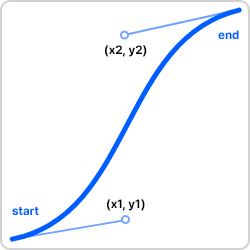
> going to [cubic-bezier.com](https://cubic-bezier.com) for making.
### How to flip cubic?
```js
const easeFlipped = Curve.Ease.flipped;
```
## How to make color tween animation?
Please utilize the `Color` and `ColorTween` class!
```js
// or new Color.parse("#FF0000"); (is skipable prefix #)
const red = new Color(255, 0, 0, alpha?);
const blue = new Color.var("--blue", scope?);
// new ColorTween(start, end);
const colorTween = new ColorTween(red, blue);
animation.addListener(value => {
const color = colorTween.transform(value);
// ... skip
});
```
## How to use raw-animation?
The code below shows how to use the class `AnimationController`, which is the base and foundation for implementing the animation.
> I decided to say this is a raw animation-controller.
```js
const controller = new AnimationController(
duration, // Milliseconds
lowerValue = 0,
upperValue = 1,
initialValue?
);
controller.addListener(value => ...);
controller.addStatusListener(status => ...);
console.log(controller.value);
console.log(controller.relValue);
console.log(controller.progressValue);
```
## What is Ticker?
Provides the ability to perform want tasks when the frame is updated, and measures the time interval between frames and is used to make smooth animation.
> Used to define a elapsed duration between a previous frame and the current frame when a frame updated.
```js
// The elapsed between the previous frame and the current frame is given.
const activeTicker = new Ticker(deltaElpased => {
console.log(deltaElpased);
});
// Dispose or clean up all relevant tasks and instances on memory.
activeTicker.dispose();
```