https://github.com/anish202020/computer-graphics-mini-project2
Builded a Real-Time Emotion Detection Website Using Streamlit with Python Libraries (opencv-python, tensorflow, keras, mtcnn, fer) to Analyze Facial Expressions via Camera
https://github.com/anish202020/computer-graphics-mini-project2
opencv-python-tensorflow-keras-mtcnn-fer python streamlit
Last synced: 2 months ago
JSON representation
Builded a Real-Time Emotion Detection Website Using Streamlit with Python Libraries (opencv-python, tensorflow, keras, mtcnn, fer) to Analyze Facial Expressions via Camera
- Host: GitHub
- URL: https://github.com/anish202020/computer-graphics-mini-project2
- Owner: Anish202020
- Created: 2024-06-12T08:06:27.000Z (about 2 years ago)
- Default Branch: main
- Last Pushed: 2024-07-15T11:05:00.000Z (almost 2 years ago)
- Last Synced: 2025-02-08T06:44:12.296Z (over 1 year ago)
- Topics: opencv-python-tensorflow-keras-mtcnn-fer, python, streamlit
- Language: Python
- Homepage:
- Size: 26.2 MB
- Stars: 0
- Watchers: 1
- Forks: 0
- Open Issues: 0
-
Metadata Files:
- Readme: README.md
Awesome Lists containing this project
README
# Real-Time Emotion Detection Website Documentation
## Overview
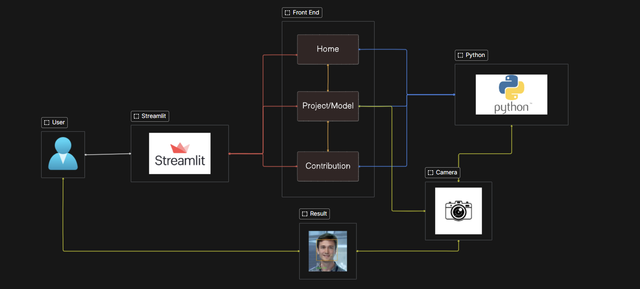
A comprehensive guide to building a real-time emotion detection website using Streamlit and various Python libraries. The website analyzes facial expressions via a camera to detect emotions in real-time.
## Purpose
The primary purpose of this website is to detect emotions in real-time using facial expressions captured via a camera.
## Prerequisites
Before setting up the development environment, ensure you have the following:
- Python installed
- Required libraries installed:
- `opencv-python`
- `tensorflow`
- `keras`
- `mtcnn`
- `fer`
- Streamlit installed
- A webcam or camera
## Setup Instructions
### Step 1: Install Python and Required Libraries
Ensure Python is installed on your system. Install the required libraries using pip:
```sh
pip install opencv-python tensorflow keras mtcnn fer streamlit
```
### Step 2: Set Up Streamlit
Streamlit is used to create the web interface for real-time emotion detection. Ensure Streamlit is installed:
```sh
pip install streamlit
```
### Step 3: Configure the Webcam
Ensure your webcam or camera is properly configured and accessible by your system.
### Step 4: Run the Streamlit Application
Create a Python script (e.g., `app.py`) with the necessary code to set up the Streamlit application and integrate the emotion detection functionality. Run the application using:
```sh
streamlit run app.py
```
## Conclusion
This documentation provides the necessary steps to set up and run a real-time emotion detection website using Streamlit and various Python libraries. Follow the setup instructions and use the provided code structure to build and customize your application.
### Key Points:
- **FER Initialization**: The FER library is initialized with the `mtcnn=True` parameter to use the MTCNN face detector, which is more robust.
- **Webcam Initialization**: The webcam is initialized using OpenCV's `VideoCapture` .
- **Text Drawing Function**: The `draw_text` function is defined to draw text with a background rectangle on the video frames.
- **Main Loop**:
- The webcam captures each frame.
- The frame is converted from BGR to RGB since the FER library requires RGB input.
- Emotions are detected in the frame using the FER library.
- For each detected face, a rectangle is drawn around the face, and the dominant emotion is displayed on the frame.
- **Exit Condition**: Pressing the 'q' key will exit the loop and release the webcam resources.
## Team Members
Anish Kumar 1AY21CS028
Aditya Arun Kumar 1AY21CS016
Aditya Jyoti Sahu 1AY21CS017
Aditya Kshatriya 1AY21CS018