https://github.com/ankane/searchjoy
Search analytics made easy
https://github.com/ankane/searchjoy
Last synced: 9 months ago
JSON representation
Search analytics made easy
- Host: GitHub
- URL: https://github.com/ankane/searchjoy
- Owner: ankane
- License: mit
- Created: 2013-10-24T07:37:31.000Z (almost 13 years ago)
- Default Branch: master
- Last Pushed: 2025-10-22T03:51:40.000Z (10 months ago)
- Last Synced: 2025-11-11T05:18:06.511Z (9 months ago)
- Language: Ruby
- Homepage:
- Size: 243 KB
- Stars: 661
- Watchers: 10
- Forks: 53
- Open Issues: 1
-
Metadata Files:
- Readme: README.md
- Changelog: CHANGELOG.md
- License: LICENSE.txt
Awesome Lists containing this project
README
# Searchjoy
Search analytics made easy
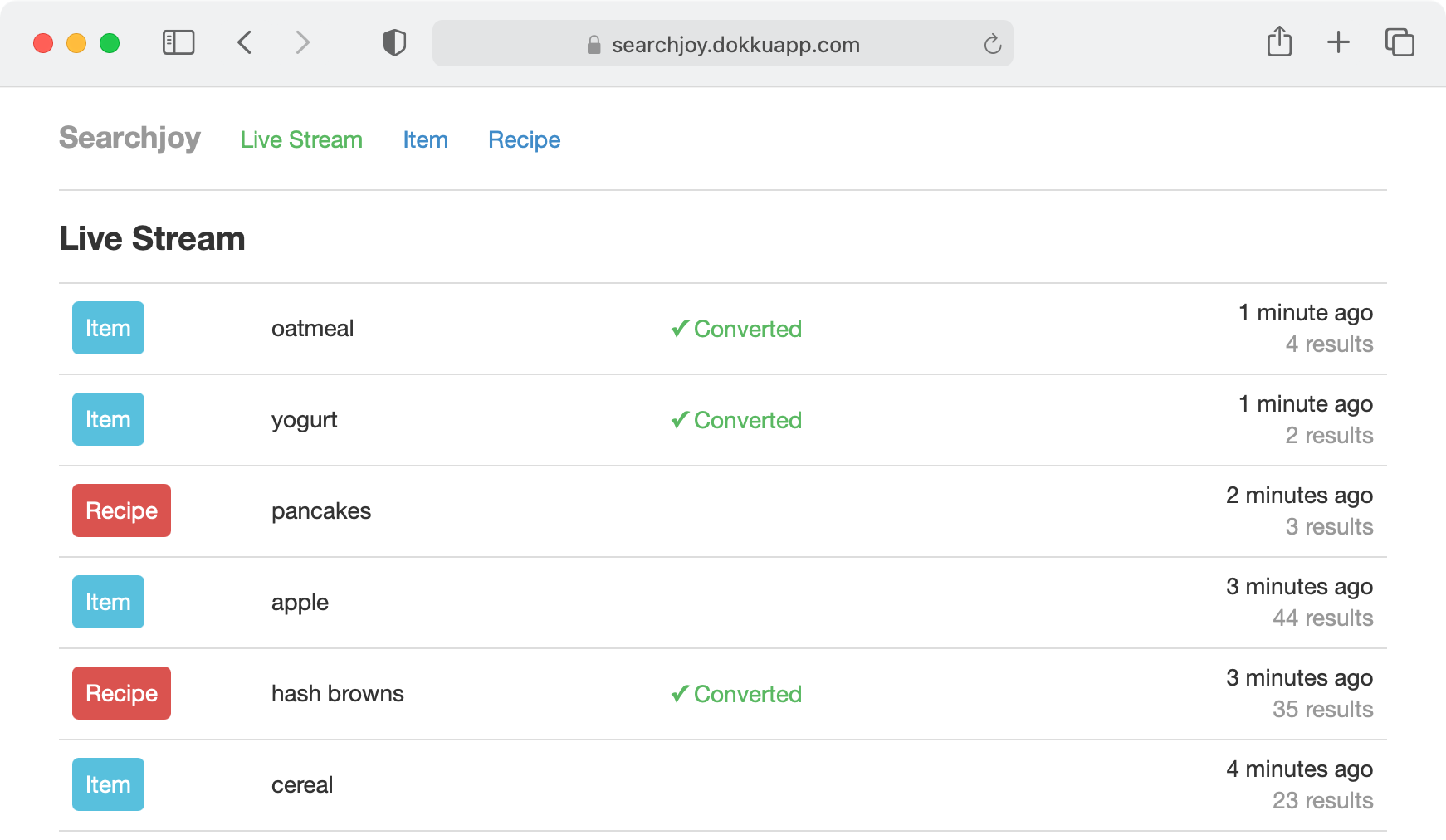
[See it in action](https://searchjoy.dokkuapp.com/)
[](https://searchjoy.dokkuapp.com/)
- view searches in real-time
- track conversion rate week over week
- monitor the performance of top searches
Works with any search platform, including Elasticsearch, OpenSearch, Sphinx, and Solr
:cupid: An amazing companion to [Searchkick](https://github.com/ankane/searchkick)
[](https://github.com/ankane/searchjoy/actions)
## Installation
Add this line to your application’s Gemfile:
```ruby
gem "searchjoy"
```
And run the generator. This creates a migration to store searches.
```sh
rails generate searchjoy:install
rails db:migrate
```
Next, add the dashboard to your `config/routes.rb`.
```ruby
mount Searchjoy::Engine, at: "searchjoy"
```
Be sure to protect the endpoint in production - see the [Authentication](#authentication) section for ways to do this.
## Track Searches
Track searches by creating a record in the database.
```ruby
Searchjoy::Search.create(
search_type: "Item", # typically the model name
query: "apple",
results_count: 12,
user_id: 1
)
```
With [Searchkick](https://github.com/ankane/searchkick), you can use the `track` option to do this automatically.
```ruby
Item.search("apple", track: {user_id: 1})
```
If you want to track more attributes, add them to the `searchjoy_searches` table.
```ruby
add_column :searchjoy_searches, :source, :string
```
Then, pass the values to the `track` option.
```ruby
Item.search("apple", track: {user_id: 1, source: "web"})
```
## Track Conversions
First, choose a conversion metric. At Instacart, an item added to the cart from the search results page counts as a conversion.
Next, when a user searches, keep track of the search id. With Searchkick, you can get the id with:
```ruby
results = Item.search("apple", track: true)
results.search.id
```
When a user converts, find the record and call `convert`.
```ruby
search = Searchjoy::Search.find(params[:id])
search.convert
```
Better yet, record the model that converted.
```ruby
search.convert(item)
```
## Authentication
Don’t forget to protect the dashboard in production.
### Devise
In your `config/routes.rb`:
```ruby
authenticate :user, ->(user) { user.admin? } do
mount Searchjoy::Engine, at: "searchjoy"
end
```
### Basic Authentication
Set the following variables in your environment or an initializer.
```ruby
ENV["SEARCHJOY_USERNAME"] = "andrew"
ENV["SEARCHJOY_PASSWORD"] = "secret"
```
## Data Retention
Data should only be retained for as long as it’s needed. Delete older data with:
```ruby
Searchjoy::Search.where("created_at < ?", 1.year.ago).find_in_batches do |searches|
search_ids = searches.map(&:id)
Searchjoy::Conversion.where(search_id: search_ids).delete_all
Searchjoy::Search.where(id: search_ids).delete_all
end
```
You can use [Rollup](https://github.com/ankane/rollup) to aggregate important data before you do.
```ruby
Searchjoy::Search.rollup("Searches")
```
Delete data for a specific user with:
```ruby
user_id = 123
search_ids = Searchjoy::Search.where(user_id: user_id).pluck(:id)
Searchjoy::Conversion.where(search_id: search_ids).delete_all
Searchjoy::Search.where(id: search_ids).delete_all
```
## Customize
To customize, create an initializer `config/initializers/searchjoy.rb`.
Change the time zone
```ruby
Searchjoy.time_zone = "Pacific Time (US & Canada)" # defaults to Time.zone
```
Change the number of top searches shown
```ruby
Searchjoy.top_searches = 500 # defaults to 100
```
Link to the search results
```ruby
Searchjoy.query_url = ->(search) { Rails.application.routes.url_helpers.items_path(q: search.query) }
```
Add additional info to the query in the live stream
```ruby
Searchjoy.query_name = ->(search) { "#{search.query} #{search.city}" }
```
Show the conversion name in the live stream
```ruby
Searchjoy.conversion_name = ->(model) { model.name }
```
## History
View the [changelog](https://github.com/ankane/searchjoy/blob/master/CHANGELOG.md)
## Contributing
Everyone is encouraged to help improve this project. Here are a few ways you can help:
- [Report bugs](https://github.com/ankane/searchjoy/issues)
- Fix bugs and [submit pull requests](https://github.com/ankane/searchjoy/pulls)
- Write, clarify, or fix documentation
- Suggest or add new feature
To get started with development and testing:
```sh
git clone https://github.com/ankane/searchjoy.git
cd searchjoy
bundle install
bundle exec rake test
```