https://github.com/anmonteiro/kpop-stack
https://github.com/anmonteiro/kpop-stack
Last synced: 10 months ago
JSON representation
- Host: GitHub
- URL: https://github.com/anmonteiro/kpop-stack
- Owner: anmonteiro
- Created: 2022-07-20T21:22:09.000Z (over 3 years ago)
- Default Branch: main
- Last Pushed: 2022-07-20T21:23:13.000Z (over 3 years ago)
- Last Synced: 2024-05-22T21:27:39.924Z (over 1 year ago)
- Language: TypeScript
- Size: 466 KB
- Stars: 1
- Watchers: 3
- Forks: 0
- Open Issues: 0
-
Metadata Files:
- Readme: README.md
Awesome Lists containing this project
README
# Remix K-pop Stack

Deployed Site: [kpop-stack.netlify.app](https://kpop-stack.netlify.app)
Learn more about [Remix Stacks](https://remix.run/stacks).
```
npx create-remix --template netlify-templates/kpop-stack
```
Click this button to create a new Github repo, new Netlify project and deploy this stack to a [CDN](https://jamstack.org/glossary/cdn/).
[](https://app.netlify.com/start/deploy?repository=https://github.com/netlify-templates/kpop-stack)
## What's in the stack
- [Netlify](https://netlify.com/) deployment to the [Edge](https://www.netlify.com/products/edge) + deploy previews and CI/CD
- [Supabase](https://supabase.com/) database and authentication
- [Tailwind](https://tailwindcss.com/) for styling
- [Cypress](https://cypress.io) end-to-end testing
- [Prettier](https://prettier.io) code formatting
- [ESLint](https://eslint.org) linting
- [TypeScript](https://typescriptlang.org) static typing
Not a fan of bits of the stack? Fork it, change it, and use `npx create-remix --template your/repo`! Make it your own.
---
## Development
- Install all dependencies & the [Netlify CLI](https://docs.netlify.com/cli/get-started/):
```sh
npm install
npm install netlify-cli -g
```
- Create or connect to your Netlify project by running through the Netlify `init` script:
```sh
netlify init
```
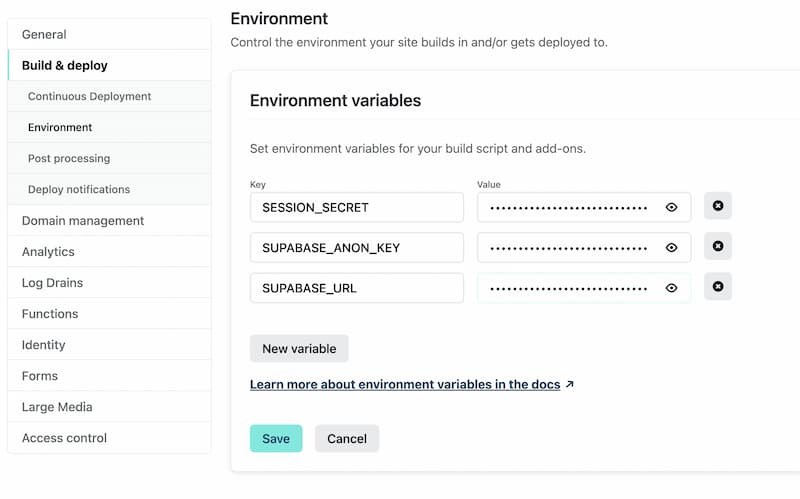
- Add your Supabase and session environment variables to a `.env` file like [`.env.sample`](./.env.sample) file or through the Netlify project dashboard at [https://app.netlify.com/](https://app.netlify.com/) Site settings/Build & deploy/Environment:
```
SUPABASE_URL=""
SUPABASE_ANON_KEY=""
SESSION_SECRET=""
```
> There is more information about the Supabase variables [in the Database section below](#database). The initial `create-remix` command will [create the `SESSION_SECRET` variable](https://github.com/netlify-templates/kpop-stack/blob/fd68e4de2f4034328481c9b26fa67e298ef20204/remix.init/index.js#L47) which is a random string of 16 characters, so feel free to just set a random 16 chars if not running `remix-create`.
Environment Variable list in project dashboard.
- Start dev server:
```sh
npm run dev
```
This starts your app in development mode, rebuilding assets on file changes.
### Running Locally
Running `npm run dev` will also trigger the Netlify local development environment which will pull in all the [environment variables](https://docs.netlify.com/configure-builds/environment-variables/#declare-variables) of your Netlify project. You can learn more about this project's Supabase environment variables in [the Database section below](#database). With Netlify dev you can also:
- test functions
- test redirects
- share a live session via url with `netlify dev --live`
- [and more](https://cli.netlify.com/netlify-dev/) :)
### Relevant code:
This is a pretty simple note-taking app, but it's a good example of how you can build a full stack app with Remix and Supabase. The main functionality is creating users, logging in and out, and creating and deleting notes.
- creating users, and logging in and out [./app/models/user.server.ts](./app/models/user.server.ts)
- user sessions, and verifying them [./app/session.server.ts](./app/session.server.ts)
- creating, and deleting notes [./app/models/note.server.ts](./app/models/note.server.ts)
---
## Database
This project uses [Supabase](https://supabase.com/) for data storage and user authentication.
### Environment Variables
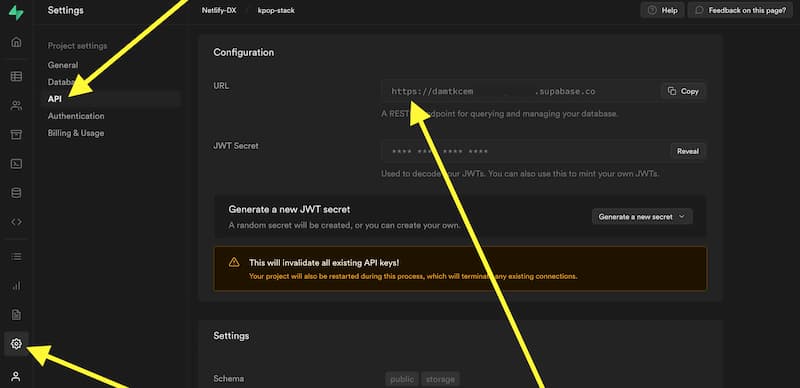
You will need these 2 environment variables to connect to your Supabase instance:
- `SUPABASE_ANON_KEY`:
Found in Settings/API/Project API keys
See screenshot

- `SUPABASE_URL`:
Found in Settings/API/Configuration/URL
See screenshot
You can add your environment variables to an `.env` file (like shown in the sample [`.env.sample`](./.env.sample)) which will not be committed publicly because it is added to the `.gitignore` file. Or you can add it to your Netlify project environment variables (Site settings/Build & deploy/Environment) as shown in the [Development section](#development) so that they can be [easily shared with teammates](https://www.netlify.com/blog/2021/12/09/use-access-and-share-environment-variables-on-netlify).
Database creation
- You can sign up with Supabase with your GitHub credentials
- Create a new project on the 'Project' page

- Next you will need to name the database and makes sure to save the password you select, then you will want to choose a region closes to you

- It will take some time for the project to be fully scaffold so you will need to wait before the next steps.
SQL Queries
- In your Supabase project dashboard, you can find the SQL Editor here

- Select "New Query"

- Here are the SQL queries used in the K-pop Stack
```sql
-- Create public profile table that references our auth.user
create table public.profiles (
id uuid references auth.users not null,
created_at timestamptz not null default current_timestamp,
email varchar not null,
primary key (id)
);
-- Create public notes table
create table public.notes (
id uuid not null default uuid_generate_v4(),
title text,
body text,
created_at timestamp default current_timestamp,
updated_at timestamp default current_timestamp,
profile_id uuid references public.profiles not null,
primary key (id)
);
-- inserts a row into public.users
create or replace function public.handle_new_user()
returns trigger
language plpgsql
security definer set search_path = public
as $$
begin
insert into public.profiles (id, email)
values (new.id, new.email);
return new;
end;
$$;
-- trigger the function every time a user is created
drop trigger if exists on_auth_user_created on auth.user;
create trigger on_auth_user_created
after insert on auth.users
for each row execute procedure public.handle_new_user();
```
- You can copy these over to the SQL Editor and click the 'Run' button

- Lastly, you will need to go to 'Authentication and Settings', and switch off "Enable email confirmations" for the project

---
## Deployment
This stack has the Netlify [configuration file (netlify.toml)](./netlify.toml) that contains all the information needed to deploy your project to Netlify's [edge nodes](https://www.netlify.com/products/edge).
Want to deploy immediately? Click this button
[](https://app.netlify.com/start/deploy?repository=https://github.com/netlify-templates/nextjs-toolbox)
Clicking this button will start the setup for a new project and deployment.
### Deploy from the Command Line
Clone this repo with the `git clone` command. Then install the [Netlify CLI](https://docs.netlify.com/cli/get-started/) tool and run `netlify init`.
```sh
git clone https://github.com/netlify-templates/kpop-stack
npm install netlify-cli -g # to install the Netlify CLI tool globally
netlify init # initialize a new Netlify project & deploy
```
### CI/CD
Using the 'Deploy to Netlify' button or the `init` process will also set up continuous deployment for your project so that a new build will be triggered & deployed when you push code to the repo (you can change this from your project dashboard: Site Settings/Build & deploy/Continuous Deployment).
You can also use `netlify deploy` or `netlify deploy --prod` to manually deploy then `netlify open` to open your project dashboard.
> 💡 If you don't use `--prod` on the deploy command you will deploy a preview of your application with a link to share with teammates to see the site deployed without deploying to production
---
## Testing
### Cypress
We have set up the basic configuration files for [Cypress](https://go.cypress.io/) End-to-End tests in this project. You'll find those in the `cypress` directory. As you make changes, add to an existing file or create a new file in the `cypress/integrations` directory to test your changes.
We use [`@testing-library/cypress`](https://testing-library.com/cypress) for selecting elements on the page semantically.
To run these tests in development, run `npm run e2e-test` which will start the dev server for the app as well as the Cypress client.
To other example of Cypress tests specifically on Remix stacks, check out the `cypress` directory in the [Remix Grunge Stack example](https://github.com/remix-run/grunge-stack/tree/main/cypress).
### Type Checking
This project uses TypeScript. It's recommended to get TypeScript set up for your editor to get a really great in-editor experience with type checking and auto-complete. To run type checking across the whole project, run `npm run typecheck`.
### Linting
This project uses ESLint for linting. That is configured in `.eslintrc.js`.
### Formatting
We use [Prettier](https://prettier.io/) for auto-formatting in this project. It's recommended to install an editor plugin (like the [VSCode Prettier plugin](https://marketplace.visualstudio.com/items?itemName=esbenp.prettier-vscode)) to get auto-formatting on save. There's also a `npm run format` script you can run to format all files in the project.