https://github.com/annahadji/unitreport
A small unittest-based tool for generating single page html reports in Python
https://github.com/annahadji/unitreport
generation plotting python report unittest
Last synced: 6 months ago
JSON representation
A small unittest-based tool for generating single page html reports in Python
- Host: GitHub
- URL: https://github.com/annahadji/unitreport
- Owner: annahadji
- License: mit
- Created: 2020-07-03T18:45:39.000Z (about 6 years ago)
- Default Branch: main
- Last Pushed: 2023-06-23T19:40:43.000Z (about 3 years ago)
- Last Synced: 2025-09-19T03:38:07.705Z (10 months ago)
- Topics: generation, plotting, python, report, unittest
- Language: Python
- Homepage:
- Size: 155 KB
- Stars: 2
- Watchers: 1
- Forks: 0
- Open Issues: 0
-
Metadata Files:
- Readme: README.md
- License: LICENSE
Awesome Lists containing this project
README
# :page_facing_up: unitreport  
UnitReport is a small unittest-based tool for generating single page html reports in Python.
The reports can include matplotlib figures and html tables.
It is designed to be minimal and fit into the unittesting framework, allowing users to make assertions about their data (e.g. data quality) before generating figures.
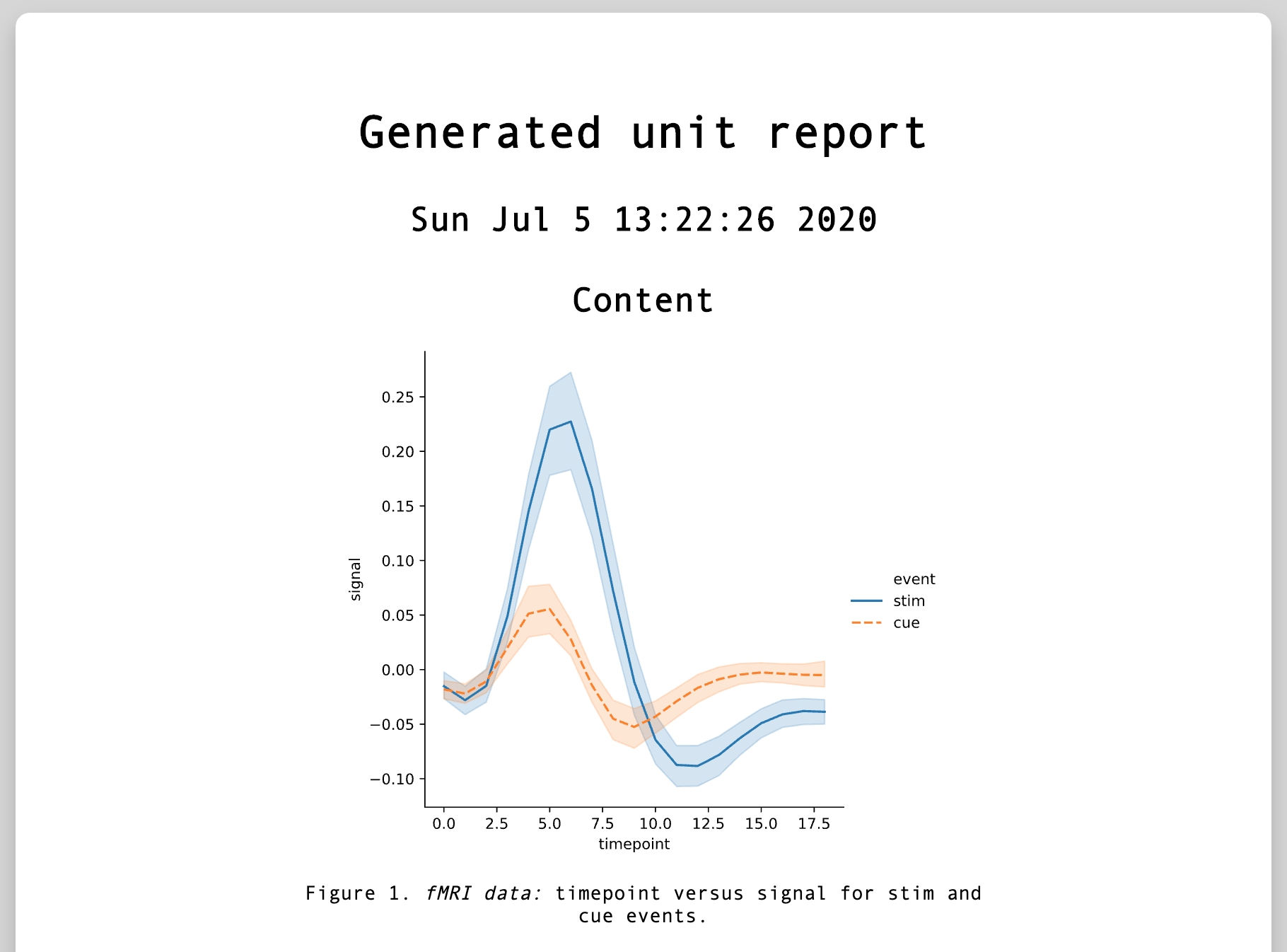
## Getting Started
You can install the library using,
`pip3 install unitreport`
There are usage examples in `test_plots.py` and `test_tables.py`.
You need to create test cases using the unittest Python library, and utilise unitreport's decorators:
```python
import unittest
import unitreport
import seaborn as sns
import pandas as pd
class TestExample(unittest.TestCase):
"""Example test suite producing plots and tables in a report using unitreport."""
dataset: pd.DataFrame = None
@classmethod
def setUpClass(cls):
"""Load dataset on setup."""
cls.dataset = sns.load_dataset("fmri")
@unitreport.plotting
def test_timepoint_vs_signal_by_event(self):
"""*fMRI data:* timepoint versus signal for stim and cue events."""
# you can still run assertions to check data quality before plotting
self.assertEqual(self.dataset.shape, (1064, 5))
# plotting decorator will call plt.savefig() to generate the plot
sns.relplot(
x="timepoint",
y="signal",
hue="event",
style="event",
kind="line",
data=self.dataset,
)
# could also return a figure & .savefig() will be called on returned object
@unitreport.tabling
def test_region_counts(self):
"""*fMRI data:* table summary description of timepoints and signals."""
# you can still run assertions to check data quality before making table
self.assertEqual(self.dataset.shape, (1064, 5))
return self.dataset.describe().to_html()
```
You can run the tests using,
`python3 -m unitreport`
This will discover and run the tests (which could be across multiple test files), generate the report and save it to the current directory.
For extra parameters you can run the following,
```
python3 -m unitreport -h
usage: __main__.py [-h] [--tests_dir TESTS_DIR] [--pattern PATTERN]
[--templates_dir TEMPLATES_DIR] [--output_file OUTPUT_FILE]
optional arguments:
-h, --help show this help message and exit
--tests_dir TESTS_DIR
Path to test files. (default: .)
--pattern PATTERN File patterns to discover test cases in. (default:
test*.py)
--templates_dir TEMPLATES_DIR
Path to jinja2 templates directory including
index.html and main.css. (default: (unitreport) templates)
--output_file OUTPUT_FILE
Output path including name. (default: report.html)
```
There are template `index.html` and `main.css` files which will be used by default to generate the style of the report.
You can also specify a path to your own templates using `--templates_dir`, where the html Jinja2 template can expect to receive `date` (today's date), and `figures`, a dictionary with test function names as keys mapped to values of `type` (table or plot), `content` (svg or html table) and `description` (test function's docstring).
You can also invoke unitreport from a Python script using the library's `main()` (runs tests and generates report), `discover_and_run()` (only run tests) and `generate_report()` (only generate report) functions.
These utilise the default values for the above parameters if not specified by the user, and `generate_report()` uses the global FIGURES dictionary generated from the tests if not passed. For more details on what they do, you can check the source code.
```python
import unitreport
# result is a unittest.TestResult which you can access things such as result.errors
result, figs = unitreport.discover_and_run()
print(result) #
print(figs) # Dict with test function names as keys mapped to 'type', 'content', and 'description'
# html_report is a string containing the generated report
html_report = unitreport.generate_report()
# same as above, raises assertion error if there are errors in tests or no tests found
result, figs, html_report = unitreport.main()
```
## Built With
- [unittest](https://docs.python.org/3/library/unittest.html) - underlying testing framework
- [Jinja2](https://jinja.palletsprojects.com/en/2.11.x/) - rendering and generating the report
- [matplotlib](https://matplotlib.org/) - plotting library
- [Markdown](https://python-markdown.github.io/) - Python markdown library for markdown captions