https://github.com/anoopkcn/plotreset
reset, customize, save, load matplotlib plot styles
https://github.com/anoopkcn/plotreset
academic context-plots graph matplotlib multi-plots plot plt
Last synced: 4 months ago
JSON representation
reset, customize, save, load matplotlib plot styles
- Host: GitHub
- URL: https://github.com/anoopkcn/plotreset
- Owner: anoopkcn
- License: mit
- Created: 2022-04-08T01:18:57.000Z (about 4 years ago)
- Default Branch: main
- Last Pushed: 2025-01-11T18:06:56.000Z (over 1 year ago)
- Last Synced: 2026-01-29T14:49:23.763Z (5 months ago)
- Topics: academic, context-plots, graph, matplotlib, multi-plots, plot, plt
- Language: Python
- Homepage:
- Size: 157 KB
- Stars: 1
- Watchers: 1
- Forks: 0
- Open Issues: 0
-
Metadata Files:
- Readme: README.md
- License: LICENSE
Awesome Lists containing this project
README
# plotreset
PlotReset is a Python package that provides a simple way to reset and customize `matplotlib` plot styles. Comes with a sensible set of defaults for academic use. You can also extend the styles by adding more templates. Save and load templates in a JSON format to reuse.
## Installation
```bash
pip install plotreset
```
## Usage
```python
from plotreset import Styles
style=Styles('reset')
```
Then create a style object. Note that when you create the object with a specific style template name(`reset`, `academic` etc,.) it sets the style for you plots. All the plots you make after this will have the style applied.
```python
style=Styles('academic')
```
Where `academic` is a `plotreset` style(you can write your own or modify `academic` defaults) where latex font and settings are preloaded.
**To revert back to `matplotlib` default template simply create the object without any arguments**
```python
style=Styles()
```
### Example:
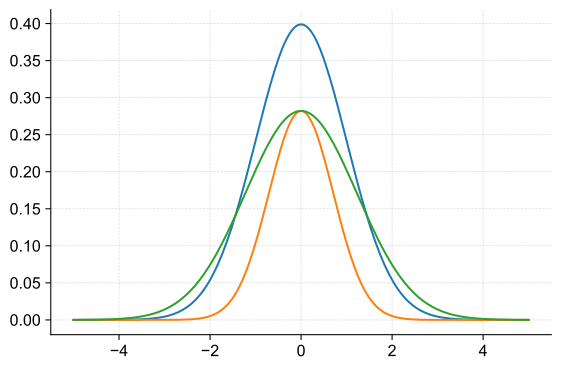
## Example.1 using the `reset` style template:
```python
import matplotlib.pyplot as plt
import numpy as np
from plotreset import Styles
style = Styles("reset")
plt.figure()
x = np.linspace(-5, 5, 200)
y = 1 / (np.sqrt(2 * np.pi)) * np.exp(-(x**2) / 2)
y2 = 1 / (np.sqrt(2 * np.pi * 2)) * np.exp(-(x**2) / (2 * 0.5))
y3 = 1 / (np.sqrt(2 * np.pi * 2)) * np.exp(-(x**2) / (2 * 1.5))
plt.plot(x, y, label="Gaussian Distribution")
plt.plot(x, y2, label="Gaussian Distribution")
plt.plot(x, y3, label="Gaussian Distribution")
plt.savefig("examples/simple.svg")
plt.show()
```
You can update the style settings:
```python
style.font.size = 18
style.font.family = "serif"
style.axes.grid = True
style.grid.alpha: 0.7
plt.plot(x, y, label="Gaussian Distribution")
```
### Example.2 using the `academic` style template and cycles:
`plotreset` also comes with a predefined set of defaults that can be used for example:
to cycle through colors, linestyles, markers, etc.
```python
import matplotlib as mpl
import matplotlib.pyplot as plt
import numpy as np
from cycler import cycler
from plotreset import Styles, defaults
style = Styles("reset")
c1 = cycler(color=defaults.COLORS[:4])
c2 = cycler(linestyle=defaults.LINE_STYLES[:4])
c3 = cycler(marker=defaults.MARKERS[:4])
x = np.linspace(0, 2 * np.pi, 50)
offsets = np.linspace(0, 2 * np.pi, 8, endpoint=False)
yy = np.transpose([np.sin(x + phi) for phi in offsets])
fig = plt.figure(figsize=(10, 4))
with mpl.rc_context({"axes.prop_cycle": c1}):
ax1 = fig.add_subplot(3, 1, 1)
ax1.plot(yy)
ax1.set_title("changing_colors")
with mpl.rc_context({"axes.prop_cycle": c1 + c2}):
ax2 = fig.add_subplot(3, 1, 2)
ax2.plot(yy)
ax2.set_title("changing linestyle and color")
with mpl.rc_context({"axes.prop_cycle": c1 + c2 + c3}):
ax3 = fig.add_subplot(3, 1, 3)
ax3.plot(yy)
ax3.set_title("changing linestyle, color and marker")
plt.show()
```
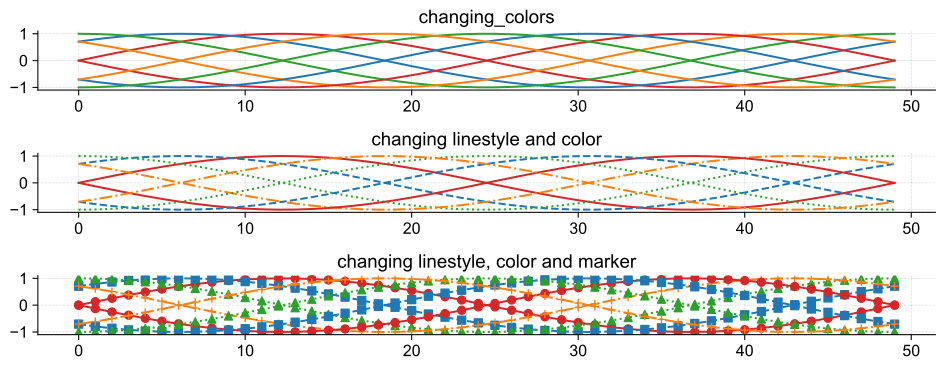
You can create your own templates and cycles and use them in the same way. (check the **Add more styles** section below for more details)
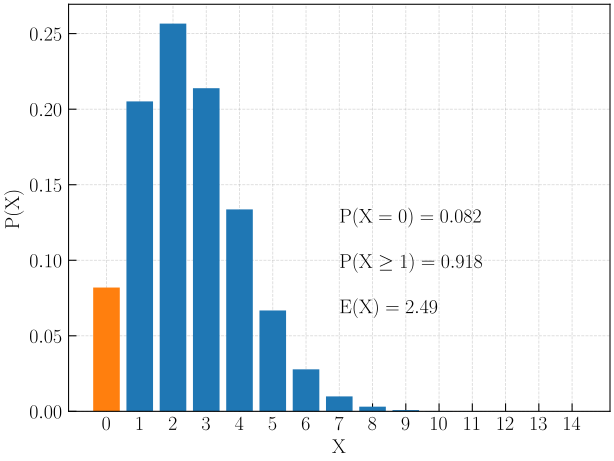
### Example.3 script using the `rc_context`:
Changing the style using dot notation(`style.font.size=10`) will change the plot settings in thje global scope but if you would like to change the settings for a specific plot you can use the `rc_context` method.
```python
import matplotlib as mpl
from plotreset import Styles
style = Styles("academic")
# Create example data
n = 30 * 75
p = 1 / 900
x = np.array(range(0, 15))
def res(n, p, x):
return math.comb(n, x) * p**x * (1 - p) ** (n - x)
p_x = np.array([res(n, p, i) for i in x])
color = ["tab:blue"] * len(x)
color[0] = "tab:orange"
# The default behavior of academic style is not to draw a grid on the axes.
# We can change this behavior by using the `rc_context` method ...
# ...so that this setting only affect this plot
rc_context = {"axes.grid": True, "axes.axisbelow": True}
with mpl.rc_context(rc_context):
plt.bar(x, p_x, color=color)
plt.xticks(x)
plt.ylabel("$\\mathrm{P(X)}$")
plt.xlabel("$\\mathrm{X}$")
plt.annotate(
"$\\mathrm{P(X=0) = 0.082}$",
xy=(x.max() / 2.0, p_x.max() / 2),
ha="left",
va="center",
)
plt.annotate(
"$\\mathrm{P(X\\geq1) = 0.918}$",
xy=(x.max() / 2.0, p_x.max() / 2 - 0.03),
ha="left",
va="center",
)
plt.annotate(
"$\\mathrm{E(X) = 2.49}$",
xy=(x.max() / 2.0, p_x.max() / 2 - 0.06),
ha="left",
va="center",
)
plt.show()
```
## Add more styles
You can add more styles in your scrit by creating a dictionary of style settings and call the `register_template` method to register the style.
```python
import plotreset
my_template = {
"axes.facecolor": "lightgray",
"font.size": 14,
# ... other style settings
}
plotreset.register_template("my_custom_style", my_template)
# Use custom template
styles = Styles("my_custom_style")
```
## Save and Load templates from a file
You can load custom templates from a JSON file and save the current template to a JSON file. When initializing the `Styles` object, you can specify the path to the JSON.
The JSON file for custom settings should have the following structure:
```json
{
"templates": {
"style_name1": {
// all the rc parameters as key-value pairs Ex: "text.usetex": true
}
"style_name2": {
// all the rc parameters as key-value pairs Ex: "font.size": 16,
}
}
}
```
You can give your style any name you want. But the **top level JSON key should be `templates`.**
```python
from plotreset import Styles
# Load a custom style(style_name1) from a JSON file(custom_style_templates.json)
style = Styles("style_name1", "path/to/custom_style_templates.json")
```
You can also save the current style to a JSON:
```python
style.save_current_template("my_new_style_name", "path/to/custom_style_templates.json")
```
If you sepecify `overwrite=True` in the `save_current_template` method and the same template name exist in the JSON file it will overwrite the template with updated style.
Here is an example JSON file with custom templates(this is the same as `academic` style):
```json
{
"templates": {
"academic": {
"text.usetex": true,
"mathtext.fontset": "cm",
"mathtext.fallback": "cm",
"mathtext.default": "regular",
"font.size": 16,
"font.family": "cmr10",
"axes.axisbelow": "line",
"axes.unicode_minus": false,
"axes.formatter.use_mathtext": true,
"axes.prop_cycle": {
"color": [
"tab:red",
"tab:blue",
"tab:green",
"tab:orange",
"tab:purple",
"tab:brown",
"tab:pink",
"tab:gray",
"tab:olive",
"tab:cyan",
"k"
]
},
"axes.grid": false,
"grid.linewidth": 0.6,
"grid.alpha": 0.5,
"grid.linestyle": "--",
"xtick.top": false,
"xtick.direction": "in",
"xtick.minor.visible": false,
"xtick.major.size": 6.0,
"xtick.minor.size": 4.0,
"ytick.right": false,
"ytick.direction": "in",
"ytick.minor.visible": false,
"ytick.major.size": 6.0,
"ytick.minor.size": 4.0,
"figure.constrained_layout.use": true
}
}
}
```