https://github.com/anshrathod/button_animations
A simple flutter package to make highly customizable Flutter widgets with 3d animations.
https://github.com/anshrathod/button_animations
android button-animations dart flutter flutter-package flutter-ui flutter-widget hacktoberfest pubdev widgets
Last synced: 9 months ago
JSON representation
A simple flutter package to make highly customizable Flutter widgets with 3d animations.
- Host: GitHub
- URL: https://github.com/anshrathod/button_animations
- Owner: anshrathod
- License: bsd-3-clause
- Created: 2020-09-12T17:01:19.000Z (almost 6 years ago)
- Default Branch: master
- Last Pushed: 2023-03-24T04:43:05.000Z (over 3 years ago)
- Last Synced: 2025-04-09T20:07:20.645Z (over 1 year ago)
- Topics: android, button-animations, dart, flutter, flutter-package, flutter-ui, flutter-widget, hacktoberfest, pubdev, widgets
- Language: Dart
- Homepage:
- Size: 3.64 MB
- Stars: 9
- Watchers: 1
- Forks: 4
- Open Issues: 0
-
Metadata Files:
- Readme: README.md
- Changelog: CHANGELOG.md
- License: LICENSE
Awesome Lists containing this project
README
# Button Animations
  [](https://pub.dev/packages/button_animations)

The [button_animations](https://pub.dev/packages/button_animations) is a package to make highly customizable [Flutter](https://flutter.dev/) widgets with 3d animations.
## Getting Started
To use this plugin, add the latest version of `button_animations` as a [dependency in your pubspec.yaml file](https://flutter.io/platform-plugins/).
### Platform Support
| Android | iOS | Web | MacOS | Linux | Windows |
| :-----: | :-: | :---: | :-----: | :-: | :---: |
| ✅ | ✅ | ✅ | ✅ | ✅ | ✅ |
### Screenshots
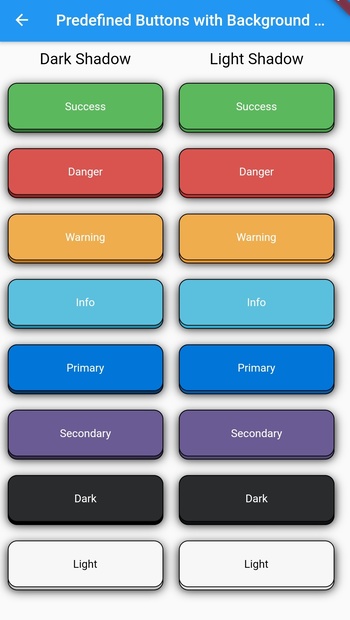
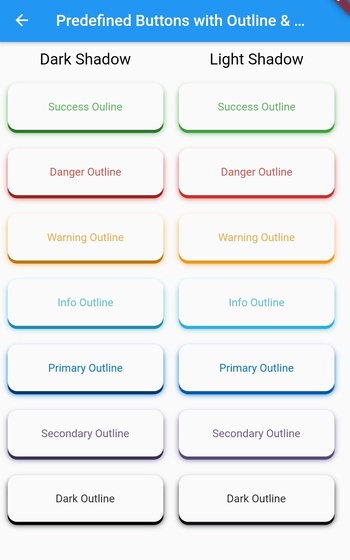
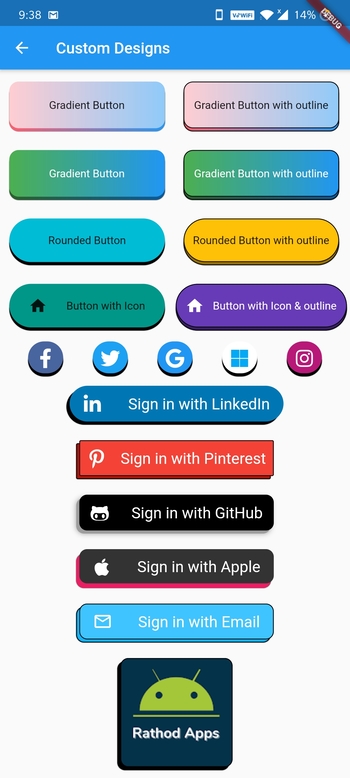
### Parameters and their Description
| Datatype | Parameter | Description | Default Value | Required |
| :----------------: | :----------------: | :------------------------------------------------------------------------------------------------------------------------: | :----------------------: | :------: |
| `function ` | onTap | The function that is called whenever the widget is tapped | -- | Yes |
| `widget` | child | The child widget | -- | Yes |
| `PredefinedThemes` | type | There are 16 predefined themes that you can choose from if you dont want to customize the widget yourself | PredefinedThemes.primary | No |
| `Curve` | animationCurve | The curve that the animation will follow | Curves.easeIn | No |
| `bool` | enabled | To check whether the button is enabled or not | true | No |
| `bool` | isMultiColor | To check whether the button has multiple color gradient or not | false | No |
| `bool` | isOutline | To check whether the button has an outline or not | false | No |
| `bool ` | darkshadow | To check whether the button has dark or light shadow | true | No |
| `int` | duration | The time that the animation takes in milliseconds | 70 | No |
| `double` | height | The height of the widget | 64 | No |
| `double` | width | The width of the widget | 200 | No |
| `double ` | blurRadius | The radius of the blur effect of the widget | 0 | No |
| `double ` | borderRadius | The radius of the borders of the widget | 12 | No |
| `double ` | shadowHeightBottom | The height of the shadow and the animation of the widget from the bottom of the child widget | 4 | No |
| `double ` | shadowHeightLeft | The height of the shadow and the animation of the widget from the left of the child widget | 0 | No |
| `double` | borderWidth | The width of the border of the widget | 1 | No |
| `Color` | borderColor | The color of the border of the widget (if type is not null, this will not work & isOutline should be true for this to work) | Colors.black | No |
| `Color` | blurColor | The color of the blur of the widget(if type is not null, this will not work) | Colors.black | No |
| `Color` | color | The color of the widget(if type is not null, this will not work) | Colors.blue | No |
| `Color` | shadowColor | The color of the shadow of the widget(if type is not null, this will not work) | Colors.black | No |
| `List` | colors | The list of colors for the gradient for the background of the widget(isMulticolor should be true for this to work) | [] | No |
### PredefinedThemes
| Theme Name | Example |
| :--------------: | :-------------------------------------------------------------------------------------------------------------------------: |
| success |  |
|
| successOutline |  |
|
| danger |  |
|
| dangerOutline |  |
|
| warning |  |
|
| warningOutline |  |
|
| info |  |
|
| infoOutline |  |
|
| primary |  |
|
| primaryOutline |  |
|
| secondary |  |
|
| secondaryOutline |  |
|
| dark |  |
|
| darkOutline |  |
|
| light |  |
|
## Example
#### For any of the predefined themes you just have to add the child widget, type, and the onTap function.
##### 1. Add borderRadius and, isOutline to add more customization.
```ruby
AnimatedButton(
child: Text(
'Danger', // add your text here
style: TextStyle(
color: Colors.white,
),
),
type: PredefinedTheme.danger,
isOutline: true,
borderWidth: 1,
onTap: () {},
),
AnimatedButton(
child: Text(
'Danger', // add your text here
style: TextStyle(
color: Colors.white,
),
),
type: PredefinedTheme.danger,
darkshadow: false,
isOutline: true,
borderWidth: 1,
onTap: () {},
),
```
##### 2. Use blurRadius and blurColor
```ruby
AnimatedButton(
child: Text(
'Dark', // add your text here
style: TextStyle(
color: Colors.white,
),
),
type: PredefinedTheme.dark,
blurRadius: 10,
onTap: () {},
),
AnimatedButton(
child: Text(
'Danger', // add your text here
style: TextStyle(
color: Colors.white,
),
),
type: PredefinedTheme.danger,
darkshadow: false,
blurRadius: 10,
onTap: () {},
),
```
##### 3. Use all other parameters to make custom buttons
- Gradient Buttons
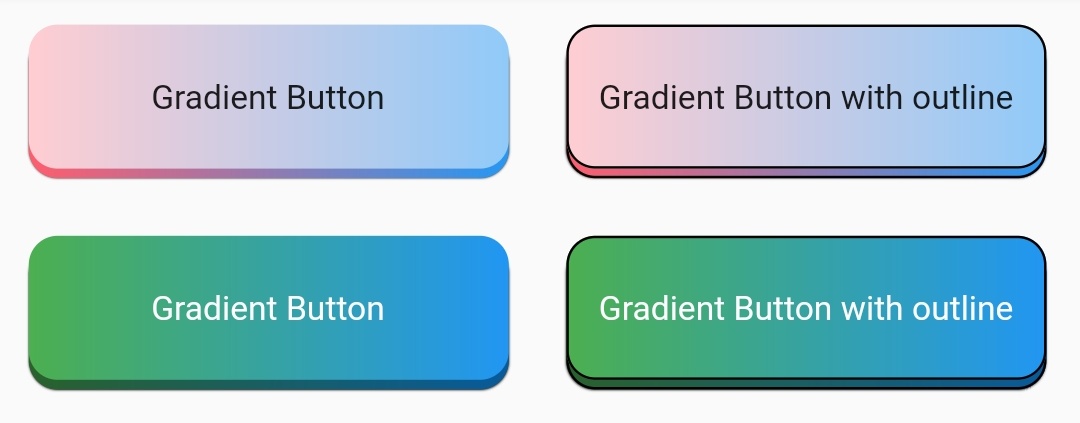
```ruby
Row(
children: [
Padding(
padding: const EdgeInsets.all(12.0),
child: AnimatedButton(
child: Text("Gradient Button"),
onTap: () {},
isMultiColor: true,
colors: [
Colors.red[100],
Colors.blue[200],
],
),
),
Padding(
padding: const EdgeInsets.all(12.0),
child: AnimatedButton(
child: Text("Gradient Button with outline"),
onTap: () {},
isMultiColor: true,
isOutline: true,
colors: [
Colors.red[100],
Colors.blue[200],
],
),
),
],
),
Row(
children: [
Padding(
padding: const EdgeInsets.all(12.0),
child: AnimatedButton(
child: Text(
"Gradient Button",
style: TextStyle(
color: Colors.white,
),
),
onTap: () {},
isMultiColor: true,
colors: [
Colors.green,
Colors.blue,
],
),
),
Padding(
padding: const EdgeInsets.all(12.0),
child: AnimatedButton(
child: Text(
"Gradient Button with outline",
style: TextStyle(
color: Colors.white,
),
),
onTap: () {},
isMultiColor: true,
isOutline: true,
colors: [
Colors.green,
Colors.blue,
],
),
),
],
),
```
- Rounded Buttons

```ruby
Row(
children: [
Padding(
padding: const EdgeInsets.all(12.0),
child: AnimatedButton(
child: Text("Rounded Button"),
onTap: () {},
height: 60,
type: null,
borderRadius: 30,
color: Colors.cyan,
),
),
Padding(
padding: const EdgeInsets.all(12.0),
child: AnimatedButton(
child: Text("Rounded Button with outline"),
onTap: () {},
height: 60,
type: null,
borderRadius: 30,
isOutline: true,
color: Colors.amber,
),
),
],
),
```
- Rounded Buttons with Icons

```ruby
Row(
children: [
Padding(
padding: const EdgeInsets.all(12.0),
child: AnimatedButton(
child: Row(
mainAxisAlignment: MainAxisAlignment.spaceEvenly,
children: [
Icon(Icons.home),
Text("Button with Icon"),
],
),
onTap: () {},
type: null,
height: 60,
borderRadius: 30,
color: Colors.teal,
),
),
Padding(
padding: const EdgeInsets.all(2.0),
child: AnimatedButton(
child: Row(
mainAxisAlignment: MainAxisAlignment.spaceEvenly,
children: [
Icon(Icons.home, color: Colors.white),
Text("Button with Icon & outline",
style: TextStyle(color: Colors.white)),
],
),
onTap: () {},
type: null,
height: 60,
width: 220,
borderRadius: 30,
isOutline: true,
color: Colors.deepPurple,
),
),
],
),
```
- Social Media Buttons

```ruby
Row(
mainAxisAlignment: MainAxisAlignment.spaceEvenly,
children: [
Padding(
padding: const EdgeInsets.all(2),
child: AnimatedButton(
child: Icon(
FontAwesomeIcons.facebookF,
color: Colors.white,
size: 25,
),
onTap: () {},
type: null,
height: 45,
width: 45,
borderRadius: 22.5,
color: Color(0xFF49659F),
),
),
Padding(
padding: const EdgeInsets.all(2),
child: AnimatedButton(
child: Icon(
FontAwesomeIcons.twitter,
color: Colors.white,
size: 25,
),
onTap: () {},
type: null,
height: 45,
width: 45,
borderRadius: 22.5,
color: Color(0xFF1DA1F2),
),
),
Padding(
padding: const EdgeInsets.all(2),
child: AnimatedButton(
child: Icon(
FontAwesomeIcons.google,
color: Colors.white,
size: 25,
),
onTap: () {},
type: null,
height: 45,
width: 45,
borderRadius: 22.5,
color: Colors.blue,
),
),
Padding(
padding: const EdgeInsets.all(2),
child: AnimatedButton(
child: Icon(
FontAwesomeIcons.microsoft,
color: Colors.lightBlue,
size: 25,
),
onTap: () {},
type: null,
height: 45,
width: 45,
borderRadius: 22.5,
color: Colors.white,
),
),
Padding(
padding: const EdgeInsets.all(2),
child: AnimatedButton(
child: Icon(
FontAwesomeIcons.instagram,
color: Colors.white,
size: 25,
),
onTap: () {},
type: null,
height: 45,
width: 45,
borderRadius: 22.5,
color: Color(0xFFB81877),
),
),
],
),
```
- Sign in Buttons
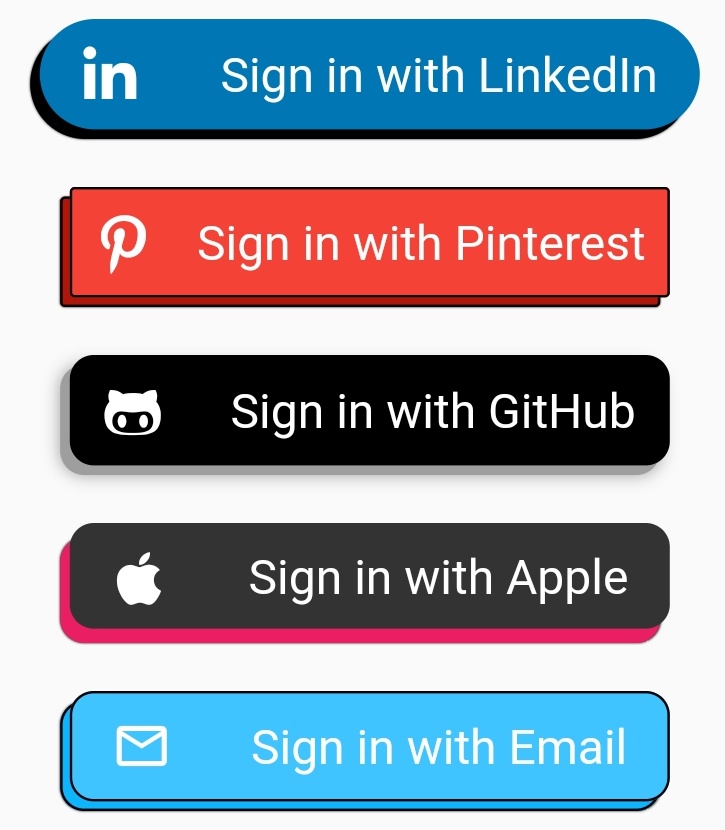
```ruby
Padding(
padding: const EdgeInsets.all(10),
child: AnimatedButton(
child: Row(
mainAxisAlignment: MainAxisAlignment.spaceAround,
children: [
Icon(
FontAwesomeIcons.linkedinIn,
color: Colors.white,
size: 25,
),
Text(
"Sign in with LinkedIn",
style: TextStyle(
color: Colors.white,
fontSize: 20.0,
),
)
],
),
onTap: () {},
type: null,
height: 50,
shadowHeightBottom: 4,
shadowHeightLeft: 4,
width: 275,
borderRadius: 25,
color: Color(0xFF0077B5),
),
),
Padding(
padding: const EdgeInsets.all(10),
child: AnimatedButton(
child: Row(
mainAxisAlignment: MainAxisAlignment.spaceAround,
children: [
Icon(
FontAwesomeIcons.pinterestP,
color: Colors.white,
size: 25,
),
Text(
"Sign in with Pinterest",
style: TextStyle(
color: Colors.white,
fontSize: 20.0,
),
)
],
),
onTap: () {},
type: null,
height: 50,
isOutline: true,
shadowHeightBottom: 4,
shadowHeightLeft: 4,
width: 250,
borderRadius: 2,
color: Colors.red,
),
),
Padding(
padding: const EdgeInsets.all(10),
child: AnimatedButton(
child: Row(
mainAxisAlignment: MainAxisAlignment.spaceAround,
children: [
Icon(
FontAwesomeIcons.githubAlt,
color: Colors.white,
size: 25,
),
Text(
"Sign in with GitHub",
style: TextStyle(
color: Colors.white,
fontSize: 20.0,
),
)
],
),
onTap: () {},
type: null,
height: 50,
shadowHeightBottom: 4,
shadowHeightLeft: 4,
width: 250,
shadowColor: Colors.grey,
blurColor: Colors.grey,
blurRadius: 5,
borderRadius: 10,
color: Colors.black,
),
),
Padding(
padding: const EdgeInsets.all(10),
child: AnimatedButton(
child: Row(
mainAxisAlignment: MainAxisAlignment.spaceAround,
children: [
Icon(
FontAwesomeIcons.apple,
color: Colors.white,
size: 25,
),
Text(
"Sign in with Apple",
style: TextStyle(
color: Colors.white,
fontSize: 20.0,
),
)
],
),
onTap: () {},
type: null,
shadowColor: Colors.pink,
height: 50,
width: 250,
shadowHeightBottom: 6,
shadowHeightLeft: 4,
borderRadius: 10,
color: Color(0xFF333333),
),
),
Padding(
padding: const EdgeInsets.all(10),
child: AnimatedButton(
child: Row(
mainAxisAlignment: MainAxisAlignment.spaceAround,
children: [
Icon(
Icons.mail_outline,
color: Colors.white,
size: 25,
),
Text(
"Sign in with Email",
style: TextStyle(
color: Colors.white,
fontSize: 20.0,
),
)
],
),
onTap: () {},
type: null,
height: 50,
width: 250,
isOutline: true,
darkShadow: false,
shadowHeightBottom: 4,
shadowHeightLeft: 4,
borderRadius: 10,
color: Colors.lightBlueAccent,
),
),
```
- Custom Buttons

```ruby
Padding(
padding: const EdgeInsets.all(10),
child: AnimatedButton(
child: ClipRRect(
borderRadius: BorderRadius.circular(10.0),
child: Image.network(
"my_logo_image_url",
fit: BoxFit.fill,
),
),
onTap: () {},
type: null,
height: 144,
width: 144,
isOutline: true,
shadowHeightBottom: 4,
shadowHeightLeft: 4,
borderRadius: 10,
color: Color(0xFF033249),
),
),
```