https://github.com/antham/eyuml
Write textual uml diagram from emacs using yuml.me
https://github.com/antham/eyuml
Last synced: 3 months ago
JSON representation
Write textual uml diagram from emacs using yuml.me
- Host: GitHub
- URL: https://github.com/antham/eyuml
- Owner: antham
- License: gpl-3.0
- Created: 2014-10-26T00:28:28.000Z (over 11 years ago)
- Default Branch: master
- Last Pushed: 2017-04-13T21:41:28.000Z (about 9 years ago)
- Last Synced: 2024-12-31T21:12:17.299Z (over 1 year ago)
- Language: Emacs Lisp
- Size: 38.1 KB
- Stars: 15
- Watchers: 3
- Forks: 2
- Open Issues: 0
-
Metadata Files:
- Readme: README.md
- License: LICENSE
Awesome Lists containing this project
README
# Eyuml [](https://travis-ci.org/antham/eyuml) [](http://melpa.org/#/eyuml)
Write textual uml diagram from emacs using [yuml.me](http://yuml.me)
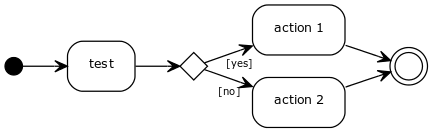
From :
```
(start)->(test)->[yes]->(action 1)->(end),[no]->(action 2)->(end)
```
Get :
## Features
- Select from various output format to generate diagram : jpg,pdf,png or svg (customize-group: eyuml)
## Getting started
### Dependencies
* s (emacs library)
* request (emacs library)
### Install
You can use melpa:
M-x package-install RET eyuml
or you can pull it from here and you have to add in your emacs config :
```elisp
(add-to-list 'load-path "/path/to/eyuml-directory")
(require 'eyuml)
```
### Usage
You get three functions (for every sort of diagram) that you can map :
```elisp
(global-set-key (kbd "C-c a") 'eyuml-create-activity-diagram)
(global-set-key (kbd "C-c c") 'eyuml-create-class-diagram)
(global-set-key (kbd "C-c u") 'eyuml-create-usecase-diagram)
```
Write your diagram in a buffer, save it and run one of this function according to your diagram. As a result, you get a picture next to the place where you recorded your diagram.
### Tests
First you need to install cask :
```bash
curl -fsSkL https://raw.github.com/cask/cask/master/go | python
```
Add cask to your path :
```bash
export PATH=$PATH:/home/YOUR_USERNAME/.cask/bin
```
Download dependencies using cask :
```bash
make downloads
```
Run tests :
```
make test
```