https://github.com/anthonybudd/spot
Bitcoin HD Wallet Billing Microservice
https://github.com/anthonybudd/spot
bitcoin hd-wallet hdwallet-provider node
Last synced: 9 months ago
JSON representation
Bitcoin HD Wallet Billing Microservice
- Host: GitHub
- URL: https://github.com/anthonybudd/spot
- Owner: anthonybudd
- Created: 2021-03-01T19:01:25.000Z (over 5 years ago)
- Default Branch: master
- Last Pushed: 2021-04-11T00:19:08.000Z (over 5 years ago)
- Last Synced: 2025-03-26T15:43:10.230Z (over 1 year ago)
- Topics: bitcoin, hd-wallet, hdwallet-provider, node
- Language: JavaScript
- Homepage:
- Size: 2.51 MB
- Stars: 4
- Watchers: 1
- Forks: 2
- Open Issues: 2
-
Metadata Files:
- Readme: README.md
Awesome Lists containing this project
README
# Spot - Bitcoin HD Wallet Billing Microservice
Spot is a Bitcoin billing microservice that provides your infrastructure with an endpoint for generating an infinite amount of addresses to handle transactions between your application and users without the need for 3rd parties.
- 🔑 **Secure By Design** - Spot only requires your public key.
- ☁️ **Production Ready** - Stateless microservice designed for production.
- 🌳 **HD Wallets** - Billing system that implements [BIP 32 HD Wallets.](https://github.com/bitcoin/bips/blob/master/bip-0032.mediawiki)
- 🐳 **DockerHub** - Available on [Docker Hub.](https://hub.docker.com/r/anthonybudd/spot)
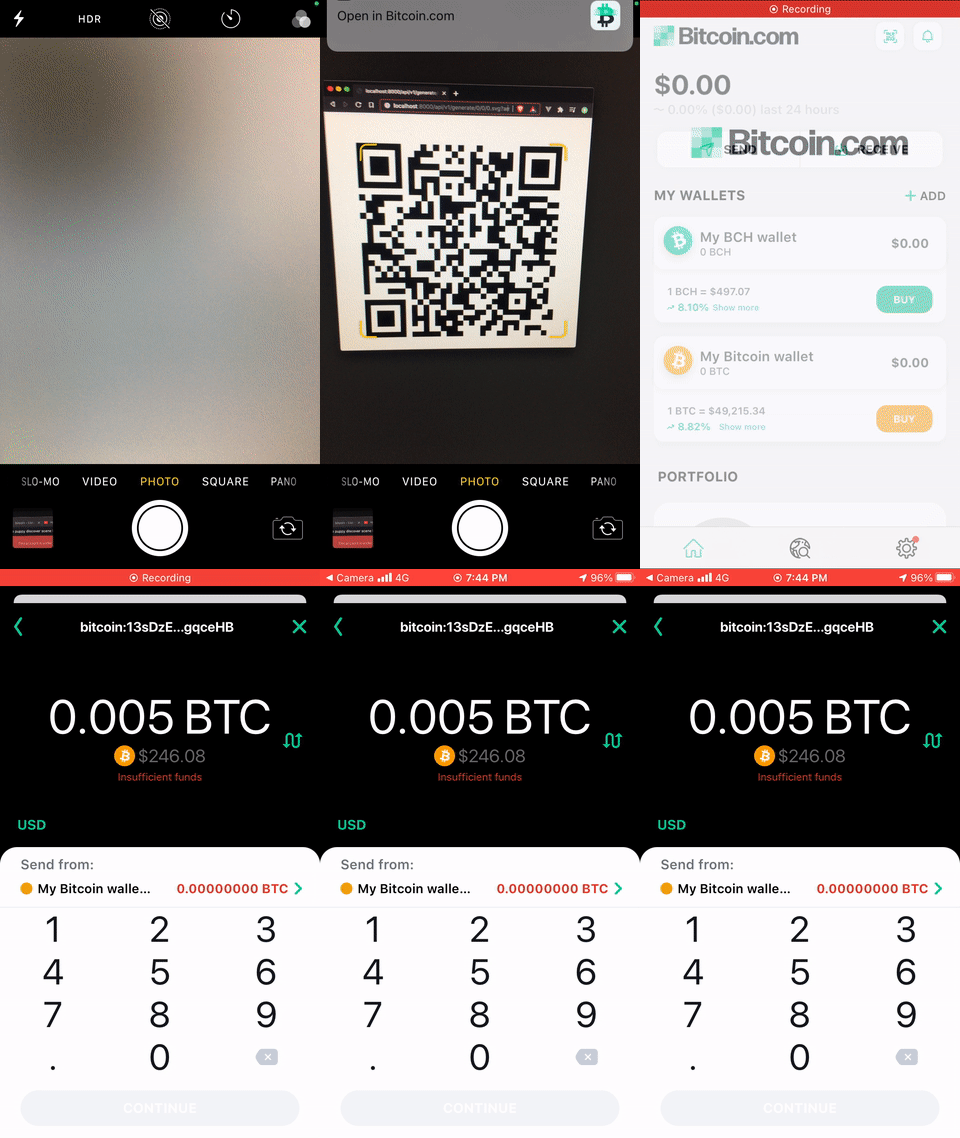
## Quick Start
To start a local instance of Spot you will first need to create a `ROOT_PUBLIC_KEY`. This is the public key for the root HD wallet, all accounts will be derived from this key. Once you have created a public key, pass it to the container as an ENV and run it using Docker.
```sh
export ROOT_PUBLIC_KEY=`node -e "console.log(require('hdkey').fromMasterSeed(Buffer.from(require('bip39').mnemonicToSeedSync(require('bip39').generateMnemonic()).toString('hex'), 'hex')).publicExtendedKey);"`
docker run -p 8888:8888 --env ROOT_PUBLIC_KEY=$ROOT_PUBLIC_KEY anthonybudd/spot
open http://localhost:8888/api/v1/generate/0/0/0.svg?amount=0.005
```
⚠️ Do not use the above code to create production keys!
## REST API
### `GET - /api/v1/generate/:account/:wallet/:address`
Endpoint for generating the receiving address. The `account`, `wallet` and `address` URL parameters represent the derivation path for the BIP 32 tree node.
### Response
By default the response will be a plain JSON object containing the address.
```json
{
"addresss": "13sDzEE3L8LeB3Af9SWiNxxY71ZjgqceHB",
}
```
### Response - QR Codes
To create a QR code of the address add the file extension `.png` or `.svg` to the endpoint, for example `/api/v1/generate/0/0/0.png`.
If you would like to prompt the user to pay a specific amount when they scan the QR code use the query parameter `amount`, this value will be in BTC. Example `/api/v1/generate/0/0/0.png?amount=0.0005`.

⚠️ Do not send Bitcoin here.
## Implementation
Spot is a stateless microservice designed to be deployed along with the rest of your containers in your infrastructure. Your application will make an HTTP request to Spot to generate an address.
To maximise security Spot does not use your private key. This means if your servers get hacked no sensitive information can be compromised. Even with these security measures you should never allow Spot to be publicly open to the internet.
Each user on your application will need their own corresponding `account` in spot. If your user ID column is unsigned int you could use this. Alternatively if you use UUID, you may need to add a new int column to the users table called `account_id` for storing the spot account.
In production you should only use one `address` for each transaction. So on the first transaction the derivation path will be `.../0/0/0`, the second will be `.../0/0/1`, the third `.../0/0/2` and so on.
```
ROOT_PUBLIC_KEY
│
└─── Account 0
│ └─── Chain 0
│ │ Address 0: 1PYvjSG6sHzHbiw19DXsbRqe6tvEU8X294
│ │ Address 1: 13uZtpZN8gQr7yypD5G5u4Y6sghiBBmAjC
│ │ Address 2: 1M1cb4EWwRSeGwNCrTtVXiDKzkdPBznzdd
│ │ ...
│
└─── Account 1
│ └─── Chain 0
│ │ Address 0: 17mcx19MzsPAWx18f6RLsB8c66TDHR66aS
│ │ Address 1: 19f3ExY2LuuYH8nxuP1pPSTaTFLjHYDXn5
│ │ ...
│...
```
### Example
Below is a basic example of how Spot works in practice.
1. A user incurs a charge on your website, such as a one-off payment or a monthly fee.
2. The backend of your application will send a request to the Spot microservice `/api/v1/generate/:account/:wallet/:address`.
3. In your application you will need to prompt the user to send bitcoin to the address. You can use the QR code feature and the `amount` param to return an image. For example `/api/v1/generate/0/0/15266.png?amount=0.0005`
4. You will need to externally verify the payment and confirm that correct amount was sent using a Bitcoin full node or an API.
### Why "Spot"?
It's the furthest thing from Stripe.