https://github.com/antonfisher/flap-app-launcher
Application Launcher based on ElectronJS
https://github.com/antonfisher/flap-app-launcher
application-launcher electronjs javascript ubuntu
Last synced: about 1 month ago
JSON representation
Application Launcher based on ElectronJS
- Host: GitHub
- URL: https://github.com/antonfisher/flap-app-launcher
- Owner: antonfisher
- License: mit
- Created: 2016-12-06T08:15:11.000Z (over 9 years ago)
- Default Branch: master
- Last Pushed: 2019-12-26T22:38:13.000Z (over 6 years ago)
- Last Synced: 2025-04-09T18:14:29.639Z (about 1 year ago)
- Topics: application-launcher, electronjs, javascript, ubuntu
- Language: JavaScript
- Size: 449 KB
- Stars: 2
- Watchers: 3
- Forks: 1
- Open Issues: 2
-
Metadata Files:
- Readme: README.md
- Changelog: CHANGELOG.md
- License: LICENSE
Awesome Lists containing this project
README
# Flap-App-Launcher
[](https://travis-ci.org/antonfisher/flap-app-launcher)
[](https://coveralls.io/github/antonfisher/flap-app-launcher?branch=master)

[](https://github.com/antonfisher/flap-app-launcher/blob/master/LICENSE)
Compact applications launcher for Ubuntu.

## Features
- minimalistic design
- suggestions on TAB button
- suggestions respect usage statistics
- run printed command in the terminal if not found in the index
- history of any run commnads.
The application list generates from:
- main menu shortcuts
- any commands what were run before.
## Installation
There are 3 ways to install the application:
#### Using NPM:
```bash
sudo npm install -g --unsafe-perm=true flap-app-launcher
#Note: "--unsafe-perm=true" is needed because of this: https://github.com/npm/npm/issues/17268
```
Run anywhere with `flap-app-launcher`.
#### Download *.deb package:
Down load from [latest release page](https://github.com/antonfisher/flap-app-launcher/releases/latest).
Or execute in the bash:
```bash
# for x86_64
wget https://github.com/antonfisher/flap-app-launcher/releases/download/v1.1.2/flap-app-launcher_1.1.2_x64.deb
sudo dpkg -i flap-app-launcher_1.1.2_x64.deb
flap-app-launcher
# for ia32
wget https://github.com/antonfisher/flap-app-launcher/releases/download/v1.1.2/flap-app-launcher_1.1.2_ai32.deb
sudo dpkg -i flap-app-launcher_1.1.2_ia32.deb
flap-app-launcher
```
#### From sources (for development):
```bash
git clone git@github.com:antonfisher/flap-app-launcher.git
cd flap-app-launcher
npm install
npm run lint
npm test
npm start # production mode
npm run dev # development mode
```
## Configuration
The config file will be created after first application run.
Default hotkey: `Super+Space`.
To change default hotkey edit the config file:
```
# for npm or binaries installation:
vim ~/.flap-app-launcher.config.json
# for source code installation:
vim %SOURCE_DIR%/.flap-app-launcher.config.json
```
__NOTE:__ single hotkeys (like just `Super`) are not supported now.
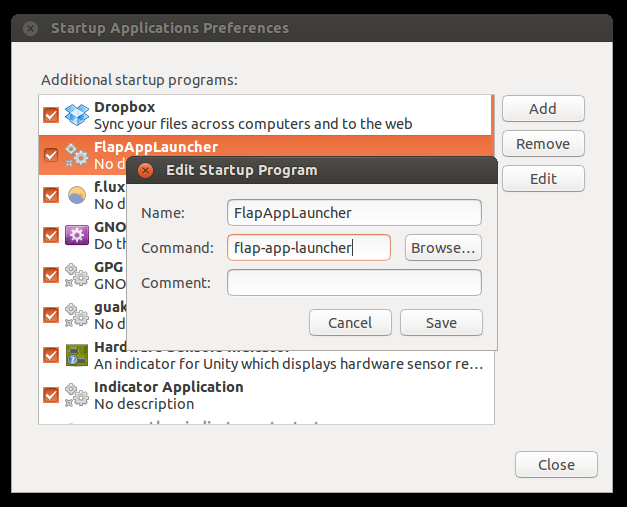
## Add to the autorun on Ubuntu
The _Command_ must be:
- for NPM installation: `flap-app-launcher`
- for binaries installation: `%PATH_TO_BINARIES%/flap-app-launcher`.
## ToDo
- [x] automate build binaries
- [x] tests coverage
- [x] configuration file
- [x] configuration window
- [x] automate release process
- [ ] driver for iOS/Win (?)
- [ ] add google apps support