https://github.com/anuja-rahul/ticketingapp
Built with Spring Boot, TicketingApp backend ensures high performance and responsiveness for managing ticket transactions and event data. It provides secure JWT-based authentication and role-based access control for a dynamic, real-time experience
https://github.com/anuja-rahul/ticketingapp
jwt-authentication learning-by-doing multithreaded postgresql restful-api spring-boot spring-jpa
Last synced: 2 months ago
JSON representation
Built with Spring Boot, TicketingApp backend ensures high performance and responsiveness for managing ticket transactions and event data. It provides secure JWT-based authentication and role-based access control for a dynamic, real-time experience
- Host: GitHub
- URL: https://github.com/anuja-rahul/ticketingapp
- Owner: anuja-rahul
- License: apache-2.0
- Created: 2024-10-17T18:14:03.000Z (almost 2 years ago)
- Default Branch: main
- Last Pushed: 2024-12-12T19:34:11.000Z (over 1 year ago)
- Last Synced: 2025-04-24T02:44:56.898Z (about 1 year ago)
- Topics: jwt-authentication, learning-by-doing, multithreaded, postgresql, restful-api, spring-boot, spring-jpa
- Language: Java
- Homepage:
- Size: 45.7 MB
- Stars: 0
- Watchers: 1
- Forks: 0
- Open Issues: 0
-
Metadata Files:
- Readme: README.md
- License: LICENSE
Awesome Lists containing this project
README
# Real-Time Event Ticketing System









```shell
_____ _ _ _ _ _ ___ ___
|_ _(_)__| |_____| |_(_)_ _ __ _ /_\ | _ \_ _|
| | | / _| / / -_) _| | ' \/ _` |/ _ \| _/| |
|_| |_\__|_\_\___|\__|_|_||_\__, /_/ \_\_| |___| v1.0
|___/
running on Spring Boot 3.3.4
```
TicketingApp backend is a state-of-the-art solution built with Spring Boot, designed to efficiently manage ticket transactions and event data.
Utilizing multithreading and the Producer-Consumer pattern, it ensures high performance and responsiveness.
The system follows solid Object-Oriented Programming (OOP) principles, promoting scalability and maintainability.
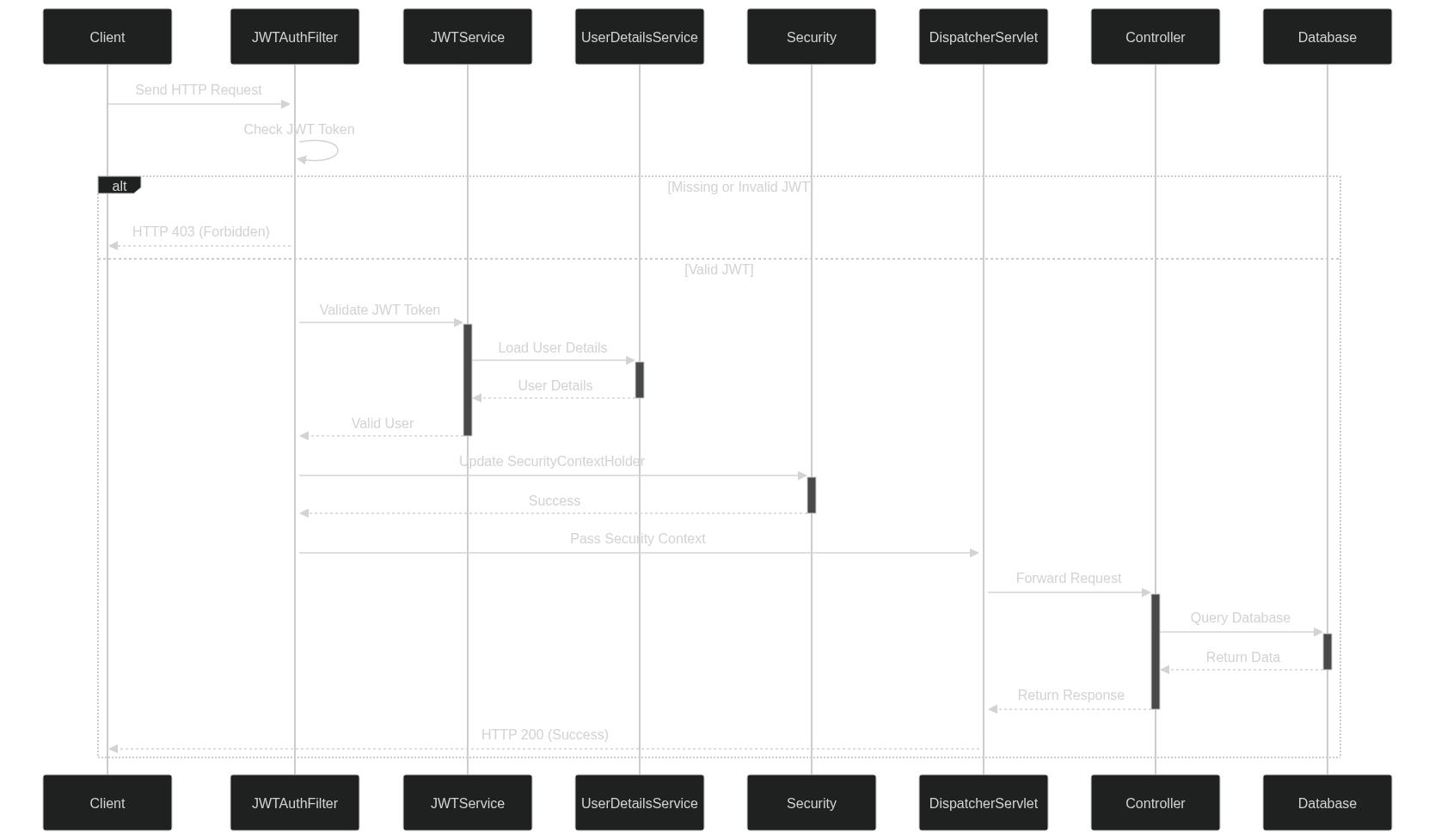
Secure JWT-based authentication and role-based access control provide distinct functionalities for admins, vendors, and customers.
Seamlessly integrating with the frontend, it offers a dynamic, real-time experience for tracking ticket sales and managing events with precision.
[](https://mermaid.live/edit#pako:eNpVUsGO2yAU_BXr7dVxsLGxzVa9NNtTq0q7PVW-vBgco8XGArzdNMq_F5Ooq554M8O8xwAX6I2QwOFkcRmTb8-P3ZwkX62Z_dMskk-73efk8PNHZMN6I74E1RqtpY38B7zJL9K-qV5G7V7fhGe5GKe8seeofcD7HPR4RLcZN7nX6NxBDomQA67aJ4PSmj8QQlIX5r1K_kApvde730r4kZfL-yOkMEk7oRIh1mXr1IEf5SQ74KEUaF876OZr2IerNy_nuQfu7SpTWBeBXh4UhtuY_iefxHZS4ANqF0htUMgAL-DPS7w_5Xzo2Jt5UKeNX60O9Oj94vh-v8nZSflxPWa9mfZOiRGtH99atmcFa7CgktUUK0pFf8zbZijKfBA1yQuE6zWFBeet6zvwhmSkKvKGVoxWtGyqFM7Ac5LlJWN5WbZ0o1nw_DEmpCBZW7O8aauKVbRmpA4GGdN8vz19_AEpWLOexn8Bw7xf0R7x9S-eDK5R)
## *TicketingAPI Class Diagram*
[](https://github.com/anuja-rahul/ticketingApp/blob/main/diagrams/ticketingappClassDiagram.png)
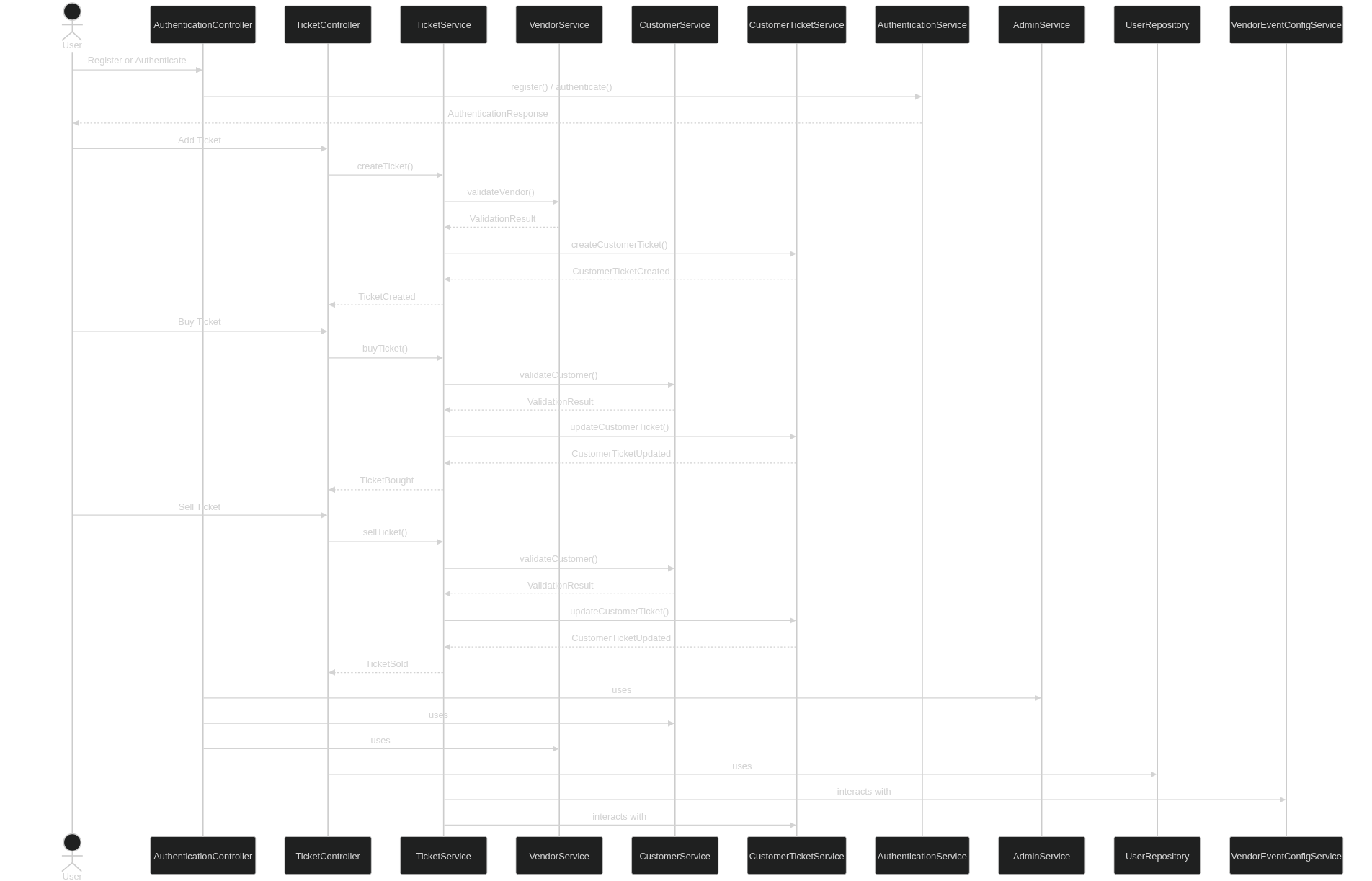
## Sequence Diagram (Producer-Consumer)
[](https://mermaid.live/edit#pako:eNrtVsuO2jAU_RXLqxmJoRARFLwYqUO77AY6s6jYuLEHrEns1A_aFPHvvXkBcUKBqt01q9g-576O7esdjhXjmGDDvzkuY_5B0LWm6Uoi-GhslUbPhutqnFFtRSwyKi167-yGSxhSK5ScK2m1SpI-5GcRv3F7GbHkeiti3l1-4ZIpfXZ57oxVKb8M8NxUwCI79PD4eDYhghZ8LYwFGBTjBFV7OsfrMVq7JkjXFu_u0TtET0ze3fcZrXnooTBZBEw8wIKbTEnTTcqvPRAZq2crqI84oR3CjTWH2KrJJsIWpCS1ZCJoSxPBgFZNN7QWqErIc_ZS8aqsXGLPuetVtYm1vdg476X0BtFGzkubrDeS_ip7vIuqPLn8ZlW-uvySJN7ROIrSLPiV-YfCuIz9dWGeS5u3C_Ok3Hpjr9BlyZPkZmEMkP4r82fKLFVyOC-_v1lZKo4XqjPcXEHqVP1Knne1HVm926HYTwueKSOgfeZdePfS_LgF12DlVawPToSEBgEd2KDvwm5ulNQn4wEGUEoFg16_K4ytMOSb8hUm8MuoflvhldwDDtqRWuYyxsRqxwdYF2cFk1eaGBhVe6V-JRxmoc1-Ueo45qxI_VP1tChfGCUGkx3-gUkQjodBNI6ms1E0jaIwCgc4x2QSDmdBMA4mk3A0DWZRsB_gn6XV0TDc_wKz5wu7)
## JWT Authentication
[](https://mermaid.live/edit#pako:eNqFVFFv2jAQ_iuWnzaNQkJIAD9UmsqqblqlrrBNmngx9kGsBjuzna6s4r_PTgyFJtvygMjdfffdZ3-5Z8wUB0ywgZ8VSAYzQTeabpcSuaek2gomSiotuioESNuOf_q-eF_Z_FoUFnRneg76UTBo574a0DOwVBTmrzVzYJUWdtfOzIQpqWU5aA8uoGO2KyWtVkXRNdiMWrqixlE2uUbfxeXluzNFxE0gObpZLO7QvT8jE3jOqhzsFeoqB_bgi9BCPUDgaH5pYdGtMEbIDVIafZSPtBDc1zb5dnfXvhmPNIOMogS9uVZ6JTgH-baBQWEAfftfq0ZfOG7S1FMLrycNwFDnUe3LIuizory-RRQyL-B2uVdxccrdDTxhDYDTY230eeTpiXbKPDjHEZW1xEPAuwKe7I0q-KGNfw7pLtp5xRgYs5T_4Gv5kaA7asyxLwq8Ly1aCN_mxbMEuSv-RTU_N15t1mNRzRysTNCXCvTuxNpHphCptZ0y3IOttKzznd19fYewALsHUyp5RtSS9Nq7wyhCb8J5HpwruT9Z3MNb0FsquNtHzz61xDaHLSwxcX851Q9LvJR7V0crq-Y7yTCxuoIeruobDrvrPPiBC6s0Jmvqvo8eLpxlwb0-Y7sr_eLbCGNdR6bkWmx8vNKFC-fWloYMBj7d3wibV6s-U9uBETx3WyR_nGaDbJhN6DCBbJzQNEk4W8XTyXo4itd8HMVDivf7HnbLxnd9wmQS9aN0GE-SNEvSZDRJe3iHSRz141GWxaPRNPHhzGF-K-VURP3pOIsn0zTN0mScRWMHgFrNbbOz69Xdw1pVm_wo0PH9qOH1-_4PXujrmQ)
## 🎫 Real-Time Event Ticketing System Checklist
- [x] **Accept User Prompts at Launch**
Prompt users for configuration options before application startup.
- [x] **Error Handling and Input Validation**
Ensure robust error handling and validation for all user inputs.
- [ ] **Start and Stop Functionality via CLI Buttons**
Implement CLI commands to easily start and stop the system.
- [ ] **Default Configuration Feature**
Provide a fallback configuration to use when custom settings are not specified.
- [x] **Dynamic Configuration Feature (Optional)**
Allow for real-time, customizable configurations during runtime.
- [x] **Documentation for CLI Usage and Config Options**
Provide clear documentation for all available CLI commands and configuration options.
- [x] **Javadoc for All Classes and Methods**
Ensure comprehensive Javadoc documentation is provided for maintainability.
## 🚀 Getting Started
### Prerequisites
- Java 21 or higher
- Maven 3.6.3 or higher
- PostgreSQL 13 or higher
### Installation
1. Clone the repository:
```shell
git clone https://github.com/anuja-rahul/ticketingApp.git
cd ticketingApp
```
2. Environment variables Configuration:
in the `.env` file
```bash
# Database connection URL for PostgreSQL
SPRING_DATASOURCE_URL=jdbc:postgresql://localhost:5432/ticketingapp
# Database username
SPRING_DATASOURCE_USERNAME=yourUsername
# Database password
SPRING_DATASOURCE_PASSWORD=yourPassword
# Secret key for JWT authentication (265bit preferably)
SECRET_KEY=yourSecretKey
```
3. Build the project:
```shell
mvn clean install
```
4. Run the application:
```shell
mvn spring-boot:run
```
### Running Tests
To run the tests, use the following command:
```shell
mvn test
```
### Usage
After starting the application, you can access the API at `http://localhost:8080/api`.
### API Documentation
After starting the application, you can access the API documentation at `http://localhost:8080/swagger-ui/index.html`.

## 📄 License
This project is licensed under the Apache License 2.0 - see the [LICENSE](LICENSE) file for details.
[](https://github.com/anuja-rahul/ticketingApp/)