https://github.com/aogg/docker_lnmp
一键部署基于docker的LAMP环境,并利用electron + vue 提供gui管理。+++ 可配置的多进程php扩展安装
https://github.com/aogg/docker_lnmp
docker docker-php electron electron-vue gui lnmp mac node php php-electron php-gui powershell ps1 vue
Last synced: 6 months ago
JSON representation
一键部署基于docker的LAMP环境,并利用electron + vue 提供gui管理。+++ 可配置的多进程php扩展安装
- Host: GitHub
- URL: https://github.com/aogg/docker_lnmp
- Owner: aogg
- License: mit
- Created: 2016-01-17T07:29:34.000Z (over 10 years ago)
- Default Branch: electron
- Last Pushed: 2023-04-16T23:16:04.000Z (about 3 years ago)
- Last Synced: 2024-04-10T13:20:28.471Z (over 2 years ago)
- Topics: docker, docker-php, electron, electron-vue, gui, lnmp, mac, node, php, php-electron, php-gui, powershell, ps1, vue
- Language: JavaScript
- Homepage:
- Size: 1.28 MB
- Stars: 37
- Watchers: 2
- Forks: 5
- Open Issues: 6
-
Metadata Files:
- Readme: README.md
- License: LICENSE
Awesome Lists containing this project
README
# 基于docker的LNMP环境
[](https://www.npmjs.com/) [](https://electron.atom.io/) [](https://www.docker.com/) [](https://cn.vuejs.org/) []()
[]() []()
## 说明
一个基于[docker](https://www.docker.com/)的LNMP环境,并利用[electron](https://electron.atom.io/) + [vue](https://cn.vuejs.org/) 提供gui管理(目前只处理了window环境和mac环境,后续支持linux)
其中gui界面通过[electron](https://electron.atom.io/)+[webpack](http://webpack.github.io/)+[vue](https://cn.vuejs.org/)+[babel](http://babeljs.cn/)实现。
## 使用
- npm打开
```bash
git clone https://github.com/aogg/docker_lnmp.git
cd electron
npm install --registry=https://registry.npm.taobao.org
npm start
```
- 首次点击构建,构建docker容器
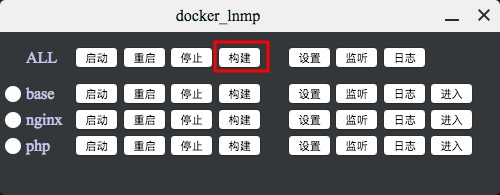
- 再点击启动按钮,启动php环境
- 其中xdebug需要额外配置127.0.0.1 host_localhost的hosts配置
## 容器配置
各容器放在[docker](docker)文件夹内,对应配置也在容器文件夹的conf文件夹
其中php、nginx的conf文件夹实现共享目录,可本地修改并在容器内及时体现出
如:
1、[docker/php/conf/conf/php.ini](docker/php/conf/conf/php.ini)
2、[docker/php/conf/etc/php-fpm.conf](docker/php/conf/etc/php-fpm.conf)
3、[docker/nginx/conf/nginx.conf](docker/nginx/conf/nginx.conf)
其中sources.list是通过COPY过去,所以如要修改必须重新构建所有容器
## 多进程安装扩展
- 1、PHP扩展安装相关目录为[docker/php/src/](docker/php/src),对应容器内路径为/usr/local/php-ext/。
- 2、[config.json](docker/php/src/config.json)为所有扩展的配置文件
可配置参数:
```json
{
"EXT_INSTALL" : "是否安装",
"EXT_NAME" : "扩展名称",
"EXT_URL" : "扩展下载地址",
"EXT_TGZ_DIR" : "不下载直接用本地目录",
"EXT_DEPEND" : "扩展对应依赖",
"EXT_ARG" : "扩展编译时参数",
"EXT_EVAL" : "扩展下载完成后执行的代码",
"EXT_DESC" : "扩展描述"
},
```
- 3、[install.json](docker/php/src/install.json)为本次构建(build)时需要安装的扩展
- 4、[php-ext.sh](docker/php/src/php-ext.sh)为安装PHP扩展的核心多线程shell脚本。平时在容器内可通过下面方式直接安装指定的多个扩展
```shell
bash /usr/local/php-ext.sh memcached-2.2.0 xdebug-2.4.0
```
- 5、最大并发安装PHP扩展的数量,默认值为15。
## 打包
放在electron/app/dist目录下
```
npm run pack
```
## 各截图
> 主界面截图
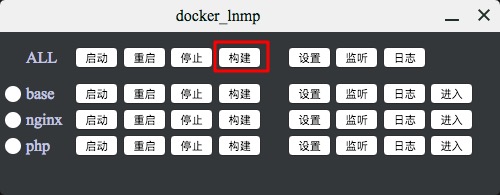
> mini安装[多个扩展](https://github.com/aogg/docker_lnmp/blob/a716e496d59bf408804cda1e10b970af387a62bf/docker/php/src/install.json)时间
