https://github.com/aojdevstudio/finance-guru
Finance Guru™ - AI-powered family office system built on BMAD-CORE™ v6 architecture
https://github.com/aojdevstudio/finance-guru
Last synced: 3 months ago
JSON representation
Finance Guru™ - AI-powered family office system built on BMAD-CORE™ v6 architecture
- Host: GitHub
- URL: https://github.com/aojdevstudio/finance-guru
- Owner: AojdevStudio
- License: other
- Created: 2025-10-18T23:50:19.000Z (9 months ago)
- Default Branch: main
- Last Pushed: 2026-03-13T18:54:18.000Z (4 months ago)
- Last Synced: 2026-03-14T07:14:24.093Z (4 months ago)
- Language: Python
- Size: 28.6 MB
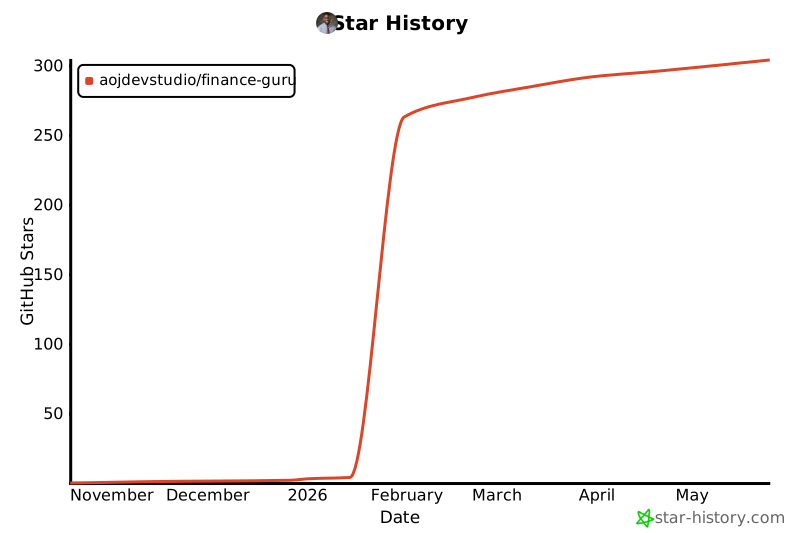
- Stars: 288
- Watchers: 3
- Forks: 85
- Open Issues: 1
-
Metadata Files:
- Readme: README.md
- Changelog: CHANGELOG.md
- Contributing: docs/CONTRIBUTING.md
- Funding: .github/FUNDING.yml
- License: LICENSE
- Codeowners: .github/CODEOWNERS
- Agents: AGENTS.md
Awesome Lists containing this project
README

Finance Guru™
Stop juggling 10 browser tabs for financial analysis.
One command activates 8 AI specialists who work together as your private family office.








---
## The Problem I Solved
I was drowning in complexity. Every investment decision meant:
- Opening Yahoo Finance for prices
- Switching to a spreadsheet for calculations
- Googling "how to calculate Sharpe ratio" (again)
- Copy-pasting data between 5 different tools
- Second-guessing myself because I couldn't see the full picture
**The real cost wasn't time—it was confidence.** I never felt certain my analysis was complete.
## The Insight
What if instead of me becoming an expert in everything, I could have a *team* of experts who already knew my portfolio, my risk tolerance, and my goals?
Not a chatbot. Not an app. A **personal family office** that treats me like a wealth management client—but built on AI agents that can actually run calculations.
## What I Built
Finance Guru™ is my private AI-powered family office. It's not software you install—it's a system where Claude transforms into specialized financial agents who work exclusively for me.
**One command:**
```bash
/finance-orchestrator
```
**Eight specialists activate:**
| Agent | Expertise | What They Do |
|-------|-----------|--------------|
| **Cassandra Holt** | Orchestrator | Coordinates the team, routes my requests |
| **Market Researcher** | Intelligence | Scans markets, identifies opportunities |
| **Quant Analyst** | Data Science | Runs calculations, builds models |
| **Strategy Advisor** | Portfolio | Optimizes allocations, validates strategies |
| **Compliance Officer** | Risk | Checks position limits, flags concerns |
| **Margin Specialist** | Leverage | Analyzes margin strategies safely |
| **Dividend Specialist** | Income | Optimizes yield, tracks distributions |
| **Tax Optimizer** | Efficiency | Structures holdings for tax advantage |
## See It In Action
**Me:** "Should I add more TSLA to my portfolio?"
**What happens behind the scenes:**
```bash
# Market Researcher checks momentum
uv run python src/utils/momentum_cli.py TSLA --days 90
# Quant Analyst calculates risk metrics
uv run python src/analysis/risk_metrics_cli.py TSLA --days 90 --benchmark SPY
# Quant Analyst checks market-implied risk
uv run python src/analysis/itc_risk_cli.py TSLA --universe tradfi
# Strategy Advisor checks correlation with existing holdings
uv run python src/analysis/correlation_cli.py TSLA PLTR NVDA --days 90
# Compliance Officer validates position size
# → Checks if addition exceeds concentration limits
```
**What I get:** A coordinated answer that considers momentum, risk, correlation, and compliance—not just a single data point.
## The Technical Foundation
### 13 Production-Ready Analysis Tools
Every tool follows the same bulletproof pattern:
```
Pydantic Models → Calculator Classes → CLI Interfaces
↓ ↓ ↓
Type Safety Business Logic Agent Access
```
| Category | Tools | Key Metrics |
|----------|-------|-------------|
| **Risk** | Risk Metrics, ITC Risk | VaR, CVaR, Sharpe, Sortino, Max Drawdown, Beta, Alpha |
| **Technical** | Momentum, Moving Averages, Volatility | RSI, MACD, Golden Cross, Bollinger Bands, ATR |
| **Portfolio** | Correlation, Optimizer, Backtester | Diversification score, Max Sharpe, Risk Parity |
| **Options** | Options Pricer | Black-Scholes, Greeks, Implied Volatility |
| **Hedging** | Total Return, Rolling Tracker, Hedge Sizer, Hedge Comparison | DRIP modeling, put roll alerts, contract sizing, SQQQ vs puts analysis |
### External Risk Intelligence
**ITC Risk Models API** integration provides market-implied risk scores:
- Real-time risk assessment for TSLA, AAPL, MSTR, NFLX, SP500, commodities
- Risk bands help agents validate entry/exit timing
- Complements internal quant metrics with external perspective
### Hedging & Portfolio Protection Toolkit
Four CLI tools for managing downside protection, built from real advisory sessions:
```bash
# Compare total returns across tickers (price + dividends + DRIP)
uv run python src/analysis/total_return_cli.py JEPI JEPQ QQQI --days 180
# Check put option positions and get roll suggestions
uv run python src/analysis/rolling_tracker_cli.py status
uv run python src/analysis/rolling_tracker_cli.py suggest-roll --dte-threshold 7
# Size hedge contracts based on portfolio value and monthly budget
uv run python src/analysis/hedge_sizer_cli.py --portfolio-value 200000 --budget 500
# Compare SQQQ inverse ETF vs protective puts for a market drop scenario
uv run python src/analysis/hedge_comparison_cli.py --drop-pct 20 --days 30
```
All hedging tools share 13 Pydantic models and read defaults from `user-profile.yaml` via the config loader.
## Quick Start
**For complete installation instructions, see [docs/setup/SETUP.md](docs/setup/SETUP.md)**
### Prerequisites
```bash
# Claude Code (the orchestration platform)
curl -fsSL https://claude.ai/install.sh | bash
# Python 3.12+ with uv package manager
curl -LsSf https://astral.sh/uv/install.sh | sh
# Bun (for onboarding and hooks)
curl -fsSL https://bun.sh/install | bash
# Docker (optional, for Google Drive MCP)
# Install from https://docs.docker.com/get-docker/
```
### Setup
```bash
# 1. Fork and clone the repository
git clone https://github.com/YOUR-USERNAME/family-office.git
cd family-office
# 2. Run the setup script
./setup.sh
```
The setup script will:
- Create your private documentation directories
- Set up portfolio data folders
- Create user profile template
- Install Python dependencies
- Load Finance Guru agent commands (symlinks to ~/.claude/commands/fin-guru)
- Load Finance Guru skills (9 skills linked to ~/.claude/skills/)
- Run interactive onboarding wizard
**Need help?** See the [complete setup guide](docs/setup/SETUP.md) for troubleshooting and configuration details.
### What Gets Installed
The setup script symlinks Finance Guru components to your global Claude Code configuration:
**Agent Commands** (→ `~/.claude/commands/fin-guru/`):
- `/fin-guru:agents:finance-orchestrator` - Main orchestrator (Cassandra Holt)
- `/fin-guru:agents:market-researcher` - Market intelligence specialist
- `/fin-guru:agents:quant-analyst` - Quantitative analysis specialist
- `/fin-guru:agents:strategy-advisor` - Portfolio strategy specialist
- `/fin-guru:agents:compliance-officer` - Risk and compliance specialist
- `/fin-guru:agents:margin-specialist` - Leverage analysis specialist
- `/fin-guru:agents:dividend-specialist` - Income optimization specialist
- `/fin-guru:agents:onboarding-specialist` - First-time setup guide
**Skills** (→ `~/.claude/skills/`):
- `fin-core` - Core Finance Guru system context
- `margin-management` - Margin Dashboard integration
- `PortfolioSyncing` - Fidelity CSV → Google Sheets sync
- `MonteCarlo` - Monte Carlo simulation runner
- `retirement-syncing` - Retirement account sync (Vanguard/Fidelity)
- `dividend-tracking` - Dividend data sync
- `FinanceReport` - PDF analysis report generator
- `TransactionSyncing` - Transaction history import
- `formula-protection` - Spreadsheet formula protection
These symlinks allow you to use Finance Guru commands and skills from any Claude Code session.
### Onboarding (First Time Users)
**Important:** Run the Onboarding Specialist before using Finance Guru.
```bash
# Start Claude Code in the project
claude
# Activate the Onboarding Specialist
/fin-guru:agents:onboarding-specialist
```
The Onboarding Specialist will guide you through:
1. Financial assessment questionnaire
2. Portfolio profile creation
3. Risk tolerance configuration
4. Strategy recommendations
### After Onboarding
Once your profile is set up, activate the full Finance Guru system:
```bash
# Activate Finance Guru
/fin-guru:agents:finance-orchestrator
# Or go direct to a specialist
*quant # "Analyze TSLA risk profile"
*strategy # "Optimize my portfolio allocation"
*market-research # "What's the momentum on NVDA?"
```
### Justfile Recipes
Finance Guru uses a [justfile](https://github.com/casey/just) as a command launchpad. Run `just --list` to see all available recipes.
**Context Loading** — inject architecture diagrams into Claude Code sessions:
| Command | What It Does |
|---------|--------------|
| `just load-diagrams` | Load all mermaid architecture diagrams |
| `just load-hedging` | Load hedging integration architecture |
| `just load-explorer` | Load interactive knowledge explorer architecture |
| `just load ` | Load a specific diagram by keyword match |
**Agent Personas** — launch Claude Code as a Finance Guru specialist:
| Command | Specialist |
|---------|------------|
| `just orchestrator` | Finance Orchestrator (Cassandra Holt) |
| `just quant` | Quant Analyst |
| `just strategy` | Strategy Advisor |
| `just market` | Market Researcher |
| `just compliance` | Compliance Officer |
| `just margin` | Margin Specialist |
| `just dividend` | Dividend Specialist |
| `just teaching` | Teaching Specialist |
| `just builder` | Builder |
| `just qa` | QA Advisor |
See [docs/guides/just-commands.md](docs/guides/just-commands.md) for the full reference.
## 🍴 Fork Model: Use Finance Guru Safely
Finance Guru is designed to be **forked** and used privately. Here's how it works:
### Architecture for Privacy

### How to Use
1. **Fork this repository** to your GitHub account
2. **Clone to your machine** (never commit personal data)
3. **Run onboarding** to generate your private configs
4. **Pull upstream updates** safely (configs in .gitignore)
### What's Tracked vs. Ignored
**Tracked (safe to commit):**
- ✅ Tools (`src/`, `scripts/`)
- ✅ Agent definitions (`fin-guru/agents/`)
- ✅ Templates (`scripts/onboarding/modules/templates/`)
- ✅ Documentation (`docs/`, `README.md`)
- ✅ Package files (`pyproject.toml`, `package.json`)
**Ignored (private data):**
- 🔒 `fin-guru/data/user-profile.yaml` (your financial data)
- 🔒 `notebooks/updates/*.csv` (your account exports)
- 🔒 `.env` (your API keys)
- 🔒 `fin-guru-private/` (your private strategies)
### Updating Your Fork
```bash
# Add upstream remote (one-time)
git remote add upstream https://github.com/ORIGINAL-AUTHOR/family-office.git
# Pull updates (safe - won't touch your private configs)
git fetch upstream
git merge upstream/main
# Your private data stays untouched
```
### Security Checklist
Before pushing to GitHub:
```bash
# Verify private files are ignored
git status --ignored
# Ensure no sensitive data in commit
git diff --cached
# Check .env is ignored
ls -la .env # Should show file exists locally
git check-ignore .env # Should output ".env" (confirmed ignored)
```
## Project Structure
```
family-office/
├── src/ # Analysis engine (13 tools)
│ ├── analysis/ # Risk, correlation, options, hedging CLIs
│ ├── strategies/ # Backtester, optimizer
│ ├── utils/ # Momentum, volatility, validators
│ ├── models/ # Pydantic type definitions
│ └── config/ # Config loader (CLI-override-YAML-default chain)
├── fin-guru/ # Agent system
│ ├── agents/ # 13 specialist definitions
│ ├── tasks/ # Workflow configurations
│ └── data/ # Knowledge base & templates
├── tests/ # 365+ pytest tests
└── justfile # Command launchpad (just --list)
```
## Why This Approach Works
**Traditional tools** give you data. Finance Guru gives you **judgment**.
The difference:
- A stock screener tells you RSI is 75
- Finance Guru tells you "RSI is overbought, but your portfolio is underweight tech, and Compliance says you have room for a small position if Quant's risk metrics confirm"
**It's the coordination that creates value**—not any single calculation.
## Security & Privacy
- All data stays local on my machine
- No external access to financial information
- Portfolio data never leaves this repository
- This is a private system, not a service
## Built With
- **Claude Code** - Multi-agent orchestration
- **Python 3.12** - Analysis engine
- **Pydantic** - Type-safe validation
- **yfinance** - Market data
- **pandas/numpy/scipy** - Calculations
- **ITC Risk Models** - External risk intelligence
## Context Management
Finance Guru is designed for **token efficiency**. Even with extensive startup context injection, you retain ample room for complex analysis.
### Typical Session Context Usage
| Component | Tokens | % of 200k |
|-----------|--------|-----------|
| System prompt | 3.8k | 1.9% |
| System tools | 17.8k | 8.9% |
| MCP tools | 1.5k | 0.8% |
| Custom agents | 1.0k | 0.5% |
| Memory files (CLAUDE.md) | 2.5k | 1.2% |
| Skills | 3.6k | 1.8% |
| Messages | 22.2k | 11.1% |
| **Free space** | **103k** | **51.3%** |
| Autocompact buffer | 45.0k | 22.5% |
**Key insight**: With Finance Guru context auto-loaded at session start, you still have **51% free context** for actual work.
### Why This Works
1. **CLI-First Architecture**: Heavy computation happens in Python CLI tools, not in context. When you run `risk_metrics_cli.py`, the calculation happens outside the token window.
2. **Session Start Hooks**: The `load-fin-core-config.ts` hook injects:
- System configuration
- User profile with portfolio strategy
- Latest Fidelity balances and positions
- fin-core skill content
3. **Skills Auto-Activate**: Instead of loading all domain knowledge upfront, skills load on-demand based on your prompts and file paths.
4. **Structured Context**: YAML configs and markdown docs compress well and are easy for Claude to parse.
See [docs/reference/hooks.md](docs/reference/hooks.md) for details on the hooks system.
## Requirements
### Required MCP Servers
These MCP servers must be configured for Finance Guru to function:
| MCP Server | Purpose | Required For |
|------------|---------|--------------|
| **exa** | Market research, intelligence gathering | Market Researcher agent, web searches |
| **bright-data** | Web scraping, data extraction | Alternative data sources, live data |
| **sequential-thinking** | Complex financial reasoning | Multi-step analysis workflows |
### Optional MCP Servers
Enhance functionality but not required:
| MCP Server | Purpose | Use Case |
|------------|---------|----------|
| **gdrive** | Google Sheets integration | Portfolio tracking, DataHub sync |
| **perplexity** | AI-powered search with citations | Deep research, market analysis |
| **financial-datasets** | Real-time market data | Live price feeds |
| **context7** | Documentation lookup | Framework reference |
| **nano-banana** | Image generation | Chart visualization |
### Optional APIs
All market data is fetched via yfinance by default. These APIs are optional enhancements:
| API | Purpose | Get Key |
|-----|---------|---------|
| **Finnhub** | Real-time intraday prices | [finnhub.io](https://finnhub.io/) (free tier: 60 calls/min) |
| **ITC Risk Models** | External risk intelligence | Contact ITC directly |
| OpenAI | Alternative LLM for specific tasks | [platform.openai.com](https://platform.openai.com/) |
### Environment Setup
```bash
# Copy example env file
cp .env.example .env
# Edit with your API keys (all optional - yfinance works without keys)
FINNHUB_API_KEY=your_key_here # For real-time prices
ITC_API_KEY=your_key_here # For ITC risk scores
```
## Documentation
| Document | Description |
|----------|-------------|
| [docs/index.md](docs/index.md) | Documentation hub |
| [docs/setup/SETUP.md](docs/setup/SETUP.md) | **Complete setup guide** (start here) |
| [docs/setup/api-keys.md](docs/setup/api-keys.md) | **API key acquisition guide** |
| [docs/setup/TROUBLESHOOTING.md](docs/setup/TROUBLESHOOTING.md) | **Comprehensive troubleshooting** |
| [docs/reference/api.md](docs/reference/api.md) | CLI tools reference |
| [docs/reference/hooks.md](docs/reference/hooks.md) | Hooks system documentation |
| [docs/CONTRIBUTING.md](docs/CONTRIBUTING.md) | Contribution guidelines |
| [docs/guides/just-commands.md](docs/guides/just-commands.md) | Just command recipes reference |
| [fin-guru/README.md](fin-guru/README.md) | Finance Guru module documentation |
**Note:** After running `setup.sh`, your personal strategies and analysis will be in `fin-guru-private/` (gitignored).
## Educational Disclaimer
Finance Guru™ is for educational purposes only. This is not investment advice. All investments carry risk, including potential loss of principal. Always consult licensed financial professionals before making investment decisions.
## License
Finance Guru is free software licensed under the **GNU Affero General Public License v3.0 (AGPLv3)**.
### What This Means for You
**You are free to:**
- ✅ **Use** Finance Guru for any purpose (personal, commercial, educational)
- ✅ **Study** the source code and understand how it works
- ✅ **Modify** the code to suit your needs
- ✅ **Share** copies with others
- ✅ **Distribute** your modifications
**Under these conditions:**
- 📖 **Source code must remain open** (copyleft) - derivatives must use AGPLv3
- 🌐 **Network users get source access** - if you run Finance Guru as a service, users must be able to get the source
- 📝 **Changes must be documented** - state what you modified and when
- 🔄 **Same license for derivatives** - any modifications must also be AGPLv3
### Why AGPLv3?
AGPLv3 is the strongest copyleft license, designed specifically for server software. It ensures:
1. **Community Protection**: Prevents companies from taking this code, modifying it, running it as a SaaS, and keeping improvements private
2. **Transparency**: Anyone using Finance Guru (especially financial analysis tools) can audit the code
3. **Freedom Forever**: Guarantees the software stays free and open for all future users
### Network Copyleft (Section 13)
The key difference from regular GPL: If you run a modified version of Finance Guru on a server and let people interact with it over a network, **you must provide them with the source code**.
This prevents the "cloud loophole" where someone could use your work without contributing back.
### Compatible With
- **Other AGPLv3 projects**: Freely combine
- **GPLv3 projects**: Compatible (see Section 13 of license)
- **Permissive licenses** (MIT, Apache, BSD): Can be included in AGPLv3 projects
### Not Compatible With
- ❌ Proprietary/closed-source projects cannot include Finance Guru code
- ❌ GPL v2-only projects (but GPLv2-or-later is compatible via GPLv3)
### Full License Text
See [LICENSE](LICENSE) for the complete legal terms.
### Questions?
- **"Can I use this for my business?"** Yes! AGPLv3 allows commercial use.
- **"Do I need to open-source my portfolio data?"** No. Your data isn't part of the software.
- **"Can I sell Finance Guru?"** Yes, but you must provide source code to buyers.
- **"Can I make a proprietary fork?"** No. All derivatives must be AGPLv3.
For more on AGPLv3, see the [GNU project page](https://www.gnu.org/licenses/agpl-3.0.html).
## Star History
If you find Finance Guru useful, please ⭐ star the repo to help others discover it!
[](https://star-history.com/#AojdevStudio/Finance-Guru&Date)
---
Finance Guru™ v2.0.0
My AI-powered family office, working exclusively for me.
If Finance Guru helps you, please ⭐ star the repo!