https://github.com/ap0405140/mssqlloganalyzer
Microsoft SQL Server Log Analyzer. DBLOG.DatabaseLogAnalyzer can read the SQL Server transaction logs online, and return RedoSQL and UndoSQL for every transaction. It base on SQL Server fn_dblog() function and develop some extension.
https://github.com/ap0405140/mssqlloganalyzer
databaselog sqlserver
Last synced: 17 days ago
JSON representation
Microsoft SQL Server Log Analyzer. DBLOG.DatabaseLogAnalyzer can read the SQL Server transaction logs online, and return RedoSQL and UndoSQL for every transaction. It base on SQL Server fn_dblog() function and develop some extension.
- Host: GitHub
- URL: https://github.com/ap0405140/mssqlloganalyzer
- Owner: ap0405140
- License: mit
- Created: 2020-03-08T10:00:56.000Z (over 6 years ago)
- Default Branch: master
- Last Pushed: 2025-02-12T06:31:35.000Z (over 1 year ago)
- Last Synced: 2025-04-04T21:07:50.595Z (about 1 year ago)
- Topics: databaselog, sqlserver
- Language: C#
- Homepage:
- Size: 438 KB
- Stars: 150
- Watchers: 8
- Forks: 40
- Open Issues: 8
-
Metadata Files:
- Readme: Readme.md
- License: LICENSE
Awesome Lists containing this project
README
## DBLOG.DatabaseLogAnalyzer can read the SQL Server transaction logs online, and return RedoSQL and UndoSQL for every transaction. It base on SQL Server sys.fn_dblog() function and develop some extension.
#### below is a use demo:
Connect to SQL Server, create a table dbo.OrderDetail, and run some sql on this table.
~~~~sql
-- create table
create table dbo.OrderDetail
(
OrderID int not null,
ItemID int not null,
ItemNumber varchar(10),
QTY int,
Price decimal(8,2),
ADate date,
AUser char(20),
UDate datetime,
UUser varchar(20)
constraint pk_OrderDetail primary key(OrderID,ItemID)
)
-- transaction1: insert 3 rows
insert into dbo.OrderDetail(OrderID,ItemID,ItemNumber,QTY,Price,ADate,AUser,UDate,UUser)
select 1001,1,'D001',100,45.62,'2015-01-02','Xh6','2015-01-03 20:15:18','Lx4' union all
select 1001,2,'Z001_2',150,180,'2015-01-02','cx5','2015-01-08 02:45:32','Yx3' union all
select 1002,1,'Z001_2',300,182.07,'2015-12-12','CL1','2015-12-18 02:45:32','LY6'
-- transaction2: update 1 row
update dbo.OrderDetail set QTY=999 where OrderID=1001 and ItemID=1
-- transaction3: update 3 rows
update dbo.OrderDetail set ItemNumber='!@#$%'
-- transaction4: delete all rows
delete from dbo.OrderDetail
-- transaction5: drop table
drop table dbo.OrderDetail
~~~~
After run, there is no table in the database.
~~~~sql
select * from dbo.OrderDetail
~~~~

**Right now, we can use this tool to recover data online(no need to restore database and logs).**
**Please download zip file in Releases, and extract files to a folder.**
**step1: Execute MSSQLLogAnalyzer.exe.**
**step2: Modify [ConnectionString], change it for your environment.**
**Modify [StartTime] and [EndTime] to what time range need to read logs.**
**Modify [TableName], It can be blank, when blank means read all table logs.**
**step3: Click [Readlog] button, wait for analysis results. below screenshot is the run result.**

**After run finished, It returned some RedoSQL and UndoSQL for every transaction, For recovery, we can use UndoSQL to recover all operations (execute from the back forward).**
~~~~sql
-- recover transaction5(drop table)
create table [dbo].[OrderDetail]
([OrderID] int not null,
[ItemID] int not null,
[ItemNumber] varchar(10) collate Chinese_PRC_CI_AS null,
[QTY] int null,
[Price] decimal(8,2) null,
[ADate] date null,
[AUser] char(20) collate Chinese_PRC_CI_AS null,
[UDate] datetime null,
[UUser] varchar(20) collate Chinese_PRC_CI_AS null
constraint [pk_OrderDetail] primary key clustered ([OrderID] asc,[ItemID] asc)
);
-- recover transaction4(delete all rows)
insert into [dbo].[OrderDetail]([OrderID],[ItemID],[ItemNumber],[QTY],[Price],[ADate],[AUser],[UDate],[UUser]) values(1002,1,'!@#$%',300,182.07,'2015-12-12','CL1','2015-12-18 02:45:32.000','LY6');
insert into [dbo].[OrderDetail]([OrderID],[ItemID],[ItemNumber],[QTY],[Price],[ADate],[AUser],[UDate],[UUser]) values(1001,2,'!@#$%',150,180.00,'2015-01-02','cx5','2015-01-08 02:45:32.000','Yx3');
insert into [dbo].[OrderDetail]([OrderID],[ItemID],[ItemNumber],[QTY],[Price],[ADate],[AUser],[UDate],[UUser]) values(1001,1,'!@#$%',999,45.62,'2015-01-02','Xh6','2015-01-03 20:15:18.000','Lx4');
-- recover transaction3(update 3 rows)
update top(1) [dbo].[OrderDetail] set [ItemNumber]='Z001_2' where [OrderID]=1002 and [ItemID]=1;
update top(1) [dbo].[OrderDetail] set [ItemNumber]='Z001_2' where [OrderID]=1001 and [ItemID]=2;
update top(1) [dbo].[OrderDetail] set [ItemNumber]='D001' where [OrderID]=1001 and [ItemID]=1;
-- recover transaction2(update 1 row)
update top(1) [dbo].[OrderDetail] set [QTY]=100 where [OrderID]=1001 and [ItemID]=1;
~~~~
Query recovery result:
~~~~sql
select * from dbo.OrderDetail
~~~~

**Recovery finished!**
----
#### Some Tips:
#### 1. The SQL Server to be analyzed needs 2008 or later version.
#### 2. Target Database Recovery model must be 'Full'.
#### 3. This module only analyzes for DML and DDL transaction.
#### 4. For develop, please install Visual Studio 2017 or later version and .NET Framework 4.8.
#### 5. Please contact me when have any question: ap0405140@163.com
#### 6. This project is open source, welcome to contribute code or give me some advice to make it better.
#### 7. This project use GPL-3.0 license, For commercial use or to obtain a commercial license, please contact the author.
----
#### SQLCLR use example:
Deployment to SQLServer with SQLCLR, then we can use a SQL Function to readlog in SQL Server Management Studio.
~~~~sql
use master;
-- enable clr
exec sys.sp_configure 'clr enabled';
exec sys.sp_configure 'clr enabled',1;
reconfigure;
-- set database trustworthy on
alter database [DatabaseName] set trustworthy on;
-- open database
use [DatabaseName];
-- create assembly
if exists(select 1 from sys.assemblies where name=N'System.ComponentModel.DataAnnotations')
drop assembly [System.ComponentModel.DataAnnotations];
create assembly [System.ComponentModel.DataAnnotations]
from 'C:\Windows\Microsoft.NET\Framework64\v4.0.30319\System.ComponentModel.DataAnnotations.dll'
with permission_set=unsafe;
if exists(select 1 from sys.assemblies where name=N'System.Runtime.Serialization')
drop assembly [System.Runtime.Serialization];
create assembly [System.Runtime.Serialization]
from 'C:\Windows\Microsoft.NET\Framework64\v4.0.30319\System.Runtime.Serialization.dll'
with permission_set=unsafe;
if exists(select 1 from sys.assemblies where name=N'FCLR')
drop assembly FCLR;
create assembly FCLR
from 'D:\github\MSSQLLogAnalyzer\FCLR\bin\Release\FCLR.dll' --> change the path for your environment.
with permission_set=unsafe;
alter assembly FCLR
add file from 'D:\github\MSSQLLogAnalyzer\FCLR\bin\Release\FCLR.pdb'; --> change the path for your environment.
-- create function
if exists(select 1 from sys.objects where name=N'DBAReadLog')
drop function dbo.DBAReadLog;
create function dbo.DBAReadLog
(
@connectionstring nvarchar(max),
@dt0 nvarchar(max),
@dt1 nvarchar(max),
@obj nvarchar(max)
)
returns table
(
LSN nvarchar(max),
Type nvarchar(max),
TransactionID nvarchar(max),
BeginTime nvarchar(max),
EndTime nvarchar(max),
ObjectName nvarchar(max),
Operation nvarchar(max),
RedoSQL nvarchar(max),
UndoSQL nvarchar(max),
Message nvarchar(max)
)
as external name FCLR.UserDefinedFunctions.DBAReadLog;
-- read log
select *
from dbo.DBAReadLog(N'server=[ServerName];database=[DatabaseName];uid=[LoginName];pwd=[Password];Connection Timeout=5;Integrated Security=false;', -- Database connection string
N'2026/05/11 15:47:00', --StartTime
N'2026/05/11 15:47:59', --EndTime
null) t --TableName, Need include schema name(like dbo.Table1), When blank or null means query all tables logs.
order by TransactionID,LSN;
~~~~

----
#### DBLOG.dll use example:
step1: Start Visual Studio 2022, create a new project.
step2: Add reference DBLOG.dll to current project.
step3: At cs file header, add "using DBLOG;"
step4: Call DatabaseLogAnalyzer.ReadLog() for read logs.
```csharp
string ConnectionString, StartTime, EndTime, TableName;
DatabaseLogAnalyzer dbla;
DatabaseLog[] logs;
//connection string: Please change below connection string for your environment.
ConnectionString = "server=[ServerName];database=[DatabaseName];uid=[LoginName];pwd=[Password];Connection Timeout=5;Integrated Security=false;";
//start time for analyze, format: yyyy-MM-dd HH:mm:ss
StartTime = "2020-03-18 10:01:02";
//end time for analyze, format: yyyy-MM-dd HH:mm:ss
EndTime = "2020-03-18 10:02:02";
//table name: Need include schema name(like dbo.Table1), When blank means query all tables 's logs, you can change it for need.
TableName = "";
// Initializes a new instance of the DBLOG.DatabaseLogAnalyzer class.
dbla = new DatabaseLogAnalyzer(ConnectionString);
// read logs, return a DatabaseLog array, include below properties:LSN,TransactionID,BeginTime,EndTime,ObjectName,Operation,RedoSQL,UndoSQL.
logs = dbla.ReadLog(StartTime, EndTime, TableName);
```
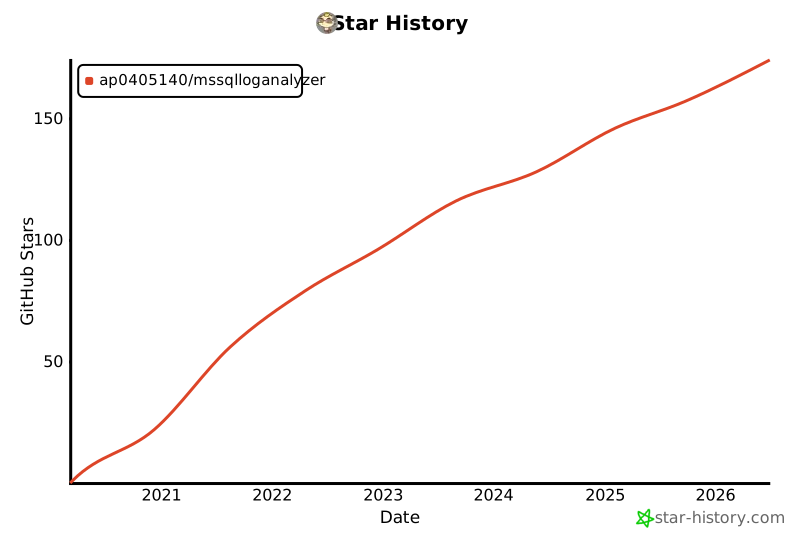
## Star History