https://github.com/apeng215/blocktuner-forge
Minecraft Note Block User Interface
https://github.com/apeng215/blocktuner-forge
forge minecraft mod music noteblock
Last synced: 2 months ago
JSON representation
Minecraft Note Block User Interface
- Host: GitHub
- URL: https://github.com/apeng215/blocktuner-forge
- Owner: APeng215
- License: other
- Created: 2023-10-12T14:47:41.000Z (almost 3 years ago)
- Default Branch: master
- Last Pushed: 2023-12-13T10:14:27.000Z (over 2 years ago)
- Last Synced: 2023-12-13T11:27:19.757Z (over 2 years ago)
- Topics: forge, minecraft, mod, music, noteblock
- Language: Java
- Homepage: https://modrinth.com/mod/blocktuner-forge
- Size: 56.6 KB
- Stars: 0
- Watchers: 1
- Forks: 0
- Open Issues: 0
-
Metadata Files:
- Readme: README.md
- License: LICENSE
Awesome Lists containing this project
README

# BlockTuner (Forge Mod)
[](https://www.curseforge.com/minecraft/mc-mods/blocktuner-forge)
[](https://modrinth.com/mod/blocktuner-forge)
This is the forge version of BlockTuner.
If you want a fabric version, please visit [this page](https://github.com/xwjcool123/BlockTunerMod).
If you want the data pack for older versions of Minecraft, please visit [this page](https://github.com/xwjcool123/blocktuner).
## Instructions
### Installation
Put this mod in your `mods` folder. You also need to install [Forge API](https://files.minecraftforge.net/net/minecraftforge/forge/) if you haven't installed it yet.
Server need to install the mod for it working.
You can get the latest version [here](https://github.com/APeng215/BlockTuner-forge/releases/latest) or find a specific release [here](https://github.com/APeng215/BlockTuner-forge/releases)
### How to Use BlockTuner
`Ctrl` + `Right click` on a note block to open up tuning UI. Placing a note block while holding `Ctrl` also opens the UI automatically.
`Ctrl` to show the note of the note block at crosshair.
`Ctrl` + `Middle click` on note blocks to pick up readily tuned note blocks.
Right click note blocks with blaze rods to play with right clicks without tuning.
### Tuning UI
Top-right corner (from left to right)
*  Play mode - toggle whether the GUI will turn off immediately upon clicking a note on the piano keyboard.
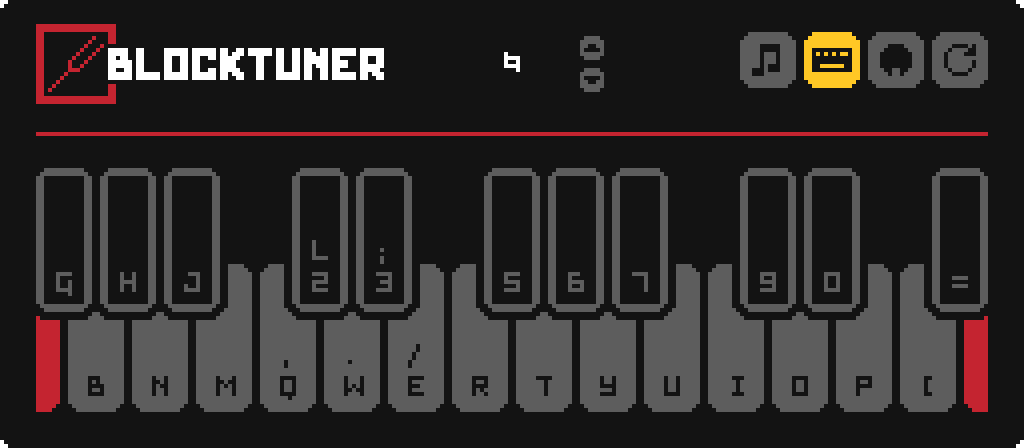
*  Typing keyboard to piano keyboard - toggle whether you want to play the piano keyboard using your computer keyboard.
*  MIDI Device - Click to cycle through available MIDI input devices. The icon shows red if the device is currently unavailable. This usually means it is being used by another program.
### Keyboard Mapping:
## Credits
### Original author
* Fabric version original author - [xwjcool](https://github.com/xwjcool123)
### Localization
* Russian - [Felix14-v2](https://github.com/Felix14-v2) (Currently outdated)
* Japanese - [misaka10843](https://github.com/misaka10843) & [hakkaku](https://note.com/hakukak/)