https://github.com/apilogicserver/basic_demo
https://github.com/apilogicserver/basic_demo
Last synced: about 1 year ago
JSON representation
- Host: GitHub
- URL: https://github.com/apilogicserver/basic_demo
- Owner: ApiLogicServer
- Created: 2025-06-07T20:17:44.000Z (about 1 year ago)
- Default Branch: main
- Last Pushed: 2025-06-07T20:25:02.000Z (about 1 year ago)
- Last Synced: 2025-06-07T21:26:05.683Z (about 1 year ago)
- Language: Python
- Size: 2.38 MB
- Stars: 0
- Watchers: 0
- Forks: 0
- Open Issues: 0
-
Metadata Files:
- Readme: readme.md
- Security: security/__init__.py
Awesome Lists containing this project
README
---
title: Instant Microservices - with Logic and Security
notes: gold is proto (-- doc); alert for apostrophe
version: 0.22 from docsite, for readme 5/24/2025
---
We'll illustrate [API Logic Server](https://www.genai-logic.com/product/key-features) basic GenAI-Logic operation: creating projects from new or existing databases, adding logic and security, and customizing your project using your IDE and Python.
The entire process takes 20 minutes; usage notes:
* Important: look for **readme files** in created projects.
* You may find it more convenient to view this [in your Browser](https://apilogicserver.github.io/Docs/Sample-Basic-Tour).
## 1. Automation: Project Creation
API Logic Server can create projects from existing databases, or use GenAI to create projects with new databases. Let's see how.
### From Existing Database
Create the project - use the CLI (**Terminal > New Terminal**), :
```bash
$ ApiLogicServer create --project_name=basic_demo --db_url=basic_demo
```
> Note: the `db_url` value is [an abbreviation](https://apilogicserver.github.io/Docs/Data-Model-Examples/) for a test database provided as part of the installation. You would normally supply a SQLAlchemy URI to your existing database.
The database is Customer, Orders, Items and Product

### GenAI: New Database
You can create a project *and a new database* from a prompt using GenAI, either by:
* [WebGenAI - in the Browser](https://apilogicserver.github.io/Docs/WebGenAI), or
* [GenAI - docker](https://apilogicserver.github.io/Docs/WebGenAI-install), or
* [GenAI CLI](https://apilogicserver.github.io/Docs/WebGenAI-CLI)
Here we use the GenAI CLI:
1. If you have signed up (see *Get an OpenAI Key*, below), this will create and open a project called `genai_demo` from `genai_demo.prompt` (available in left Explorer pane):
```bash
als genai --using=system/genai/examples/genai_demo/genai_demo.prompt --project-name=genai_demo
```
2. ***Or,*** you can simulate the process (no signup) using:
```bash
als genai --repaired-response=system/genai/examples/genai_demo/genai_demo.response_example --project-name=genai_demo
```
For background on how it works, [click here](Sample-Genai#how-does-it-work).
## 2. Working Software Now
### Open in your IDE and Run
You can open with VSCode, and run it as follows:
1. **Create Virtual Environment:** automated in most cases; see the Appendix (Procedures / Detail Procedures) for details.
2. **Start the Server:** F5 (also described in the Appendix).
3. **Start the Admin App:** either use the links provided in the IDE console, or click [http://localhost:5656/](http://localhost:5656/). The screen shown below should appear in your Browser.
The sections below explore the system that has been created (which would be similar for your own database).
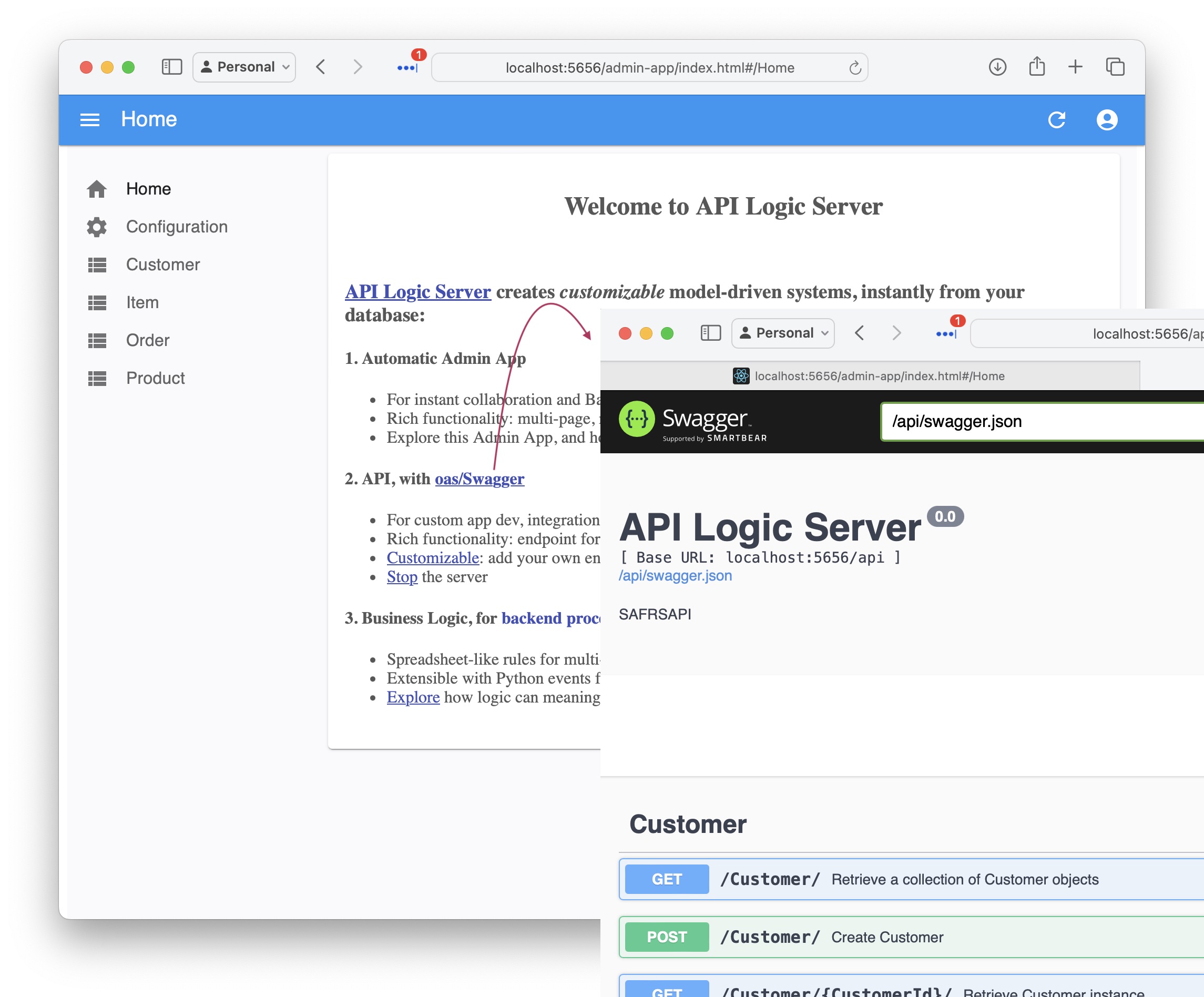
### API with Swagger
The system creates an API with end points for each table, with filtering, sorting, pagination, optimistic locking and related data access -- **[self-serve](https://apilogicserver.github.io/Docs/API-Self-Serve/), ready for custom app dev.**
See the Swagger
### Admin App
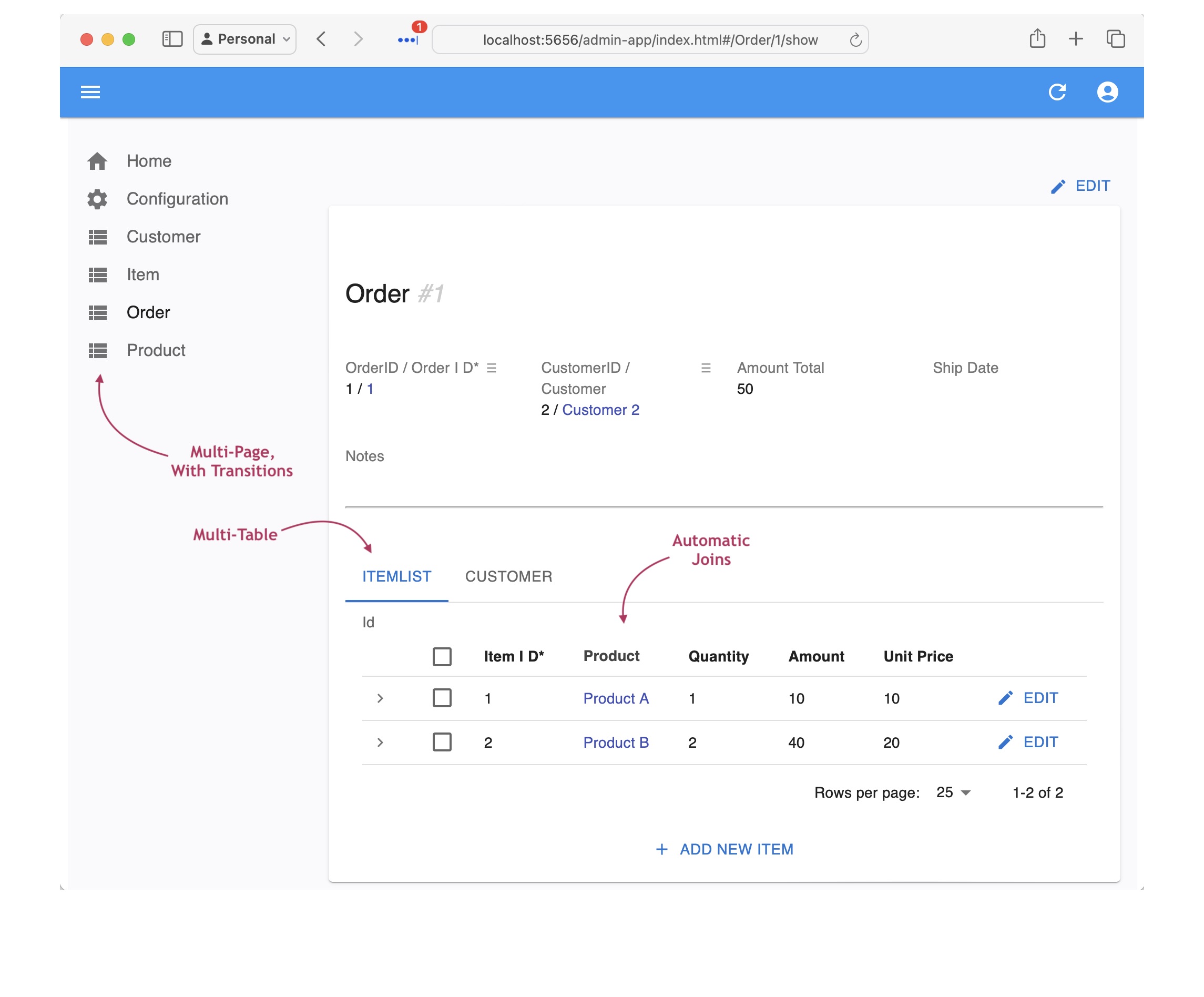
It also creates an Admin App: multi-page, multi-table -- ready for **[business user agile collaboration](https://apilogicserver.github.io/Docs/Tech-AI/),** and back office data maintenance. This complements custom UIs created with the API.
You can click Customer Alice, and see their Orders, and Items.
See the Admin App
### MCP, Vibe, Collaboration
In little more than a minute, you've used either
* **GenAI** to create a database and project using Natural Language, or
* 1 CLI command to create a project from an existing database
The project is standard Python, which you can customize in a standard IDE.
This means you are ready for:
* **Vibe:** unblock UI dev
* Instead of creating data mockups, use GenAI to create real data
* Use you favorite Vibe tools with your running API
* And, you'll have projects that are architecurally correct: shared logic, enforced in the server,
available for both User Interfaces and services.
* **MCP:** your project is MCP-ready: `python integration/mcp/mcp_client_executor.py`.
We'll explore more interesting examples below.
* **Collaboration to Get Requirements Right:** Business Users can use GenAI to create systems, and the Admin app to verify their business idea. And iterate.
> But automated direct access to the database is a terrible architecture. A key feature of GenAI-Logic is logic automation, using declarative, spreadsheet-like **business rules.** Let's now explore those.
## 3. Declare Logic And Security
While API/UI automation is a great start, it's critical to enforce logic and security. You do this in your IDE. Here's how.
The following `add_customizations` process simulates:
* Adding security to your project, and
* Using your IDE to declare logic and security in `logic/declare_logic.sh` and `security/declare_security.py`.
> Declared security and logic are shown in the screenshots below.
It's quite short - 5 rules, 7 security settings.
To add customizations, in a terminal window for your project:
**1. Stop the Server** (Red Stop button, or Shift-F5 -- see Appendix)
**2. Add Customizations**
```bash
als add-cust
als add-auth --db_url=auth
```
### Security: Role Based Access
The `add_customizations` process above has simulated using your IDE to declare security in `logic/declare_logic.sh`.
To see security in action:
**1. Start the Server** F5
**2. Start the Admin App:** [http://localhost:5656/](http://localhost:5656/)
**3. Login** as `s1`, password `p`
**4. Click Customers**
Observe:
**1. Login now required**
**2. Role-Based Filtering**
Observe you now see fewer customers, since user `s1` has role `sales`. This role has a declared filter, as shown in the screenshot below.
**3. Transparent Logging**
See Security Declarations
The screenshot below illustrates security declaration and operation:
* The declarative Grants in the upper code panel, and
* The logging in the lower panel, to assist in debugging by showing which Grants (`+ Grant:`) are applied:

### Logic: Derivations, Constraints
Logic (multi-table derivations and constraints) is a significant portion of a system, typically nearly half. API Logic server provides **spreadsheet-like rules** that dramatically simplify and accelerate logic development.
Rules are declared in Python, simplified with IDE code completion. The screen below shows the 5 rules for **Check Credit Logic.**
The `add_customizations` process above has simulated the process of using your IDE to declare logic in `logic/declare_logic.sh`.
To see logic in action:
**1. In the admin app, Logout (upper right), and login as admin, p**
**2. Use the Admin App to add an Order and Item for `Customer Alice`** (see Appendix)
Observe the rules firing in the console log - see Logic In Action, below.
> 💡 Logic: Multi-table Derivations and Constraint Declarative Rules.
Declarative Rules are 40X More Concise than procedural code.
For more information, [click here](https://apilogicserver.github.io/Docs/Logic-Why).
See Logic In Action
[Declare logic](Logic#declaring-rules) with WebGenAI, or in your IDE using code completion or Natural Language:

**a. Chaining**
The screenshot below shows our logic declarations, and the logging for inserting an `Item`. Each line represents a rule firing, and shows the complete state of the row.
Note that it's a `Multi-Table Transaction`, as indicated by the indentation. This is because - like a spreadsheet - **rules automatically chain, *including across tables.***

**b. 40X More Concise**
The 5 spreadsheet-like rules represent the same logic as 200 lines of code, [shown here](https://github.com/valhuber/LogicBank/wiki/by-code). That's a remarkable 40X decrease in the backend half of the system.
> 💡 No FrankenCode
Note the rules look like syntactically correct requirements. They are not turned into piles of unmanageable "frankencode" - see [models not frankencode](https://www.genai-logic.com/faqs#h.3fe4qv21qtbs).
**c. Automatic Re-use**
The logic above, perhaps conceived for Place order, applies automatically to all transactions: deleting an order, changing items, moving an order to a new customer, etc. This reduces code, and promotes quality (no missed corner cases).
**d. Automatic Optimizations**
SQL overhead is minimized by pruning, and by elimination of expensive aggregate queries. These can result in orders of magnitude impact.
**e. Transparent**
Rules are an executable design. Note they map exactly to our natural language design (shown in comments) - readable by business users.
Optionally, you can use the Behave TDD approach to define tests, and the Rules Report will show the rules that execute for each test. For more information, [click here](https://apilogicserver.github.io/Docs/Behave-Logic-Report/).
### Logic-Enabled MCP
Logic is automatically executed in your MCP-enabled API. For example, consider the following MCP orchestration:
```
List the orders date_shipped is null and CreatedOn before 2023-07-14,
and send a discount email (subject: 'Discount Offer') to the customer for each one.
```
When sending email, we require a business rules to ensure it respects the opt-out policy:

With the server running, test it by posting to `SysMCP` like this:
```bash
curl -X 'POST' 'http://localhost:5656/api/SysMcp/' -H 'accept: application/vnd.api+json' -H 'Content-Type: application/json' -d '{ "data": { "attributes": {"request": "List the orders date_shipped is null and CreatedOn before 2023-07-14, and send a discount email (subject: '\''Discount Offer'\'') to the customer for each one."}, "type": "SysMcp"}}'
```
For more on MCP, [click here](https://apilogicserver.github.io/Docs/Integration-MCP).
## 4. Iterate with Rules and Python
Not only are spreadsheet-like rules 40X more concise, they meaningfully simplify maintenance. Let's take an example:
>> Give a 10% discount for carbon-neutral products for 10 items or more.
The following `add-cust` process simulates an iteration:
* acquires a new database with `Product.CarbonNeutral`
* issues the `ApiLogicServer rebuild-from-database` command that rebuilds your project (the database models, the api), while preserving the customizations we made above.
* acquires a revised `ui/admin/admin.yaml` that shows this new column in the admin app
* acquires this revised logic - in `logic/declare_logic.py`, we replaced the 2 lines for the `models.Item.Amount` formula with this (next screenshot shows revised logic executing with breakpoint):
```python
def derive_amount(row: models.Item, old_row: models.Item, logic_row: LogicRow):
amount = row.Quantity * row.UnitPrice
if row.Product.CarbonNeutral and row.Quantity >= 10:
amount = amount * Decimal(0.9) # breakpoint here
return amount
Rule.formula(derive=models.Item.Amount, calling=derive_amount)
```
To add this iteration, repeat the process above - in a terminal window for your project:
**1. Stop the Server** (Red Stop button, or Shift-F5 -- see Appendix)
**2. Add Iteration**
```bash
als add-cust
als rebuild-from-database --db_url=sqlite:///database/db.sqlite
```
**3. Set the breakpoint as shown in the screenshot below**
**4. Test: Start the Server, login as Admin**
**5. Use the Admin App to update your Order by adding 12 `Green` Items**
At the breakpoint, observe you can use standard debugger services to debug your logic (examine `Item` attributes, step, etc).

This simple example illustrates some significant aspects of iteration, described in the sub-sections below.
> 💡 Iteration: Automatic Invocation/Ordering, Extensible, Rebuild Preserves Customizations
**a. Dependency Automation**
Along with perhaps documentation, one of the tasks programmers most loathe is maintenance. That's because it's not about writing code, but it's mainly archaeology - deciphering code someone else wrote, just so you can add 4 or 5 lines that will hopefully be called and function correctly.
Rules change that, since they **self-order their execution** (and pruning) based on system-discovered dependencies. So, to alter logic, you just "drop a new rule in the bucket", and the system will ensure it's called in the proper order, and re-used over all the Use Cases to which it applies. Maintenance is **faster, and higher quality.**
**b. Extensibile with Python**
In this case, we needed to do some if/else testing, and it was convenient to add a pinch of Python. Using "Python as a 4GL" is remarkably simple, even if you are new to Python.
Of course, you have the full object-oriented power of Python and its many libraries, so there are *no automation penalty* restrictions.
**c. Debugging: IDE, Logging**
The screenshot above illustrates that debugging logic is what you'd expect: use your IDE's debugger. This "standard-based" approach applies to other development activities, such as source code management, and container-based deployment.
**d. Customizations Retained**
Note we rebuilt the project from our altered database, illustrating we can **iterate, while *preserving customizations.***
### API Customization: Standard
Of course, we all know that all businesses the world over depend on the `hello world` app. This is provided in `api/customize_api`. Observe that it's:
* standard Python
* using Flask
* and, for database access, SQLAlchemy. Note all updates from custom APIs also enforce your logic.
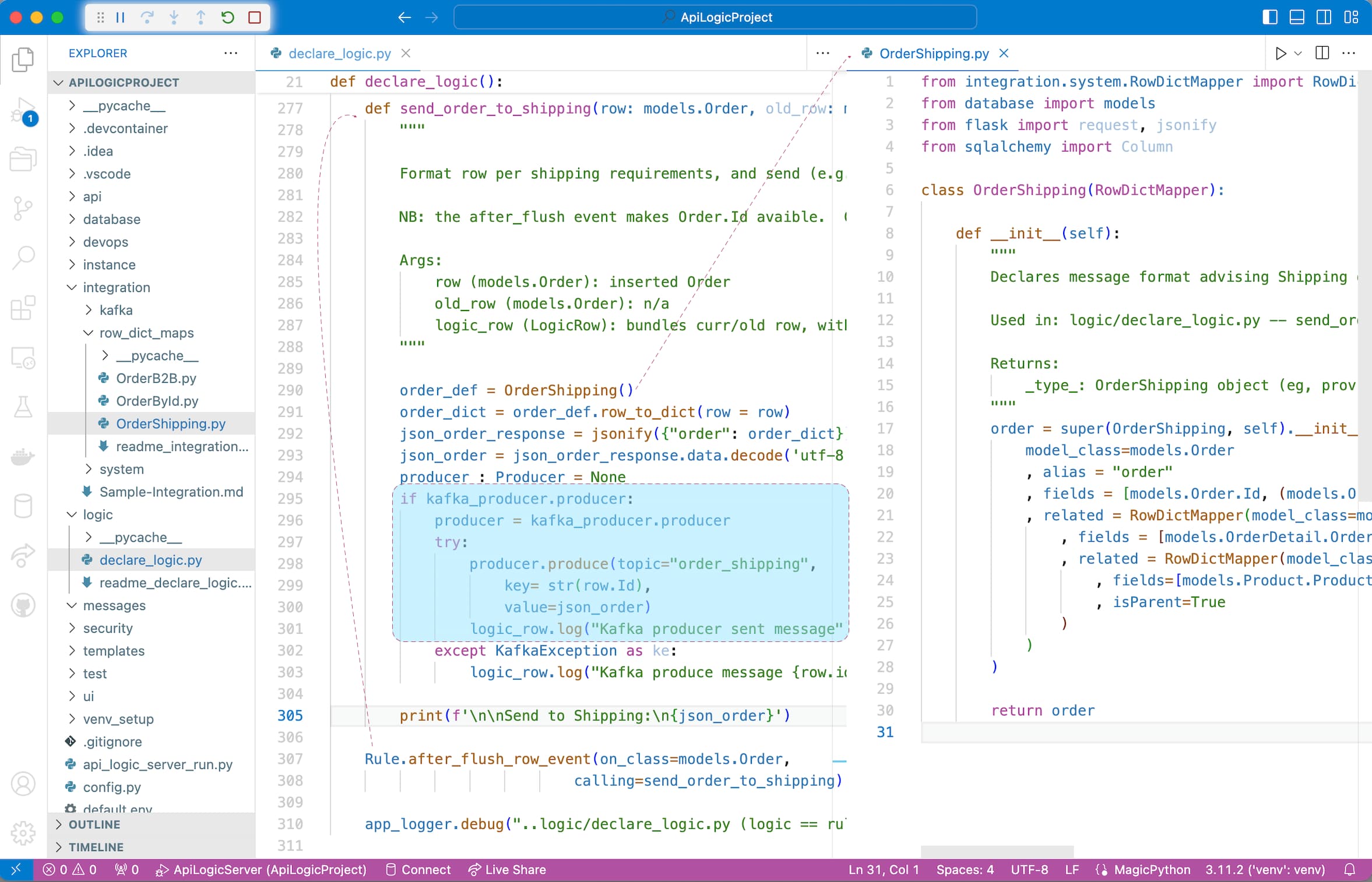
### Messaging With Kafka
Along with APIs, messaging is another technology commonly employed for application integration. See the screenshot below; for more information, see [Sample Integration](Sample-Integration#produce-ordershipping-message).
## 5. Deploy Containers: No Fees
API Logic Server also creates scripts for deployment. While these are ***not required at this demo,*** this means you can enable collaboration with Business Users:
1. Create a container from your project -- see `devops/docker-image/build_image.sh`
2. Upload to Docker Hub, and
3. Deploy for agile collaboration.