https://github.com/apop880/config-check
Check your Home Assistant configuration from the frontend, or automatically when the configuration is updated, and optionally restart HASS automatically!
https://github.com/apop880/config-check
appdaemon-apps hacs
Last synced: about 1 year ago
JSON representation
Check your Home Assistant configuration from the frontend, or automatically when the configuration is updated, and optionally restart HASS automatically!
- Host: GitHub
- URL: https://github.com/apop880/config-check
- Owner: apop880
- Created: 2019-07-20T02:08:06.000Z (almost 7 years ago)
- Default Branch: master
- Last Pushed: 2020-01-26T06:56:03.000Z (over 6 years ago)
- Last Synced: 2024-02-13T21:25:59.640Z (over 2 years ago)
- Topics: appdaemon-apps, hacs
- Language: Python
- Homepage:
- Size: 105 KB
- Stars: 13
- Watchers: 4
- Forks: 3
- Open Issues: 8
-
Metadata Files:
- Readme: README.md
Awesome Lists containing this project
README
# Check Config
[](https://github.com/custom-components/hacs)

### Requires AppDaemon
**As of version 2.0, I am only testing against AppDaemon 4.x. The app will likely continue to work with
AppDaemon 3.x, but if you have an issue and are using AppDaemon 3.x, I will not be able to provide support.**
_Allows you to check your Home Assistant configuration from within Lovelace, or
automatically using when configuration.yaml is updated.
Outputs the results to a sensor and can automatically restart HASS if
configuration is valid._
## Installation
This app is best installed using
[HACS](https://github.com/custom-components/hacs), so that you can easily track
and download updates.
Alternatively, you can download the `check-config` directory from inside the `apps` directory here to your
local `apps` directory, then add the configuration to enable the `checkconfig`
module.
## How it works
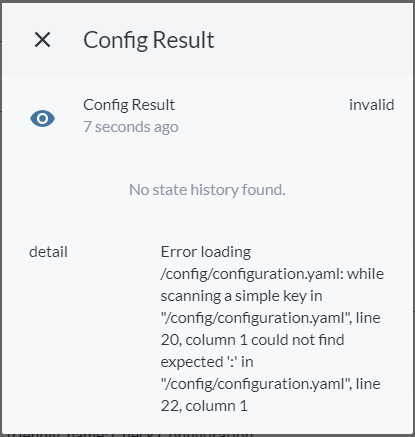
The app will auto-generate an entity called `sensor.config_result`. It has an
initial value of `-` until a configuration check is actually run. After running
a check, it will change to `valid` or `invalid`. If it is invalid, the `detail`
attribute on the sensor will include additional data about the specific failure.
If it is valid, Home Assistant can restart automatically, or you can configure
it to not restart until you do so manually.
## App configuration
Add the following to your `apps.yaml` file:
```yaml
check_config:
module: checkconfig
class: CheckConfig
```
key | optional | type | default | description
-- | -- | -- | -- | --
`module` | False | string | | `checkconfig`
`class` | False | string | | `CheckConfig`
`restart` | True | boolean | True | By default, Home Assistant will be restarted if the configuration is valid. Setting this to false will allow you to restart at the time of your choosing.
`folder_watcher` | True | boolean | False | If you are using the `folder_watcher` component (see "Using with Folder Watcher" below), the app can automatically monitor for changes to `configuration.yaml` and run the check any time the file is changed.
## Using With Lovelace
You will need to create an entity called `script.check_config`, but this script
can be blank and won't actually perform any steps. It simply allows us to call
the config check from Lovelace. Copying and pasting the following into your
`scripts.yaml` file will add the proper script.
```yaml
check_config:
sequence: []
alias: Check Configuration
```
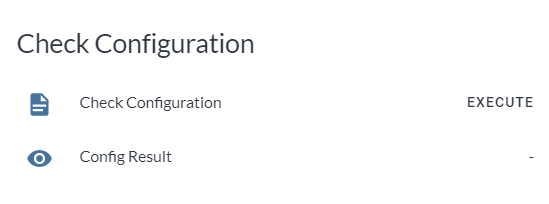
The following is a basic example of a Lovelace example to run the check and show
the results.
```yaml
type: entities
title: Check Configuration
show_header_toggle: false
entities:
- script.check_config
- sensor.config_result
```
## Using with Folder Watcher
_Note: Folder Watcher support currently does not support split configuration files, nor will it monitor changes to secrets.yaml. Support for secrets.yaml and split configurations is planned for the next release. In addition, when using the Folder Watcher configuration, the Lovelace script configuration above will no longer work (but the sensor will still update for you to optionally display in Lovelace)._
As of version 0.3.0, the [Folder
Watcher](https://www.home-assistant.io/components/folder_watcher/) component can
be integrated into this app. The app will then automatically trigger a
configuration check when your `configuration.yaml` file is updated. You can then
either have Home Assistant restart automatically, or continue to utilize the
sensor updating as you see fit. For example, I have Telegram set up on the
computer I perform my configuration updates on. So, I now receive a notification
from Telegram on my desktop seconds after saving a change to
`configuration.yaml`. If the config is invalid, the specific issue is called out
in the notification. Otherwise, if it's valid, I have an inline keyboard button
that will restart Home Assistant when pressed.
The example code for this notification setup is included in `confignotify.py` in
this repository. Since everyone's notification setup is different, I am not
attempting to include it in the main app at this time, but you are free to use
what I have created as a starting point.
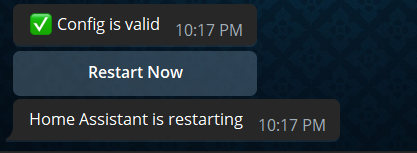
Here is the YAML I'm using to include `folder_watcher` in my setup to monitor
`configuration.yaml`:
```yaml
folder_watcher:
- folder: /config
patterns:
- '*.yaml'
```
You also need your `config` directory under `whitelist_external_dirs` in the
`homeassistant` section of `configuration.yaml`:
```yaml
homeassistant:
whitelist_external_dirs:
- /config
```
## Example Screenshots
## Advanced Lovelace Config Examples
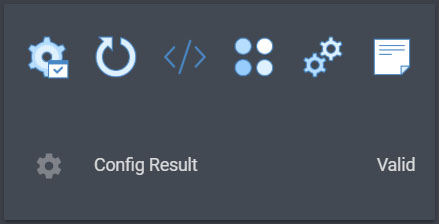
As a picture elements card with options to reload elements of your
configuration, or a full restart:
```yaml
type: custom:vertical-stack-in-card
cards:
- type: picture-elements
image: /local/images/BG_blank_slim.png
elements:
- type: image
image: /local/images/icons8-administrative-tools-80.png
tap_action:
action: call-service
service: script.check_config
style:
top: 50%
left: 10%
width: 10%
- type: image
image: /local/images/icons8-restart-80.png
tap_action:
action: call-service
service: homeassistant.restart
style:
top: 50%
left: 26%
width: 10%
- type: image
image: /local/images/icons8-source-code-80.png
tap_action:
action: call-service
service: homeassistant.reload_core_config
style:
top: 50%
left: 42%
width: 10%
- type: image
image: /local/images/icons8-variation-80.png
tap_action:
action: call-service
service: group.reload
style:
top: 50%
left: 58%
width: 10%
- type: image
image: /local/images/icons8-automation-80.png
tap_action:
action: call-service
service: automation.reload
style:
top: 50%
left: 74%
width: 10%
- type: image
image: /local/images/icons8-note-80.png
tap_action:
action: call-service
service: script.reload
style:
top: 50%
left: 90%
width: 10%
- type: entities
show_header_toggle: false
entities:
- sensor.config_result
```
## Issues/Feature Requests
Please log any issues or feature requests in this GitHub repository for me to review.