https://github.com/app-generator/cth-flask-dashboard-dattaable
Datta Able Flask - Open-Source Seed Project | CodedThemes
https://github.com/app-generator/cth-flask-dashboard-dattaable
appseed codedthemes datta-able flask
Last synced: 2 months ago
JSON representation
Datta Able Flask - Open-Source Seed Project | CodedThemes
- Host: GitHub
- URL: https://github.com/app-generator/cth-flask-dashboard-dattaable
- Owner: app-generator
- License: other
- Created: 2020-12-02T07:04:30.000Z (over 5 years ago)
- Default Branch: master
- Last Pushed: 2020-12-02T15:45:12.000Z (over 5 years ago)
- Last Synced: 2025-04-06T18:12:46.984Z (about 1 year ago)
- Topics: appseed, codedthemes, datta-able, flask
- Language: CSS
- Homepage: https://codedthemes.com/item/datta-able-free-flask-template/
- Size: 3.82 MB
- Stars: 0
- Watchers: 2
- Forks: 1
- Open Issues: 0
-
Metadata Files:
- Readme: README.md
- Changelog: CHANGELOG.md
- License: LICENSE.md
Awesome Lists containing this project
README
# Datta Able Flask
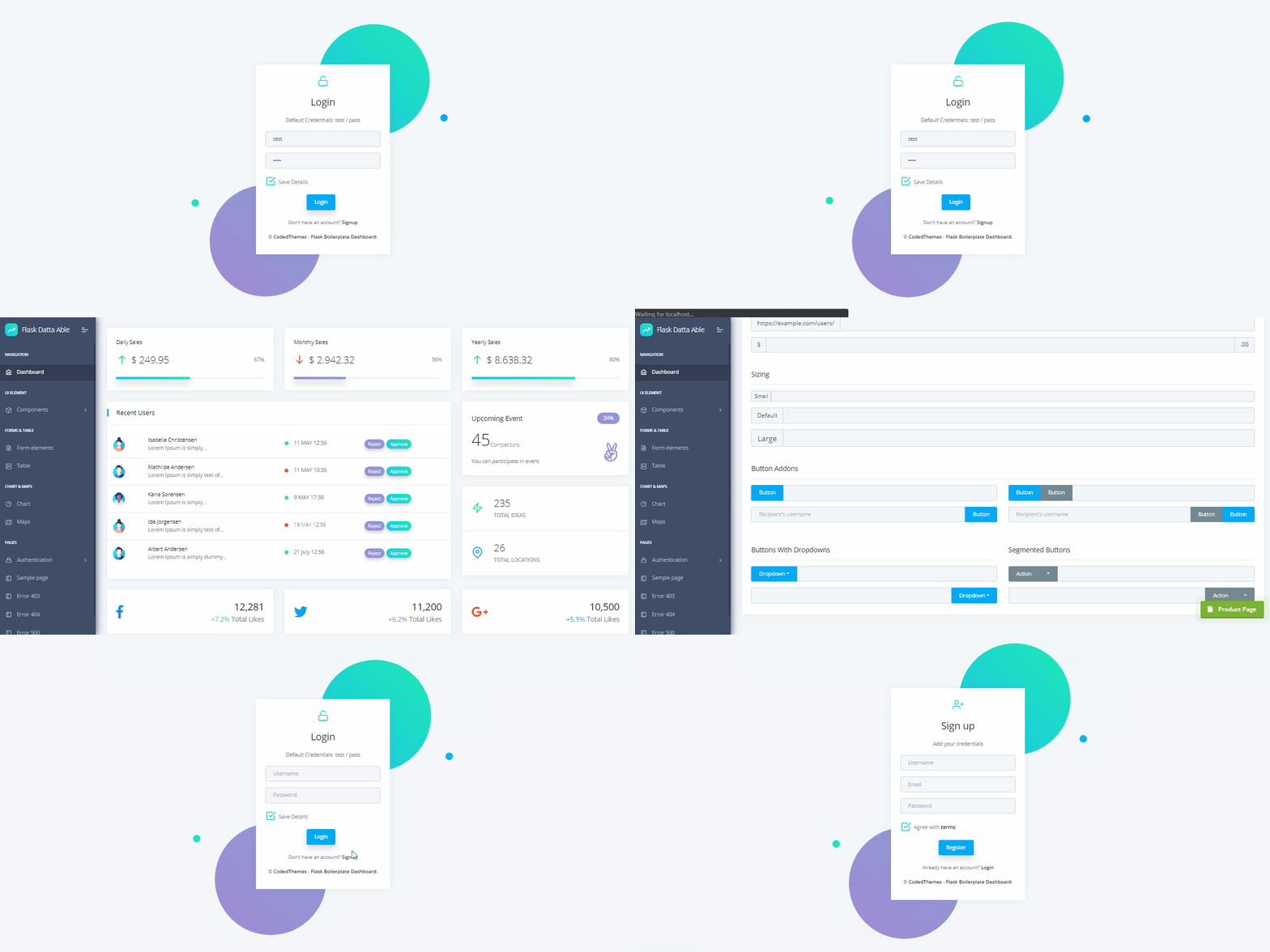
Admin Dashboard generated by the AppSeed platform in **Flask Framework** on top of **Datta Able** (free version), a modern Bootstrap 4 dashboard template. The Flask codebase is provided with authentication, database, ORM and deployment scripts.
## Product Features
- Reference Codebase - [Flask Dashboard Boilerplate](https://docs.appseed.us/boilerplate-code/flask-dashboard)
- DBMS: SQLite, PostgreSQL (production)
- DB Tools: SQLAlchemy ORM, Alembic (schema migrations)
- Modular design with Blueprints
- Session-Based authentication (via flask_login), Forms validation
- Deployment scripts: Docker, Gunicorn/Nginx, HEROKU
- Support via Github (issues tracker) and [Discord](https://discord.gg/fZC6hup).
**Links**
- [Datta Able Flask](https://codedthemes.com/item/datta-able-free-flask-template/) - the product page
- [Datta Able Flask - Demo](https://cth-flask-dashboard-dattaable.appseed-srv1.com/login) - Default login credentials ** *test / pass* **
## **[Datta Able](https://codedthemes.com/item/datta-able-bootstrap-lite/)**
**Datta Able** Bootstrap Lite is the most stylised Bootstrap 4 Lite Admin Template, around all other Lite/Free admin templates in the market. It comes with high feature-rich pages and components with fully developer-centric code. Before developing Datta Able our key points were performance and design. While developing we have gone through various testing & code optimization process, for making this performance and design-centric backend application.
Comes with error/bug-free, well structured, well-commented code and regularly with all latest updated code. Which saves your a large amount of developing backend application time and it is fully customizable.
## How to use it
```bash
$ # Get the code
$ git clone https://github.com/app-generator/cth-flask-dashboard-dattaable.git
$ cd cth-flask-dashboard-dattaable
$
$ # Virtualenv modules installation (Unix based systems)
$ virtualenv env
$ source env/bin/activate
$
$ # Virtualenv modules installation (Windows based systems)
$ # virtualenv env
$ # .\env\Scripts\activate
$
$ # Install modules - SQLite Database
$ pip3 install -r requirements.txt
$
$ # OR with PostgreSQL connector
$ # pip install -r requirements-pgsql.txt
$
$ # Set the FLASK_APP environment variable
$ (Unix/Mac) export FLASK_APP=run.py
$ (Windows) set FLASK_APP=run.py
$ (Powershell) $env:FLASK_APP = ".\run.py"
$
$ # Set up the DEBUG environment
$ # (Unix/Mac) export FLASK_ENV=development
$ # (Windows) set FLASK_ENV=development
$ # (Powershell) $env:FLASK_ENV = "development"
$
$ # Start the application (development mode)
$ # --host=0.0.0.0 - expose the app on all network interfaces (default 127.0.0.1)
$ # --port=5000 - specify the app port (default 5000)
$ flask run --host=0.0.0.0 --port=5000
$
$ # Access the dashboard in browser: http://127.0.0.1:5000/
```
> Note: To use the app, please access the registration page and create a new user. After authentication, the app will unlock the private pages.
## Code-base structure
The project is coded using blueprints, app factory pattern, dual configuration profile (development and production) and an intuitive structure presented bellow:
> Simplified version
```bash
< PROJECT ROOT >
|
|-- app/ # Implements app logic
| |-- base/ # Base Blueprint - handles the authentication
| |-- home/ # Home Blueprint - serve UI Kit pages
| |
| __init__.py # Initialize the app
|
|-- requirements.txt # Development modules - SQLite storage
|-- requirements-mysql.txt # Production modules - Mysql DMBS
|-- requirements-pqsql.txt # Production modules - PostgreSql DMBS
|
|-- .env # Inject Configuration via Environment
|-- config.py # Set up the app
|-- run.py # Start the app - WSGI gateway
|
|-- ************************************************************************
```
> The bootstrap flow
- `run.py` loads the `.env` file
- Initialize the app using the specified profile: *Debug* or *Production*
- If env.DEBUG is set to *True* the SQLite storage is used
- If env.DEBUG is set to *False* the specified DB driver is used (MySql, PostgreSQL)
- Call the app factory method `create_app` defined in app/__init__.py
- Redirect the guest users to Login page
- Unlock the pages served by *home* blueprint for authenticated users
> App / Base Blueprint
The *Base* blueprint handles the authentication (routes and forms) and assets management. The structure is presented below:
```bash
< PROJECT ROOT >
|
|-- app/
| |-- home/ # Home Blueprint - serve app pages (private area)
| |-- base/ # Base Blueprint - handles the authentication
| |-- static/
| | |-- # CSS files, Javascripts files
| |
| |-- templates/ # Templates used to render pages
| |
| |-- includes/ #
| | |-- navigation.html # Top menu component
| | |-- sidebar.html # Sidebar component
| | |-- footer.html # App Footer
| | |-- scripts.html # Scripts common to all pages
| |
| |-- layouts/ # Master pages
| | |-- base-fullscreen.html # Used by Authentication pages
| | |-- base.html # Used by common pages
| |
| |-- accounts/ # Authentication pages
| |-- login.html # Login page
| |-- register.html # Registration page
|
|-- requirements.txt # Development modules - SQLite storage
|-- requirements-mysql.txt # Production modules - Mysql DMBS
|-- requirements-pqsql.txt # Production modules - PostgreSql DMBS
|
|-- .env # Inject Configuration via Environment
|-- config.py # Set up the app
|-- run.py # Start the app - WSGI gateway
|
|-- ************************************************************************
```
> App / Home Blueprint
The *Home* blueprint handles UI Kit pages for authenticated users. This is the private zone of the app - the structure is presented below:
```bash
< PROJECT ROOT >
|
|-- app/
| |-- base/ # Base Blueprint - handles the authentication
| |-- home/ # Home Blueprint - serve app pages (private area)
| |
| |-- templates/ # UI Kit Pages
| |
| |-- index.html # Default page
| |-- page-404.html # Error 404 page
| |-- page-500.html # Error 500 page
| |-- page-403.html # Error 403 page
| |-- *.html # All other HTML pages
|
|-- requirements.txt # Development modules - SQLite storage
|-- requirements-mysql.txt # Production modules - Mysql DMBS
|-- requirements-pqsql.txt # Production modules - PostgreSql DMBS
|
|-- .env # Inject Configuration via Environment
|-- config.py # Set up the app
|-- run.py # Start the app - WSGI gateway
|
|-- ************************************************************************
```
## Deployment
The app is provided with a basic configuration to be executed in [Docker](https://www.docker.com/), [Gunicorn](https://gunicorn.org/), and [Waitress](https://docs.pylonsproject.org/projects/waitress/en/stable/).
### [Docker](https://www.docker.com/) execution
---
The application can be easily executed in a docker container. The steps:
> Get the code
```bash
$ git clone https://github.com/app-generator/cth-flask-dashboard-dattaable.git
$ cd cth-flask-dashboard-dattaable
```
> Start the app in Docker
```bash
$ sudo docker-compose pull && sudo docker-compose build && sudo docker-compose up -d
```
Visit `http://localhost:5005` in your browser. The app should be up & running.
### [Gunicorn](https://gunicorn.org/)
---
Gunicorn 'Green Unicorn' is a Python WSGI HTTP Server for UNIX.
> Install using pip
```bash
$ pip install gunicorn
```
> Start the app using gunicorn binary
```bash
$ gunicorn --bind 0.0.0.0:8001 run:app
Serving on http://localhost:8001
```
Visit `http://localhost:8001` in your browser. The app should be up & running.
### [Waitress](https://docs.pylonsproject.org/projects/waitress/en/stable/)
---
Waitress (Gunicorn equivalent for Windows) is meant to be a production-quality pure-Python WSGI server with very acceptable performance. It has no dependencies except ones that live in the Python standard library.
> Install using pip
```bash
$ pip install waitress
```
> Start the app using [waitress-serve](https://docs.pylonsproject.org/projects/waitress/en/stable/runner.html)
```bash
$ waitress-serve --port=8001 run:app
Serving on http://localhost:8001
```
Visit `http://localhost:8001` in your browser. The app should be up & running.
## Credits & Links
- [Flask Framework](https://www.palletsprojects.com/p/flask/) - The official website
- [Boilerplate Code](https://appseed.us/boilerplate-code) - Index provided by **AppSeed**
- [Boilerplate Code](https://github.com/app-generator/boilerplate-code) - Index published on Github
---
[Datta Able Flask](https://codedthemes.com/item/datta-able-free-flask-template/) - Provided by **AppSeed** [Web App Generator](https://appseed.us/app-generator).