https://github.com/apparebit/prettypretty
Hello pretty-pretty, awesome terminal colors you have there!
https://github.com/apparebit/prettypretty
ansi-colors ansi-escape-codes apca-w3 color-contrast color-distance terminal tty
Last synced: about 1 year ago
JSON representation
Hello pretty-pretty, awesome terminal colors you have there!
- Host: GitHub
- URL: https://github.com/apparebit/prettypretty
- Owner: apparebit
- License: apache-2.0
- Created: 2024-05-06T00:13:19.000Z (about 2 years ago)
- Default Branch: main
- Last Pushed: 2024-05-22T17:49:33.000Z (about 2 years ago)
- Last Synced: 2024-05-22T23:08:44.766Z (about 2 years ago)
- Topics: ansi-colors, ansi-escape-codes, apca-w3, color-contrast, color-distance, terminal, tty
- Language: Python
- Homepage: https://apparebit.github.io/prettypretty/
- Size: 2.41 MB
- Stars: 0
- Watchers: 1
- Forks: 0
- Open Issues: 0
-
Metadata Files:
- Readme: README.md
- License: LICENSE
Awesome Lists containing this project
README
# Pretty 🌸 Terminals
[](https://github.com/apparebit/prettypretty/actions/workflows/ci.yml)
[](https://github.com/apparebit/prettypretty/actions/workflows/gh-pages.yml)
## Pretty 🌸 Tty
\[ [**Docs.rs**](https://docs.rs/prettytty/latest/prettytty/)
| [**GitHub Pages**](https://apparebit.github.io/prettypretty/prettytty/)
| [**Rust Crate**](https://crates.io/crates/prettytty)
| [**Repository**](https://github.com/apparebit/prettypretty)
\]
Prettytty is a **lightweight and flexible terminal library** for Rust that has
only one low-level dependency, i.e., [`libc`](https://crates.io/crates/libc) on
Unix and [`windows-sys`](https://crates.io/crates/windows-sys) on Windows. Its
API is clean and simple: Open a [`Connection`] to the terminal and share it
across threads as needed. Write [`Command`]s to [`Output`]. Read [`Query`]
responses from [`Input`]. [`Scan::read_token`] takes care of low-level UTF-8 and
ANSI escape sequence decoding and [`Query::parse`] turns token payloads into
objects. A [`cmd`] library with 70+ built-in commands covers basic needs and
then some.
[`cmd`]: https://apparebit.github.io/prettypretty/prettytty/cmd/index.html
[`Command`]: https://apparebit.github.io/prettypretty/prettytty/trait.Command.html
[`Connection`]: https://apparebit.github.io/prettypretty/prettytty/struct.Connection.html
[`Input`]: https://apparebit.github.io/prettypretty/prettytty/struct.Input.html
[`Output`]: https://apparebit.github.io/prettypretty/prettytty/struct.Output.html
[`Query`]: https://apparebit.github.io/prettypretty/prettytty/trait.Query.html
[`Query::parse`]: https://apparebit.github.io/prettypretty/prettytty/trait.Query.html#method.parse
[`Scan`]: https://apparebit.github.io/prettypretty/prettytty/trait.Scan.html
[`Scan::read_token`]: https://apparebit.github.io/prettypretty/prettytty/trait.Scan.html#method.read_token
----
## Pretty 🌸 Pretty:
\[ [**Docs.rs**](https://docs.rs/prettypretty/latest/prettypretty/)
| [**GitHub Pages**](https://apparebit.github.io/prettypretty/prettypretty/)
| [**Rust Crate**](https://crates.io/crates/prettypretty)
| [**Python Package**](https://pypi.org/project/prettypretty/)
| [**Repository**](https://github.com/apparebit/prettypretty)
\]
🎖️ As featured on [Real Python #211](https://realpython.com/podcasts/rpp/211/)
🎖️ Inspired [iTerm2's color preferences](https://raw.githubusercontent.com/apparebit/prettypretty/main/docs/figures/iterm2-color-preferences.jpg)
Prettypretty is a Rust library with optional Python bindings that applies
**2020s color science to 1970s terminals** to facilitate scalable user
interfaces. However, instead of progressive enhancement, it primarily relies on
graceful degradation from high-resolution colors down to more limited terminal
colors.
The **three steps for better terminal styles** are:
1. Fluently declare high-resolution styles.
2. Let prettypretty adjust styles to terminal capabilities and user preferences at
program startup.
3. Use adjusted styles at will.
Prettypretty seamlessly integrates with
[prettytty](https://crates.io/crates/prettytty) for **querying the terminal for
its current color theme**. It then uses said color theme to produce more
accurate results when converting high resultion colors down to 256 or 16
terminal colors. The integration also is entirely optional, controlled by the
`tty` feature, and fairly small, requiring about 80 lines of code for
[`Theme::query`](https://apparebit.github.io/prettypretty/prettypretty/theme/struct.Theme.html#method.query).
Hence integration with another terminal library should be easy enough.
As far as colors are concerned, prettypretty comes with all the expressivity and
convenience of **high-resolution, floating point colors and [color
spaces](https://lab.ardov.me/spaces-3d)**, including the perceptually uniform
[Oklab](https://bottosson.github.io/posts/oklab/), whether in Cartesian or polar
form, with original or [revised
lightness](https://bottosson.github.io/posts/colorpicker/#intermission---a-new-lightness-estimate-for-oklab).
It further implements state-of-the-art algorithms for
[gamut-mapping](https://www.w3.org/TR/css-color-4/#gamut-mapping), [color
interpolation](https://www.w3.org/TR/css-color-4/#interpolation), [perceptual
contrast](https://github.com/Myndex/apca-w3), as well as its own hue- and
lightness-based downsampling for optimal selection of ANSI colors.
## Python Integration
The optional Python integration is enabled with the `pyffi` feature flag and
relies on [PyO3](https://pyo3.rs/v0.22.0/) and [Maturin](https://www.maturin.rs)
for building an extension module with the same functionality. Only where the
Rust library uses trait implementations, the Python module [uses dedicated
methods](https://github.com/apparebit/prettypretty/blob/main/prettypretty/color/__init__.pyi).
While prettytty takes care of terminal access for Rust, the Python version of
prettypretty has its own terminal abstraction, with its own Pythonic interface.
## Scripts Using Prettypretty
Besides the [documentation](https://apparebit.github.io/prettypretty/), a good
starting point for familiarizing yourself with prettypretty are the scripts:
* [prettypretty.progress](https://github.com/apparebit/prettypretty/blob/main/prettypretty/progress.py)
illustrates the library's use on the example of a progress bar in less than
100 lines of Python. The finished progress bar is shown below for both light
and dark themes.


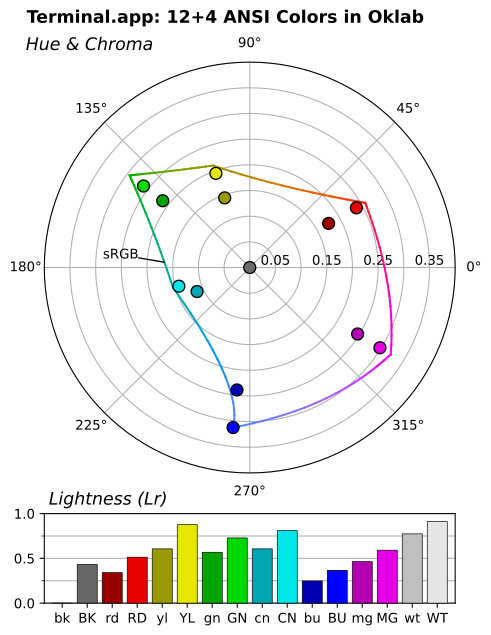
* [prettypretty.plot](https://github.com/apparebit/prettypretty/blob/main/prettypretty/plot.py)
charts colors on the chroma/hue plane of Oklab, if you don't feed it colors
defaulting to your terminal's current color scheme. Here's the one for the
basic theme in Apple's Terminal.app:
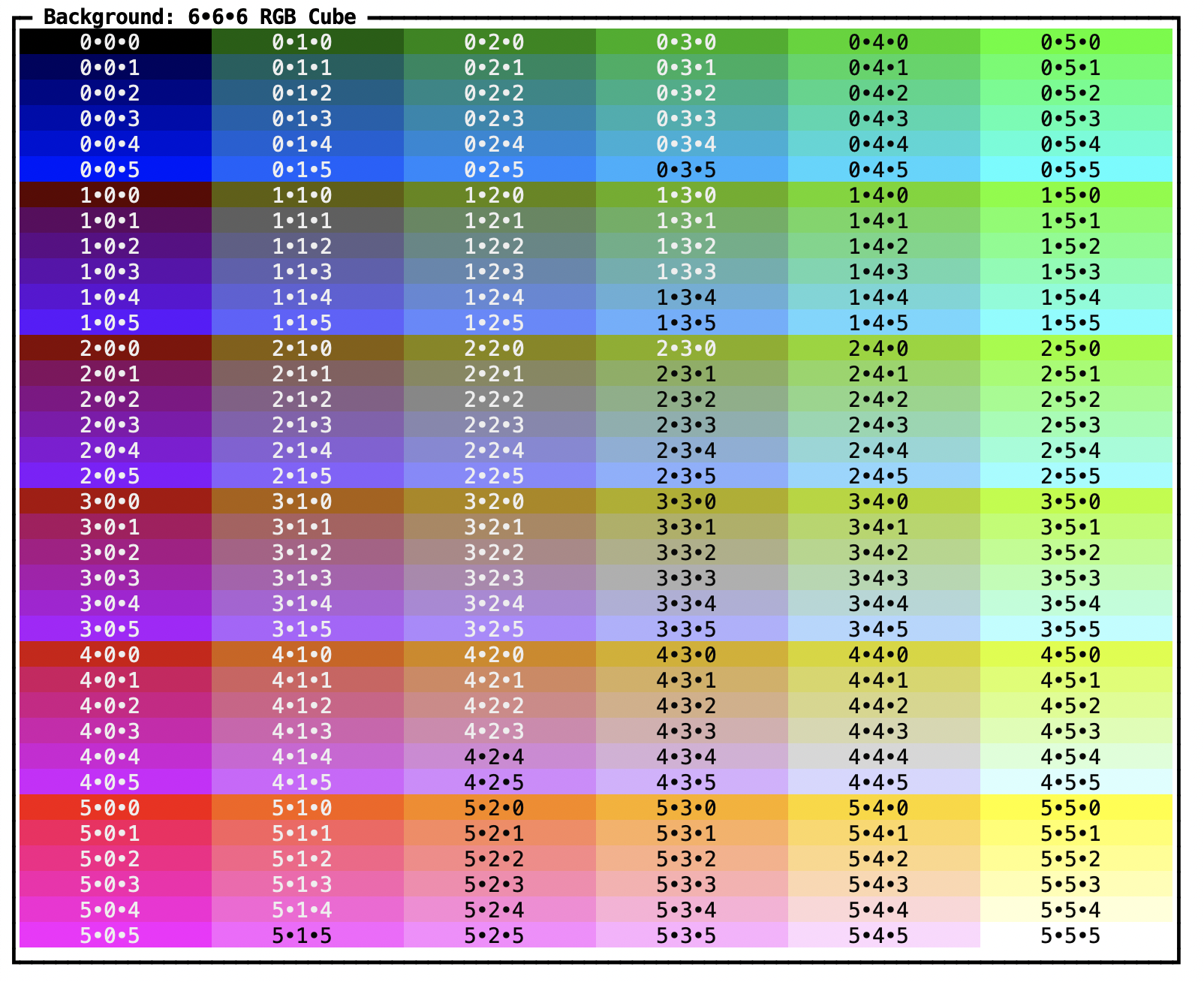
* [prettypretty.grid](https://github.com/apparebit/prettypretty/blob/main/prettypretty/grid.py)
visualizes perceptual contrast and color downsampling strategies,
exhaustively for the 6x6x6 RGB cube embedded in 8-bit color and selectively
for 32x32 slices through the much bigger 24-bit RGB cube.
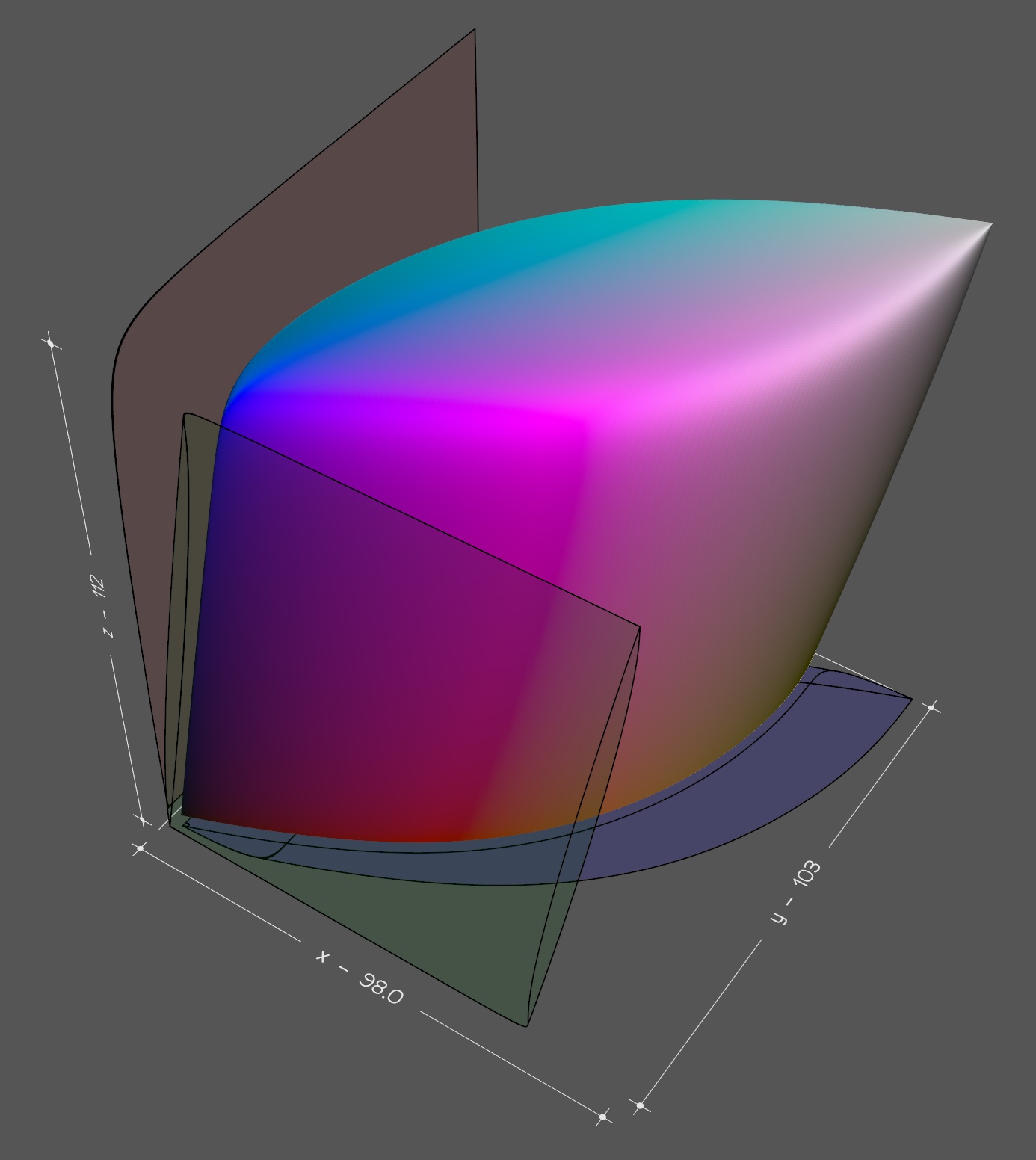
* [prettypretty.viz3d](https://github.com/apparebit/prettypretty/blob/main/prettypretty/viz3d.py)
traces the boundaries of the *visual gamut* in 3D and saves the
corresponding point cloud or mesh in [PLY
format](https://en.wikipedia.org/wiki/PLY_(file_format)). The screenshot
below shows [Vedo](https://vedo.embl.es)'s rendering.
## Acknowledgements
I wrote much of prettypretty over a two-month period in 2024. Twice. I first
implemented the core color routines in Python and then I did so again in Rust.
At this point, only the Rust version survives. But Python remains a tier-1
runtime target for prettypretty. Two things really helped with getting this
project started. First, I had been toying with different approaches to terminal
styles for a while and knew what I was looking for. Second, I benefitted
tremendously from [Lea Verou](http://lea.verou.me/)'s and [Chris
Lilley](https://svgees.us/)'s work on the [Color.js](https://colorjs.io) library
and [CSS Color 4](https://www.w3.org/TR/css-color-4/) specification.
Prettypretty directly reuses Color.js' formulae for conversion between color
spaces and implements several CSS Color 4 algorithms.
---
Copyright 2024-2025 Robert Grimm. The code in this repository has been released
as open source under the [Apache
2.0](https://github.com/apparebit/prettypretty/blob/main/LICENSE) license.