https://github.com/appbaseio/importer
Brower GUI data importer for OpenSearch and Elasticsearch clusters. Supports uploading CSV, JSON, and NDJSON files.
https://github.com/appbaseio/importer
data-import elasticsearch gui opensearch
Last synced: 3 months ago
JSON representation
Brower GUI data importer for OpenSearch and Elasticsearch clusters. Supports uploading CSV, JSON, and NDJSON files.
- Host: GitHub
- URL: https://github.com/appbaseio/importer
- Owner: appbaseio
- License: mit
- Created: 2025-09-06T08:20:14.000Z (11 months ago)
- Default Branch: main
- Last Pushed: 2025-11-27T08:23:47.000Z (8 months ago)
- Last Synced: 2026-02-06T14:22:36.507Z (6 months ago)
- Topics: data-import, elasticsearch, gui, opensearch
- Language: TypeScript
- Homepage: https://importer.reactivesearch.io
- Size: 629 KB
- Stars: 0
- Watchers: 0
- Forks: 0
- Open Issues: 0
-
Metadata Files:
- Readme: README.md
- License: LICENSE
Awesome Lists containing this project
README
# Importer
A browser‑based importer UI to index data into Elasticsearch / OpenSearch.
## Highlights
- React 18 + Vite + TypeScript + Tailwind UI
- Drag & drop upload with auto format detection (CSV, JSON array, NDJSON)
- 100 MB file size guard and binary/corruption sniffing
- Preview table (first rows) with id key/column detection and warning
- Stepper flow with strict gating and clear statuses
- Upload → Cluster → Ingestion → Import
- Cluster connect with persisted URL, Basic auth support, and HTTP status badge
- Ingestion: validate/create index, document count, inline JSON settings editor, optional ingest pipeline
- Import: concurrent \_bulk with backoff, accurate Sent/OK/Failed counts, per‑batch logs
- State preserved across steps; import state preserved unless inputs change
- One‑click “View data in Dejavu” after import, using your cluster URL (with auth)
## Requirements
- Node.js 18+ (recommended)
- pnpm (recommended) or npm/yarn
## Quick start
Using pnpm:
```bash
pnpm install
pnpm dev
```
Using npm:
```bash
npm install
npm run dev
```
Build & preview:
```bash
pnpm build
pnpm preview
```
## Usage
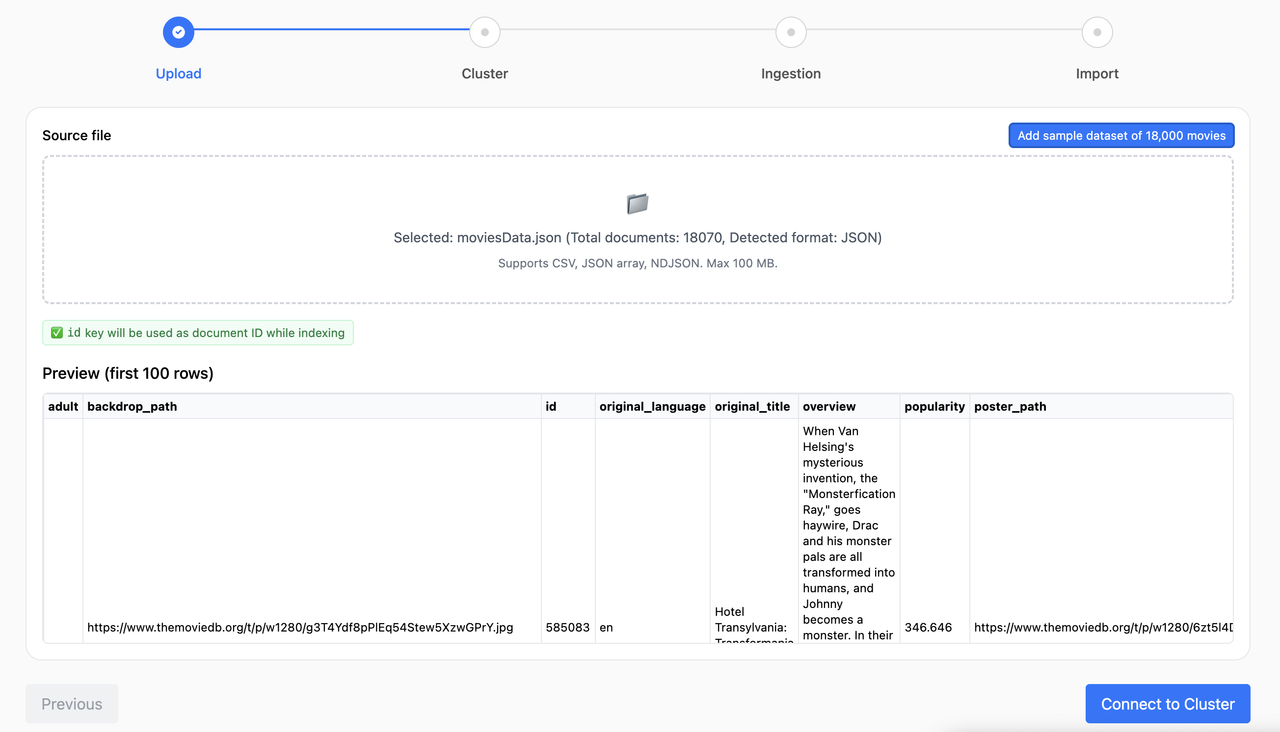
1. Upload
- Drag & drop a file or click to browse. Supported: CSV, JSON array, NDJSON (≤ 100 MB).
- A preview renders the first rows. If no id key/column is found, you’ll see a warning about potential duplicates.
- Optional: use the “Add sample dataset of 18,000 movies” button to try a bundled NDJSON file.
2. Cluster
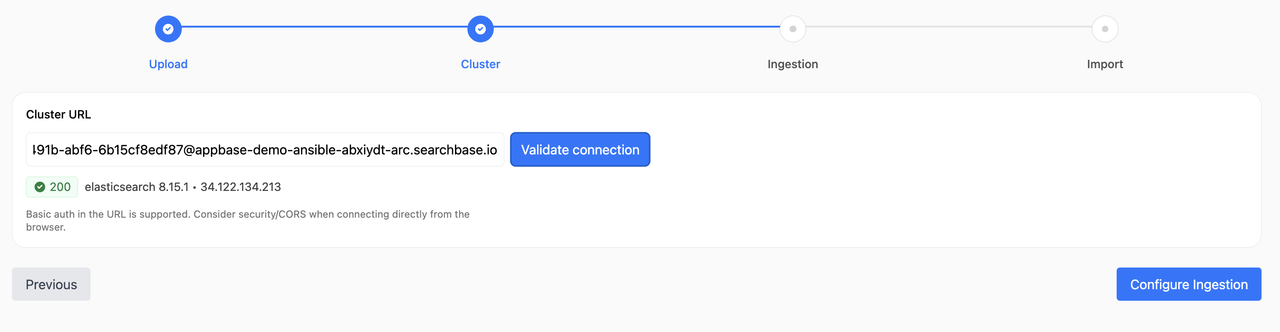
- Enter your Elasticsearch/OpenSearch URL. If Basic auth is needed, you can include it when prompted; the app persists the auth header.
- The UI shows the HTTP status and product info if reachable.
3. Ingestion
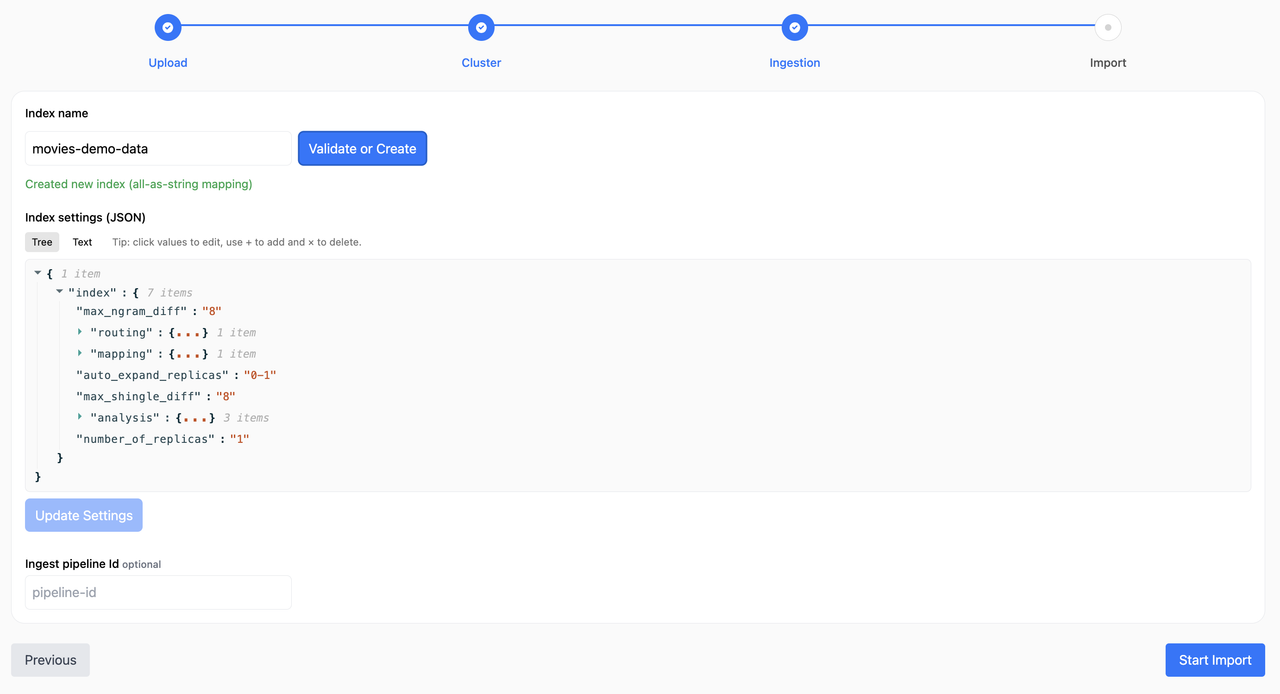
- Enter an index name. Validate will check existence or create a new index with an “all‑as‑string” mapping template if it doesn’t exist.
- JSON settings editor (tree/text) lets you edit index settings.
- If you have an ingestion pipeline configured, you can configure its id. This is optional.
4. Import
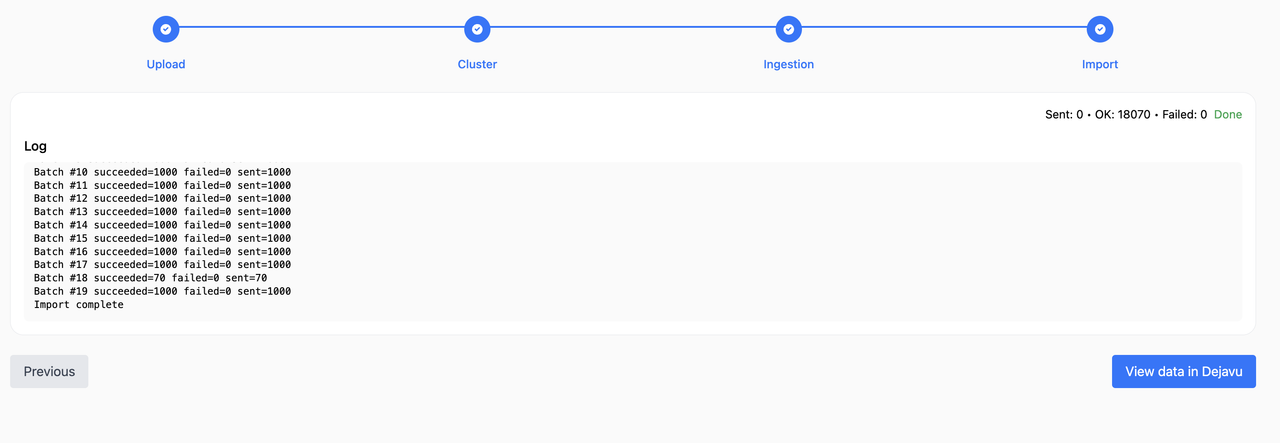
- Import starts automatically when you enter this step (from Ingestion) or via the button.
- Progress shows Sent, OK, Failed and a bar based on total rows from parsing.
- Logs show per‑batch stats only. Failures include a sample payload list.
- When done, use “View data in Dejavu” to browse your index data.
## Data formats
- CSV: First row as headers. Each row becomes a document. If a column named `_id` or `id` exists, it’s used as the document id.
- JSON array: A top‑level array of objects.
- NDJSON: One JSON object per line.
## Authentication
- Basic auth is captured during cluster connect and reused for index/settings/bulk operations.
- The Dejavu link includes user:password@host in the URL when Basic auth is present (be mindful of URL exposure in history/address bar).
## Accuracy & logging
- Sent increments as soon as a batch is dispatched.
- OK/Failed update when the bulk response returns; partial successes within a batch are accounted for per item.
- Batch numbers increment on completion (1..N), even with concurrency/retries.
## State & resets
- Ingestion screen state is cached per (cluster URL + index) and restored when revisiting.
- Import state (progress/logs/workers) is preserved only if the run “signature” (cluster + index + file name/size + settings baseline) is unchanged. Any change resets the import state.
## Troubleshooting
- CORS or network errors during connect may hide the exact HTTP code; consider a dev proxy if needed.
- Very large files can be memory‑intensive in the browser; keep to ≤ 100 MB as enforced.
- If logs double or batches repeat, ensure only one tab/instance is running; the app reuses workers and guards duplicate starts.
## Scripts
- `dev` – start Vite dev server
- `build` – production build
- `preview` – preview the production build locally
## Embedding in your dashboard
Install the package and render the Importer component in your React app:
```bash
pnpm add @appbaseio/importer
# or
npm install @appbaseio/importer
```
```tsx
import { Importer } from "@appbaseio/importer";
export default function DataImportPage() {
return (
);
}
```
Notes:
- No props are required. You can optionally provide `config.sampleDataset` to show a custom sample button.
- The package expects React 18+ in your host app (declared as peer dependency).
- Styles are bundled from the component; if you tree‑shake CSS, ensure component CSS is included.
## License
MIT License