https://github.com/appflowy-io/appflowy-board
AppFlowy Board is a board-style widget that consists of multi-groups. It supports drag and drop between different groups. The AppFlowy Kanban Board project for AppFlowy and Beyond.
https://github.com/appflowy-io/appflowy-board
flutter flutter-apps flutter-examples flutter-package flutter-widget kanban kanban-board kanban-board-application
Last synced: over 1 year ago
JSON representation
AppFlowy Board is a board-style widget that consists of multi-groups. It supports drag and drop between different groups. The AppFlowy Kanban Board project for AppFlowy and Beyond.
- Host: GitHub
- URL: https://github.com/appflowy-io/appflowy-board
- Owner: AppFlowy-IO
- License: other
- Created: 2023-02-01T10:03:00.000Z (over 3 years ago)
- Default Branch: main
- Last Pushed: 2025-03-03T03:29:02.000Z (over 1 year ago)
- Last Synced: 2025-03-28T16:08:59.179Z (over 1 year ago)
- Topics: flutter, flutter-apps, flutter-examples, flutter-package, flutter-widget, kanban, kanban-board, kanban-board-application
- Language: Dart
- Homepage: https://appflowy.io/blocks
- Size: 828 KB
- Stars: 77
- Watchers: 6
- Forks: 56
- Open Issues: 14
-
Metadata Files:
- Readme: README.md
- Changelog: CHANGELOG.md
- License: LICENSE
Awesome Lists containing this project
README
# appflowy_board
AppFlowy Board
A customizable and draggable Kanban Board widget for Flutter
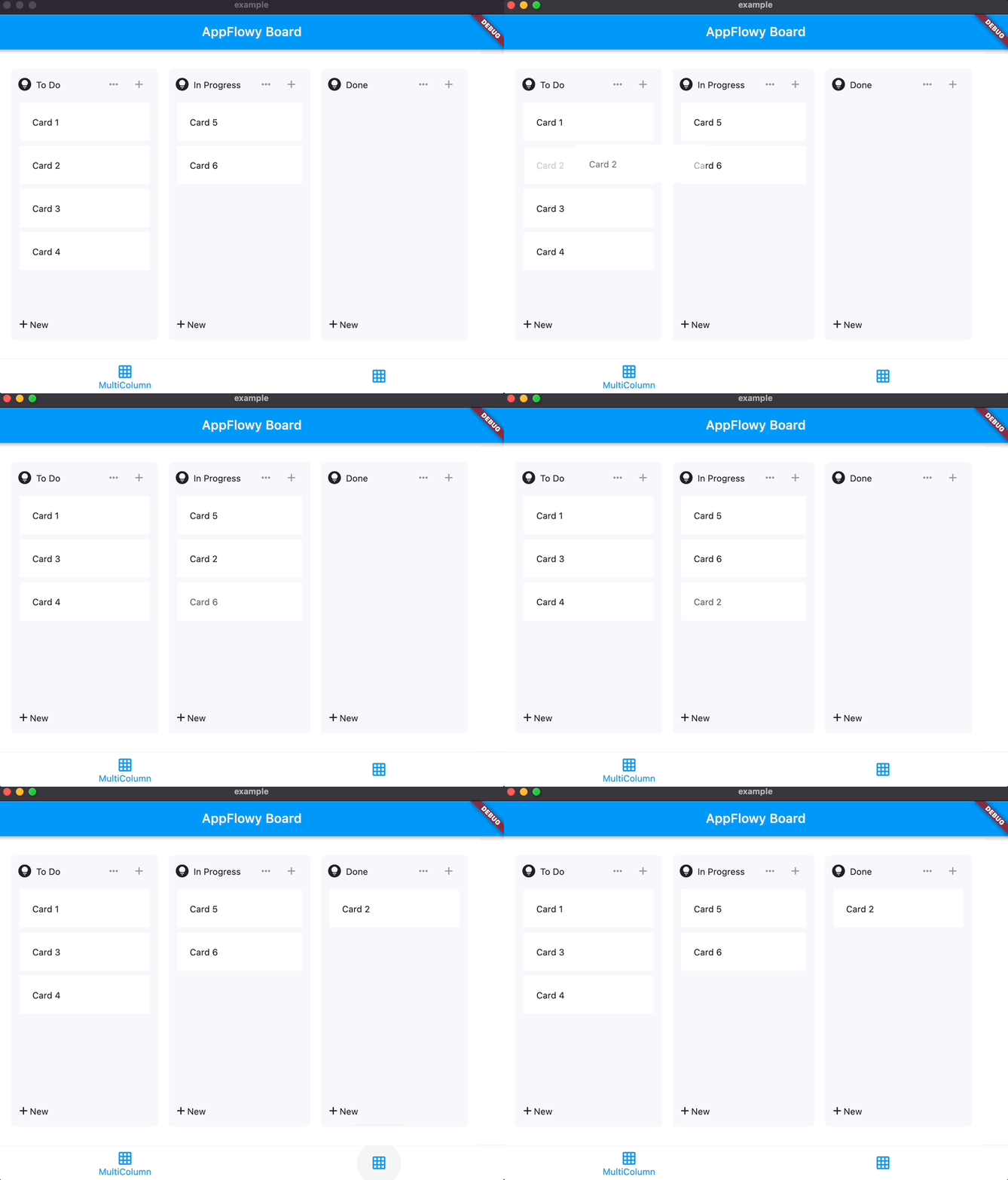
## Intro
appflowy_board is a customizable and draggable Kanban Board widget for Flutter.
You can use it to create a Kanban Board tool like those in Trello.
Check out [appflowy_board](https://github.com/AppFlowy-IO/appflowy-board) to see to build a BoardView database.

## Getting Started
Add the AppFlowy Board [Flutter package](https://docs.flutter.dev/development/packages-and-plugins/using-packages) to your environment.
With Flutter:
```dart
flutter pub add appflowy_board
flutter pub get
```
This will add a line like this to your package's pubspec.yaml:
```dart
dependencies:
appflowy_board: ^0.1.0
```
## Create your first board
Initialize an `AppFlowyBoardController` for the board. It contains the data used by the board. You can
register callbacks to receive the changes of the board.
```dart
final AppFlowyBoardController controller = AppFlowyBoardController(
onMoveGroup: (fromGroupId, fromIndex, toGroupId, toIndex) {
debugPrint('Move item from $fromIndex to $toIndex');
},
onMoveGroupItem: (groupId, fromIndex, toIndex) {
debugPrint('Move $groupId:$fromIndex to $groupId:$toIndex');
},
onMoveGroupItemToGroup: (fromGroupId, fromIndex, toGroupId, toIndex) {
debugPrint('Move $fromGroupId:$fromIndex to $toGroupId:$toIndex');
},
);
```
Provide an initial value of the board by initializing the `AppFlowyGroupData`. It represents a group data and contains list of items. Each item displayed in the group requires to implement the `AppFlowyGroupItem` class.
```dart
void initState() {
final group1 = AppFlowyGroupData(id: "To Do", items: [
TextItem("Card 1"),
TextItem("Card 2"),
]);
final group2 = AppFlowyGroupData(id: "In Progress", items: [
TextItem("Card 3"),
TextItem("Card 4"),
]);
final group3 = AppFlowyGroupData(id: "Done", items: []);
controller.addGroup(group1);
controller.addGroup(group2);
controller.addGroup(group3);
super.initState();
}
class TextItem extends AppFlowyGroupItem {
final String s;
TextItem(this.s);
@override
String get id => s;
}
```
Finally, return a `AppFlowyBoard` widget in the build method.
```dart
@override
Widget build(BuildContext context) {
return AppFlowyBoard(
controller: controller,
cardBuilder: (context, group, groupItem) {
final textItem = groupItem as TextItem;
return AppFlowyGroupCard(
key: ObjectKey(textItem),
child: Text(textItem.s),
);
},
groupConstraints: const BoxConstraints.tightFor(width: 240),
);
}
```
## Usage Example
To quickly grasp how it can be used, look at the /example/lib folder.
First, run main.dart to play with the demo.
Second, let's delve into multi_board_list_example.dart to understand a few key components:
- A Board widget is created via instantiating an `AppFlowyBoard` object.
- In the `AppFlowyBoard` object, you can find the `AppFlowyBoardController`, which is defined in board_data.dart, is fed with pre-populated mock data. It also contains callback functions to materialize future user data.
- Three builders: AppFlowyBoardHeaderBuilder, AppFlowyBoardFooterBuilder, AppFlowyBoardCardBuilder. See below image for what they are used for.

## Glossary
Please refer to the API documentation.
## Contributing
Contributions are what make the open source community such an amazing place to learn, inspire, and create. Any contributions you make are greatly appreciated.
Please look at [CONTRIBUTING.md](https://appflowy.gitbook.io/docs/essential-documentation/contribute-to-appflowy/contributing-to-appflowy) for details.