https://github.com/appotry/hexo-feed-new
RSS, Atom and JSON Feed generator for Hexo static site generator
https://github.com/appotry/hexo-feed-new
Last synced: about 1 year ago
JSON representation
RSS, Atom and JSON Feed generator for Hexo static site generator
- Host: GitHub
- URL: https://github.com/appotry/hexo-feed-new
- Owner: appotry
- License: mit
- Fork: true (sergeyzwezdin/hexo-feed)
- Created: 2022-04-27T23:13:26.000Z (about 4 years ago)
- Default Branch: develop
- Last Pushed: 2024-04-07T08:53:21.000Z (over 2 years ago)
- Last Synced: 2025-05-13T23:15:34.996Z (about 1 year ago)
- Language: JavaScript
- Homepage: https://hexo.io/
- Size: 52.7 KB
- Stars: 1
- Watchers: 1
- Forks: 0
- Open Issues: 0
-
Metadata Files:
- Readme: README.md
- License: LICENSE
Awesome Lists containing this project
README
# hexo-feed-new
> Supports hexo 6!
> Just For Test Npm Publish
>
> 上游一直不支持hexo 6,PR也没反应,留言也没回复,就先自建一个使用了
>
> 上游如果修复问题了,就不再更新
## 支持RSS分类订阅
> 这个功能个人使用很久了,但是原作者插件不支持`hexo`6, Hexo 6 强制使用的时候,会影响很多基础功能。
>
> 这次测试Npm包发布,就拿这个插件练手了!
- Github 地址 **[hexo-feed-new](https://github.com/appotry/hexo-feed-new)**
- NPM 地址 [hexo-feed-new](https://www.npmjs.com/package/hexo-feed-new)
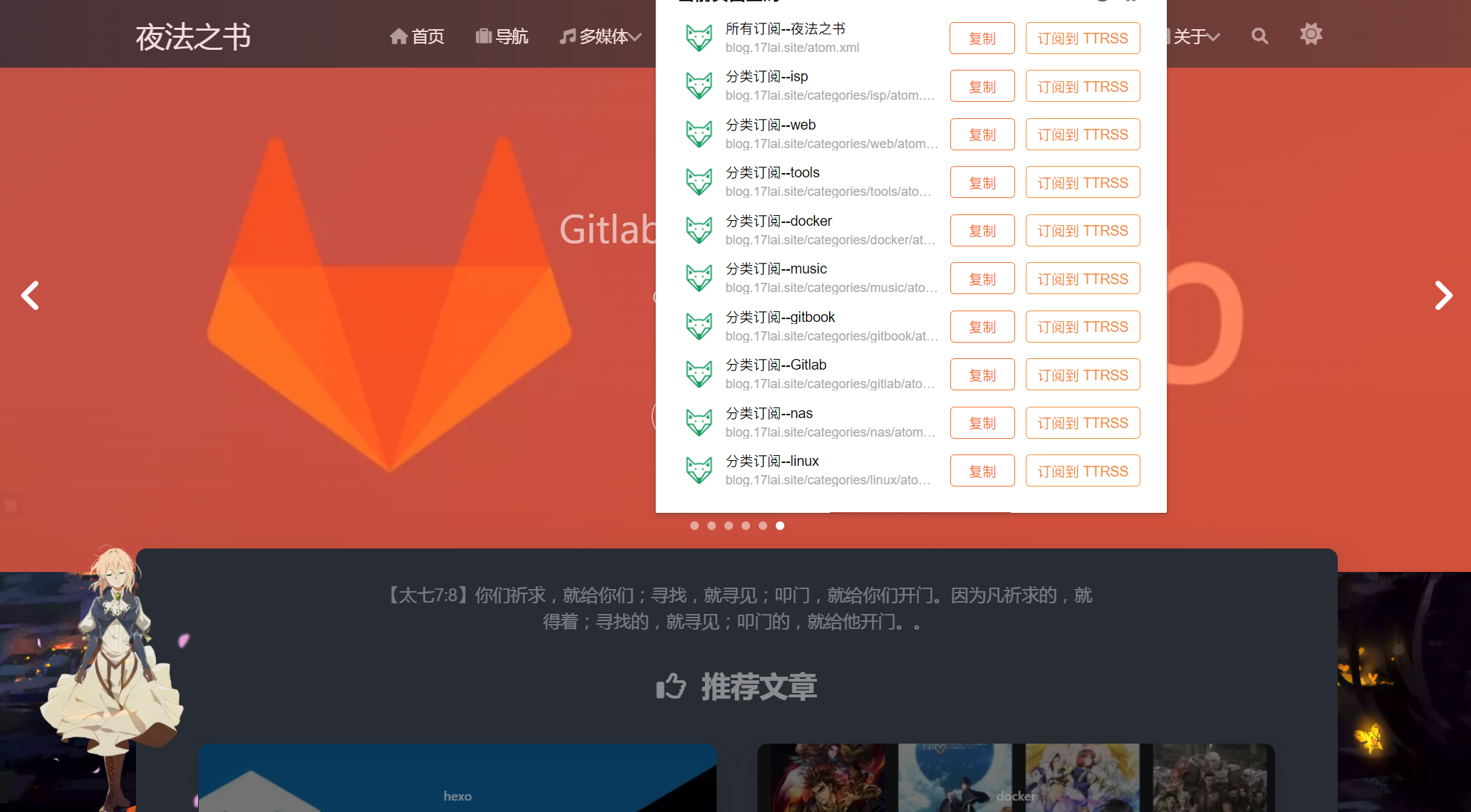
或者直接访问[我的博客](https://blog.17lai.site/)查看效果!
> 重要注意.需要安装 [hexo-generator-tag](https://www.npmjs.com/package/hexo-generator-tag) 和 [hexo-generator-category](https://www.npmjs.com/package/hexo-generator-category) 插件用来生成 tag/category feeds.
### 安装
```bash
npm install hexo-feed-new --save-dev
```
### 配置
```yaml
feed:
limit: 20
order_by: "-date"
tag_dir: "tag"
category_dir: "category"
rss:
enable: true
template: "themes/theme/layout/_alternate/rss.ejs"
output: "rss.xml"
atom:
enable: true
template: "themes/theme/layout/_alternate/atom.ejs"
output: "atom.xml"
jsonFeed:
enable: true
template: "themes/theme/layout/_alternate/json.ejs"
output: "feed.json"
```
| Key | Required | Default value | Description |
| ------------------- | -------- | ------------- | ------------------------------------------------------------ |
| `limit` | `false` | `0` | Post count that will be presented in the feed. Use `0` to publish all posts to the feed. |
| `order_by` | `false` | `-date` | Sorting order for the posts. |
| `tag_dir` | `false` | `tag` | Directory name to publish all tag-related feeds. Set `false` to avoid generating feeds by tag. For more information see below. |
| `category_dir` | `false` | `category` | Directory name to publish all category-related feeds. Set `false` to avoid generating feeds by category. For more information see below. |
| `rss.enable` | `false` | `true` | Enable/disable RSS feed generating. |
| `rss.template` | `false` | | Path to custom template for the RSS feed. |
| `rss.output` | `false` | `rss.xml` | Output filename for RSS feed. |
| `atom.enable` | `false` | `true` | Enable/disable ATOM feed generating. |
| `atom.template` | `false` | | Path to custom template for the ATOM feed. |
| `atom.output` | `false` | `atom.xml` | Output filename for ATOM feed. |
| `jsonFeed.enable` | `false` | `true` | Enable/disable JSON feed generating. |
| `jsonFeed.template` | `false` | | Path to custom template for the JSON feed. |
| `jsonFeed.output` | `false` | `feed.json` | Output filename for JSON feed. |
### 添加feed
```html
```
---
> English
## hexo-feed-new
`hexo-feed-new` is a plugin for Hexo static site generator that builds RSS, Atom and JSON Feed for your content.
* Supports most popular formats: **RSS**, **Atom** and **JSON Feed**.
* **Lightweight** and fast.
* **Customizable**. You can choose which formats to use, how many posts should be included in the feed, ordering and more.
* Generates feeds by **tags and categories**. It is possible to generate feed not only for the whole website content but also for every tag/category.
* Support for **custom templates**. If you are unhappy with the default template for some of the format, you can specify your own template and build there exactly what you want.
## How it works
1. The plugin registers a few generators that run once you build your website.
2. Every generator analyzes your website content (posts, tags, categories) and prepares the data.
3. Based on the content the plugin generates the feed with default (or custom) template.
4. Once the website is published user can grab the feed.
## Requirements
- Hexo: 4.x
- Node 12+
## Usage
1. Install the plugin using npm:
```bash
$ npm install hexo-feed-new --save-dev
```
2. Once the plugin is installed it is enabled by default. So you can build your website with Hexo and see the result. By default, the following feed files will be created: `rss.xml`, `atom.xml`, and `feed.json`.
3. Add custom configuration to the Hexo config file if you want to customize the plugin behavior.
4. Publish your website and enjoy your feed 🎉.
## Configuration
To configure the plugin add `feed` key to the Hexo config file. For example:
```yaml
feed:
limit: 20
order_by: "-date"
tag_dir: "tag"
category_dir: "category"
rss:
enable: true
template: "themes/theme/layout/_alternate/rss.ejs"
output: "rss.xml"
atom:
enable: true
template: "themes/theme/layout/_alternate/atom.ejs"
output: "atom.xml"
jsonFeed:
enable: true
template: "themes/theme/layout/_alternate/json.ejs"
output: "feed.json"
```
| Key | Required | Default value | Description |
| --- | --- | --- | --- |
| `limit` | `false` | `0` | Post count that will be presented in the feed. Use `0` to publish all posts to the feed. |
| `order_by` | `false` | `-date` | Sorting order for the posts. |
| `tag_dir` | `false` | `tag` | Directory name to publish all tag-related feeds. Set `false` to avoid generating feeds by tag. For more information see below. |
| `category_dir` | `false` | `category` | Directory name to publish all category-related feeds. Set `false` to avoid generating feeds by category. For more information see below. |
| `rss.enable` | `false` | `true` | Enable/disable RSS feed generating. |
| `rss.template` | `false` | | Path to custom template for the RSS feed. |
| `rss.output` | `false` | `rss.xml` | Output filename for RSS feed. |
| `atom.enable` | `false` | `true` | Enable/disable ATOM feed generating. |
| `atom.template` | `false` | | Path to custom template for the ATOM feed. |
| `atom.output` | `false` | `atom.xml` | Output filename for ATOM feed. |
| `jsonFeed.enable` | `false` | `true` | Enable/disable JSON feed generating. |
| `jsonFeed.template` | `false` | | Path to custom template for the JSON feed. |
| `jsonFeed.output` | `false` | `feed.json` | Output filename for JSON feed. |
## Adding link to your feed into the website layout
It's strongly recommended to include links to your feeds into the head section of your website pages. So, once you installed the plugin add the following code into your `layout.ejs` file:
```html
```
*The plugin intentionally doesn't change the `` section content. It allows you to customize the tag in the way you want.*
## Tags/categories support
`hexo-feed` supports generating separated feeds for every tag and category. It allows your users to subscribe to a particular tag or category instead of all posts on the website.
Generating feeds for tags and categories is enabled by default. If you want to disable it set `tag_dir` and `category_dir` parameter to `false`.
> **Important notice.** [`hexo-generator-tag`](https://www.npmjs.com/package/hexo-generator-tag) and [`hexo-generator-category`](https://www.npmjs.com/package/hexo-generator-category) packages should be installed in order to generate tag/category feeds.
## Template customization
If you want to customize the feed template, specify the template path in `rss.template`, `atom.template` or `jsonFeed.template` parameter. You can use default templates from `hexo-feed` as a reference:
* [`templates/rss.ejs`](https://github.com/sergeyzwezdin/hexo-feed/blob/master/lib/templates/rss.ejs)
* [`templates/atom.ejs`](https://github.com/sergeyzwezdin/hexo-feed/blob/master/lib/templates/atom.ejs)
* [`templates/json.ejs`](https://github.com/sergeyzwezdin/hexo-feed/blob/master/lib/templates/json.ejs)