https://github.com/appsflyersdk/appsflyer-psn-unity-sample-app
https://github.com/appsflyersdk/appsflyer-psn-unity-sample-app
Last synced: 8 months ago
JSON representation
- Host: GitHub
- URL: https://github.com/appsflyersdk/appsflyer-psn-unity-sample-app
- Owner: AppsFlyerSDK
- Created: 2023-07-24T12:18:03.000Z (almost 3 years ago)
- Default Branch: master
- Last Pushed: 2023-08-24T08:18:50.000Z (almost 3 years ago)
- Last Synced: 2025-01-23T17:57:15.986Z (over 1 year ago)
- Language: C#
- Size: 25.4 KB
- Stars: 0
- Watchers: 2
- Forks: 0
- Open Issues: 0
-
Metadata Files:
- Readme: README.md
Awesome Lists containing this project
README
## AppsFlyer Playstation Unity SDK integration
AppsFlyer empowers gaming marketers to make better decisions by providing powerful tools to perform cross-platform attribution.
Game attribution requires the game to integrate the AppsFlyer SDK that records first opens, consecutive sessions, and in-app events. For example, purchase events.
We recommend you use this sample app as a reference for integrating the AppsFlyer SDK into your Unity Playstation game.
## AppsflyerModule - Interface
`AppsflyerModule.cs`, included in the scenes folder, contains the required code and logic to connect to AppsFlyer servers and report events.
### AppsflyerModule
This method receives your API key, App ID, the parent MonoBehaviour and a sandbox mode flag (optional, false by default) and initializes the AppsFlyer Module.
**Method signature**
```c#
AppsflyerModule(string devkey, string appid, MonoBehaviour mono, bool isSandbox = false)
```
**Usage**:
```c#
// for regular init
AppsflyerModule afm = new AppsflyerModule(<< DEV_KEY >>, << APP_ID >>, this);
// for init in sandbox mode (reports the events to the sandbox endpoint)
AppsflyerModule afm = new AppsflyerModule(<< DEV_KEY >>, << APP_ID >>, this, true);
```
**Arguments**:
- `DEV_KEY`: Get from the marketer or [AppsFlyer HQ](https://support.appsflyer.com/hc/en-us/articles/211719806-App-settings-#general-app-settings).
- `APP_ID`: The app id on Appsflyer HQ
### Start
This method sends first open/session requests to AppsFlyer.
**Method signature**
```c#
void Start(bool skipFirst = false)
```
**Usage**:
```c#
// without the flag
afm.Start();
// with the flag
bool skipFirst = [SOME_CONDITION];
afm.Start(skipFirst);
```
### LogEvent
This method receives an event name and JSON object and sends an in-app event to AppsFlyer.
**Method signature**
```
void LogEvent(string event_name, Dictionary event_parameters)
```
**Usage**:
```c#
// set event name
string event_name = "af_purchase";
// set event values
Dictionary event_parameters = new Dictionary();
event_parameters.Add("af_currency", "USD");
event_parameters.Add("af_price", 6.66);
event_parameters.Add("af_revenue", 12.12);
// send logEvent request
afm.LogEvent(event_name, event_parameters);
```
### IsInstallOlderThanDate
This method receives a date string and returns true if the game folder creation date is older than the date string. The date string format is: "2023-03-01T23:12:34+00:00"
**Method signature**
```c#
bool IsInstallOlderThanDate(string datestring)
```
**Usage**:
```c#
// the creation date in this example is "2023-03-23T08:30:00+00:00"
bool newerDate = afm.IsInstallOlderThanDate("2023-06-13T10:00:00+00:00");
bool olderDate = afm.IsInstallOlderThanDate("2023-02-11T10:00:00+00:00");
// will return true
Debug.Log("newerDate:" + (newerDate ? "true" : "false"));
// will return false
Debug.Log("olderDate:" + (olderDate ? "true" : "false"));
// example usage with skipFirst -
// skipping if the install date is NOT older than the given date
bool IsInstallOlderThanDate = afm.IsInstallOlderThanDate("2023-02-11T10:00:00+00:00");
afm.Start(!IsInstallOlderThanDate);
```
### GetAppsFlyerUID
Get AppsFlyer's unique device ID. The SDK generates an AppsFlyer unique device ID upon app installation. When the SDK is started, this ID is recorded as the ID of the first app install.
**Method signature**
```c#
void GetAppsFlyerUID()
```
**Usage**:
```c#
AppsflyerModule afm = new AppsflyerModule(<< DEV_KEY >>, << APP_ID >>, this);
afm.Start();
string af_uid = afm.GetAppsFlyerUID();
```
## Running the sample app
1. Open Unity hub and open the project.
2. Use the sample code in AppsflyerScript.cs and update it with your DEV_KEY and APP_ID.
3. Add the AppsflyerScript to an empty game object (or use the one in the scenes folder):
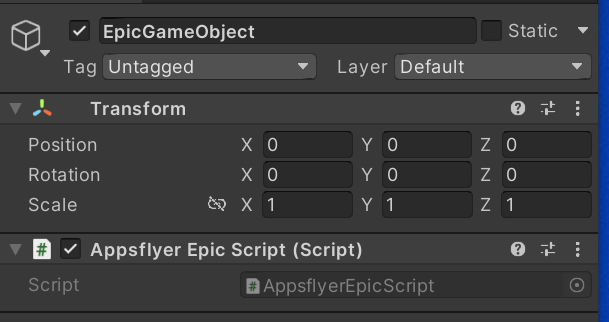
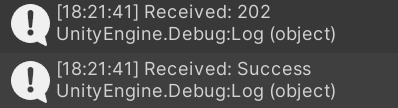
4. Launch the sample app via the Unity editor and check that your debug log shows the following message:
5. After 24 hours, the AppsFlyer dashboard updates and shows organic and non-organic installs and in-app events.
## Implementing AppsFlyer in your Playstation game
### Setup
1. Add the script from `Assets/AppsflyerModule.cs` to your app.
2. In the script above, [within these lines](https://github.com/AppsFlyerSDK/appsflyer-psn-unity-sample-app/blob/97b24f776d06b53d020438f8794cc8e4108d3d48/Assets/AppsflyerModule.cs#L51-L54), add PSN user ID for tracking or comment those in case you prefer not to collect it.
3. Use the sample code in `Assets/AppsflyerScript.cs` and update it with your `DEV_KEY` and `APP_ID`.
4. Initialize the SDK.
```c#
AppsflyerModule afm = new AppsflyerModule(<< DEV_KEY >>, << APP_ID >>, this);
```
5. [Start](#start) the AppsFlyer integration.
6. Report [in-app events](#logevent).
## Resetting the attribution
[Delete the PlayerPrefs data the registry/preferences folder](https://docs.unity3d.com/ScriptReference/PlayerPrefs.html), or use [PlayerPrefs.DeleteAll()](https://docs.unity3d.com/2020.1/Documentation/ScriptReference/PlayerPrefs.DeleteAll.html) when testing the attribution in the UnityEditor.