https://github.com/appsflyersdk/appsflyer-roku-sample-app
https://github.com/appsflyersdk/appsflyer-roku-sample-app
Last synced: 3 months ago
JSON representation
- Host: GitHub
- URL: https://github.com/appsflyersdk/appsflyer-roku-sample-app
- Owner: AppsFlyerSDK
- Created: 2023-03-14T22:54:40.000Z (over 3 years ago)
- Default Branch: main
- Last Pushed: 2024-03-04T12:47:29.000Z (over 2 years ago)
- Last Synced: 2025-01-23T17:57:16.518Z (over 1 year ago)
- Language: Brightscript
- Size: 57.6 KB
- Stars: 1
- Watchers: 4
- Forks: 0
- Open Issues: 0
-
Metadata Files:
- Readme: README.md
Awesome Lists containing this project
README
---
title: Roku (BrightScript)
parentDoc: 64ad64dd8459f10012a22209
category: 6446526dddf659006c7ea807
order: 1
hidden: false
slug: roku-brighscript
---
> Link to repository
> [GitHub](https://github.com/AppsFlyerSDK/appsflyer-roku-sample-app)
## AppsFlyer Roku SDK integration
AppsFlyer empowers gaming marketers to make better decisions by providing powerful tools that solve real pain points, including cross-platform attribution, mobile and web analytics, deep linking, fraud detection, privacy management and preservation, and more.
Game attribution requires the game to communicate with AppsFlyer APIs over HTTPS and report user activities like first opens, consecutive sessions, and in-app events. For example, purchase events.
We recommend you use this sample app as a reference for integrating AppsFlyer into your Roku channel
## AppsFlyerRokuSDK - Interface
`AppsFlyerRokuSDK.brs`, included in the `source/appsflyer-integration-files` folder, contains the required code and logic to connect to AppsFlyer servers and report events.
### Init
This method receives your API key and app ID and initializes the AppsFlyer Module that sends first open and session requests to AppsFlyer.
**Method signature**
```brs
AppsFlyer().init(<< DEV_KEY >>, << APP_ID >>)
```
**Usage**:
```brs
' Initialize the AppsFlyer integration (send first-open/session event)
AppsFlyer().init(<< DEV_KEY >>, << APP_ID >>)
```
**Arguments**:
- `APP_ID`: Found via [ifAppInfo](https://developer.roku.com/docs/references/brightscript/interfaces/ifappinfo.md).
- `DEV_KEY`: Get from the marketer or [AppsFlyer HQ](https://support.appsflyer.com/hc/en-us/articles/211719806-App-settings-#general-app-settings).
> **_NOTE:_** It is recommended to set the `APP_ID` manually.
>
> When retrieving the `APP_ID` with `GetID()` [roAppInfo](https://developer.roku.com/en-gb/docs/references/brightscript/interfaces/ifappinfo.md), the channel ID is "dev" if the application is sideloaded, and then app will not be able to communicate with the AppsFlyer endpoint.
### Start
This method sends first open and session requests to AppsFlyer.
**Method signature**
```brs
start()
```
**Usage**:
```brs
AppsFlyer().start()
```
### Stop
This method stops the SDK from functioning and communicating with AppsFlyer servers. It's used when implementing user opt-in/opt-out.
**Method signature**
```brs
stop()
```
**Usage**:
```brs
' Starting the SDK
AppsFlyer().start()
' ...
' Stopping the SDK, preventing further communication with AppsFlyer
AppsFlyer().stop()
```
### LogEvent
This method receives an event name and JSON object and sends in-app events to AppsFlyer.
**Method signature**
```brs
logEvent: function(eventName as string, eventParameters as object, eventCustomParameters = {})
```
**Usage**:
```brs
' logEvent without eventCustomParameters
trackEventParameters = { "af_revenue": 24.22, "af_currency": "ILS" }
AppsFlyer().logEvent("af_purchase", trackEventParameters)
' logEvent with eventCustomParameters
trackEventParameters = { "af_revenue": 24.22, "af_currency": "ILS", "freeHandParam": "freeHandValue" }
trackCustomEventParameters = { "freeHandParam": "freeHandValue" }
AppsFlyer().logEvent("af_purchase", trackEventParameters, trackCustomEventParameters)
```
### SetCustomerUserId
This method sets a customer ID that enables you to cross-reference your unique ID with the AppsFlyer unique ID and other device IDs. Note: You can only use this method before calling `Start()`.
The customer ID is available in raw data reports and in the postbacks sent via API.
**Method signature**
```c#
setCustomerUserId(string cuid)
```
**Usage**:
```c#
AppsFlyer().init(devkey, appid)
AppsFlyer().setCustomerUserId("")
AppsFlyer().start()
```
## Running the sample app
1. Open the `appsflyer-sample-app` folder in VSCode.
2. In `source/main.brs`, replace the following parameters with [your own](#app-details):
```brs
devkey = << DEV_KEY >>
appid = << APP_ID >>
```
3. Deploy the channel: - by ([using this plugin](https://marketplace.visualstudio.com/items?itemName=mjmcaulay.roku-deploy-vscode) makes it easier), - by zipping the content of the `source` folder
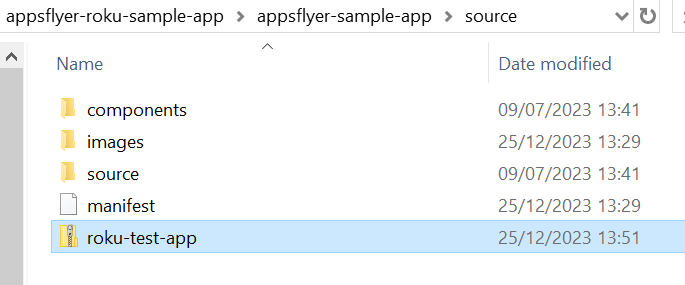
and then deploying it to Roku through Roku's Development Application Installer:
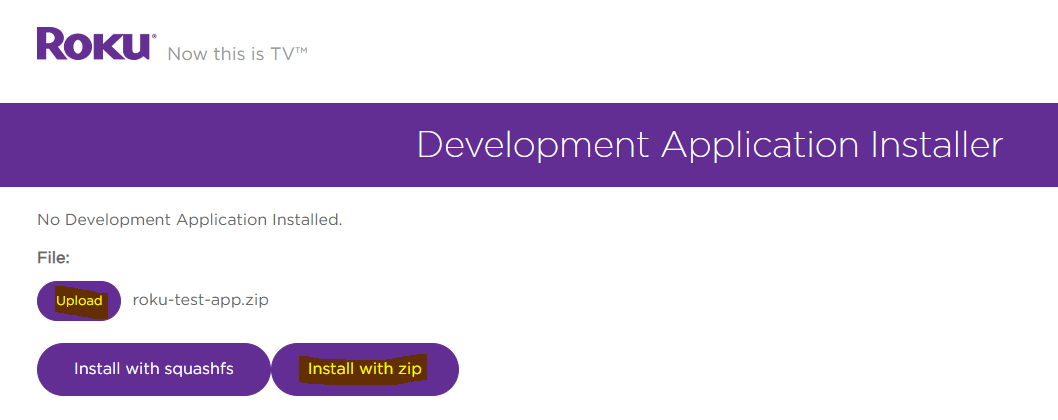
4. After the app loads, you may use the following commands through the [Roku remote](https://developer.roku.com/en-gb/docs/references/scenegraph/component-functions/onkeyevent.md):
- Click the **down** button to [set customer user id](#setcustomeruserid) (cuid) to `"AF roku test CUID"`.
- Click the **right** button to [set customer user id](#setcustomeruserid) (cuid) to `""` (reset it).
- Click the **up** button to [stop](#stop) the SDK.
- Click the **left** button to send the [start](#start) (first open/session) event.
- Click the **options** button (\*) to send [logEvent](#logevent).
- Click the **replay** button (\*) to send [logEvent](#logevent) with custom parameters.
- Click the **OK** button after every command in order to refresh the logs.
## Implementing AppsFlyer in your Roku channel
### Setup
1. Copy the files from the `appsflyer-integration-files` folder into your project.
2. Add the following code to your `main.brs` file and [Initialize](#init) the AppsFlyer integration:
```brs
Function Main(args as Dynamic) as Void
...
showAppsflyerChannelSGScreen(args)
...
End Function
sub showAppsflyerChannelSGScreen(args as Dynamic)
screen = CreateObject("roSGScreen")
m.port = CreateObject("roMessagePort")
screen.setMessagePort(m.port)
scene = screen.CreateScene("AppsFlyerScene")
screen.show()
' Initialize the AppsFlyer integration
AppsFlyer().init(DEV_KEY, APP_ID)
' Enable debugging if necessary
AppsFlyer().enableDebugLogs(true) ' same as AppsFlyer().setLogLevel("debug")
' ConversionData response arrives here
while true
msg = Wait(0, m.port)
?"MESSAGE RECEIVED: "msg.GetData()
msgType = Type(msg)
if msgType = "roSGScreenEvent"
if msg.isScreenClosed() then
return
end if
end if
end while
end sub
```
3. [Start](#start) the SDK.
4. Report [in-app events](#logevent).