https://github.com/appupgrade-dev/app-upgrade-android-sdk
Official App Upgrade Android SDK
https://github.com/appupgrade-dev/app-upgrade-android-sdk
Last synced: 4 months ago
JSON representation
Official App Upgrade Android SDK
- Host: GitHub
- URL: https://github.com/appupgrade-dev/app-upgrade-android-sdk
- Owner: appupgrade-dev
- License: mit
- Created: 2023-01-10T19:48:27.000Z (over 3 years ago)
- Default Branch: main
- Last Pushed: 2024-05-22T13:06:27.000Z (about 2 years ago)
- Last Synced: 2024-05-22T14:29:51.980Z (about 2 years ago)
- Language: Kotlin
- Homepage:
- Size: 189 KB
- Stars: 2
- Watchers: 1
- Forks: 0
- Open Issues: 0
-
Metadata Files:
- Readme: README.md
- Changelog: CHANGELOG.md
- License: LICENSE
- Code of conduct: CODE_OF_CONDUCT.md
Awesome Lists containing this project
README
# App Upgrade: Android SDK
Android SDK for [App Upgrade](https://appupgrade.dev)
App Upgrade is a service let your users know when to upgrade your apps or force them to upgrade the app.
[](https://jitpack.io/#appupgrade-dev/app-upgrade-android-sdk)
Many times we need to force upgrade mobile apps on users' mobile. Having faced this issue multiple times decided to find a better way to tackle this problem. After doing some research on how people are doing this there are so many custom solutions or checking with the play store or AppStore API if there is a new version available. Although this works if we just want to nudge users that there is a new version available. It doesn't solve the problem where we want to make a decision.. whether it's a soft graceful update or we want to force update. So here is this product that will make developers' life easy. We can set custom messages.. see the versions in beautify dashboard, and many exciting features in the roadmap ahead.
This SDK communicate with App Upgrade and check the version with store version information in App Upgrade. Based on response it will:
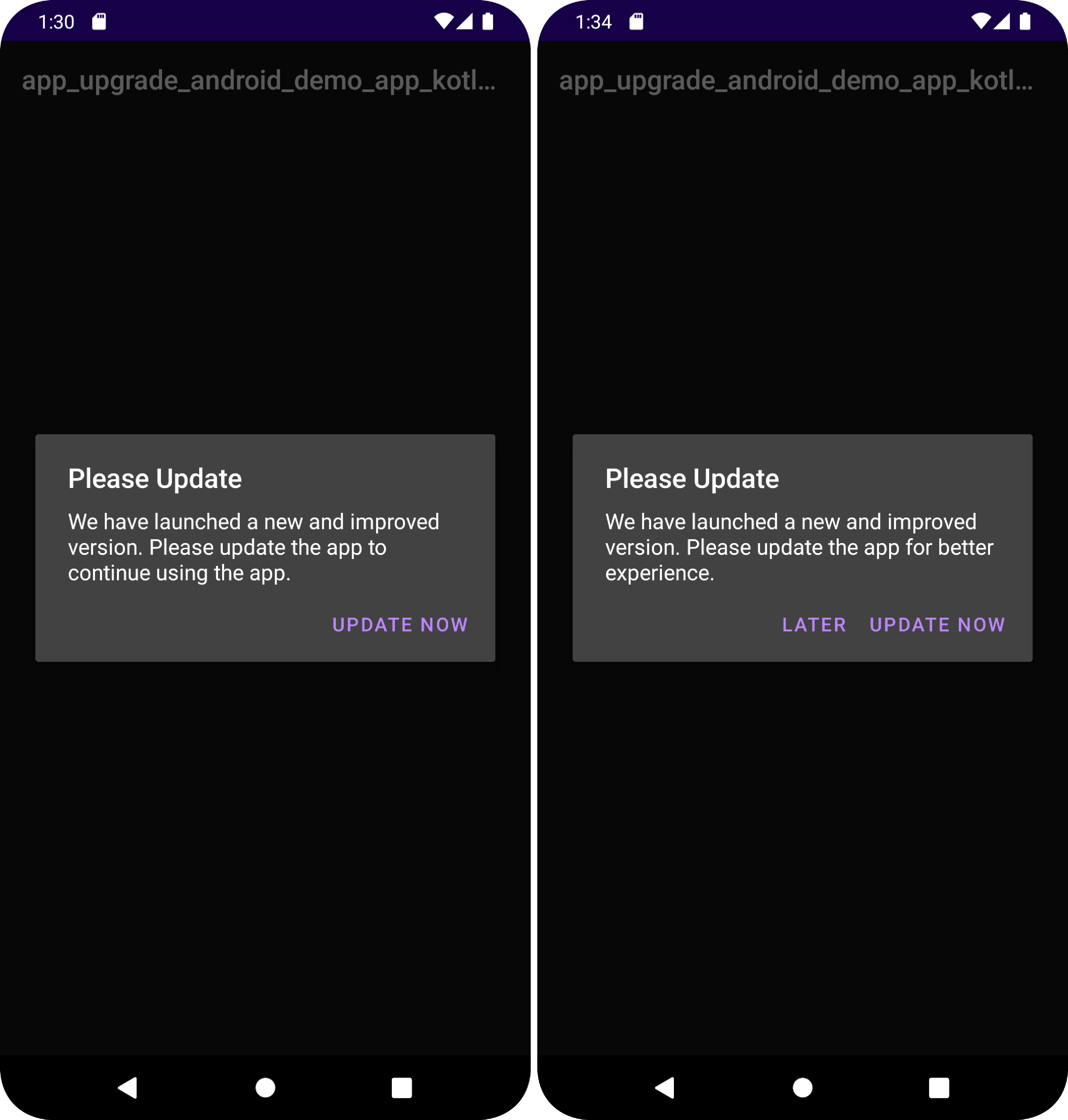
- If app needs force update will show a non-dismissable popup for update. On click it will launch app in app store for user to update.
- If app needs to be updated but not a force update, it will show a dismissable popup.
- If no action is required it won't do anything.
App Upgrade is a cross platform solution to getting users to easily update your app.
##### Stores Supported:
Apple App Store | Google Play Store | Amazon App Store | Huawei AppGallery | Other Android Markets
--- | --- | --- | --- | ---
**✓** | **✓** | **✓** | **✓** | **✓** If your app market place isn't one of these you can pass your own store URL.
## Installation
Install via gradle
1. Add the JitPack repository to your settings.gradle file
```
dependencyResolutionManagement {
repositoriesMode.set(RepositoriesMode.FAIL_ON_PROJECT_REPOS)
repositories {
google()
mavenCentral()
...
maven { url "https://jitpack.io" }
}
}
```
If you are using gradle version prior to 7.x.x add the following in your root build.gradle at the end of repositories:
```
allprojects {
repositories {
...
maven { url 'https://jitpack.io' }
}
}
```
For Kotlin build.gradle.kts syntax is:
```
allprojects {
repositories {
...
maven ("https://jitpack.io")
}
}
```
2. Add the dependency to your project
```groovy
dependencies {
implementation 'com.github.appupgrade-dev:app-upgrade-android-sdk:1.0.3'
}
```
3. Internet Permission required. Add the following in AndroidManifest.xml file if not already present.
```
```
4. If you are using `minifyEnabled true` it may obfuscate the code. Add the following rule in proguard-rules.pro to make sure SDK shows the popup.
```
# Keep all classes in the App Upgrade SDK package
-keep class com.appupgrade.app_upgrade_android_sdk.** { *; }
```
## How to use it.
1. Register on App Upgrade and follow the instructions to create project and get the x-api-key.
2. Use the SDK.
#### Kotlin
Add the following code in your MainActivity.kt -> onCreate method.
```kotlin
class MainActivity : AppCompatActivity() {
private lateinit var appUpgrade: AppUpgrade
override fun onCreate(savedInstanceState: Bundle?) {
super.onCreate(savedInstanceState)
setContentView(R.layout.activity_main)
// App Upgrade
val xApiKey = "ZWY0ZDhjYjgtYThmMC00NTg5LWI0NmUtMjM5OWZkNjkzMzQ5"
val appInfo = AppInfo(
appId = "com.android.com",
appName = "Wallpaper app",
appVersion = "1.0.0",
platform = "android",
environment = "production",
appLanguage = "es"
)
//Optional
val alertDialogConfig = AlertDialogConfig(
title = "Update Required", //Default: Please Update
updateButtonTitle = "Update Now", //Default: Update Now
laterButtonTitle = "Not Now" //Default: Later
)
val appUpgrade = AppUpgrade()
appUpgrade.checkForUpdates(this, xApiKey, appInfo, alertDialogConfig)
// appUpgrade.checkForUpdates(this, xApiKey, appInfom)
}
}
```
#### Java
Add the following code in your MainActivity.java -> onCreate method.
```java
public class MainActivity extends AppCompatActivity {
@Override
protected void onCreate(Bundle savedInstanceState) {
super.onCreate(savedInstanceState);
setContentView(R.layout.activity_main);
// App Upgrade
String xApiKey = "ZWY0ZDhjYjgtYThmMC00NTg5LWI0NmUtMjM5OWZkNjkzMzQ5";
String appId = "com.android.com";
String appName = "Wallpaper app";
String appVersion = "1.0.0";
String platform = "android";
String environment = "production";
String appLanguage = "es"; //Nullable
AppInfo appInfo = new AppInfo(appId, appName, appVersion, platform, environment, appLanguage);
// Optional
String title = "Update Required.";
String updateButtonTitle = "UPDATE";
String laterButtonTitle = "Not Now";
AlertDialogConfig alertDialogConfig = new AlertDialogConfig(title, updateButtonTitle, laterButtonTitle);
AppUpgrade appUpgrade = new AppUpgrade();
appUpgrade.checkForUpdates(this, xApiKey, appInfo, alertDialogConfig);
// appUpgrade.checkForUpdates(this, xApiKey, appInfo);
}
}
```
### Note:
1. For opening the play store the app should be live.
2. It might not be able to open the play store in simulator. You can try it in physical device.
3. You can find a sample Kotlin app from here [app-upgrade-android-kotlin-demo-app](https://github.com/appupgrade-dev/app_upgrade_android_kotlin_demo_app) and a sample Java app from here [app-upgrade-android-java-demo-app](https://github.com/appupgrade-dev/app_upgrade_android_java_demo_app)
4. Read detailed blog on how to integrate Kotlin app from here [How to upgrade/force upgrade Android Kotlin app](https://appupgrade.dev/blog/how-to-force-upgrade-android-kotlin-app) and Java app from here [How to upgrade/force upgrade Android Java app](https://appupgrade.dev/blog/how-to-force-upgrade-android-java-app)
### Example with store other than app store or play store.
If you want users to redirect to store other than playstore. You can add these additional parameters **preferredAndroidMarket** see the example below.
```kotlin
class MainActivity : AppCompatActivity() {
private lateinit var appUpgrade: AppUpgrade
override fun onCreate(savedInstanceState: Bundle?) {
super.onCreate(savedInstanceState)
setContentView(R.layout.activity_main)
// App Upgrade
val xApiKey = "ZWY0ZDhjYjgtYThmMC00NTg5LWI0NmUtMjM5OWZkNjkzMzQ5"
val appInfo = AppInfo(
appId = "com.android.com",
appName = "Wallpaper app",
appVersion = "1.0.0",
platform = "android",
environment = "production",
appLanguage = "es",
preferredAndroidMarket = PreferredAndroidMarket.HUAWEI // or PreferredAndroidMarket.AMAZON or PreferredAndroidMarket.OTHER If not provided default is Google playstore. Optional
)
val appUpgrade = AppUpgrade()
appUpgrade.checkForUpdates(this, xApiKey, appInfo)
}
}
```
- preferredAndroidMarket: PreferredAndroidMarket.AMAZON // or PreferredAndroidMarket.HUAWEI or PreferredAndroidMarket.OTHER If not provided default is Google playstore. If SDK fails to open preferred market place in case marketplace is not available then default Google playstore will be open.
If you want to redirect user to some other android market place you can use the following example:
```kotlin
class MainActivity : AppCompatActivity() {
private lateinit var appUpgrade: AppUpgrade
override fun onCreate(savedInstanceState: Bundle?) {
super.onCreate(savedInstanceState)
setContentView(R.layout.activity_main)
// App Upgrade
val xApiKey = "ZWY0ZDhjYjgtYThmMC00NTg5LWI0NmUtMjM5OWZkNjkzMzQ5"
val appInfo = AppInfo(
appId = "com.android.com",
appName = "Wallpaper app",
appVersion = "1.0.0",
platform = "android",
environment = "production",
appLanguage = "es",
preferredAndroidMarket = PreferredAndroidMarket.HUAWEI, // or PreferredAndroidMarket.AMAZON or PreferredAndroidMarket.OTHER If not provided default is Google playstore. Optional
otherAndroidMarketUrl = "https://otherandroidmarketurl.com/app/id" // Required if preferredAndroidMarket is OTHER.
)
val appUpgrade = AppUpgrade()
appUpgrade.checkForUpdates(this, xApiKey, appInfo)
}
}
```
## Screenshot
## App Upgrade Docs
For more information visit [App Upgrade](https://appupgrade.dev)
### Changelog
Please see [CHANGELOG](CHANGELOG.md) for more information what has changed recently.
### Contributing
Please see [CONTRIBUTING](CONTRIBUTING.md) and [CODE OF CONDUCT](CODE_OF_CONDUCT.md) for details.
### License
The MIT License (MIT). Please see [License File](LICENSE) for more information.
## Need help?
If you're looking for help, try our [Documentation](https://appupgrade.dev/docs/) or our [FAQ](https://appupgrade.dev/docs/app-upgrade-faq).
If you need support please write to us at support@appupgrade.dev
### Happy Coding!!!