https://github.com/appupgrade-dev/app_upgrade_flutter_demo_app
App Upgrade: Flutter Demo App is a sample flutter app integrated with App Upgrade Flutter SDK to demonstrate how Force upgrade works in flutter app.
https://github.com/appupgrade-dev/app_upgrade_flutter_demo_app
appupgrade flutter force-update force-upgrade forceupgrade
Last synced: 4 months ago
JSON representation
App Upgrade: Flutter Demo App is a sample flutter app integrated with App Upgrade Flutter SDK to demonstrate how Force upgrade works in flutter app.
- Host: GitHub
- URL: https://github.com/appupgrade-dev/app_upgrade_flutter_demo_app
- Owner: appupgrade-dev
- License: mit
- Created: 2022-04-09T20:39:59.000Z (about 4 years ago)
- Default Branch: main
- Last Pushed: 2023-11-14T16:04:30.000Z (over 2 years ago)
- Last Synced: 2024-04-25T04:04:28.917Z (about 2 years ago)
- Topics: appupgrade, flutter, force-update, force-upgrade, forceupgrade
- Language: C++
- Homepage:
- Size: 1.42 MB
- Stars: 0
- Watchers: 1
- Forks: 0
- Open Issues: 0
-
Metadata Files:
- Readme: README.md
- License: LICENSE
Awesome Lists containing this project
README
# App Upgrade: Flutter Demo App
[App Upgrade: Flutter Demo App](https://github.com/appupgrade-dev/app_upgrade_flutter_demo_app) is a sample flutter app integrated with [App Upgrade Flutter SDK](https://pub.dev/packages/app_upgrade_flutter_sdk) to demonstrate how Force upgrade works in flutter app with [App Upgrade](https://appupgrade.dev).
You can find the flutter demo app integrated via API in [integration-via-api](https://github.com/appupgrade-dev/app_upgrade_flutter_demo_app/tree/integrate-via-api) branch.
## Installation
To get started, clone the repo:
`$ git clone https://github.com/appupgrade-dev/app_upgrade_flutter_demo_app`
## Setup
1. Once cloned, navigate to the `app_upgrade_flutter_demo_app` directory.
`$ cd app_upgrade_flutter_demo_app`
2. Open the directory in your code editor.
3. Open the `app_upgrade_flutter_demo_app/lib/main.dart` file, and replace required values in line 14-32
| Key | Value Description |
| -----------------------|-------------|
| `xApiKey` | Your API Key. Required. |
| `appName` | Your app name. Required. |
| `appVersion` | Your app version. Required. |
| `platform` | Your app platform, ex: android or iOS. Required. |
| `environment` | Your app enviroment, ex: dev, stating, production. Required. |
| `appLanguage` | Your app language, ex: en, es etc. Optional. |
| `preferredAndroidMarket` | Your preferred android market, ex: amazon, huawei or other. Optional. |
| `otherAndroidMarketUrl` | Other market place url from where update can be done. Optional. Required only if PreferredAndroidMarket is other |
If you want users to redirect to store other than app store or playstore. You can add these additional parameters in appInfo
- preferredAndroidMarket: PreferredAndroidMarket.amazon // or PreferredAndroidMarket.huawei or PreferredAndroidMarket.other If not provided default is Google playstore.
If you want to redirect user to some other android market place you can add the following fields:
- preferredAndroidMarket: PreferredAndroidMarket.other
- otherAndroidMarketUrl: 'https://someotherandroidmarket.com/app/id'// Required if preferredAndroidMarket is other.
Example:
```js
AppInfo appInfo = AppInfo(
appName: 'Wallpaper app', // Your app name
appVersion: '1.0.0', // Your app version
platform: 'android', // App Platform, android or ios
environment:
'production', // Environment in which app is running, production, staging or development etc.
appLanguage: 'es'
);
return MaterialApp(
title: 'App Upgrade Flutter Demo App',
home: Scaffold(
appBar: AppBar(
title: Text('App Upgrade Flutter Demo App'),
),
body: AppUpgradeAlert(
xApiKey:
'ZWY0ZDhjYjgtYThmMC00NTg5LWI0NmUtMjM5OWZkNjkzMzQ5', // Your x-api-key
appInfo: appInfo,
child: Center(child: Text('Hello World!')),
)),
);
```
4. Save `main.dart` file.
## Run the app:
Start the app
`$ flutter run --no-sound-null-safety`
## Usage:
1. Head to [App Upgrade](https://appupgrade.dev) and signup if not already.
2. Create a new Project.
3. Grab the API Key. You will need to provide the same in the required fields mentioned in above section.
4. Create a new version with the required details and force upgrade field as selected. Make sure the details provided in version matches with the details provided in the App.js file.
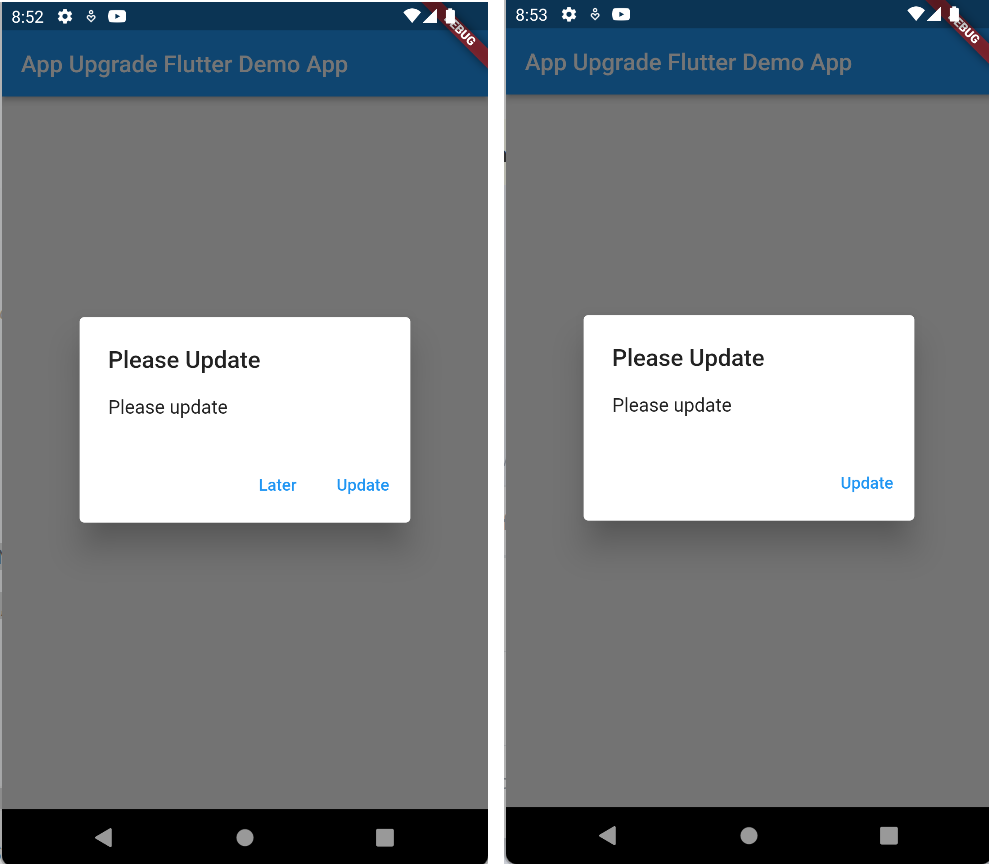
5. Refresh the app and you will be able to see a popup for force upgrade.
6. Edit the version in dashboard with Force upgrade field unselected. Refresh the app and you will see a popup with soft upgrade with a button to upgrade later.
> For full details on how to use App Upgrade dashboard read our [Documentation](https://appupgrade.dev/docs)
## Screenshots
## Need help?
If you're looking for help, try our [Documentation](https://appupgrade.dev/docs/) or our [FAQ](https://appupgrade.dev/docs/app-upgrade-faq).
If you need support please write to us at support@appupgrade.dev