https://github.com/aquice/eezpass
A really personalisable random password generator
https://github.com/aquice/eezpass
password-generator python security
Last synced: 10 months ago
JSON representation
A really personalisable random password generator
- Host: GitHub
- URL: https://github.com/aquice/eezpass
- Owner: AquIce
- License: agpl-3.0
- Created: 2022-05-20T17:25:08.000Z (about 4 years ago)
- Default Branch: main
- Last Pushed: 2022-05-22T15:01:49.000Z (about 4 years ago)
- Last Synced: 2025-03-03T09:41:47.092Z (over 1 year ago)
- Topics: password-generator, python, security
- Language: Python
- Homepage:
- Size: 6.87 MB
- Stars: 2
- Watchers: 1
- Forks: 0
- Open Issues: 0
-
Metadata Files:
- Readme: README.md
- License: LICENSE
Awesome Lists containing this project
README
# EezPass
EezPass is a really personalisable random password generator
### Importation
To import **EezPass**, you just have move the *eezpass.py* file in the same folder as your code file.

After you have checked that, use the **from ... import ...** command by adding the following line on top of your code :
```py
from eezpass import *
```
By doing this, Python will automatically add the *__pycache__* folder into your code folder like shown on the image.
***
### Basic configuration
First, you need to create an instance of the *EezPass class* with this code :
```py
= EezPass()
```
The admin password is used to make modifications to the parameters.
For more readability, we will use myPass as further in the code
After that, you just have to set a few parameters before starting using the password generator :
- The charsets you will use (a = lower letters, m = upper letters, n = numbers, s = special characters)
- The password's length
With the following code :
```py
myPass.set_charsets('')
myPass.set_length()
```
An example for could be 'amn' for all letters and numbers
These are the necessaries options.
***
### Advanced configuration
Now, let's take a look at the unnecessaries options, but who gives you interesting features.
- Passwords logs
This feature allow you to create a file that will contain all the passwords generated by EezPass using the following code
```py
myPass.enable_password_logs(True)
```
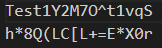
You can also disable the logs (they are disabled by default) just by using False instead of True as argument
If you want to change the file name (by default passwords.log), then use this command
```py
myPass.passwordLogs = ''
```
- Global logs
While passwords logs allow you to find your generated passwords easily, global logs allow you to see every action performed by your code.
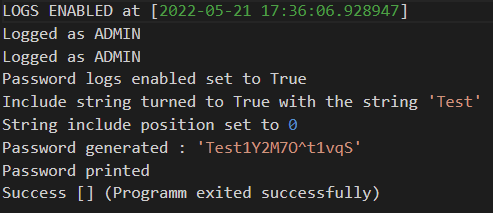
You can enable them like that :
```py
myPass.enable_logs(True)
```
And just as passwords logs, they are also disabled by default but you can if necessary you can disable them by using False instead of True.
You can also change the logs file name, who is default.log
```py
myPass.logs = ''
```
- Include string
This is probably the hardest thing to understand about this code, the string including allows you to insert the string you want in your password and at a chosen or random position (by default it is 0).
You can configure that with these few commands :
```py
myPass.include_string(True)
myPass.set_include_string_position()
```
And when you will run your code, it will ask you for the string you want to include.
For the , you can use a number or the * character (this will generate a random number).
If you do not want to include a string anymore while you are running your code, just press enter without answering.
***
### Addtionnal features
They are a few functions that are not explained up to now. So let's show these additionnal features :
- Print properties
You can print the password's properties (charsets and length) with this command :
```py
myPass.print_properties()
```

- Print generated password(s)
You can print one or all the generated passwords with their index :
```py
myPass.print_passlogs()
```
The index can be a number or '*'. In that case, it will print all the generated passwords
- End the programm
There is a function called *end()* who is called at the end of the programm
```py
end()
```
***
### Code example
For this example I will use this code :
```py
from eezpass import * # Import the eezpass module
os.system('cls') # Clear the console
myPass = EezPass('admin') # Create a new instance of EezPass
myPass.enable_logs(True) # Enable general logs
myPass.enable_password_logs(True) # Enable password logs
myPass.set_charsets('amns') # Select all charsets
myPass.set_length(16) # Set the password length to 16 characters
myPass.include_string(True) # Enable string including
myPass.set_include_string_position('*') # Set it to a random position
myPass.print_properties() # Print properties
myPass.print_password() # Print the final password
myPass.print_passlogs('*') # Print all generated passwords
```
As you can see, we have configured that with the following process :
- Use'admin' as admin password (which is not really a good choice)
- Enable logs
- Enable password logs
- Select lower letters, upper letters, numbers and special characters as charsets
- Set the password's length to 16 characters
- Enable the string inclusion
- Set the string included's position to random
- Print the properties
- Print the final password
- Print all generated passwords
And this will produce the following output :
```
What is the password ? admin
Which string do you want to include ? EezPass
Password length : 16
Enabled charsets : Lower letters, upper letters, numbers, special characters
Y9jWht^DgEezPass
Y9jWht^DgEezPass
```
Now, if we rerun the same code, we get this output :
```
What is the password ? admin
Which string do you want to include ? EezPass
Password length : 16
Enabled charsets : Lower letters, upper letters, numbers, special characters
E4]n*ZgO}EezPass
Y9jWht^DgEezPass
E4]n*ZgO}EezPass
```
If you open the logs file, you will get something very similar to this :
```log
LOGS ENABLED at [2022-05-21 21:36:46.422301]
Password logs enabled set to True
Logged as ADMIN
Include string turned to True with the string 'EezPass'
Properties printed
Password generated : 'Y9jWht^DgEezPass'
Password printed
Success [] (Programm exited successfully)
LOGS ENABLED at [2022-05-21 21:37:13.842654]
Password logs enabled set to True
Logged as ADMIN
Include string turned to True with the string 'EezPass'
Properties printed
Password generated : 'E4]n*ZgO}EezPass'
Password printed
Success [] (Programm exited successfully)
```
By Lil_Tim_0 ;)