https://github.com/arafkarsh/ms-cache-kafka-quickstart
Microservice Service Template With Redis Cache and Kafka Framework. Microservice Template gives you a SpringBoot App template with Open API 3 Ex, Actuator, Sleuth, Prometheus, and POM file with Fat and Thin jar file creation and Dockerfile for containerization.
https://github.com/arafkarsh/ms-cache-kafka-quickstart
aop exception-handling kafka microservices redis security spring-boot
Last synced: 2 months ago
JSON representation
Microservice Service Template With Redis Cache and Kafka Framework. Microservice Template gives you a SpringBoot App template with Open API 3 Ex, Actuator, Sleuth, Prometheus, and POM file with Fat and Thin jar file creation and Dockerfile for containerization.
- Host: GitHub
- URL: https://github.com/arafkarsh/ms-cache-kafka-quickstart
- Owner: arafkarsh
- License: apache-2.0
- Created: 2022-06-22T15:36:31.000Z (about 4 years ago)
- Default Branch: main
- Last Pushed: 2022-06-22T15:36:34.000Z (about 4 years ago)
- Last Synced: 2025-03-04T21:29:22.637Z (over 1 year ago)
- Topics: aop, exception-handling, kafka, microservices, redis, security, spring-boot
- Language: Java
- Homepage:
- Size: 73.2 KB
- Stars: 1
- Watchers: 1
- Forks: 1
- Open Issues: 0
-
Metadata Files:
- Readme: README.md
- License: LICENSE
Awesome Lists containing this project
README
# Microservice Template
Microservice Template gives you a
1. SpringBoot App template with
2. Open API 3 Ex,
3. Spring Actuator,
4. Spring Sleuth and
5. POM File with (SpringBoot) Fat and Thin (Maven) jar file creation and
6. Dockerfile for containerisation.
## Service Setup
### Step 1 - Setup Org, Service, & Container Name, Versions, API Path in app.props.tmpl
1. Update the Org Name in src/main/resources/app.props.tmpl file (service.org)
2. Update the Microservice name in src/main/resources/app.props.tmpl file (service.name)
3. Update the API Version in src/main/resources/app.props.tmpl file (service.api.version)
4. Update the API Name in src/main/resources/app.props.tmpl file (service.api.name)
5. Update the Container Name in src/main/resources/app.props.tmpl file (service.container)
6. Update the Server Version src/main/resources/app.props.tmpl file (server.version)
7. Update the SRC_BASE (Your Service Repository Base Directory) in getServiceName shell script
Sample Property File Template
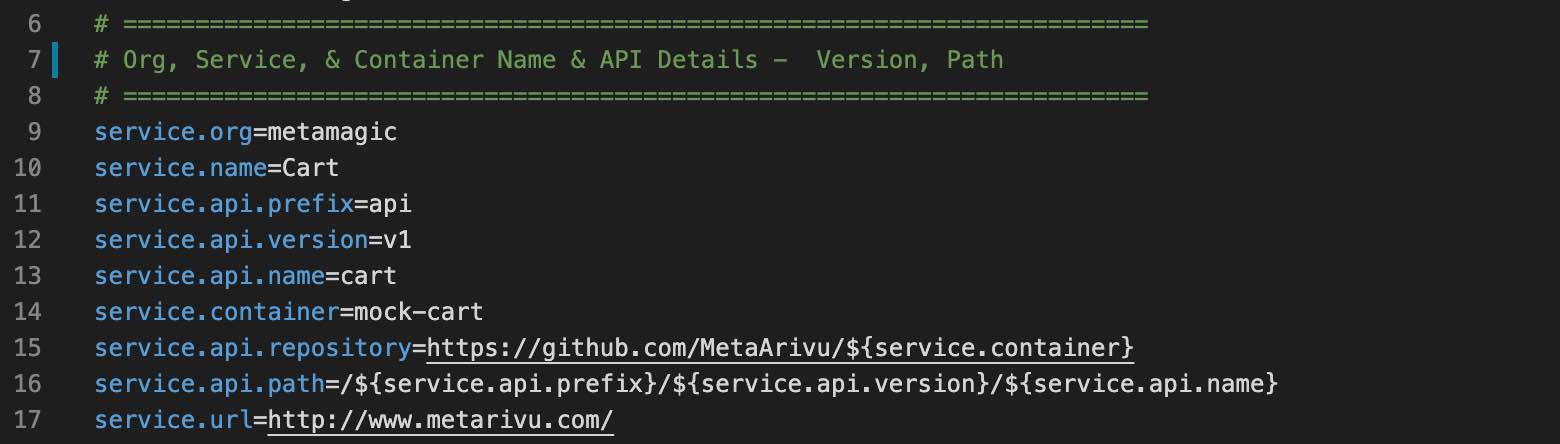
When you change the version in POM.xml, update that info in src/main/resources/app.props.tmpl - service.version property also.
### Step 2 - Compile (Once your code is ready)
1. compile
The above compile script will do the following
1. Clean up the target folder
2. Generate the build no. and build date (takes application.properties backup)
3. build final output SpringBoot fat jar and maven thin jar
4. copy the jar files (and dependencis) to src/docker folder
5. copy the application.properties file to current folder and src/docker folder
In Step 2.2 application.properties file will be auto generated by the compile script. This is a critical step.
Without generated application.properties file the service will not be running.
### Step 3 - Run and Test
2. run
3. test
## Docker Container Setup
### Step 1 - Verify Container Name and Org Name
1. Verify the Org Name in src/main/resources/app.props.tmpl file (service.org)
2. Verify the container name in src/main/resources/app.props.tmpl file (service.container)
3. Verify the microservice name in src/main/resources/app.props.tmpl file (service.api.name)
### Step 2 - Build the image
1. build (Build the Container)
2. scan (Scan the container vulnerabilities)
### Step 3 - Test the image
1. start (Start the Container)
2. logs (to view the container logs) - Wait for the Container to Startup
3. Check the URL in a Browser
### Step 4 - Push the image to Container Cloud Repository
Update the Org Name in src/main/resources/app.props.tmpl file (service.org)
Setup the Docker Hub or any other Container Registry
1. push (Push the Container to Docker Hub)
### Other Commands
1. stop (Stop the Container)_
2. stats (show container stats)
(C) Copyright 2021 - MetArivu
Author: Araf Karsh Hamid