https://github.com/aramb-dev/transcriptr
Transcriptr is a modern web application that converts audio files to text using artificial intelligence. It provides a clean, intuitive interface for uploading audio files and receiving high-quality transcriptions powered by Replicate's Incredibly Fast Whisper model.
https://github.com/aramb-dev/transcriptr
ai openai openai-whisper replicate replicate- transcri
Last synced: 5 months ago
JSON representation
Transcriptr is a modern web application that converts audio files to text using artificial intelligence. It provides a clean, intuitive interface for uploading audio files and receiving high-quality transcriptions powered by Replicate's Incredibly Fast Whisper model.
- Host: GitHub
- URL: https://github.com/aramb-dev/transcriptr
- Owner: aramb-dev
- Created: 2025-03-16T19:19:18.000Z (over 1 year ago)
- Default Branch: master
- Last Pushed: 2026-01-18T16:27:01.000Z (5 months ago)
- Last Synced: 2026-01-19T00:40:46.683Z (5 months ago)
- Topics: ai, openai, openai-whisper, replicate, replicate-, transcri
- Language: TypeScript
- Homepage: https://transcriptr.aramb.dev
- Size: 16.2 MB
- Stars: 4
- Watchers: 1
- Forks: 1
- Open Issues: 5
-
Metadata Files:
- Readme: README.md
Awesome Lists containing this project
README
[](https://app.netlify.com/sites/transcriptr/deploys)
# Transcriptr - AI-Powered Audio Transcription
Transcriptr is a modern web application that converts audio files to text using artificial intelligence. It provides a clean, intuitive interface for uploading audio files and receiving high-quality transcriptions powered by Replicate's Incredibly Fast Whisper model.
Visit the live demo at [Transcriptr Demo](https://transcriptr.aramb.dev).
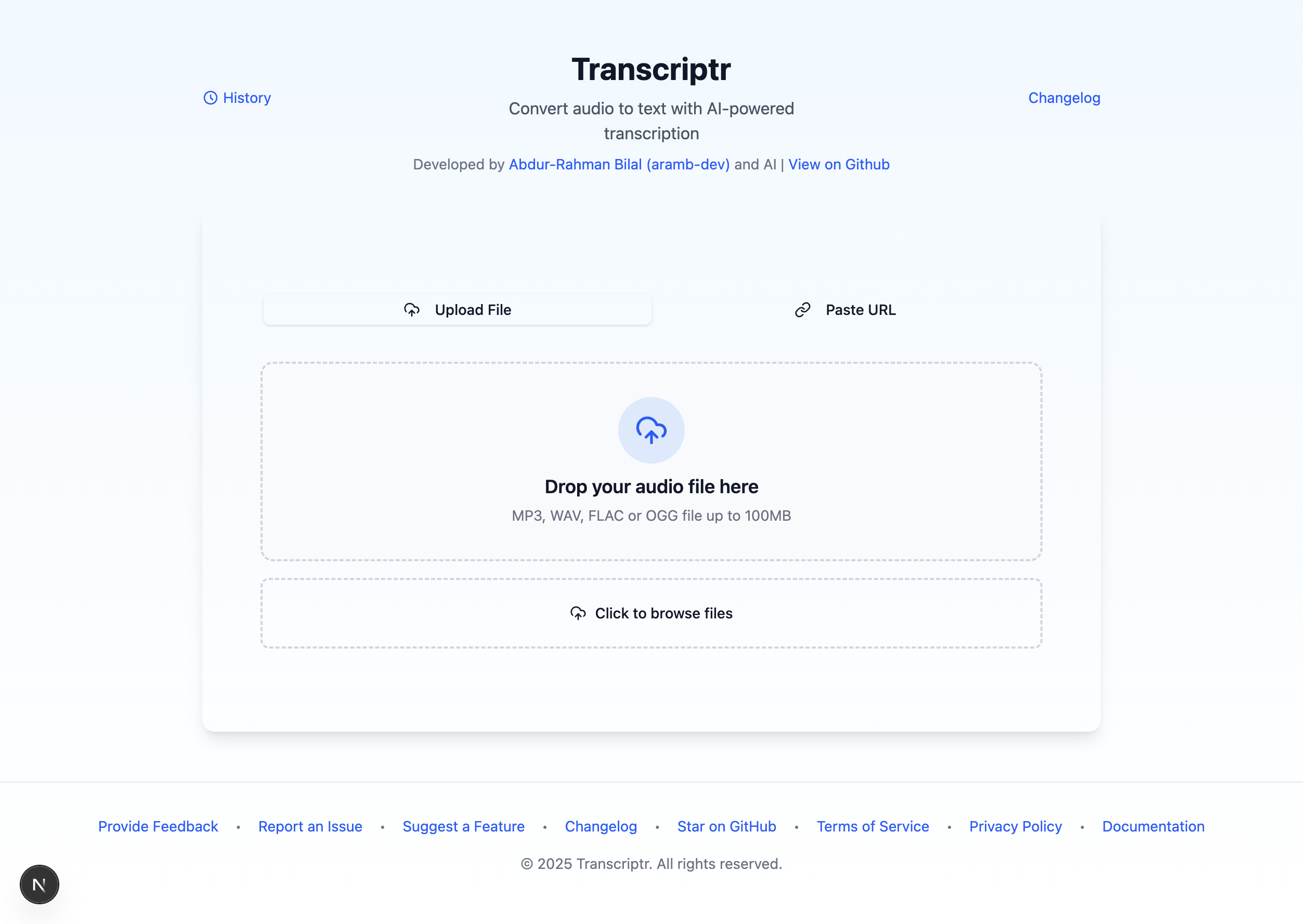
## Features
- **Audio Transcription**: Convert audio to text with high accuracy
- **Multiple Format Support**: Download transcriptions in TXT, MD, PDF, and DOCX formats
- **Language Selection**: Choose from multiple languages for better accuracy
- **Speaker Diarization**: Optionally identify different speakers in the transcription
- **Batch Processing**: Handle large files efficiently with optimized processing
- **Export Options**: Download individual formats or all formats as a ZIP
## Technology Stack
- **Frontend**: React with TypeScript, powered by Next.js for server-side rendering and static site generation
- **UI**: Tailwind CSS with shadcn/ui components for a modern interface
- **Backend**: Next.js API Routes for handling API requests
- **AI Integration**: Replicate API for accessing the Incredibly Fast Whisper model
- **Document Handling**:
- Printerz for high-quality PDF template rendering
- Libraries for generating DOCX, and ZIP files
- **Storage**: Firebase Storage for saving generated documents
## Getting Started
### Prerequisites
- Node.js (v18 or later)
- bun
- Replicate API token (for AI transcription)
### Installation
1. Clone the repository:
```bash
git clone https://github.com/aramb-dev/transcriptr.git
cd transcriptr
```
2. Install dependencies:
```bash
bun install
```
3. Create a .env.local file in the root directory with your Replicate API token:
```
NEXT_PUBLIC_REPLICATE_API_TOKEN=your_replicate_api_token_here
```
4. Start the development server:
```bash
bun run dev
```
5. Open your browser to `http://localhost:3000` to see the application.
## Environment Variables
Transcriptr requires several environment variables to function properly. Create a `.env.local` file in the project root with the following variables:
### Required Environment Variables
| Variable | Description |
| ------------------------------------------ | ------------------------------------------------------------------------ |
| `NEXT_PUBLIC_REPLICATE_API_TOKEN` | Your Replicate API token for accessing the Incredibly Fast Whisper model |
| `NEXT_PUBLIC_FIREBASE_API_KEY` | Firebase API key for storage services |
| `NEXT_PUBLIC_FIREBASE_AUTH_DOMAIN` | Firebase auth domain |
| `NEXT_PUBLIC_FIREBASE_PROJECT_ID` | Firebase project ID |
| `NEXT_PUBLIC_FIREBASE_STORAGE_BUCKET` | Firebase storage bucket for storing transcriptions and PDFs |
| `NEXT_PUBLIC_FIREBASE_MESSAGING_SENDER_ID` | Firebase messaging sender ID |
| `NEXT_PUBLIC_FIREBASE_APP_ID` | Firebase application ID |
| `NEXT_PUBLIC_PRINTERZ_API_KEY` | API key for Printerz PDF generation services |
### Optional Environment Variables
| Variable | Description | Default |
| ---------------------------------- | -------------------------------------------------------------------------------- | ------------- |
| `NEXT_PUBLIC_CLOUDCONVERT_API_KEY` | CloudConvert API key for automatic audio format conversion (M4A, AAC, WMA → MP3) | None |
| `PORT` | Port for the server to listen on | `3000` |
| `NODE_ENV` | Environment mode (`development` or `production`) | `development` |
### Example .env.local file
```
NEXT_PUBLIC_REPLICATE_API_TOKEN=your_replicate_token_here
NEXT_PUBLIC_FIREBASE_API_KEY=your_firebase_api_key
NEXT_PUBLIC_FIREBASE_AUTH_DOMAIN=your-project.firebaseapp.com
NEXT_PUBLIC_FIREBASE_PROJECT_ID=your-project-id
NEXT_PUBLIC_FIREBASE_STORAGE_BUCKET=your-project.appspot.com
NEXT_PUBLIC_FIREBASE_MESSAGING_SENDER_ID=123456789012
NEXT_PUBLIC_FIREBASE_APP_ID=1:123456789012:web:abcdef1234567890
NEXT_PUBLIC_PRINTERZ_API_KEY=your_printerz_api_key
NEXT_PUBLIC_CLOUDCONVERT_API_KEY=your_cloudconvert_api_key
```
### Getting API Keys
- **Replicate API Token**: Sign up at [Replicate](https://replicate.com/) and create an API token
- **Firebase**: Set up a project in [Firebase Console](https://console.firebase.google.com/) and get your credentials
- **Printerz**: Create an account at [Printerz](https://printerz.dev/) and get your API key
- **CloudConvert** (optional): Register at [CloudConvert](https://cloudconvert.com/) to enable automatic conversion of M4A, AAC, WMA, and other formats to MP3
## Build and Deployment
### Building for Production
To build the application for production:
```bash
bun run build
```
This command creates an optimized production build in the `.next` directory.
### Deploying to Production
1. Build the application as described above
2. Set the environment variable `NODE_ENV` to `production`
3. Start the server:
```bash
bun run start
```
The server will run on port 3000 by default, but you can override this by setting the `PORT` environment variable.
### Docker Deployment (Optional)
Create a Dockerfile in the root directory:
```dockerfile
FROM node:18-alpine
WORKDIR /app
COPY package*.json ./
RUN bun install
COPY . .
RUN bun run build
ENV NODE_ENV=production
ENV PORT=3000
EXPOSE 3000
CMD ["bun", "run", "start"]
```
Build and run the Docker container:
```bash
docker build -t transcriptr .
docker run -p 3000:3000 -e NEXT_PUBLIC_REPLICATE_API_TOKEN=your_token_here transcriptr
```
## Project Structure
```
transcriptr/
├── public/ # Static assets
├── src/ # Source code
│ ├── app/ # Next.js App Router
│ │ ├── layout.tsx # Main layout
│ │ └── page.tsx # Main page
│ ├── components/ # React components
│ │ ├── ui/ # UI components based on shadcn/ui
│ │ └── ...
│ ├── hooks/ # Custom React hooks
│ ├── lib/ # Utility functions
│ └── server/ # Server-side logic
├── next.config.mjs # Next.js configuration
├── tailwind.config.js # Tailwind CSS configuration
├── tsconfig.json # TypeScript configuration
└── package.json # Dependencies and scripts
```
## API Documentation
Next.js API Routes are used for the backend. The API endpoints are located in the `src/app/api` directory.
## Audio Format Support
Transcriptr supports a wide range of audio formats with **automatic conversion**:
### 🚀 Directly Supported (Fastest Processing)
- MP3 (.mp3) - Most common format
- WAV (.wav) - Uncompressed audio
- FLAC (.flac) - Lossless compression
- OGG (.ogg) - Open-source format
### 🔄 Auto-Converted Formats (Slightly Longer Processing)
- M4A (.m4a) - iPhone/macOS recordings
- AAC (.aac) - Advanced Audio Coding
- MP4 (.mp4) - Video files with audio
- WMA (.wma) - Windows Media Audio
- AIFF (.aiff) - Apple format
- CAF (.caf) - Core Audio Format
### How It Works
1. **Upload any supported format** - No manual conversion needed!
2. **Automatic detection** - System identifies if conversion is required
3. **Seamless processing** - Unsupported formats are converted to MP3 automatically
4. **Transparent progress** - View conversion status in real-time
> **Note**: To enable automatic conversion, you need to set up the `CLOUDCONVERT_API_KEY` environment variable. See the [Environment Variables](#environment-variables) section for details.
## Contributing
Contributions are welcome! Please feel free to submit a Pull Request.
1. Fork the repository
2. Create your feature branch (`git checkout -b feature/AmazingFeature`)
3. Commit your changes (`git commit -m 'Add some AmazingFeature'`)
4. Push to the branch (`git push origin feature/AmazingFeature`)
5. Open a Pull Request
## License
This project is licensed under the MIT License - see the LICENSE file for details.
## Acknowledgements
- [Replicate](https://replicate.com/) for providing the Incredibly Fast Whisper model
- [shadcn/ui](https://ui.shadcn.com/) for the component library
- [Tailwind CSS](https://tailwindcss.com/) for styling
- [React](https://reactjs.org/) for the UI framework
- [Next.js](https://nextjs.org/) for the application framework
- [Printerz](https://printerz.dev/) for PDF template rendering and generation
---
Developed by [Abdur-Rahman Bilal (aramb-dev)](https://github.com/aramb-dev)