https://github.com/ardcore/atom-html-to-css
atom.io plugin: generate css from html structure
https://github.com/ardcore/atom-html-to-css
atom-html atom-package frontend-webdevelopment javascript
Last synced: over 1 year ago
JSON representation
atom.io plugin: generate css from html structure
- Host: GitHub
- URL: https://github.com/ardcore/atom-html-to-css
- Owner: ardcore
- License: mit
- Created: 2016-04-29T23:43:29.000Z (about 10 years ago)
- Default Branch: master
- Last Pushed: 2017-07-09T19:58:55.000Z (about 9 years ago)
- Last Synced: 2025-03-24T16:46:38.282Z (over 1 year ago)
- Topics: atom-html, atom-package, frontend-webdevelopment, javascript
- Language: JavaScript
- Homepage: https://atom.io/packages/html-to-css
- Size: 11.7 KB
- Stars: 21
- Watchers: 1
- Forks: 6
- Open Issues: 4
-
Metadata Files:
- Readme: README.md
- Changelog: CHANGELOG.md
- License: LICENSE.md
Awesome Lists containing this project
README
# atom html-to-css package
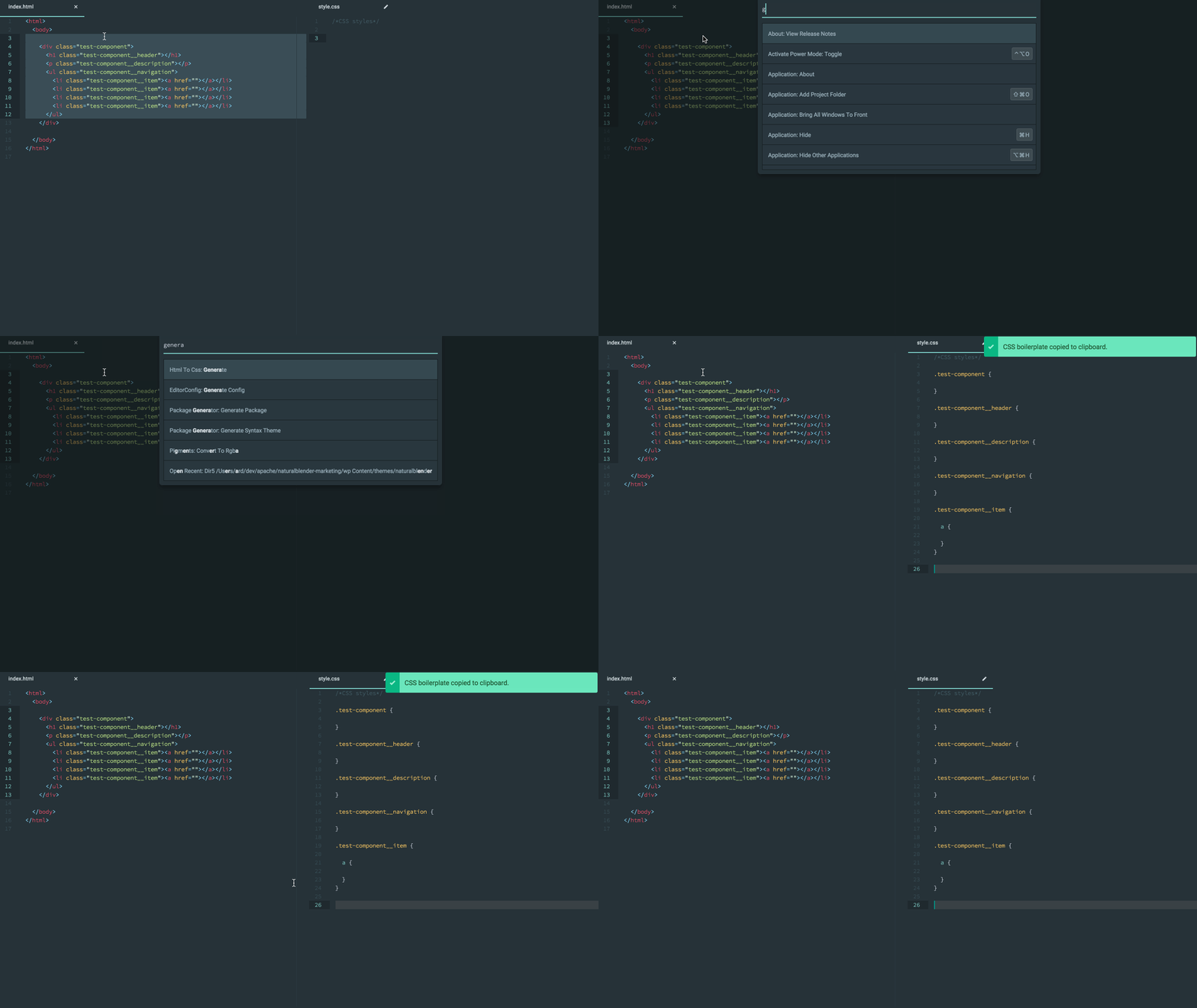
Generates CSS boilerplate based on the selected HTML.
- Only cares about classes, ignores id's/other possible selectors
- Supports CSS, SCSS, Sass, LESS and possibly other syntaxes
- BEM support (actually, more like a *BE* support for now. Modifiers support will be added if needed)
- Configurable nesting, grouping and formatting
- "Supports" JSX (recognizes the `className` attribute)
- Is *forgiving* (meaning it should work even with invalid HTML code)
# demo
# settings
## BEM grouping
key: `html-to-css.bem-group`, type: `boolean`, default: `false`
Should BEM-style declarations be grouped and nested in a SCSS-style?
When *true*:
↓
.introduction {
&__header {
}
&__text {
}
}
When *false*, the same HTML code becomes:
.introduction {
}
.introduction__header {
}
.introduction__text {
}
## BEM separator token
key: `html-to-css.bem-separator`, type: `string`, default: `__`
Character(s) used as a BLOCK*__*ELEMENT separator in BEM.
## rulelist open token
key: `html-to-css.rulelist-open`, type: `string`, default: ` {\n\n`
Character(s) to output when opening rulelists (including whitespaces)
## rulelist close token
key: `html-to-css.rulelist-close`, type: `string`, default: `}\n\n`
Character(s) to output when opening rulelists (including whitespaces)
You can change them to fine-tune the output format to your own liking. Just remove `{` and `}` to support SASS-like indented syntax.
## Grouping character
key: `html-to-css.grouping-character`, type: `string`, default: `&`
Character(s) to be used in output when referring to the parent element while nesting declarations SCSS-style.
# key bindings
To avoid conflicts and promote peace, this package doesn't register any keys by default. Do it yourself, or just paste the following lines in `~/.atom/keymap.cson`:
'atom-text-editor':
'alt-x': 'html-to-css:generate'
It'll try to register alt+x key shortcut.
# indentation
`\t` is used to indent, but Atom seems to be clever enough to convert it to your default style when pasting. Let me know if it's not doing that.
# parsing
due to the forgiving nature of the excellent [htmlparser2](https://github.com/fb55/htmlparser2) used under the hood, this plugin is able to deal with:
* incomplete selections (wouldn't it be faster if you could select opening tags only? well, you can)
* not-really-valid-HTML-code (JSX, anyone?)
* general mess (really. you can hit cmd+a in this markdown file and it'll still parse the few HTML lines from the code sample)
# TODO
- ~extend it with different transformers/formatters as settings.~
Contributions welcomed.