https://github.com/arebaka/lena
a Telegram bot who saves messages from group chats and sends them binding to triggers
https://github.com/arebaka/lena
bot everlasting-summer nodejs telegram trigger
Last synced: 3 months ago
JSON representation
a Telegram bot who saves messages from group chats and sends them binding to triggers
- Host: GitHub
- URL: https://github.com/arebaka/lena
- Owner: arebaka
- License: mit
- Created: 2021-07-25T18:41:38.000Z (almost 5 years ago)
- Default Branch: master
- Last Pushed: 2022-04-09T07:26:17.000Z (about 4 years ago)
- Last Synced: 2025-09-18T11:27:48.840Z (10 months ago)
- Topics: bot, everlasting-summer, nodejs, telegram, trigger
- Language: JavaScript
- Homepage: https://t.me/eslenabot
- Size: 140 KB
- Stars: 11
- Watchers: 2
- Forks: 0
- Open Issues: 0
-
Metadata Files:
- Readme: README.md
- License: LICENSE
Awesome Lists containing this project
README
# LenaBot
*Всегда ненавидела эту суку!*
> A [Telegram](https://telegram.org) bot who saves messages from group chats and sends them binding to triggers.






## Commands
`/on ` – create a trigger on text
`/off ` – delete the trigger by number
`/onjoin` – create a trigger on someone joins the chat
`/onleft` – create a trigger on someone lefts the chat
`/list` – get all active triggers
`/trigger ` – invoke active trigger by number forcibly
`/settings` – configure the chat
`/edit ` – configure the trigger by number
## Supported message types
+ 📃 text
+ 📹 animation
+ 🎧 audio
+ 🎲 dice
+ 🏷️ document
+ 🌐 location
+ 🖼️ photo
+ 📊 poll (not quiz)
+ 😽 sticker
+ 🎬 video
+ 🎥 videonote
+ 🎤 voice
## TLDR
1. Create and setup a bot via [@BotFather](https://t.me/BotFather)
2. Install [PostgreSQL](https://www.postgresql.org/download/) if you didnt
3. Create an empty database 'lena' in PSQL owned to your user
4. Install [npm](https://www.npmjs.com) & [node.js](https://npmjs.com/package/node)
5. `npm i lenabot`
6. `export TOKEN=`
7. `npx lenabot`
8. Add your bot to a group chat and add triggers with commands above replying the messages to be resend
9. To stop the bot type to console with it `stop` and press enter
## Preparing
1. Create your bot via [@BotFather](https://t.me/BotFather), it will guide you on that
2. The bot uses DBMS PostgreSQL. [Install](https://www.postgresql.org/download/) if you dont have it
3. Create a database in PSQL for you bot
4. The bot works using [node.js](https://npmjs.com/package/node). Install it
## Installation
```bash
npm i lenabot
```
## Launch
The bot requires some environment variables. Here is a list of them:
`TOKEN` – bot token from @BotFather
`DBURI` – URI-string for connection to PSQL in format `postgres://:@/:`
Instead of the environment you can set launch parameters in a file `config.toml`.
After setup the environment run
```bash
npx lenabot
```
If everything went well, you will see something like this in the console:
```
> lenabot@1.2.0 start
> node index.js
Bot @eslenabot started.
> _
```
## Control
After the launch, there are available commands `stop` & `reload` for safe stop and restart respectively.
## Usage
1. Send the message with one of the supported type
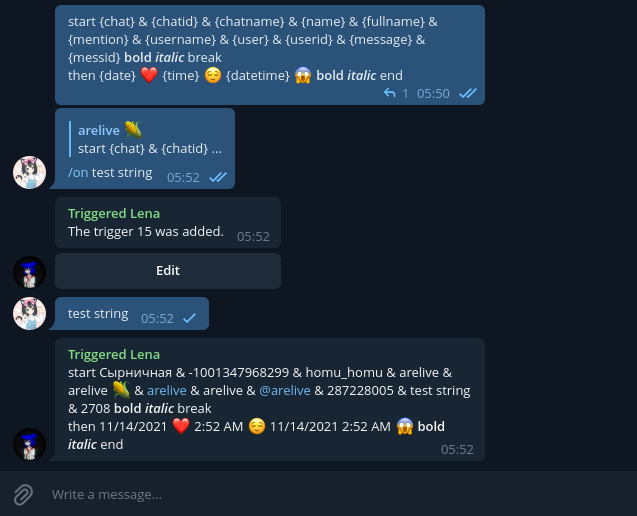
2. Reply to it with a command `/on` + the string on which you wanted to set the trigger (e.g. `/on !rules`)
3. If success, bot will answer that the trigger has been added, as well as offer to edit it by an inline button
4. Now, when a new message containing that string, bot will send a message that duplicates the one you replied to with the `/on` command
5. To trigger when someone enters/leaves the chat, send a command `/onjoin` / `/onleft` without parameters replying to the message
6. If the message is text or includes caption, it can contain some patterns that replaced with the corresponding values:
- `{chat}` – title of the chat
- `{chatid}` – Telegram ID of the chat
- `{chatname}` – username of the chat, if there is
- `{name}` – first name of the triggering message sender
- `{fullname}` – first name and last name of the sender
- `{mention}` – first name of the sender linked to them
- `{username}` – username of the sender if there is (without @)
- `{user}` – username with @ or linked first name to the sender
- `{userid}` – Telegram ID of the sender
- `{date}` – localized current date without time
- `{time}` – localized current time
- `{datetime}` – localized current date with time
- `{message}` – text of the triggering message
- `{messid}` – ID of the triggering message
## Support
If something doesnt work, or you just wanna talk to the bot creator or his mom, write [@arelive](https://t.me/arelive). There also accepted kicks from volunteer project managers.