https://github.com/arjuncodess/tbh
https://github.com/arjuncodess/tbh
Last synced: 5 months ago
JSON representation
- Host: GitHub
- URL: https://github.com/arjuncodess/tbh
- Owner: ArjunCodess
- Created: 2024-06-10T10:06:56.000Z (about 2 years ago)
- Default Branch: main
- Last Pushed: 2024-08-14T13:46:29.000Z (almost 2 years ago)
- Last Synced: 2025-04-24T01:45:48.246Z (about 1 year ago)
- Language: TypeScript
- Homepage: https://tbh-tobehonest.vercel.app/
- Size: 2.49 MB
- Stars: 3
- Watchers: 1
- Forks: 0
- Open Issues: 0
-
Metadata Files:
- Readme: README.md
Awesome Lists containing this project
README
TBH - Anonymous Q&A App
[]()
[](https://github.com/ArjunCodess/tbh/issues)
[](https://github.com/ArjunCodess/tbh/pulls)
[]()
---
TBH is an anonymous Q&A app where friends can send you questions, you can reply in public, make threads, and keep the fun going.
## 📝 Table of Contents
- [About](#about)
- [Getting Started](#getting_started)
- [Usage](#usage)
- [Built Using](#built_using)
- [Deployment](#deployment)
- [Authors](#authors)
- [Acknowledgments](#acknowledgement)
TBH is an anonymous Q&A app that lets friends ask questions without revealing their identity. Users can reply publicly, organize conversations into threads, and keep the interaction going. The app features AI-powered daily prompts, customizable profiles, and a clean, modern interface.
The main goal is to create a fun, safe space for honest conversations between friends and followers. Users get a personalized profile page where others can send anonymous questions, and they can choose to reply publicly or keep things private.
**I built it** to be fast, secure, and engaging. It uses modern web technologies with a focus on user experience and privacy. The AI integration provides contextual question suggestions, while the threading system allows for deeper conversations.
## 🏁 Let's Get You Set Up
Want to run TBH locally? Here's what you need.
### What You Need First
- Node.js version 18 or newer
- pnpm (it's like npm but faster)
- MongoDB database (local or cloud)
- Google AI API key for AI features
### Getting It Running
1. **Grab the code**
```bash
git clone https://github.com/ArjunCodess/tbh.git
cd tbh
```
2. **Install everything**
```bash
pnpm install
```
3. **Set up your environment**
Copy `.env.example` to `.env.local` and add your configuration:
```env
MONGODB_URI=your_mongodb_connection_string
NEXTAUTH_SECRET=your_nextauth_secret
NEXTAUTH_URL=http://localhost:3000
GOOGLE_AI_API_KEY=your_google_ai_api_key
```
4. **Start the development server**
```bash
pnpm dev
```
The app should be running at `http://localhost:3000`.
## 🎈 How to Use It
### What It Does
1. **Landing Page**
Introduces TBH and showcases the main features with an interactive demo.
2. **User Profiles**
Each user gets a personalized page at `/u/[username]` where visitors can send anonymous questions.
3. **Dashboard**
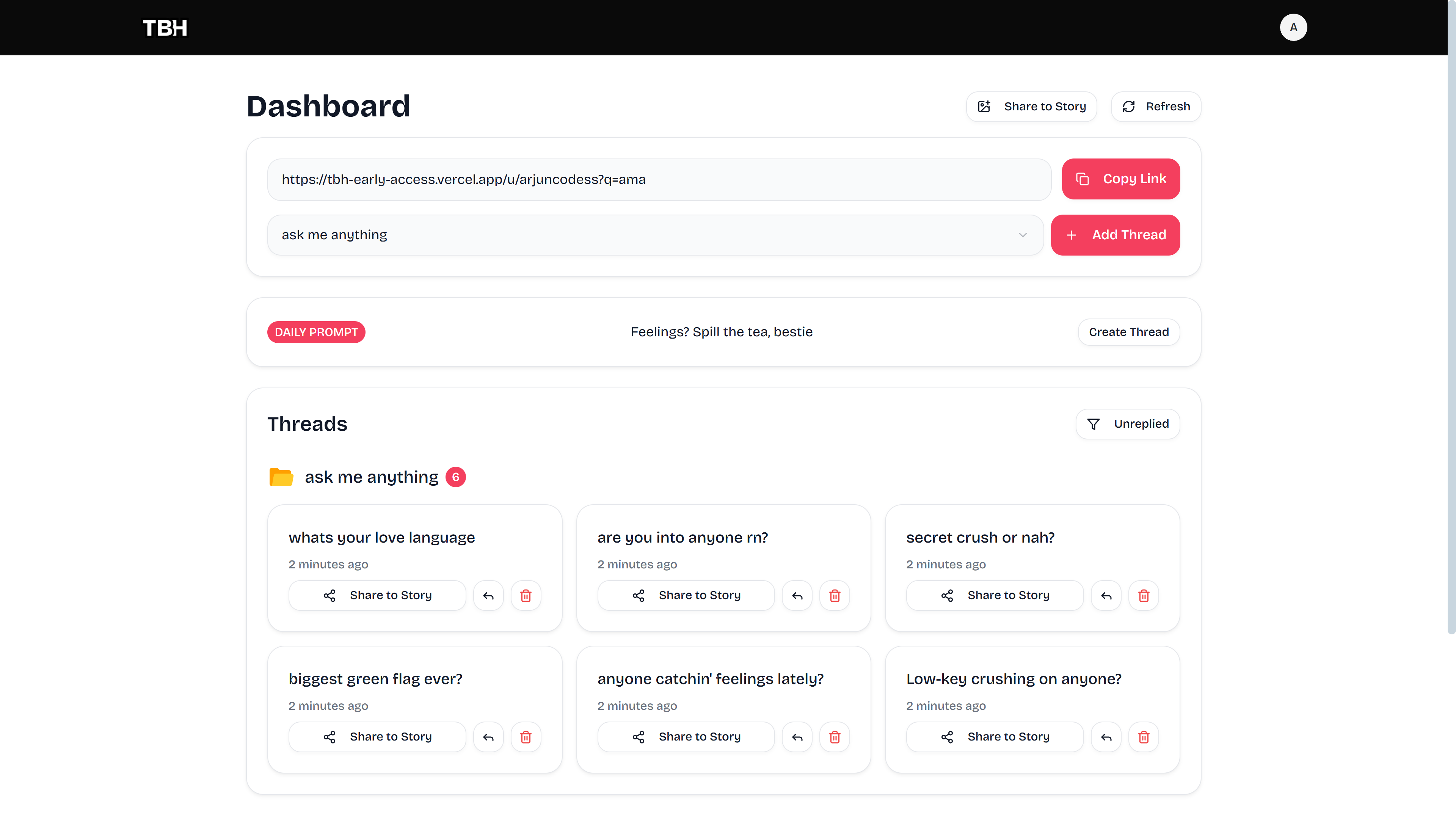
Signed-in users can manage their questions, reply to messages, organize threads, and customize their profile.
4. **Anonymous Q&A**
Friends can ask questions without logging in, and users can reply publicly or keep responses private.
5. **AI Features**
Daily AI-generated prompts and contextual question suggestions to spark conversations.
6. **Threading**
Group related questions and answers into conversation threads for better organization.
### The Q&A Flow
1. Someone visits your TBH profile page
2. They send you an anonymous question
3. You receive it in your dashboard and can choose to reply
4. Your public replies appear on your profile, creating a thread of conversation
5. Others can see the conversation and join in with follow-up questions
It's all designed to be fun, honest, and engaging while keeping anonymity when requested.
## 🔧 Built Using
### Core Stuff
- **Next.js** with the App Router for the main framework
- **React** for the user interface (version 19)
- **TypeScript** to catch errors before they happen
- **MongoDB** with Mongoose for data storage
- **NextAuth** for authentication
### AI & Features
- **Google AI (Gemini)** for generating daily prompts and question suggestions
- **AI SDK** for reliable AI integration with retry logic
### UI and Design
- **Tailwind CSS** for styling
- **Radix UI** for accessible components
- **Framer Motion** for smooth animations
- **Lucide React** for icons
- **Next Themes** for dark/light mode
### Making It Work
- **Axios** for API communication
- **Vercel Analytics** for tracking usage
- **bcryptjs** for password hashing
- **Zod** for data validation
### Development Tools
- **Vercel** for hosting and deployment
- **pnpm** for managing packages
- **ESLint** to check code quality
## 🚀 Putting It Live
TBH is set up to deploy on Vercel with MongoDB Atlas for the database.
### Getting It Live
1. **Vercel Setup**
Connect your GitHub repo to Vercel and set up the environment variables in their dashboard.
2. **Environment Variables You Need**
```env
MONGODB_URI=your_mongodb_atlas_connection_string
NEXTAUTH_SECRET=your_secure_random_secret
NEXTAUTH_URL=https://your-domain.vercel.app
GOOGLE_AI_API_KEY=your_google_ai_api_key
```
3. **Database**
Set up a MongoDB Atlas cluster and connect it to your app.
The app will be live and ready to collect anonymous questions!
## ✍️ Who Built This
- **ArjunCodess** - I built TBH and continue to work on it
I believe in open source because it keeps things honest and helps everyone get better together. If you want to collaborate or have questions, feel free to reach out.
## 🎉 Thanks to
- **Vercel** for making deployment so smooth
- **Google AI** for the Gemini API that powers the AI features
- **shadcn/ui** for great components I could build on
- **The open source community** who shares their work and makes this possible
---
**TBH** - Real questions. Honest answers.
_Built with ❤️ for authentic conversations_