https://github.com/armmbed/stm32customtargets
Enable the support of your custom boards in mbed-os 6
https://github.com/armmbed/stm32customtargets
custom stm32
Last synced: about 1 year ago
JSON representation
Enable the support of your custom boards in mbed-os 6
- Host: GitHub
- URL: https://github.com/armmbed/stm32customtargets
- Owner: ARMmbed
- Created: 2021-07-02T13:37:08.000Z (about 5 years ago)
- Default Branch: master
- Last Pushed: 2023-12-18T16:16:01.000Z (over 2 years ago)
- Last Synced: 2023-12-18T21:19:29.318Z (over 2 years ago)
- Topics: custom, stm32
- Language: C
- Homepage:
- Size: 697 KB
- Stars: 17
- Watchers: 8
- Forks: 13
- Open Issues: 2
-
Metadata Files:
- Readme: README.md
- License: LICENSE-apache-2.0.txt
Awesome Lists containing this project
README
# CUSTOM boards with STM32
Feel free to propose your custom boards support in mbed-os!
Table of Contents
=================
* [Usage](#usage)
* [GENERIC BOARDS](#generic-boards)
* [STM32F1](#stm32f1)
* [BLUEPILL](#bluepill)
* [STM32F4](#stm32f4)
* [CORE2](#core2)
* [STM32L0](#stm32l0)
* [MURATA LPWAN Wireless Module](#murata-lpwan-wireless-module)
* [MURATA Grasshopper](#murata-grasshopper)
* [MURATA Gnat](#murata-gnat)
* [STM32L4](#stm32l4)
* [STWIN SensorTile Wireless Industrial Node development kit](#stwin-sensortile-wireless-industrial-node-development-kit)
* [STM32WL](#stm32wl)
* [Seeed Studio LoRa E5](#seeed-studio-lora-e5)
* [Seeed Studio LoRa E5 Mini](#seeed-studio-lora-e5-mini)
* [Seeed Studio LoRa E5 Dev Board](#seeed-studio-lora-e5-dev-board)
* [Charles's LoRa-E5 breakout board](#charless-lora-e5-breakout-board)
* [Charles's LoRa-E5 Tiny](#charless-lora-e5-tiny)
* [RAK Wireless RAK3172](#rak-wireless-rak3172)
* [Charles's RAK3172 breakout board](#charless-rak3172-breakout-board)
* [RAK Wirekess RAK3172-SiP SOC](#rak-wirekess-rak3172-sip-soc)
* [RAK Wirekess RAK3272-SiP Breakout Board](#rak-wirekess-rak3272-sip-breakout-board)
* [License](#license)
* [Contributions](#contributions)
* [Automatic pull request checks](#automatic-pull-request-checks)
* [Manual pull request checks](#manual-pull-request-checks)
* [Automatic weekly non regression](#automatic-weekly-non-regression)
# Usage
In your application, clone this repo.
````
git clone https://github.com/ARMmbed/stm32customtargets.git
````
Copy custom_targets.json
````
cp stm32customtargets/custom_targets.json .
````
For some targets, you have to customize the configuration in your local mbed_app.json.
Details are explained for each target below, but you can also use the mbed_app_template.json file as example.
Then build your target with
- CLI1:
````
mbed compile -m XXX -t XXX
````
- CLI2:
Add in the application CMakeLists.txt:
````
add_subdirectory(stm32customtargets)
````
And build:
````
mbedtools compile -m XXX -t XXX
````
# GENERIC BOARDS
A "generic" board is a mbed-os "virtual" target with a pure STM32 MCU.
Goal is to make real custom boards creation very easy
as we ensure that build has alrady been tested.
Check the GENERIC_TARGET branch in this repo:
https://github.com/ARMmbed/stm32customtargets/tree/GENERIC_TARGET
# STM32F1
## BLUEPILL
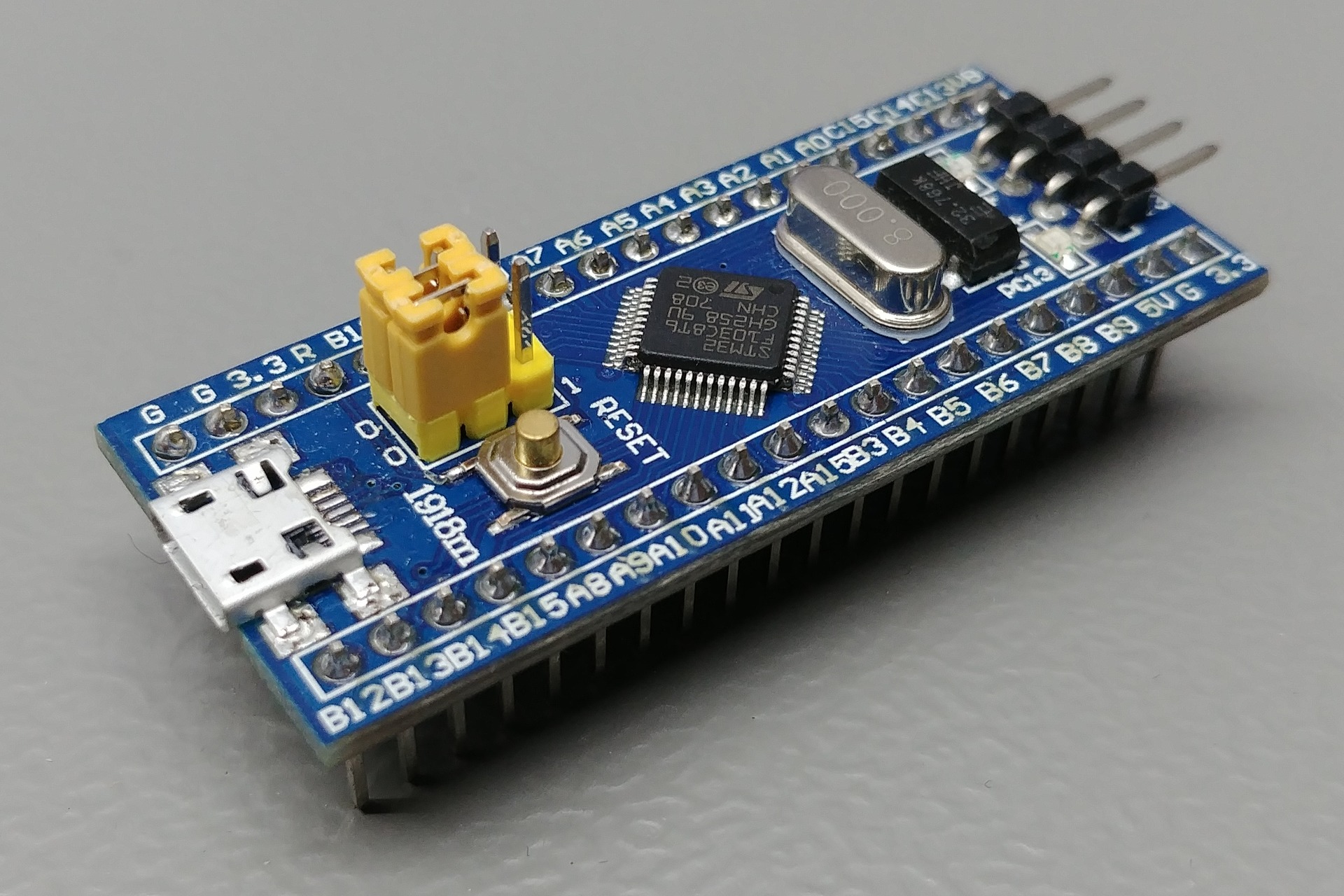
MCU: STM32F103C8T6
TARGET: BLUEPILL_F103C8
source: https://os.mbed.com/users/hudakz/code/mbed-os-bluepill/
(https://os.mbed.com/users/hudakz/code/STM32F103C8T6_Hello/)
# STM32F4
## CORE2
MCU: STM32F407ZG
TARGET: CORE2
https://github.com/byq77/core2-mbed6-template
# STM32L0
## MURATA LPWAN Wireless Module
MCU: STM32L082CZ
TARGET: MTB_MURATA_ABZ
https://wireless.murata.com/type-abz-078.html
- LORA is not enabled by default. You need to update your local mbed_app.json file:
```json
{
"target_overrides": {
"MTB_MURATA_ABZ": {
"target.components_add": ["SX1276"],
"sx1276-lora-driver.spi-mosi": "LORA_SPI_MOSI",
"sx1276-lora-driver.spi-miso": "LORA_SPI_MISO",
"sx1276-lora-driver.spi-sclk": "LORA_SPI_SCLK",
"sx1276-lora-driver.spi-cs": "LORA_CS",
"sx1276-lora-driver.reset": "LORA_RESET",
"sx1276-lora-driver.dio0": "LORA_DIO0",
"sx1276-lora-driver.dio1": "LORA_DIO1",
"sx1276-lora-driver.dio2": "LORA_DIO2",
"sx1276-lora-driver.dio3": "LORA_DIO3",
"sx1276-lora-driver.txctl": "LORA_ANT_TX",
"sx1276-lora-driver.rxctl": "LORA_ANT_RX",
"sx1276-lora-driver.pwr-amp-ctl": "LORA_ANT_BOOST"
}
}
}
```
If you need to Low Power with VDD TXCO like [b-l072z-lrwan1](https://www.st.com/en/evaluation-tools/b-l072z-lrwan1.html), then you need JP9 positionned 1-2.
And reflect the pin used for that because it's defined to `NC` by default.
```json
{
"target_overrides": {
"MTB_MURATA_ABZ": {
"sx1276-lora-driver.tcxo": "PA_12"
}
}
}
```
## MURATA Grasshopper
MCU: STM32L082CZ
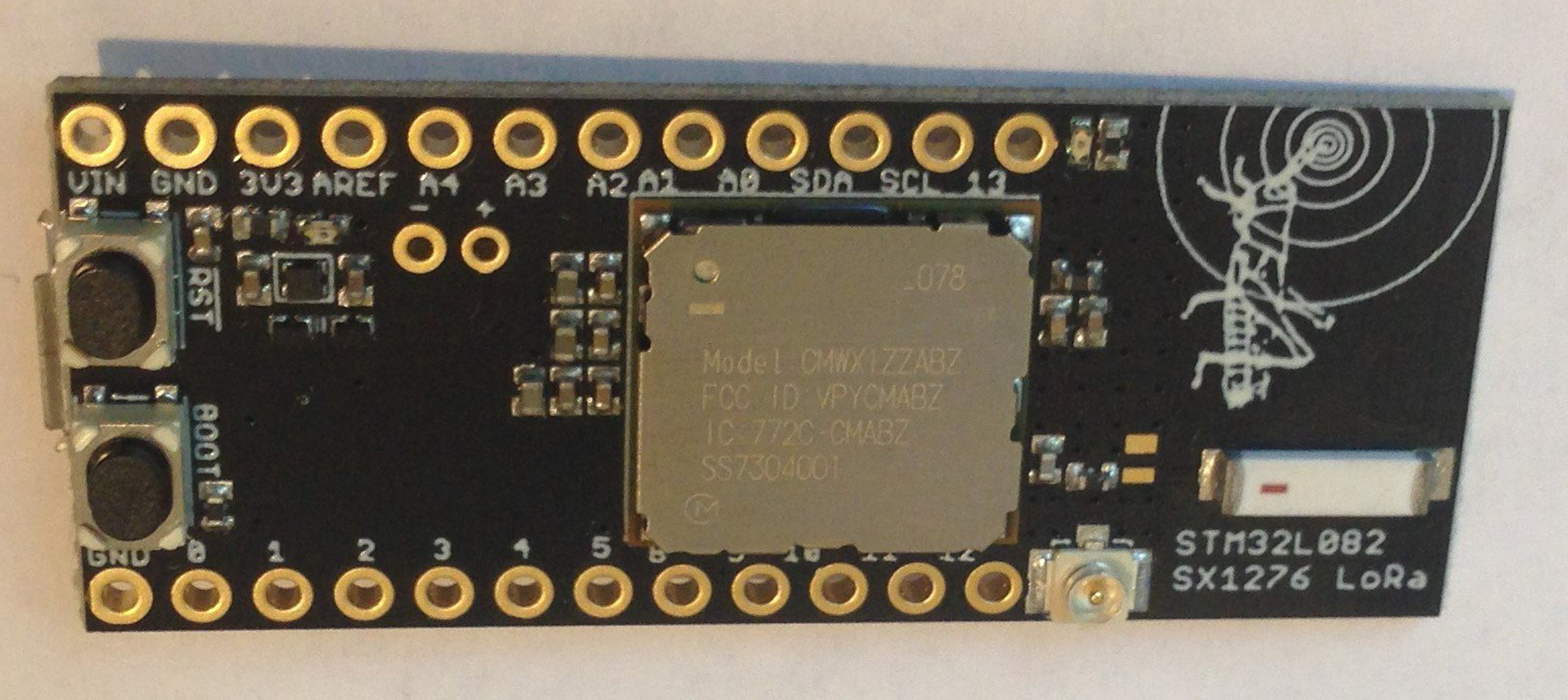
TARGET: GRASSHOPPER [TleraCorp](https://www.tindie.com/stores/tleracorp/)
- LORA is not enabled by default. You need to update your local mbed_app.json file:
```json
{
"target_overrides": {
"GRASSHOPPER": {
"target.components_add": ["SX1276"],
"sx1276-lora-driver.spi-mosi": "LORA_SPI_MOSI",
"sx1276-lora-driver.spi-miso": "LORA_SPI_MISO",
"sx1276-lora-driver.spi-sclk": "LORA_SPI_SCLK",
"sx1276-lora-driver.spi-cs": "LORA_CS",
"sx1276-lora-driver.reset": "LORA_RESET",
"sx1276-lora-driver.dio0": "LORA_DIO0",
"sx1276-lora-driver.dio1": "LORA_DIO1",
"sx1276-lora-driver.dio2": "LORA_DIO2",
"sx1276-lora-driver.dio3": "LORA_DIO3",
"sx1276-lora-driver.txctl": "LORA_ANT_TX",
"sx1276-lora-driver.rxctl": "LORA_ANT_RX",
"sx1276-lora-driver.pwr-amp-ctl": "LORA_ANT_BOOST",
"sx1276-lora-driver.tcxo": "LORA_VDD_TXCO"
}
}
}
```
## MURATA Gnat
MCU: STM32L082CZ
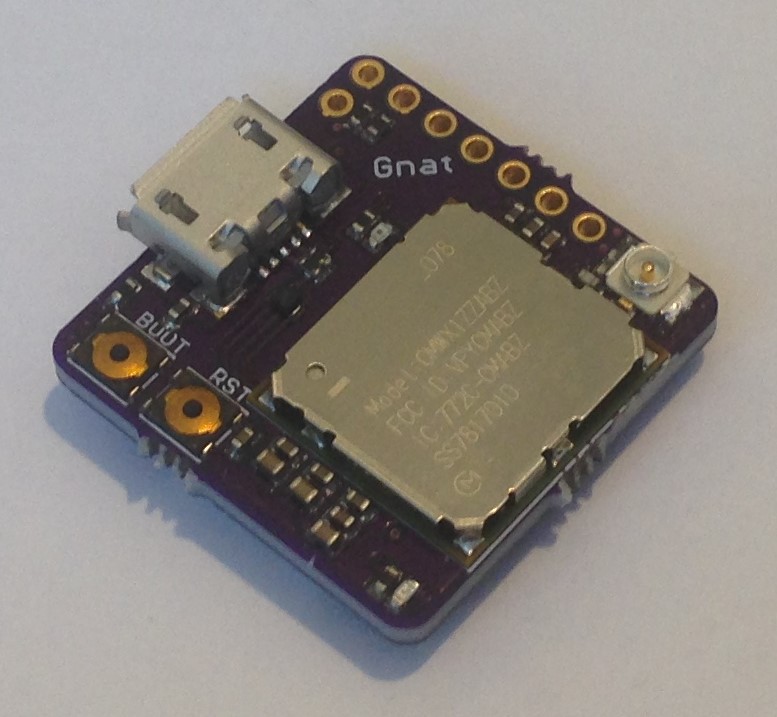
https://www.tindie.com/products/tleracorp/gnat-loragnss-asset-tracker/
TARGET: GNAT [TleraCorp](https://www.tindie.com/products/tleracorp/gnat-loragnss-asset-tracker/)
- LORA is not enabled by default. You need to update your local mbed_app.json file:
```json
{
"target_overrides": {
"GNAT": {
"target.components_add": ["SX1276"],
"sx1276-lora-driver.spi-mosi": "LORA_SPI_MOSI",
"sx1276-lora-driver.spi-miso": "LORA_SPI_MISO",
"sx1276-lora-driver.spi-sclk": "LORA_SPI_SCLK",
"sx1276-lora-driver.spi-cs": "LORA_CS",
"sx1276-lora-driver.reset": "LORA_RESET",
"sx1276-lora-driver.dio0": "LORA_DIO0",
"sx1276-lora-driver.dio1": "LORA_DIO1",
"sx1276-lora-driver.dio2": "LORA_DIO2",
"sx1276-lora-driver.dio3": "LORA_DIO3",
"sx1276-lora-driver.txctl": "LORA_ANT_TX",
"sx1276-lora-driver.rxctl": "LORA_ANT_RX",
"sx1276-lora-driver.pwr-amp-ctl": "LORA_ANT_BOOST",
"sx1276-lora-driver.tcxo": "LORA_VDD_TXCO"
}
}
}
```
# STM32L4
## STWIN SensorTile Wireless Industrial Node development kit
MCU: STM32L4R9ZI
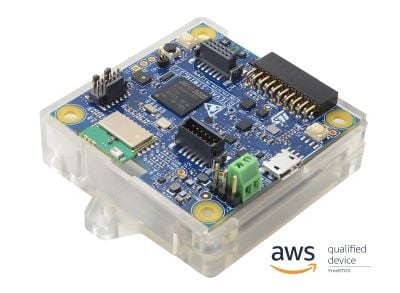
TARGET: STWIN
https://www.st.com/en/evaluation-tools/steval-stwinkt1.html
- BLE is enabled by default
# STM32WL
## Seeed Studio LoRa E5

MCU: STM32WLE5JC
TARGET: LORA_E5
https://www.seeedstudio.com/LoRa-E5-Wireless-Module-p-4745.html
LoRa-E5 use only RFO_HP for TX power, so for all boards using this module you need to add this to your `mbed_app.json` on section `target_overrides`
```json
"LORA_E5": {
"stm32wl-lora-driver.rf_switch_config": 2
}
```
## Seeed Studio LoRa E5 Mini
TARGET: LORA_E5_MINI
Use LoRa E5 modulen basic board with USB/Serial and headers
https://www.seeedstudio.com/LoRa-E5-mini-STM32WLE5JC-p-4869.html
## Seeed Studio LoRa E5 Dev Board

TARGET: LORA_E5_DEV_BOARD
Use LoRa E5 module
https://www.seeedstudio.com/LoRa-E5-Dev-Kit-p-4868.html
- RS485 Modbus
- all LoRa-E5 pins exposed
- temperature sensor
- buttons
- Led
- GPIO to enable 3.3V and 5V for sensors
- some grove sonnectors (I2C, Serial, ..)
- Arduino form factor to plug shield
## Charles's LoRa-E5 breakout board
TARGET: LORA_E5_BREAKOUT

https://github.com/hallard/LoRa-E5-Breakout
Use LoRa E5 module and added
- FTDI 6 pins connector (:warning: **use 3.3V FTDI One, not 5V**)
- Exposed JTAG pins needed to flash module (PA13-SWDIO / PA14-SWCLK / RESET)
- Green Led on PB10 (LED1) reversed (1=OFF, 0=ON)
- Red Led on PB5 (LED2) reversed (1=OFF, 0=ON)
for debug LEDs of breakout so you need to add this to your `mbed_app.json` on section `target_overrides` and don't forget also the `rf_switch_config` seen above
```json
"LORA_E5_BREAKOUT": {
"stm32wl-lora-driver.rf_switch_config": 2,
"stm32wl-lora-driver.debug_tx": "PB_5",
"stm32wl-lora-driver.debug_rx": "PB_10",
"stm32wl-lora-driver.debug_invert": 1
}
```
## Charles's LoRa-E5 Tiny
TARGET: LORA_E5_TINY

https://github.com/hallard/LoRa-E5-Tiny
Use LoRa E5 module with CR2450 cell coin
- FTDI SMD 6 pads edge connector (:warning: **use 3.3V FTDI One, not 5V**)
- JTAG SMD 6 pads edge connector to flash module (PA13-SWDIO / PA14-SWCLK / PB3-SWO / RESET)
- Green Led on PB13
- Red Led on PA9
- 2 Tactile Switches (user PB4 and reset)
- Stemma QWIIC I2C connector
- PTH CR2450 battery holder
for debug LEDs of this board you need to add this to your `mbed_app.json` on section `target_overrides` and don't forget also the `rf_switch_config` seen above
```json
"LORA_E5_TINY": {
"stm32wl-lora-driver.rf_switch_config": 2,
"stm32wl-lora-driver.debug_tx": "PB_13",
"stm32wl-lora-driver.debug_rx": "PA_9"
}
```
## RAK Wireless RAK3172

MCU: STM32WLE5CC
TARGET: RAK3172
RAK3172 use only RFO_HP for TX power and no TXCO so for all boards using this module you need to add this to your `mbed_app.json` on section `target_overrides`
```json
"RAK3172": {
"stm32wl-lora-driver.rf_switch_config": 2,
"stm32wl-lora-driver.crystal_select" : 0
}
```
## Charles's RAK3172 breakout board
TARGET: RAK3172_BREAKOUT

https://github.com/hallard/RAK3172-Breakout
Use RAK3172 and added
- FTDI 6 pins connector (:warning: **use 3.3V FTDI One, not 5V**)
- Exposed JTAG pins needed to flash module (PA13-SWDIO / PA14-SWCLK / RESET)
- Green Led on PA10 (LED1) reversed (1=OFF, 0=ON)
- Red Led on PA9 (LED2) reversed (1=OFF, 0=ON)
- SMD CR2450 battery holder
For debug LEDs of breakout so you need to add this to your `mbed_app.json` on section `target_overrides` and don't forget also the `rf_switch_config` and `crystal_select` seen above
```json
"RAK3172_BREAKOUT": {
"stm32wl-lora-driver.rf_switch_config": 2,
"stm32wl-lora-driver.crystal_select" : 0,
"stm32wl-lora-driver.debug_tx": "PA_10",
"stm32wl-lora-driver.debug_rx": "PA_9",
"stm32wl-lora-driver.debug_invert": 1
}
```
## RAK Wirekess RAK3172-SiP SOC

MCU: STM32WLE5CC
TARGET: RAK3172SIP
RAK3172-SIP SOC is just a SOC, you can build your own boards with this module, check below the usage for the RAK3272-SiP Breakout Board reference board and an example of board definition and usage.
## RAK Wirekess RAK3272-SiP Breakout Board

MCU: STM32WLE5CC
TARGET: RAK3272_SIP_BREAKOUT
RAK3172-SIP SOC exists in two versions, both with TCXO connected to PB0 (so you can disable it for low power):
- RAK3172-SIP using high power path (>14db) that use only RFO_HP for TX power, you need to add this to your `mbed_app.json` on section `target_overrides`
```json
"RAK3272_BREAKOUT": {
"stm32wl-lora-driver.rf_switch_config": "RBI_CONF_RFO_HP",
"stm32wl-lora-driver.crystal_select" : 1
}
```
- RAK3172LP-SIP using low power path only (<=14db) that use only RFO_LP for TX power, you need to add this to your `mbed_app.json` on section `target_overrides`
```json
"RAK3272_BREAKOUT": {
"stm32wl-lora-driver.rf_switch_config": "RBI_CONF_RFO_LP",
"stm32wl-lora-driver.crystal_select" : 1
}
```
# License
The software is provided under the [Apache-2.0 license](LICENSE-apache-2.0.txt).
# Contributions
Contributions to this project are accepted under the same license.
## Automatic pull request checks
- Build with CLI1 should be OK
```
python aci_build.py
```
- Build with CLI2 should be OK
```
python aci_build.py --cli2
```
Note that build is using the mbed_app_template.json file as configuration file.
- Standard Pin Names check should be OK
https://os.mbed.com/docs/mbed-os/latest/apis/standard-pin-names.html
```
python aci_build.py --pin
```
## Manual pull request checks
- Each target in custom_targets.json should be described in the README.md file
```
##
MCU:
TARGET:
```
Note we limit image size to 200
- Keep Table of Contents up to date
## Automatic weekly non regression
A full non regression is executed each week-end
```
python aci_build.py --all
python aci_build.py --all --baremetal
python aci_build.py --all --cli2
python aci_build.py --all --cli2 --baremetal
python aci_build.py --all --pin
```
See in https://github.com/ARMmbed/stm32customtargets/actions