https://github.com/arnav-kr/dc-tokens
Discord Like Tokens for Authentication for Everyone. Uses HMAC with SHA-256
https://github.com/arnav-kr/dc-tokens
auth authentication dc-token dc-tokens dct discord hacktoberfest hmac hmac-sha256 javascript nodejs token
Last synced: 9 months ago
JSON representation
Discord Like Tokens for Authentication for Everyone. Uses HMAC with SHA-256
- Host: GitHub
- URL: https://github.com/arnav-kr/dc-tokens
- Owner: arnav-kr
- License: mit
- Created: 2022-05-11T12:20:21.000Z (about 4 years ago)
- Default Branch: main
- Last Pushed: 2024-10-13T05:32:46.000Z (almost 2 years ago)
- Last Synced: 2025-08-17T19:29:43.463Z (11 months ago)
- Topics: auth, authentication, dc-token, dc-tokens, dct, discord, hacktoberfest, hmac, hmac-sha256, javascript, nodejs, token
- Language: TypeScript
- Homepage: https://arnav.is-a.dev/DC-Tokens
- Size: 1.31 MB
- Stars: 9
- Watchers: 1
- Forks: 1
- Open Issues: 0
-
Metadata Files:
- Readme: README.md
- Changelog: CHANGELOG.md
- Funding: .github/FUNDING.yml
- License: LICENSE
- Code of conduct: CODE_OF_CONDUCT.md
Awesome Lists containing this project
README
# DC Tokens

[](https://npmjs.com/package/dc-tokens)
[](https://npmjs.com/package/dc-tokens)
---
## About
DCTokens are the discord like tokens that can be used for authentiction in your website, api, or anything you want (you can even trick people to think its an actual discord token 😉).
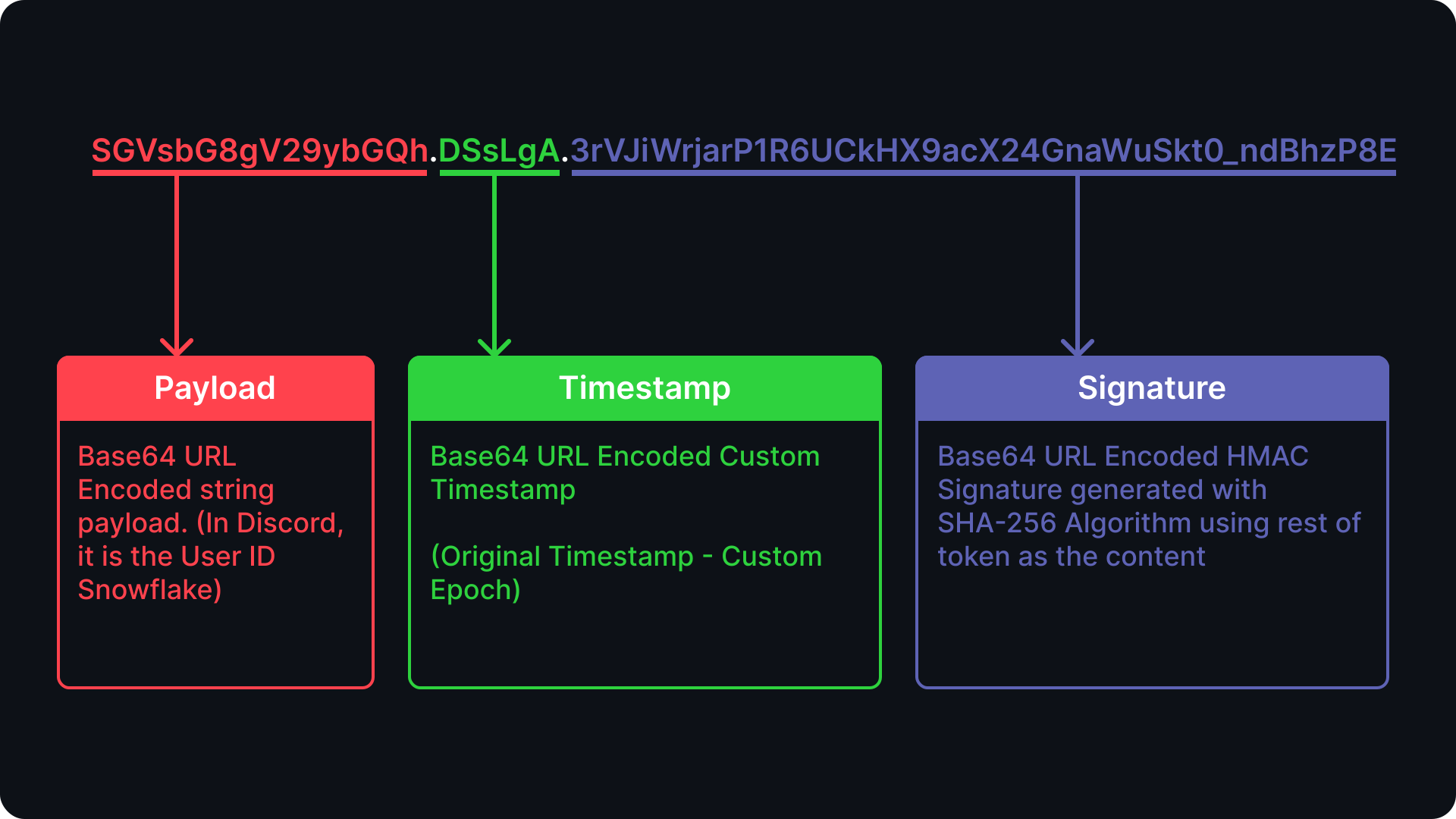
It Uses HMAC with SHA-256 to sign the tokens.
## Features
* Sign Custom Tokens (with your own private key) 📝
* Verify Tokens ✅
* Zero-Depencency 💪
## Install
**Via NPM:**
```bash
npm install dc-tokens
```
**Via Yarn:**
```bash
yarn add dc-tokens
```
**Via PNPM**
```bash
pnpm install dc-tokens
```
[**CHANGELOG**](https://github.com/arnav-kr/DC-Tokens/blob/main/CHANGELOG.md)
## Usage
> **NOTE:** For Node.js only (not supported in browsers)
### DCT.sign(payload, privateKey, [options, callback])
If a callback is supplied, the callback is called with the `err` and the `Token`.
Else returns the `DCToken` as string
`payload` should be string.
`privateKey` is a string or buffer.
`options` is an object with the following properties:
* `timestamp` (in milliseconds) - defaults to `Date.now()`
* `epoch` (in milliseconds) - defaults to Milliseconds since Discord Epoch: `1420070400000`
`callback` is a function that is called with the `err` and the `Token` as string respectively.
Synchronous Sign:
```js
const DCT = require('dc-tokens');
let token = DCT.sign("Cute little cats", "secret");
```
Sign asynchronously
```js
const DCT = require('dc-tokens');
DCT.sign("Cute little cats", "secret", { }, (err, token) => {
if (err) {
console.error(err);
} else {
console.log(token);
}
});
```
### DCT.verify(token, privateKey, [options, callback])
If a callback is supplied, the callback is called with the `err` and the `TokenObject`.
Else returns the `TokenObject` as string
The `TokenObject` is an object with the following structure
```ts
{
payload: string;
timestamp: Date;
signature: string;
}
```
`privateKey` is a string or buffer. it should be the same key that was used to generate the token.
`options` is an object with the following properties:
* `epoch` (in milliseconds) - defaults to Milliseconds since Discord Epoch: `1420070400000`
`callback` is a function that is called with the `err` and the `TokenObject` respectively.
Verify Asynchronously
```js
const DCT = require('dc-tokens');
DCT.verify(token, privateKey, options, (err, decoded) =>{
console.log(decoded);
});
```
Verify Synchronously
```js
const DCT = require('dc-tokens');
let decoded = DCT.verify(token, privateKey, options);
```
Handiling Errors
```js
const DCT = require('dc-tokens');
// Handling Erros - Asynchronously
DCT.verify(token, privateKey, options, (err, decoded) =>{
if (err) {
console.error(err);
} else {
console.log(decoded);
}
});
// Handling Erros - Synchronously
try{
let decoded = DCT.verify(token, privateKey, options);
} catch (err) {
console.error(err);
}
```
## Error Codes
the error that is passed as the first paramater in the callback function in either `sign` or `verify` has a specific structure when running asynchronously.
```ts
{
code: DCTError;
message: string;
stack?: string;
}
```
`DCTError` can have the following values:
* `INVALID_TOKEN` - token is invalid
* `TOKEN_MALFORMED` - token is malformed
* `SIGNATURE_REQUIRED` - signature is required
* `INVALID_SIGNATURE` - invalid signature
* `UNCAUGHT_ERROR` - uncaught error (any other error)
* `TIMESTAMP_MALFORMED` - malformed timestamp
If used synchronously, the error is thrown.
## Report an Issue
If you have found a bug or if you have a feature request, please report them at this repository issues section.
## Author
[arnav-kr](https://github.com/arnav-kr)
## License
The project is licensed under the [MIT](https://github.com/arnav-kr/DC-Tokens/blob/main/LICENSE) license.