https://github.com/arsensokolov/capistrano-stride
Capistrano plugin to notify deployments on Stride
https://github.com/arsensokolov/capistrano-stride
capistrano stride
Last synced: 5 months ago
JSON representation
Capistrano plugin to notify deployments on Stride
- Host: GitHub
- URL: https://github.com/arsensokolov/capistrano-stride
- Owner: arsensokolov
- License: mit
- Created: 2018-04-16T04:21:39.000Z (about 8 years ago)
- Default Branch: master
- Last Pushed: 2018-07-13T04:42:42.000Z (almost 8 years ago)
- Last Synced: 2026-01-13T06:37:04.768Z (6 months ago)
- Topics: capistrano, stride
- Language: Ruby
- Size: 37.1 KB
- Stars: 0
- Watchers: 1
- Forks: 1
- Open Issues: 1
-
Metadata Files:
- Readme: README.md
- License: LICENSE.txt
Awesome Lists containing this project
README
# Capistrano::Stride
[](https://badge.fury.io/rb/capistrano-stride)
[](https://codeclimate.com/github/ArsenBespalov/capistrano-stride/maintainability)
[](https://travis-ci.org/ArsenBespalov/capistrano-stride)
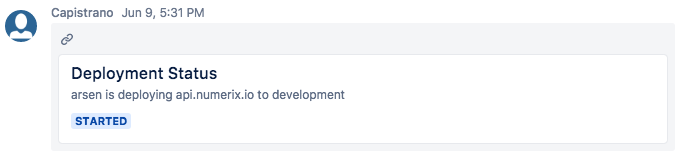
Notifies in a Stride room about a new deployment showing the git log for the latest
commits included in the current deploy.
## Installation
Add this line to your application's Gemfile:
```ruby
group :deployment do
gem 'capistrano-stride', '~> 0.3', require: false
end
```
The group declaration is optional, but it's important to make sure you only load this gem
withing a Capistrano script (as explained below) and never within your application
(eg. rails does the require of the default bundler group and the current environment group).
And then execute:
```
$ bundle
```
Or install it yourself as:
```
$ gem install capistrano-stride
```
## Usage
Add this to your `Capfile`
```ruby
require 'capistrano/stride'
```
Then you need to configure you Stride token and the room URL you want to notify about
the new deployment
```ruby
set :stride_url, "https://api.atlassian.com/site/SITE_ID/conversation/CONVERSATION_ID/message"
set :stride_token, "STRIDE_ACCESS_TOKEN"
```
For get Stride URL and access token you need add custom app with API tokens,
without installation application. Just only enter specify a token name. Simple and Easy!
## Contributing
1. Fork it
2. Create your feature branch (`git checkout -b my-new-feature`)
3. Commit your changes (`git commit -am 'Add some feature'`)
4. Push to the branch (`git push origin my-new-feature`)
5. Create new Pull Request